Overview
ProductRatingMost Used ByProduct SummaryStarting Price
Quiq
Score 0.0 out of 10
Mid-Size Companies (51-1,000 employees)
Quiq is an agentic customer journey platform used to support customer support agents' resolution efforts. Quiq works across channels—voice, chat, SMS, WhatsApp, Apple Messages for Business, email, and social—keeping every interaction connected and true to the brand's voice.N/A
Webex Contact Center
Score 8.7 out of 10
N/A
Cisco Webex Contact Center is a cloud-based omni-channel (e.g. voice, email, and chat) contact center solution providing customer / agent matching, customer service self-service agent, and built-in chat and voice for collaboration between agents.N/A
Pricing
QuiqWebex Contact Center
Editions & Modules
No answers on this topic
Offerings
Pricing Offerings
QuiqWebex Contact Center
Free Trial
YesNo
Free/Freemium Version
NoNo
Premium Consulting/Integration Services
YesNo
Entry-level Setup FeeNo setup feeNo setup fee
Additional DetailsPricing is based on conversations, not by seat. Number of users is unlimited.
More Pricing Information
Community Pulse
QuiqWebex Contact Center
Features
QuiqWebex Contact Center
Contact Center Software
Comparison of Contact Center Software features of Product A and Product B
Quiq
-
Ratings
Webex Contact Center
8.1
42 Ratings
3% below category average
Agent dashboard00 Ratings9.140 Ratings
Validate callers00 Ratings8.738 Ratings
Outbound response00 Ratings6.733 Ratings
Call forwarding00 Ratings9.038 Ratings
Click-to-call (CTC)00 Ratings8.535 Ratings
Warm transfer00 Ratings8.539 Ratings
Predictive dialing00 Ratings5.525 Ratings
Interactive voice response00 Ratings8.235 Ratings
REST APIs00 Ratings8.235 Ratings
Call scripts00 Ratings8.635 Ratings
Call tracking00 Ratings8.338 Ratings
Multichannel integration00 Ratings8.137 Ratings
CRM software integration00 Ratings7.537 Ratings
Workforce Optimization (WFO)
Comparison of Workforce Optimization (WFO) features of Product A and Product B
Quiq
-
Ratings
Webex Contact Center
7.9
38 Ratings
4% below category average
Inbound call routing00 Ratings8.036 Ratings
Omnichannel inbound routing00 Ratings8.034 Ratings
Recording00 Ratings8.736 Ratings
Quality management00 Ratings8.532 Ratings
Call analytics00 Ratings7.533 Ratings
Historical reporting00 Ratings8.436 Ratings
Live reporting00 Ratings7.936 Ratings
Customer surveys00 Ratings7.334 Ratings
Customer interaction analytics00 Ratings6.830 Ratings
Best Alternatives
QuiqWebex Contact Center
Small Businesses
Sogolytics
Sogolytics
Score 9.0 out of 10
CloudTalk
CloudTalk
Score 7.5 out of 10
Medium-sized Companies
CustomerSuccessBox
CustomerSuccessBox
Score 9.5 out of 10
CloudTalk
CloudTalk
Score 7.5 out of 10
Enterprises
Verint Voice of the Customer
Score 9.4 out of 10
Google Cloud Contact Center AI
Score 7.0 out of 10
All AlternativesView all alternativesView all alternatives
User Ratings
QuiqWebex Contact Center
Likelihood to Recommend
-
(0 ratings)
8.6
(42 ratings)
Likelihood to Renew
-
(0 ratings)
9.1
(2 ratings)
Usability
-
(0 ratings)
7.9
(19 ratings)
User Testimonials
QuiqWebex Contact Center
Likelihood to Recommend
Quiq
No answers on this topic
Cisco
It depends on your needs. If you only need simple call flows, consider using Cisco Webex Calling Auto-Attendant. If you require more complex call flows and time-of-day routing, you can utilize Cisco Webex Contact Center. You only have to purchase 1 Agent to use the Call Flow Designer.
Read full review
Pros
Quiq
No answers on this topic
Cisco
  • Easy to setup a flow and managing it and make changes without impacting the production system
  • Great analyzer that gives detailed information
  • Provide social channels to reach all the customers regardless of age and social groups
  • Easy to SMS and have communication for customers on the go
Read full review
Cons
Quiq
No answers on this topic
Cisco
  • Better integration with Webex Calling.
  • More on premise features integrated into the cloud solution.
  • Better documentation for pebble templates.
  • Better information for changes and when new features are available. Instead of having to look on the what’s coming webpage alerts or a pop-up inside Webex control hub would be nice.
Read full review
Likelihood to Renew
Quiq
No answers on this topic
Cisco
We are happy with the product, with Cisco as a partner and the roadmap looks mightily impressive. Webex Contact Center is one of our growth areas so we're keen to get more agents on the platform, we want to get more customers on it and we want to make use of all the features and functionalities it offers, so that we can help our customers do what they do best.
Read full review
Usability
Quiq
No answers on this topic
Cisco
It is great to use Webex Contact Center as it delivers the call routing and workflow for agent and call routing. In addition to this the noise reduction helps to focus attention on the call and with the client. The notes feature and the ability for the transcription really helps with translation and language barriers.
Read full review
Alternatives Considered
Quiq
No answers on this topic
Cisco
Webex Contact Center feels the most modern of the solutions we evaluated. It is an all in one package which required no capital expenditure up front. Webex Contact Center was able to integrate with the AI packages which our IT team investigating for future use. Webex Contact Center was also able to integrate with the CRM packages which we use internally (without the use of a 3rd party connector).
Read full review
Return on Investment
Quiq
No answers on this topic
Cisco
  • Increasing the number of channels agent can reach out to customers, especially text has shaved off a lot of hours from calling , leaving voicemail and waiting for customers to call back.
  • Less Downtime. No Upgrades or certificate Renewal, so fewer overtime hours.
  • Adoption of new features is now so quick, I don't have to worry about upgrading the Software or even hardware to get new features deployed.
Read full review
ScreenShots

Quiq Screenshots

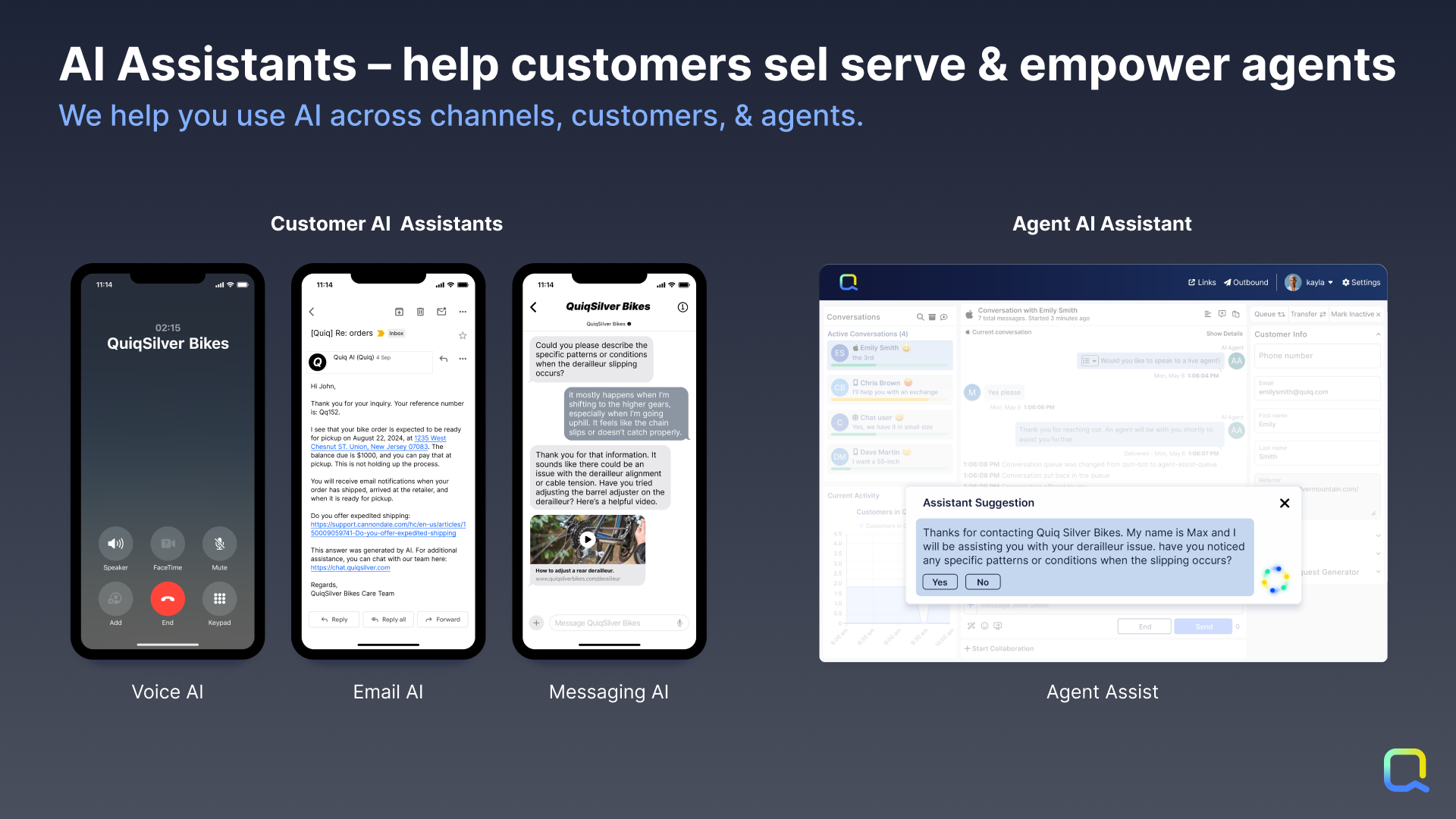
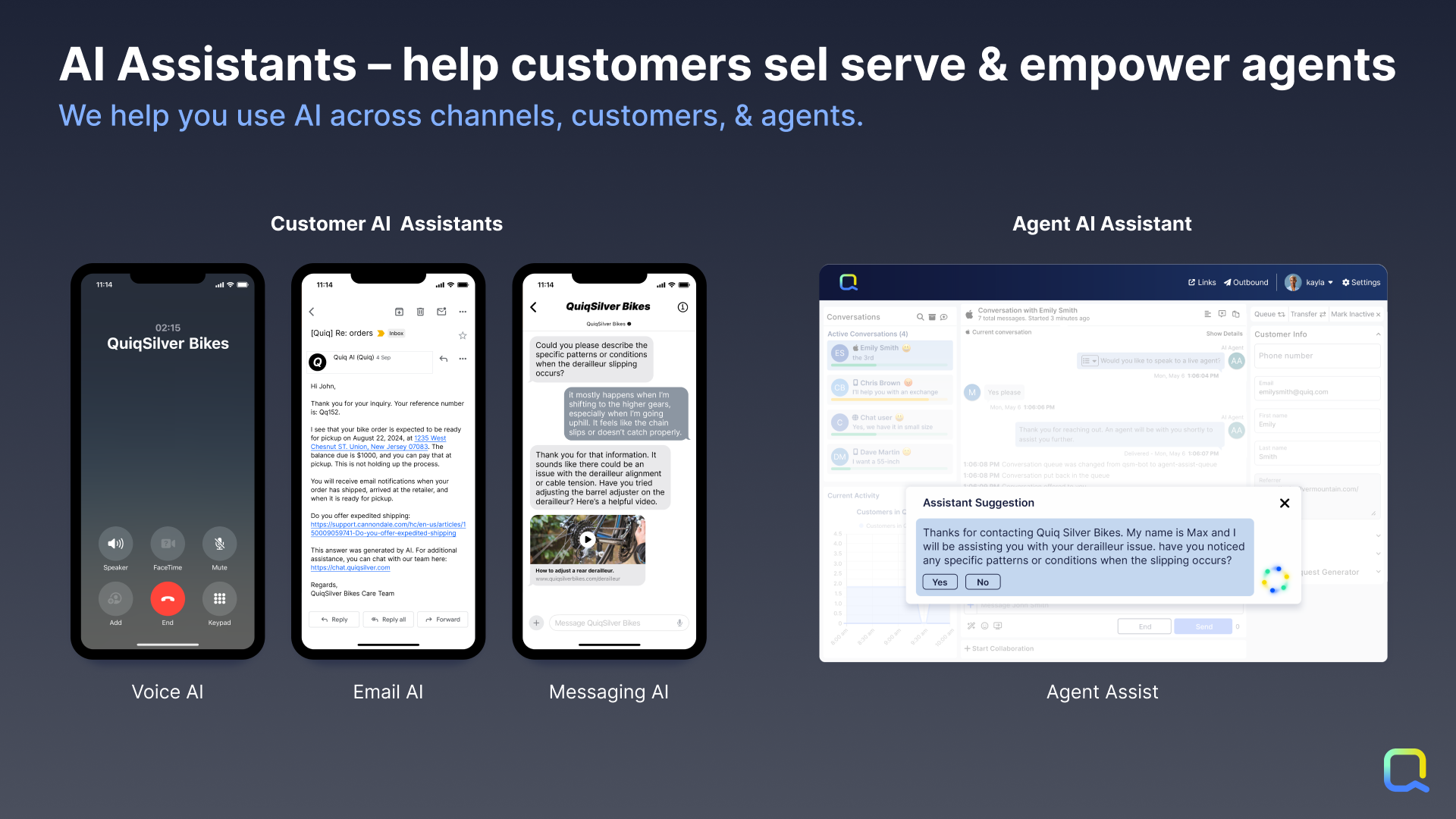
Screenshot of Customer AI Assistants: By leveraging Generative AI combined with company knowledge and data, customers get answers created directly from data as if they had a human agent helping them.

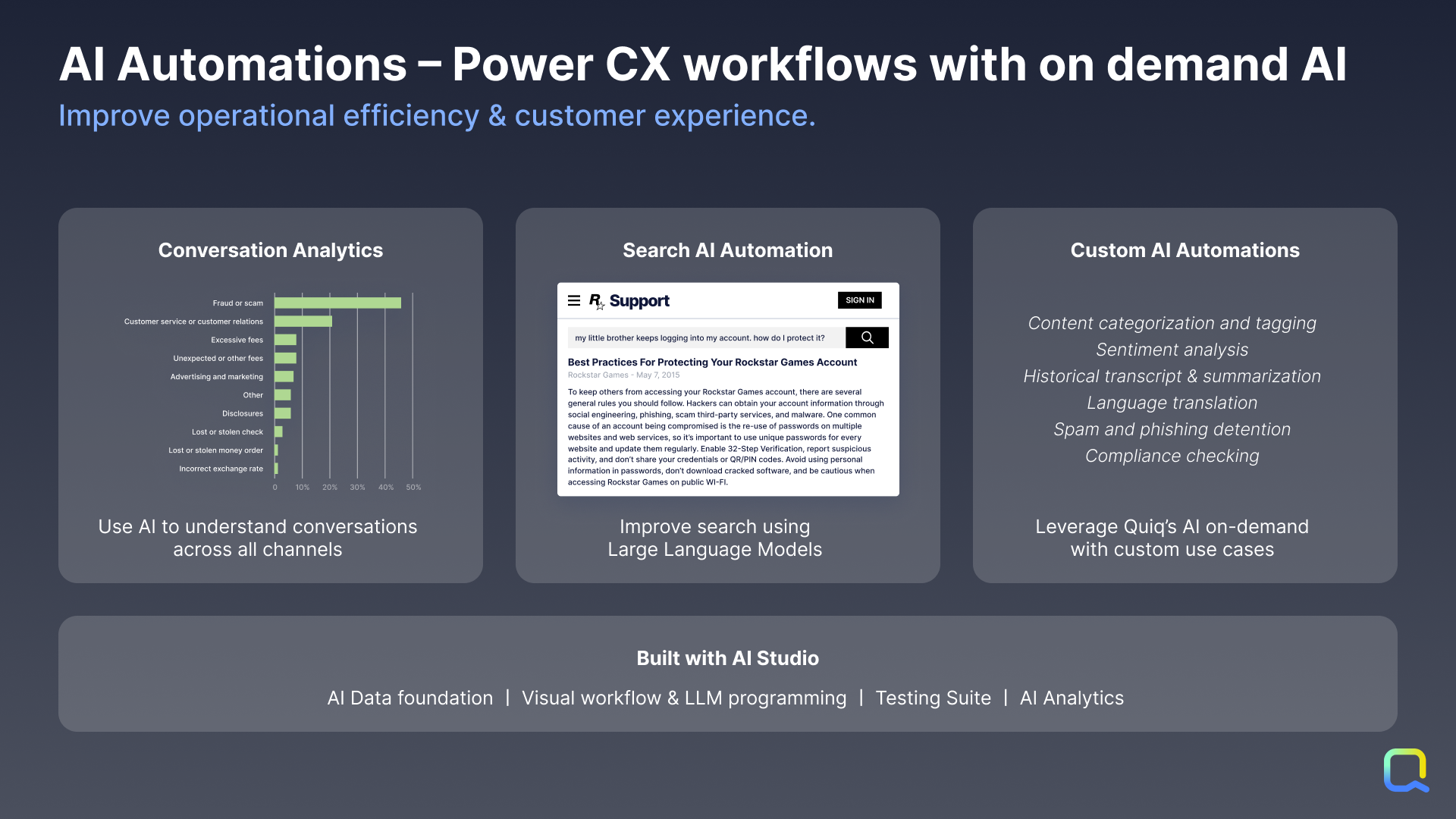
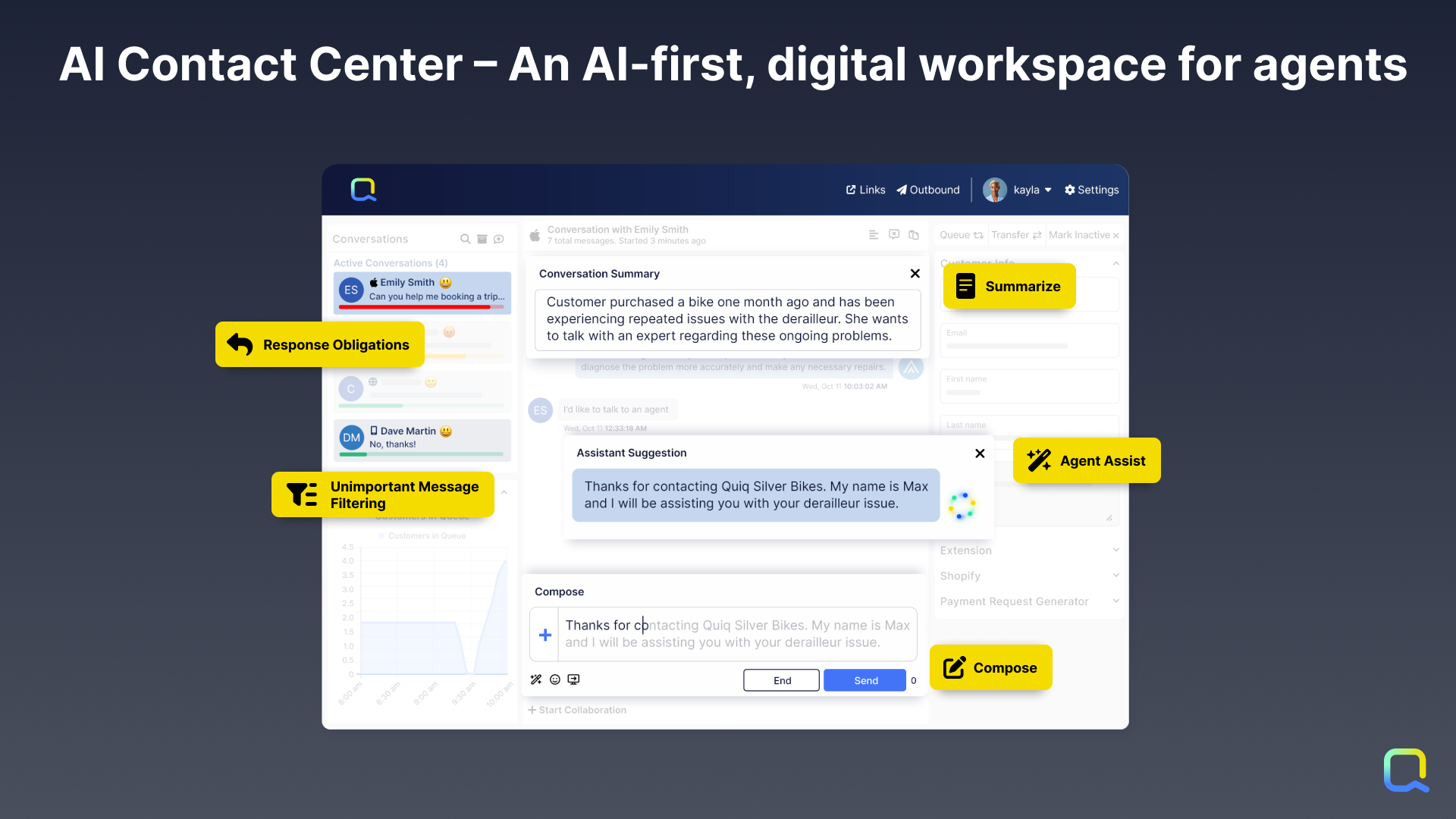
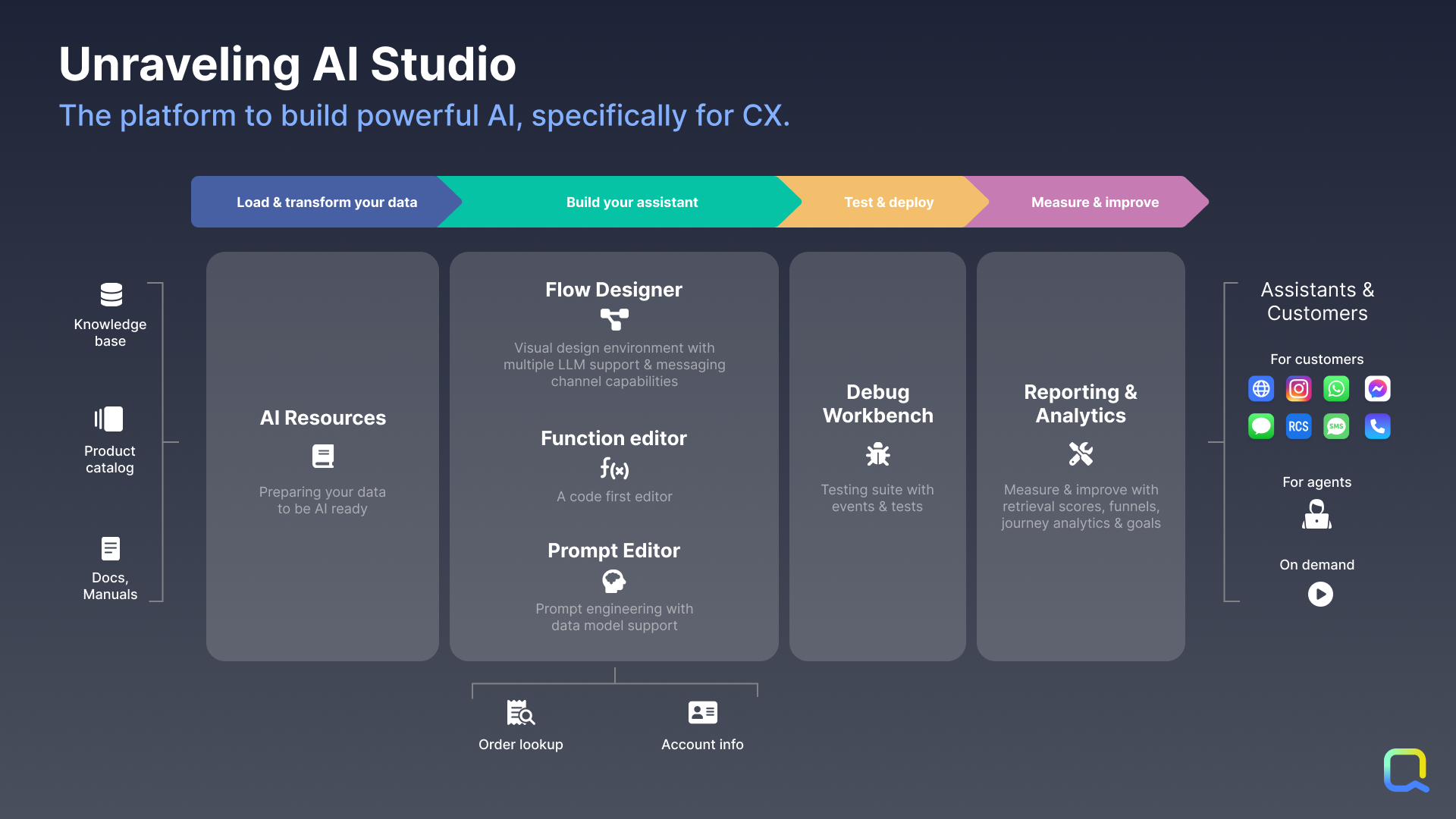
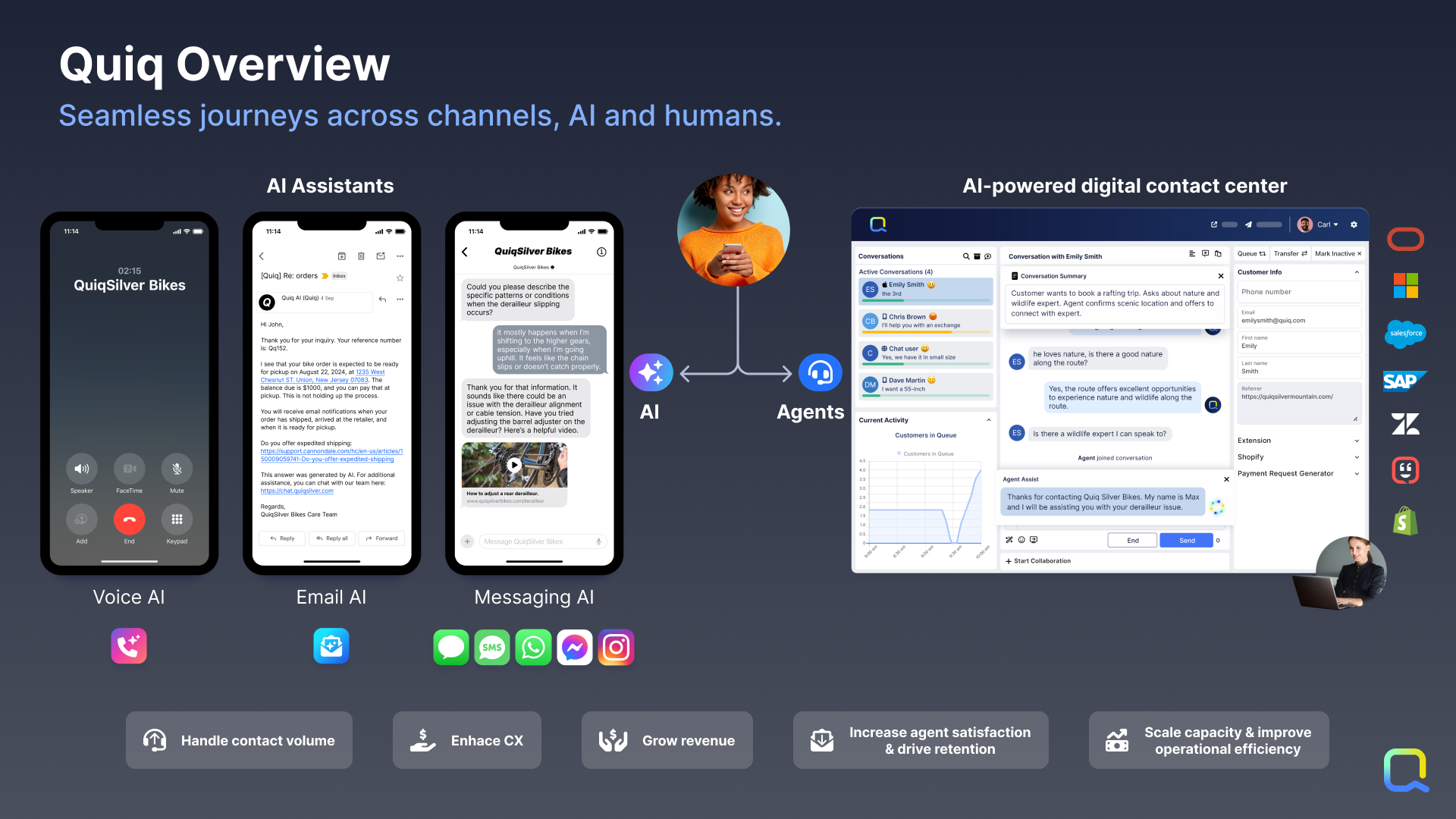
Agent AI Assistants: Not every question can be answered by AI, so Quiq’s AI-assisted contact center empowers human agents to handle many simultaneous asynchronous conversations across all popular messaging channels.Screenshot of AI Automations: Quiq’s platform can be used to apply AI on demand to any business workflow, such as analyzing incoming emails and routing it more accurately to human agents.Screenshot of Quiq’s AI-powered, multi-channel agent workspace, which is designed for CX leaders and Contact Center Managers. Those who manage agents and the agent experience at enterprise businesses need a robust console for modern channels that will drive speed, efficiency, and agent retention.Screenshot of Quiq’s AI Studio, which is a suite of infrastructure and tools that empowers developers, conversational designers, and CX leaders to create conversational experiences together across the development lifecycle.Screenshot of Integrations: AI Assistants based upon internal knowledge and data integrated can be built through Quiq’s AI Studio. Quiq conversations can be automated with native Quiq Assistants or third-party bots integrated with the Bot API. Through workspace extensions, users can augment agents' workflow with internal data to enable them to execute faster and do their jobs better. Internal systems and business intelligence can be kept up to date with Quiq’s real-time conversation and agent performance data webhooks. Quiq integrates into the largest CRMs.Screenshot of the Quiq AI for CX platform that offers a number of capabilities to drive transformational change in the customer experience.

Webex Contact Center Screenshots

Screenshot of Agent desktop viewScreenshot of View of Analyzer - Dark ModeScreenshot of Contact Center in Control Hub viewScreenshot of Supervisor desktop view