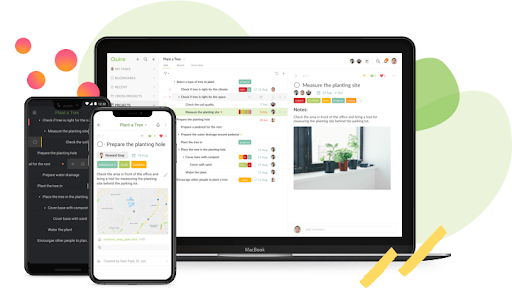
Quire is a visual collaboration platform that enables task and project management. It allows users to visualize their workflows and improves real-time collaboration.
$10.95
per month per user
Remember the Milk
Score7.3 out of 10
N/A
Remember the Milk is a task management and to-do list application from the company of the same name headquartered in San Francisco.
$39.99
per year
Pricing
Quire
Remember the Milk
Editions & Modules
Professional
$10.95
per month per user
Premium
$18.95
per month per user
Enterprise
$24.95
per month per user
Pro Plan
$39.99
per year
Basic Plan
Free
Offerings
Pricing Offerings
Quire
Remember the Milk
Free Trial
Yes
No
Free/Freemium Version
Yes
Yes
Premium Consulting/Integration Services
Yes
No
Entry-level Setup Fee
No setup fee
No setup fee
Additional Details
—
—
More Pricing Information
Features
Quire
Remember the Milk
Project Management
Comparison of Project Management features of Quire and Remember the Milk
Well-suited for small teams. It's feature-rich and simple, but doesn't have the bug-tracking capabilities of heavier tools like Jira. Low setup overhead, so it's easy to jump in and start quickly! Best Gantt chart experience I've had in a while.
I think Remember the Milk is a great tool for managing tasks and information. However, it depends on what the person is looking for. If you are looking for just a simple task management tool without any bells and whistles, this may be a lot, as it has a lot of advanced features (and even more if you go pro). If you are looking for a more robust task management tool with the option to add priorities, tags, categories, and assign tasks to others, this may be more suited for this. It is also helpful for managing lists like shopping lists or project lists.
A de minimis incentive was given to thank the reviewer for their time. The incentive was not used to bias or drive a particular response, nor was the incentive contingent on a positive endorsement. More Info
A de minimis incentive was given to thank the reviewer for their time. The incentive was not used to bias or drive a particular response, nor was the incentive contingent on a positive endorsement. More Info
A de minimis incentive was given to thank the reviewer for their time. The incentive was not used to bias or drive a particular response, nor was the incentive contingent on a positive endorsement. More Info
A de minimis incentive was given to thank the reviewer for their time. The incentive was not used to bias or drive a particular response, nor was the incentive contingent on a positive endorsement. More Info
A de minimis incentive was given to thank the reviewer for their time. The incentive was not used to bias or drive a particular response, nor was the incentive contingent on a positive endorsement. More Info
Very easy to input tasks, assign them to people, and make dependencies between tasks. Workflow is super convenient once you get used to using enter or tab in the right place. Can do a lot of things from the keyboard, but the commands are not as intuitive as those in Todoist.
A de minimis incentive was given to thank the reviewer for their time. The incentive was not used to bias or drive a particular response, nor was the incentive contingent on a positive endorsement. More Info
A de minimis incentive was given to thank the reviewer for their time. The incentive was not used to bias or drive a particular response, nor was the incentive contingent on a positive endorsement. More Info
A de minimis incentive was given to thank the reviewer for their time. The incentive was not used to bias or drive a particular response, nor was the incentive contingent on a positive endorsement. More Info
Google Tasks is a much simpler task-keeping interface, and I use it for the most important tasks on my phone. It does not offer tags, priorities, or distinguish between lists/tasks. It does let me star tasks, but does not let me determine the priority levels. I can also move tasks to different lists, but they can be hard to manage if there are too many, so I generally do not use this feature. For me, Google Tasks is ideal for very simple "I need to write this down" type tasks that are of high priority. It is not a good brain dumping tool because tasks can easily get lost. This is more for those nagging tasks that I want to do and make sure there is an appropriate alarm for. It also integrates well with my Android home screen. However, when I have lots of tasks I want to categorize, or I do want to do more of a brain dump type thing, I think Remember the Milk is far better. I can have more control over priorities, tags, assigning tasks to others, and other robust features.
A de minimis incentive was given to thank the reviewer for their time. The incentive was not used to bias or drive a particular response, nor was the incentive contingent on a positive endorsement. More Info
A de minimis incentive was given to thank the reviewer for their time. The incentive was not used to bias or drive a particular response, nor was the incentive contingent on a positive endorsement. More Info