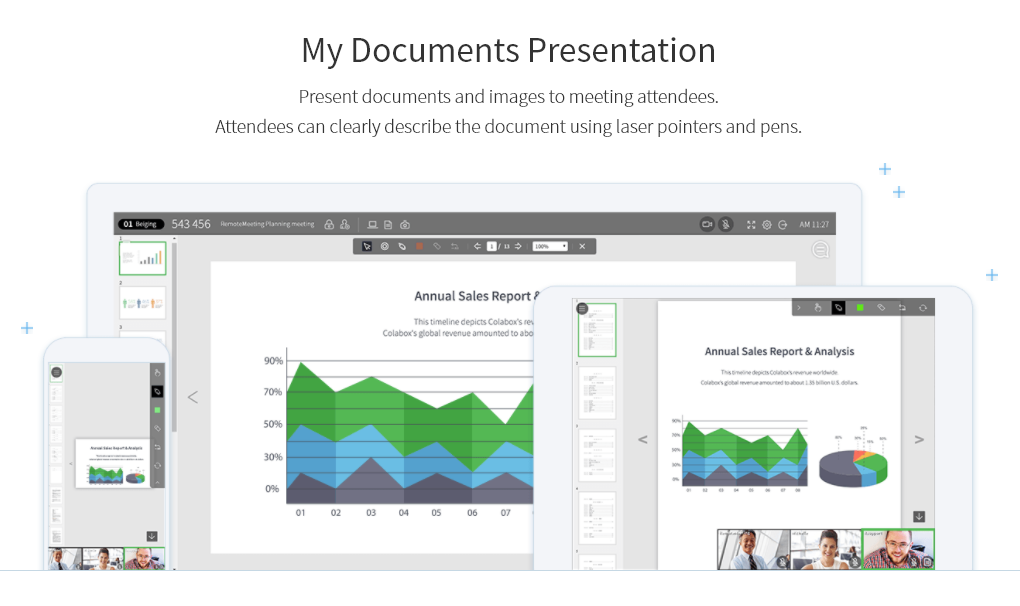
A web-based video conferencing tool. Supports mobile, browser and AI minutes. RemoteMeeting is a video conferencing solution. Use a browser to start and join video conferences. No need for a dedicated application. Present a desktop, share documents and interactively mark on them. Create automated meeting minute as record them for later review. RemoteMeeting can detect the speaker automatically and pin it in the main screen for a more immersive…
$0.20
per usage
Whereby
Score9.9 out of 10
N/A
Norwegian company appear.in offers their flagship video conferencing platform to small teams, both in a free edition hosting up to 4 guests simultaneously in a session or a paid edition that supports up to 12 simultaneous meeting guests, among other features.
$0
per user
Pricing
RemoteMeeting
Whereby
Editions & Modules
RemoteMeeting Pay-per-USE
$0.20 / min
per usage
RemoteMeeting Pay-per-USER
$17.99 / month
per user
Free
$0
per user
Pro
$9.99
per user
Business
$59.99 and up
per user/room
Offerings
Pricing Offerings
RemoteMeeting
Whereby
Free Trial
Yes
Yes
Free/Freemium Version
No
Yes
Premium Consulting/Integration Services
No
No
Entry-level Setup Fee
No setup fee
No setup fee
Additional Details
** Server deployment option available upon request.
RemoteMeeting is a virtual conference room system that offers a simplified user experience with a modern and intuitive design and speed of just one click, it is a meeting tool that always has a room available for my team from anywhere and any device With powerful meeting modes for any occasion, it fully suits our daily virtual communication needs to connect with colleagues, customers, employees and vendors with the ease of just screen sharing with the unique and enjoyable collaboration experience.
A de minimis incentive was given to thank the reviewer for their time. The incentive was not used to bias or drive a particular response, nor was the incentive contingent on a positive endorsement. More Info
If you cannot use another more common solution on the market or are looking for an alternative to the known solutions, it is a great alternative. If you have other tools already, and just want to test [them], that's fine, but I think the better-known ones have a better chance of using, knowing, and the learning curve will be shorter.
A de minimis incentive was given to thank the reviewer for their time. The incentive was not used to bias or drive a particular response, nor was the incentive contingent on a positive endorsement. More Info
RemoteMeeting works in an extraordinary way to initiate meetings through videoconferences in real time sharing screen audio and video provides dynamic meetings in 3D With avatar profiles that make the experience of the participants much more enjoyable.
For team collaboration RemoteMeeting has fallen like a glove, it is a platform that allows high-level business videoconferences to be carried out with security and excellent wireless connection.
A de minimis incentive was given to thank the reviewer for their time. The incentive was not used to bias or drive a particular response, nor was the incentive contingent on a positive endorsement. More Info
A de minimis incentive was given to thank the reviewer for their time. The incentive was not used to bias or drive a particular response, nor was the incentive contingent on a positive endorsement. More Info
RemoteMeeting is a modern and high-level video conferencing solution that provides a quality service, it is a tool where meetings are not boring, so it offers positive and satisfactory results, it provides flexible and intuitive features with solutions that fit our needs. user, ease, visually pleasing interface, safety and quality.
A de minimis incentive was given to thank the reviewer for their time. The incentive was not used to bias or drive a particular response, nor was the incentive contingent on a positive endorsement. More Info
The paid version may have dial-in. But I have always used the free version. Dial-in is typically required for an "official" multi-purpose teleconference platform.
I did have some trouble with larger groups (5+) when it was Appear.in but almost always use it for small 1-on-1 or 3 person meetings.
A de minimis incentive was given to thank the reviewer for their time. The incentive was not used to bias or drive a particular response, nor was the incentive contingent on a positive endorsement. More Info
We are using a larger tool suite that already includes video conferencing instead of our older approach of using different apps from different vendors. appear.in has a simple but great set of features but its pricing scheme is not as scalable as we really need in a 500+ employee company.
A de minimis incentive was given to thank the reviewer for their time. The incentive was not used to bias or drive a particular response, nor was the incentive contingent on a positive endorsement. More Info
A de minimis incentive was given to thank the reviewer for their time. The incentive was not used to bias or drive a particular response, nor was the incentive contingent on a positive endorsement. More Info
Never had to contact support, so we cannot give a rating for their overall support. When we noticed the audio was not always great quality, we simply educated our users to mute the mic and use the in-room conference phone which is connected via a dedicated VOIP link and had much better voice quality. The video performance varied by locations network speed and found it got much worse when the room size increased to over 4 connections.
A de minimis incentive was given to thank the reviewer for their time. The incentive was not used to bias or drive a particular response, nor was the incentive contingent on a positive endorsement. More Info
A de minimis incentive was given to thank the reviewer for their time. The incentive was not used to bias or drive a particular response, nor was the incentive contingent on a positive endorsement. More Info
The results we have obtained with RemoteMeeting have been unparalleled, it is an online meeting solution that improves the way we share screen perfectly from anywhere because it provides collaboration tools for more efficient meetings from offering virtual backgrounds, face focus to automatically detect the face on the screen, separate video and information display for multiple monitors, simplicity security and speed is a perfect tool.
A de minimis incentive was given to thank the reviewer for their time. The incentive was not used to bias or drive a particular response, nor was the incentive contingent on a positive endorsement. More Info
I find Zoom more complicated to use and harder to use because a lot of people do not like having to download things to their computers or devices and Whereby is so easy to get connected with . I like that Zoom offers larger rooms, but at this point the cost is not worth the extra expense.
A de minimis incentive was given to thank the reviewer for their time. The incentive was not used to bias or drive a particular response, nor was the incentive contingent on a positive endorsement. More Info
RemoteMeeting has a positive impact on my organization by offering simplified meetings that significantly increase the collaboration and productivity of my work team, offering cloud-based virtual meeting solutions that improve customer relations, reduce work time and additional costs, as well as Provide progress in projects and efficiency.
It is a video conferencing solution that improves the way we communicate with colleagues, customers, employees, partners and suppliers with a simplified experience with privacy protection, making all participants feel comfortable and safe in meetings, since we use RemoteMeeting. Work flow has increased by 15%, sales have increased and work teams develop a better relationship with each other.
A de minimis incentive was given to thank the reviewer for their time. The incentive was not used to bias or drive a particular response, nor was the incentive contingent on a positive endorsement. More Info
A de minimis incentive was given to thank the reviewer for their time. The incentive was not used to bias or drive a particular response, nor was the incentive contingent on a positive endorsement. More Info