TrustRadius: an HG Insights company

Save this comparison

Save this comparison

Add Product

Recommended Comparisons

    Overview
    ProductRatingMost Used ByProduct SummaryStarting Price

    RSign

    Score9 out of 10
    N/ARSign, from RPost headquartered in Los Angeles, is presented as an E-Signature solution that the vendor describes as simple but feature-rich, elegantly easy, and affordable.

    $7

    per month per user

    SigningHub

    Score9.4 out of 10
    N/ASigningHub provides a secure way to sign documents. The vendor’s value proposition is that their solution provides long-term advanced electronic signatures that are legally compliant and independently verifiable. This solution caters to all levels of signature including EU qualified signatures. Focusing on signature security, SigningHub follows the gold standard “PAdES” definitions including Part 4 – long-term verification which is important for all organisations who require…N/A
    Pricing
    RSignSigningHub
    Editions & Modules
    RSign Personal
    $7.00
    per month per user
    RSign Standard
    $15.00
    per month per user
    No answers on this topic
    Offerings
    Pricing Offerings
    RSignSigningHub
    Free Trial
    YesYes
    Free/Freemium Version
    NoYes
    Premium Consulting/Integration Services
    YesYes
    Entry-level Setup FeeNo setup feeOptional
    Additional DetailsContact Sales for API & Custom Integrations.Cloud service plans are user-based or signature-based. SigningHub is also available for on-premise use or for private cloud hosting.
    More Pricing Information
    Community Pulse
    RSignSigningHub
    Considered Both Products
    RPost
    No answer on this topic
    Ascertia
    No answer on this topic
    Key User Insights
    Would buy again
    100%
    Would buy again
    7 Answers
    No answers on this topic
    Delivers good value for the price
    100%
    Delivers good value for the price
    7 Answers
    No answers on this topic
    Happy with the feature set
    100%
    Happy with the feature set
    7 Answers
    No answers on this topic
    Lived up to sales and marketing promises
    100%
    Lived up to sales and marketing promises
    7 Answers
    No answers on this topic
    Implementation went as expected
    100%
    Implementation went as expected
    7 Answers
    No answers on this topic
    Best Alternatives
    RSignSigningHub
    Small Businesses
    BoldSign, by Syncfusion
    Score10 out of 10
    BoldSign, by Syncfusion
    Score10 out of 10
    Medium-sized Companies
    OneSpan Sign
    Score9.6 out of 10
    OneSpan Sign
    Score9.6 out of 10
    Enterprises
    DocuSign
    Score8.7 out of 10
    DocuSign
    Score8.7 out of 10
    All AlternativesView all alternativesView all alternatives
    User Ratings
    RSignSigningHub
    Likelihood to Recommend
    10.0
    (7 ratings)
    9.0
    (2 ratings)
    User Testimonials
    RSignSigningHub
    Likelihood to Recommend
    RPost
    RSign is really useful in organizations where many different kinds of forms and applications for signature have to be sent to customers. In the industry where signature time stamp is important.
    Incentivized
    Read full review
    Ascertia
    SigningHub worked well for me for collecting digital signatures on contracts from independent contractors. It's well suited for both small businesses (like mine) and bigger businesses since you can create a specific workflow for each sort of document you upload. It's also great for storing the signed and master documents. However, it may not be appropriate in certain industries with specific data security rules. Check with the regulators of your industry before using (lawyers, I'm talking to you...)
    Incentivized
    Read full review
    Pros
    RPost
    • Making documents that we require use as templates and reuse them with rules.
    • Streamlined the process of esigning when multiple people are involved.
    • Pre-fill, back-fill removed manual work & human error
    Read full review
    Ascertia
    • cloud management
    • contract management
    • signing forms
    Incentivized
    Read full review
    Cons
    RPost
    • The most useful feature would be if we were able to type within the forms/applications that we upload to RSign to be sent for signature.
    Incentivized
    Read full review
    Ascertia
    • I found setting up a workflow for each different document a little confusing.
    • I'd get errors from time to time when prepping a document. This usually happened when I was inserting a date field or a signature field (which are fairly important fields for contracts).
    • The one time I needed help and contacted the company, the representative made me feel like I was dumb.
    Incentivized
    Read full review
    Alternatives Considered
    RPost
    Honestly I thought DocuSign would have more advantages because I usually think "Most expensive" equals "The best", but DocuSign was very hard to adopt for my business, the interface was packed and messy, full of stuff that not intuitive to learn. And I couldn't get ANY support at all. So we ended up looking for another software and my colleagues recommended RSign. I didn't personally try any other softwares, but my colleagues switched from HelloSign and from PandaDoc to RSign because of similar reasons.
    Read full review
    Ascertia
    We have not used any other products, apart from SigningHub.
    Incentivized
    Read full review
    Return on Investment
    RPost
    • RSign has had tremendous ROI for us. We don't have to print the forms to be sent to customer for signature.
    • Huge time savings
    • No paper printing. Very environment friendly application
    Incentivized
    Read full review
    Ascertia
    • It was very affordable for a small business. I could use it for unlimited documents for a very modest monthly fee.
    • It could handle an unlimited number of documents.
    • Document retrieval is easy.
    Incentivized
    Read full review
    ScreenShots

    RSign Screenshots

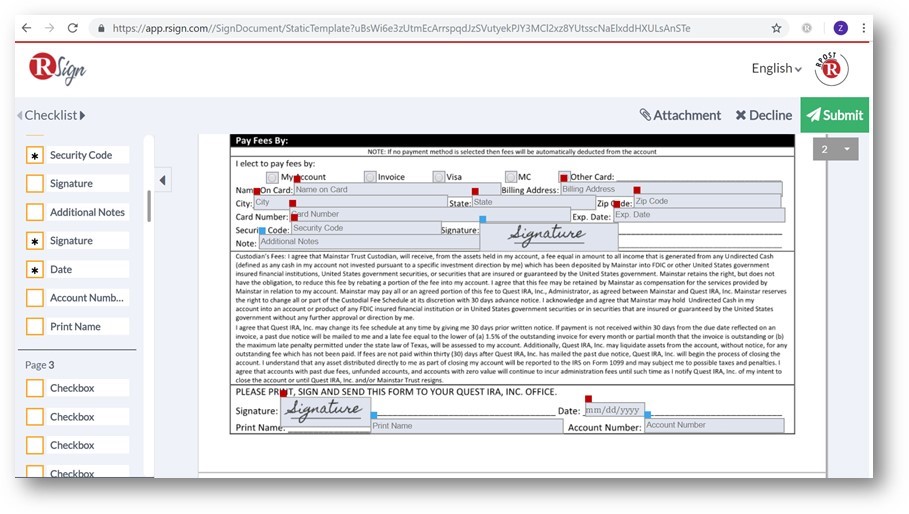
    Screenshot of RSign EnvelopeScreenshot of RSign eSignatures requestScreenshot of RSign eSignatures PrepareScreenshot of RSign Prepare & SendScreenshot of RSign Sending SettingsScreenshot of RSign Sign Document

    SigningHub Screenshots

    Screenshot of Dashboard - You can start a new document workflow, change personal or enterprise settings and quickly access pending, in-progress, declined and completed documents.Screenshot of Sending Documents - Upload documents, add recipients, choose a template and set permissions.Screenshot of Prepare document - Prepare document(s) by adding signature and other form fields.Screenshot of Signing Documents - Review and sign documents quickly, easily and securely.