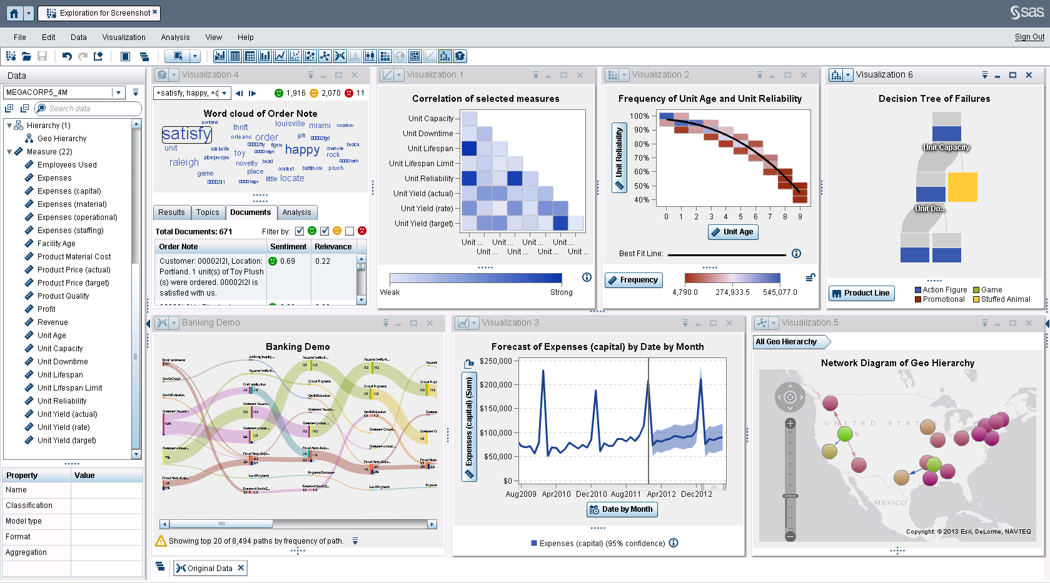
SAS Visual Analytics provides a complete platform for analytics visualization, enabling users to identify patterns and relationships in data that weren't initially evident. Interactive, self-service BI and reporting capabilities are combined with out-of-the-box advanced analytics so everyone can discover insights from any size and type of data, including text.
N/A
TARGIT
Score7.6 out of 10
N/A
TARGIT Decision Suite is a business intelligence (BI) and analytics platform used to automate reporting, boost operational visibility, and give teams insights that support data-driven decisions. The solution combines data from multiple source systems, including enterprise resource planning (ERP) software, customer relationship management (CRM) platforms, and all other data sources to give organizations a complete picture of their operations. …
N/A
Pricing
SAS Visual Analytics
TARGIT
Editions & Modules
SAS Visual Analytics for SAS Cloud
$0
Annual By Users: 5, 10, 20
No answers on this topic
Offerings
Pricing Offerings
SAS Visual Analytics
TARGIT
Free Trial
Yes
No
Free/Freemium Version
No
No
Premium Consulting/Integration Services
Yes
No
Entry-level Setup Fee
No setup fee
No setup fee
Additional Details
SAS Visual Statistics and SAS Office Analytics are also available as add-ons.
—
More Pricing Information
Features
SAS Visual Analytics
TARGIT
BI Standard Reporting
Comparison of BI Standard Reporting features of SAS Visual Analytics and TARGIT
Feature
SAS Visual Analytics
8.3
11 Ratings
2% above category average
TARGIT
8.3
7 Ratings
2% above category average
Pixel Perfect reports
8.011 Ratings
9.06 Ratings
Customizable dashboards
8.011 Ratings
9.07 Ratings
Report Formatting Templates
9.010 Ratings
7.04 Ratings
Ad-hoc Reporting
Comparison of Ad-hoc Reporting features of SAS Visual Analytics and TARGIT
Feature
SAS Visual Analytics
8.8
12 Ratings
9% above category average
TARGIT
6.0
8 Ratings
29% below category average
Drill-down analysis
9.012 Ratings
7.08 Ratings
Formatting capabilities
8.012 Ratings
8.07 Ratings
Integration with R or other statistical packages
8.010 Ratings
2.03 Ratings
Report sharing and collaboration
10.011 Ratings
7.06 Ratings
Report Output and Scheduling
Comparison of Report Output and Scheduling features of SAS Visual Analytics and TARGIT
Feature
SAS Visual Analytics
9.2
12 Ratings
11% above category average
TARGIT
5.0
7 Ratings
49% below category average
Publish to Web
9.011 Ratings
5.05 Ratings
Publish to PDF
9.012 Ratings
5.07 Ratings
Report Versioning
9.09 Ratings
5.05 Ratings
Report Delivery Scheduling
10.011 Ratings
5.05 Ratings
Delivery to Remote Servers
9.06 Ratings
5.04 Ratings
Data Discovery and Visualization
Comparison of Data Discovery and Visualization features of SAS Visual Analytics and TARGIT
I was in a meeting with the client and there I have to show them some analytic data to them. But I was confused about how I will manage to show big data to clients with accuracy. But then the SAS Visual Analytics software helps me in presenting accurate data at the moment and it was very presentable and through that, I got the deal for that business.
A de minimis incentive was given to thank the reviewer for their time. The incentive was not used to bias or drive a particular response, nor was the incentive contingent on a positive endorsement. More Info
Targit is very strong when the data is presented to the system. Because of this, we are able to report on almost all of the information that is valuable to us. When we have questions or ideas on how to better leverage Targit, they are great to work with. We track our sales progress/process in Targit and AP tracks things such as outstanding invoices, open invoices, etc
Provides the flexibility to the end user to slice and dice the data.
Anyone can make predictive models with the help of in-built algorithms without the need to write a single line of code or knowledge of what's under the hood of algorithms.
The feature to simply ask a question related to data and getting a response in form of text, chart or graph is amazing.
A de minimis incentive was given to thank the reviewer for their time. The incentive was not used to bias or drive a particular response, nor was the incentive contingent on a positive endorsement. More Info
A de minimis incentive was given to thank the reviewer for their time. The incentive was not used to bias or drive a particular response, nor was the incentive contingent on a positive endorsement. More Info
SAS is relatively expensive when compared to other BI tools and requires a large amount of upfront fee which becomes an issue for smaller organizations.
UI for the dashboards looks a little date in comparison to competitors like Tableau and Microstrategy.
Integration with other open source software like Python needs to be built in.
A de minimis incentive was given to thank the reviewer for their time. The incentive was not used to bias or drive a particular response, nor was the incentive contingent on a positive endorsement. More Info
Probably one of our biggest complaints from the user community is the inability for the user to see the details behind the data. I know with the tool you can write reporting services reports that would allow users to see the detail by right clicking on a measure and selecting Actions, but for a very lean IT shop there simply has not been time to build these Actions for every possible scenario a user might want to see detailed reporting on.
Another complaint I've heard is the inability for the user to know exactly what the data represents from the source. If Targit had maybe some type of capability to hover over a measure or dimension and see a pop up of a more detailed description this might help resolve that issue.
The most difficult concepts to teach our users is how and when to use comparisons and the syntax for calculations. Creating comparisons has become much simpler with the 2k11 release but it is still difficult for my users.
SAS really is the cutting edge in Business Intelligence. That is all they do! They are constantly coming out with new products, product upgrades, and their tech support is second to none. In addition, their support of Education has made our ability to acquire their product possible.
It is very easy to use and I am proficient at this point to be able to figure out how to run most of the reports I need. I have had the time to "play around" in TARGIT and really teach myself about the visibility settings and other aspects - though other users have needed help with some of these aspects - but once you conceptually understand how to build the reports, it is very simple from a power user perspective.
A de minimis incentive was given to thank the reviewer for their time. The incentive was not used to bias or drive a particular response, nor was the incentive contingent on a positive endorsement. More Info
SAS BI is good for creating reports and dashboards and then sharing it with the users. It also has ability to manage access to the reports and dashboards but somehow with most of the world moving to open source languages R, Python and Julia, SAS BI feels to be archaic in terms of feature set and integrations it allow[s]. Also, comparing it with other Business Intelligence tools like Tableau and Microsoft BI, the functionality of SAS BI is very limited and doesn't justify the pricing.
A de minimis incentive was given to thank the reviewer for their time. The incentive was not used to bias or drive a particular response, nor was the incentive contingent on a positive endorsement. More Info
Everything on the back end needs to be correct, which sometimes it may not be set up or missing some variables. Some of the more difficult parts of Targit require a lot more attention and object creation to work properly
When you call tech support, you are immediately routed to a person who can answer your question. Often they can answer on the spot. However, if they cannot, you are given a track number and then followed up with. There have been times when I have had multiple track numbers open and they will actually TRACK YOU DOWN to ensure that your problem has been resolved. Issues do not fall into black holes with SAS. They are also willing to do a WebEx with you to diagnose the problem by seeing your environment, which is always helpful.
Everyone I've dealt with at Targit genuinely cares about me and my success, and they respond to questions quickly and accurately. There is literally nothing more I could ask for from their support.
A de minimis incentive was given to thank the reviewer for their time. The incentive was not used to bias or drive a particular response, nor was the incentive contingent on a positive endorsement. More Info
Make sure all of the back end work is done prior to getting Targit set up. Every variable you may need for calculations needs to be correct and every item needs to be uniform so it is read properly.
I have used Crystal Reports, Jaspersoft and SQL Server Reporting Services (SSRS). I would recommended Business Intelligence over SSRS and Crystal Reports. SSRS is very SQL-centric and Crystal Reports is more of an end-user tool. I would recommend Jaspersoft over Business Intelligence for developing a seamless web-based reporting interface but I highly recommend Business Intelligence for end-user ad-hoc reporting.
A de minimis incentive was given to thank the reviewer for their time. The incentive was not used to bias or drive a particular response, nor was the incentive contingent on a positive endorsement. More Info
It really met our business requirements when we were searching for a reporting/Bi tool and the flexible business model of being able to introduce additional functionally as your organization grows and requires it made the investment decision the right one for us. The functionality available in comparison to the investment is well worth it.
A de minimis incentive was given to thank the reviewer for their time. The incentive was not used to bias or drive a particular response, nor was the incentive contingent on a positive endorsement. More Info
A de minimis incentive was given to thank the reviewer for their time. The incentive was not used to bias or drive a particular response, nor was the incentive contingent on a positive endorsement. More Info