SecureLink is a platform for remote support in regulated industries. Enterprise software vendors use SecureLink to deliver remote support and services. Hospitals, banks, casinos and other regulated entities use SecureLink to authenticate, control and audit remote access for their vendors, business associates and other 3rd parties.
N/A
SolarWinds Network Configuration Manager (NCM)
Score8.3 out of 10
N/A
SolarWinds Network Configuration Manager is network diagnostics and troubleshooting technology, from Austin-based SolarWinds.
It does exactly what it needs to. The only times I've had serious issues with rolling out to a vendor is when they have a "contractual agreement" to only use their solution. Almost every vendor that I've worked with and shown this product to has been skeptical for the first 5 minutes and fully converted to liking the ease of use of the product by 10 minutes
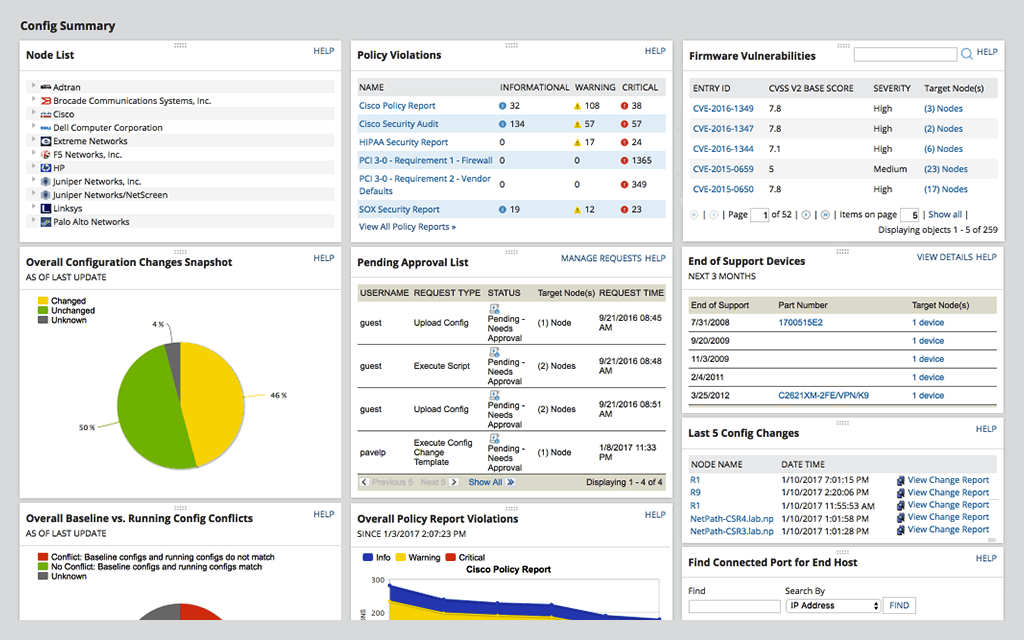
Network Configuration Manager is well suited for backing up configurations of all your devices. It also has a great comparison tool for seeing only the differences in config. Another great feature is it's ability to push a script to any number of devices. This is very handy for pushing changes to one, 10 or multiple devices. There are also some great reports that you can run against the devices in inventory
A de minimis incentive was given to thank the reviewer for their time. The incentive was not used to bias or drive a particular response, nor was the incentive contingent on a positive endorsement. More Info
A de minimis incentive was given to thank the reviewer for their time. The incentive was not used to bias or drive a particular response, nor was the incentive contingent on a positive endorsement. TR verified that a representative sample of customers was invited. More Info
Java based. Always an issue. I know they are working on this and it will be Javaless if we need it. I know that Java can cause issues across the board and I understand the need of it, but it does not make it any better when there are Java issues.
Stronger integration with the Active Directory. Currently its only read-only, which is good and bad.
I would love to see an App. I know they are working on this as well.
For our use case, it does everything great and some of the features we underutilize but I would like to be able to set a configuration baseline when initially adding a node instead of after the configuration is pulled but it's not a particularly big deal to let it pull the configuration then set it as the baseline.
A de minimis incentive was given to thank the reviewer for their time. The incentive was not used to bias or drive a particular response, nor was the incentive contingent on a positive endorsement. TR verified that a representative sample of customers was invited. More Info
Medium complexity to set up in the beginning if using any non-standard devices or configurations, else fairly easy (e.g. Cisco Nexus or IOS-based devices). Reports are fairly straightforward to set up. Updates to the platform are fairly straightforward and don't take a major effort. Easy to add or remove devices.
A de minimis incentive was given to thank the reviewer for their time. The incentive was not used to bias or drive a particular response, nor was the incentive contingent on a positive endorsement. TR verified that a representative sample of customers was invited. More Info
The user interface is lacking. It is difficult to navigate at times and things can be done multiple ways. Quite often I am confused by how their notification structure works. It is not very intuitive. They do offer a free Academy. They also offer a community of other technical folks. I have enjoyed both.
A de minimis incentive was given to thank the reviewer for their time. The incentive was not used to bias or drive a particular response, nor was the incentive contingent on a positive endorsement. More Info
The employees at Securelink have always been responsive and seem to be invested in the success of my company. They truly understand what their product means to us so if there is a problem, they are always willing to help. In the rare event that something is found on their end, they will be proactive and reach out to someone to help and get something on calendar for a fix
To be fair, I have not had to involve Support in a number of years, but when I did, I was greeted with enthusiastic engineers who wanted to understand and solve the issue. It was a fairly complex scenario and I have discovered in my most recent implementation that engineering included that option as a standard now.
A de minimis incentive was given to thank the reviewer for their time. The incentive was not used to bias or drive a particular response, nor was the incentive contingent on a positive endorsement. More Info
Solarwinds has actually produced new training since I last used it that is available on their site at any time. Their previous training was more than enough to get us started but now there is significantly more content. Since I'm comfortable with the Orion platform and the products we use I haven't checked the new training out yet but we have new staff go through portions of that training and they always come away with an understanding of the platform and ready to use it
A de minimis incentive was given to thank the reviewer for their time. The incentive was not used to bias or drive a particular response, nor was the incentive contingent on a positive endorsement. TR verified that a representative sample of customers was invited. More Info
it was a fairly easy implementation and everything was pretty straightforward. only challenge we had was getting all the snmp communities updated on the networking equipment
A de minimis incentive was given to thank the reviewer for their time. The incentive was not used to bias or drive a particular response, nor was the incentive contingent on a positive endorsement. More Info
Securelink seems to work better than LogMein for a large enterprise group. Our company has over 10,000 different connections and securelink manages them well.
At the time SolarWinds was the biggest player in the space and their whole portfolio was very comprehensive. As time progressed and newer technologies came about (i.e. SDWAN) their products couldn't keep up with the consumer demands and changing market. Security became such a big focus that once Solarwinds got hacked we had to remove all their products from our environment
A de minimis incentive was given to thank the reviewer for their time. The incentive was not used to bias or drive a particular response, nor was the incentive contingent on a positive endorsement. More Info
I've found that Securelink allows me to get a vendor access to an application for support purposes much faster than a provisioned VPN account and the red tape around this. I can set up a vendor to access an application suite in a half hour and it will be more secure than regular provisioning.
The ROI is yet to be seen on this, but it certainly makes Compliance, Internal Audit, and Legal very happy, which helps everybody.
Internally, there is much more push back and it has been problematic. For a tech, to have to log in to a server and navigate to a system is considered cumbersome, when before all they had to do was open up Putty or RDP to a server to get in. The only way to combat this is to force them to use Securelink by removing rights. Near impossible for the domain admins.
Saves 100s of hours a year in man hours over manual configuration.
Saved easily 50k in lost revenue when a switch rebooted with months old unsaved configuration. NCM let us quickly restore a snapshot of the running config from the previous day.
Saves us several man hours per week of config auditing by reducing all changes to a summary email.
A de minimis incentive was given to thank the reviewer for their time. The incentive was not used to bias or drive a particular response, nor was the incentive contingent on a positive endorsement. TR verified that a representative sample of customers was invited. More Info