Altium Develop vs. KiCad EDA

Overview
ProductRatingMost Used ByProduct SummaryStarting Price
Altium Develop
Score 9.2 out of 10
N/A
Altium Develop is a platform that unifies multidisciplinary teams across engineering, sourcing, and manufacturing to support seamless co-creation. It provides real-time visibility into designs, requirements, and supply chain data, enabling contributors to work together concurrently rather than in silos.
$995
per year per seat
KiCad EDA
Score 6.5 out of 10
N/A
KiCad EDA is a Cross Platform and Open Source Electronics Design Automation Suite. KiCad's PCB Editor is built to be approachable enough to make the first PCB design easy, and powerful enough for complex modern designs. Its interactive router and improved visualization and selection tools make layout tasks easier.N/A
Pricing
Altium DevelopKiCad EDA
Editions & Modules
No answers on this topic
Offerings
Pricing Offerings
Altium DevelopKiCad EDA
Free Trial
YesNo
Free/Freemium Version
NoNo
Premium Consulting/Integration Services
NoNo
Entry-level Setup FeeNo setup feeNo setup fee
Additional Details
More Pricing Information
Community Pulse
Altium DevelopKiCad EDA
Considered Both Products
Altium Develop
Chose Altium Develop
The advantage of KiCAD and EasyEDA versus Altium Designer is that KiCAD and EasyEDA are free. Even so, Altium Designer is more powerful than competitors in terms of integrability, easy of use and powerful tools. For example, in Siemens EDA software there is no tool for …
Chose Altium Develop
Other tools are open source and free to use, which often means its easier to use but has limited abilities. With using Altium Designer compared to the other tools I have found the review process a lot better and its workspace environment a big plus because I can find …
Chose Altium Develop
Altium Designer is a more mature, feature complete product. However, in 2025 it has become EXTERMELY expensive. KiCAD is quickly catching up and focusing on the core PCB design tools. We are likely to switch over in 2-3 years if things progress like they have.
Chose Altium Develop
I always thought of Altium Designer as a more intuitive tool. Also makes PCB design more fun. Don't know why, it just happens.
Chose Altium Develop
KiCad is easier to learn and the performance is fine, but BOMs, Footpring-Management, all that had to be done manually
With Altium and 365 everything is just built-in
Chose Altium Develop
Altium offers much better features and usability over Proteus. Proteus also has certain limitations in what it can achieve, so that leaves it behind.
Same with KiCad, while it is easier to use, and quite an amazing software for a freeware, it lacks certain features which makes …
Chose Altium Develop
The opensource nature of the library system works better than Altium. The libraries being text based means that version control with github is a natural fit. I don't see Altium having an advantage here even if it has tied into external api's like Octopart.
Chose Altium Develop
It's the first and only choice.
Chose Altium Develop
Overall Altium Designer is in another league compared to KiCad, especially the older versions. The whole design process works better in Altium Designer. The only thing I miss from KiCad is the disjointedness between symbols and footprints. Whilst less appropriate for …
Chose Altium Develop
Altium Designer is overly complex, particularly for smaller organizations that don't have a dedicated library, schematic, and layout personnel. KiCAD is simple to use and free.
Chose Altium Develop
Altium Designer is the industry standard for a reason. While KiCad can be used for complex and capable designs the software will fight you along the way. Further, the constantly breaking backward compatibility makes KiCad hard to maintain current versions and up to date with.
Chose Altium Develop
It is certainly easier to get designs up and running with great support and constant software updates. The ability to work with or without the cloud is a great feature. The only downside to Altium Designer is that it does have a cost to it that is not cheap. Overall I think it …
KiCad EDA
Chose KiCad EDA
I use nowadays mainly ALTIUM because of its advanced features for complex projects. Altium has many more benefits but on the other hand it depends on the complexity. For simple project I recommend KiCad because its open-source, easy to learn and work with. Therefore I would …
Best Alternatives
Altium DevelopKiCad EDA
Small Businesses
SOLIDWORKS
SOLIDWORKS
Score 8.5 out of 10
SOLIDWORKS
SOLIDWORKS
Score 8.5 out of 10
Medium-sized Companies
SOLIDWORKS
SOLIDWORKS
Score 8.5 out of 10
SOLIDWORKS
SOLIDWORKS
Score 8.5 out of 10
Enterprises
Autodesk Fusion
Autodesk Fusion
Score 8.0 out of 10
Autodesk Fusion
Autodesk Fusion
Score 8.0 out of 10
All AlternativesView all alternativesView all alternatives
User Ratings
Altium DevelopKiCad EDA
Likelihood to Recommend
9.5
(54 ratings)
6.0
(1 ratings)
Likelihood to Renew
8.2
(4 ratings)
-
(0 ratings)
Usability
8.4
(51 ratings)
6.0
(1 ratings)
Availability
6.4
(1 ratings)
-
(0 ratings)
Performance
7.3
(1 ratings)
-
(0 ratings)
Support Rating
7.2
(3 ratings)
-
(0 ratings)
Online Training
9.1
(1 ratings)
-
(0 ratings)
Implementation Rating
6.3
(2 ratings)
-
(0 ratings)
Product Scalability
2.7
(1 ratings)
-
(0 ratings)
User Testimonials
Altium DevelopKiCad EDA
Likelihood to Recommend
Altium
For general PCB design, rigid flex PCB design, and multi-layer PCB design, Altium Designer is the best software to use on the market. The simple movement between board layers and easy component placement are what sets it apart from other similar software. When designing our PCBs for industry, it is easily capable of suiting all of our needs.
Read full review
Open Source
KiCad is great for learning and getting started with Hardware design because its open source and easy to work with. Besides this its interface is simple and easy to understand. I have used KiCad personally for simple projects as more complex projects are harder to do in KiCad. The simplicity allows to me to do my work quick
Read full review
Pros
Altium
  • BOM management - with just a little bit of extra care any designer produces a usable bom along with their pcb design ready to be ordered
  • 365 - being able to view and review (placing comments) projects without the need to have the software installed locally
  • Multi-pcb projects
Read full review
Open Source
  • User Interface
  • Open source
  • Component import
Read full review
Cons
Altium
  • The tools organization section has too many tools that are easy to lose.
  • Save settings for multi-projects and reuse settings from other projects in new ones.
  • Better import final designs into multiple formats (details are often lost when imported into CAD formats).
Read full review
Open Source
  • Design rules
  • Limited libraries
  • Large custom libraries
  • Version control
Read full review
Likelihood to Renew
Altium
ALTIUM DESIGNER is the reference tool in the electronic circuit design sector, its use is widespread worldwide. Although there are other alternatives, some of them free do not rival ALTIUM DESIGNER in terms of features and reliability. It is also very practical to request quotes with ALTIUM DESIGNER BOM reports since all suppliers are accustomed to using the tool.
Read full review
Open Source
No answers on this topic
Usability
Altium
For beginners, Altium 365 is extremely accessible because of its friendly UI and thorough documentation regarding how the software should be used. For professional engineers, Altium 365 lays out all advanced features that could ever be needed in a PCB project. Thus, Altium 365 makes it easy to transition from other ECAD software to this one.
Read full review
Open Source
KiCad is great for learning and getting started with Hardware design because its open source and easy to work with. Besides this its interface is simple and easy to understand. I have used KiCad personally for simple projects as more complex projects are harder to do in KiCad. The simplicity allows to me to do my work quick.
Read full review
Reliability and Availability
Altium
Not very stable. Sudden lack of functionality when the license expires is not indicated clearly and can lead to loss of work.
Read full review
Open Source
No answers on this topic
Support Rating
Altium
I use the educational Program. And so far is the best technical support. Every time that I need one or I have a question. They respond so far and with excellent advice.
Read full review
Open Source
No answers on this topic
Online Training
Altium
easy to follow, Good technical materials. good videos The platform is easy to use.
Read full review
Open Source
No answers on this topic
Implementation Rating
Altium
Some times it is slow down PC due to polygons
Read full review
Open Source
No answers on this topic
Alternatives Considered
Altium
Altium offers much better features and usability over Proteus. Proteus also has certain limitations in what it can achieve, so that leaves it behind. Same with KiCad, while it is easier to use, and quite an amazing software for a freeware, it lacks certain features which makes it harder for us to use. OrCAD offers a lot of features, great focus on signal integrity, but the ease of use is non-existent
Read full review
Open Source
I use nowadays mainly ALTIUM because of its advanced features for complex projects. Altium has many more benefits but on the other hand it depends on the complexity. For simple project I recommend KiCad because its open-source, easy to learn and work with. Therefore I would recommend KiCad is more then sufficient for easy less complex projects
Read full review
Scalability
Altium
Because, in my opinion, usage for small organization is poor, it is difficult to set up initial configuration to support scaling.
Read full review
Open Source
No answers on this topic
Return on Investment
Altium
  • I can only guess, but I think the investment, at least for real industry, is a no-brainer. The labor savings are obvious and far over the outlay.
  • To be more specific, the time saved on component selection/procurement is phenomenal. I will no longer waste days poring over catalogs and websites.
  • The biggest downside I know of is the time spent explaining the above to the accounts department because, let's face it, it's still pretty spendy.
Read full review
Open Source
  • PCB Client Projects
  • More Electronic designers
  • Open source
  • Missing advanced features for complex projects
Read full review
ScreenShots

Altium Develop Screenshots

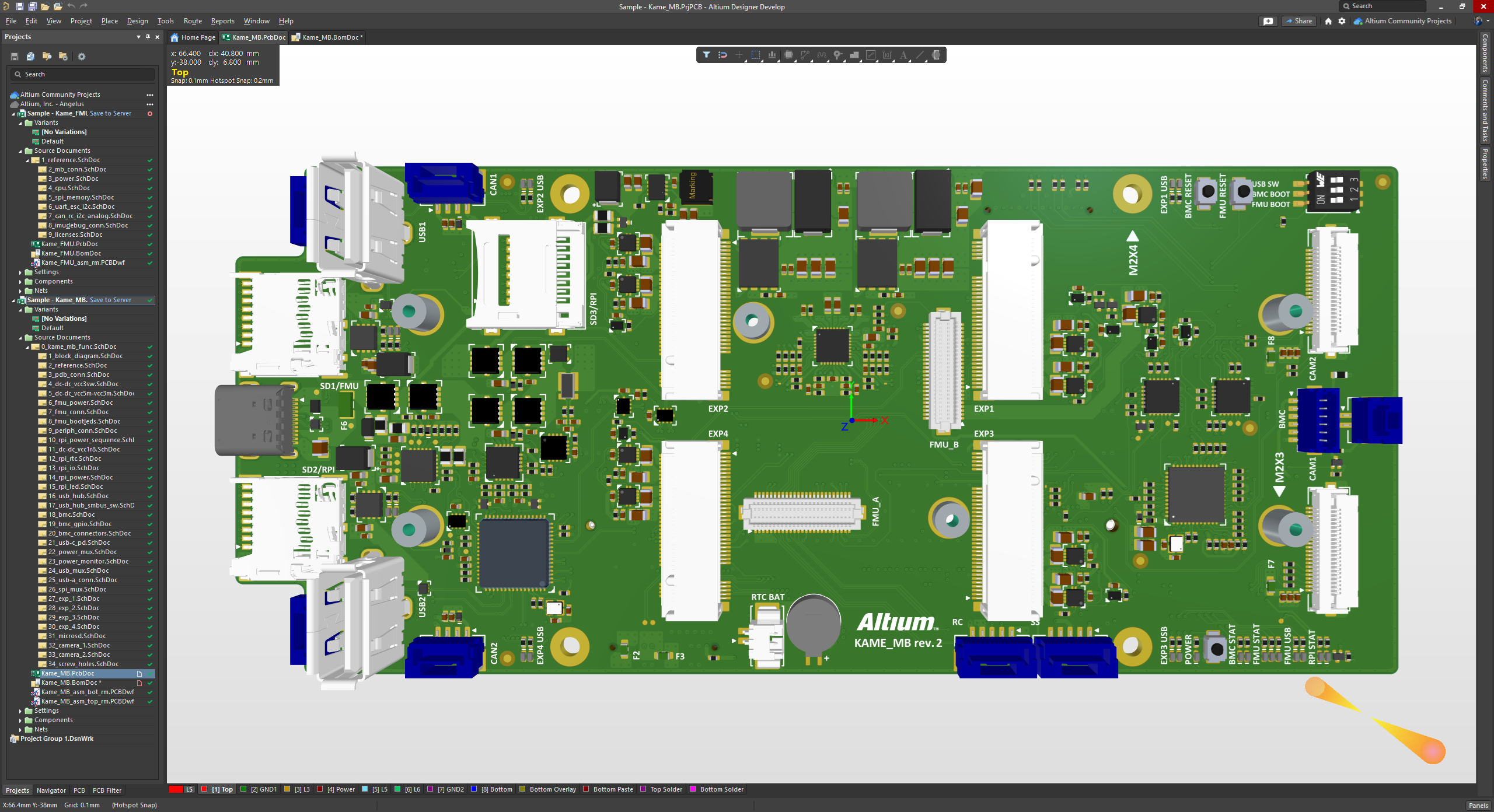
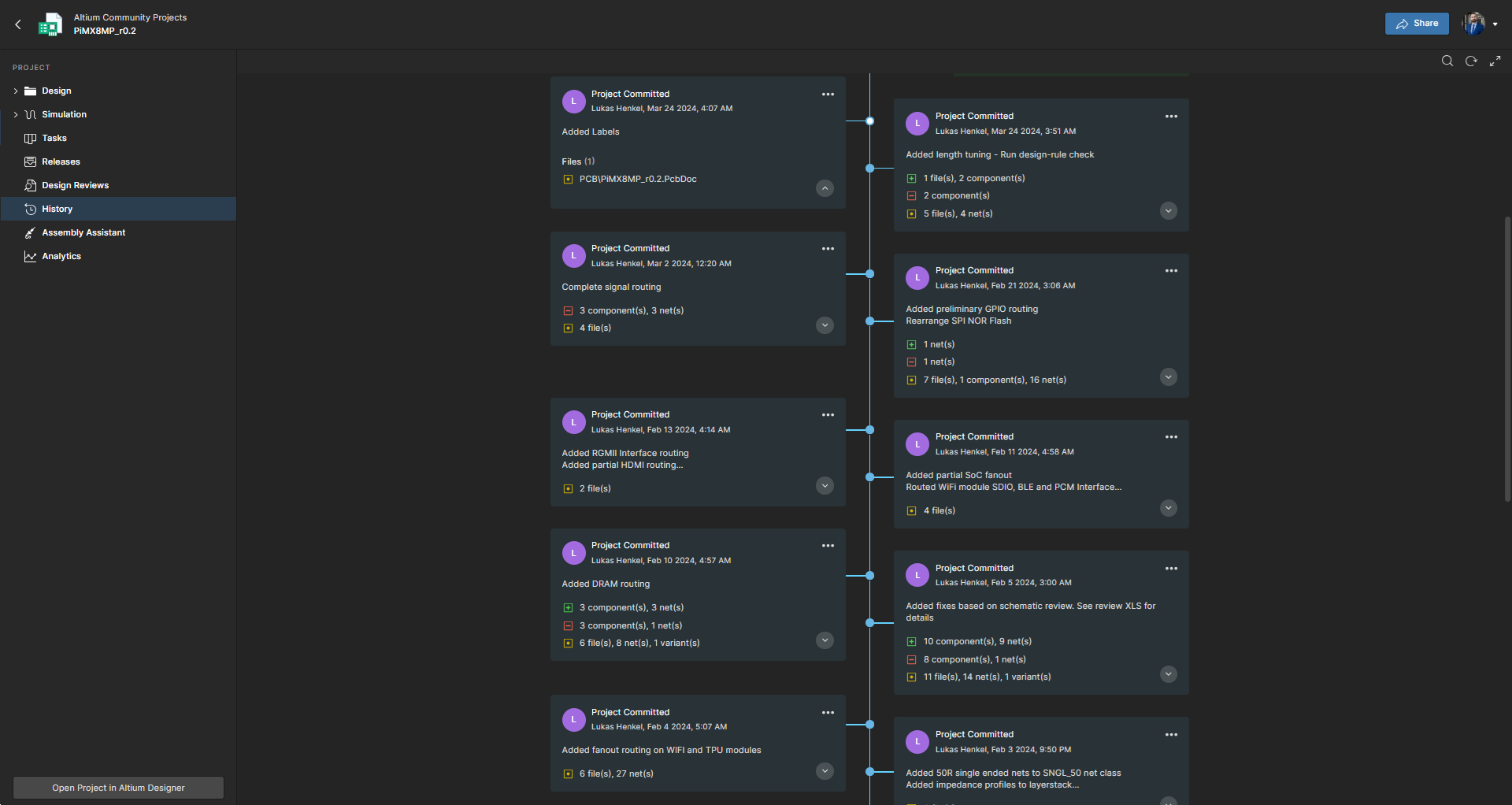
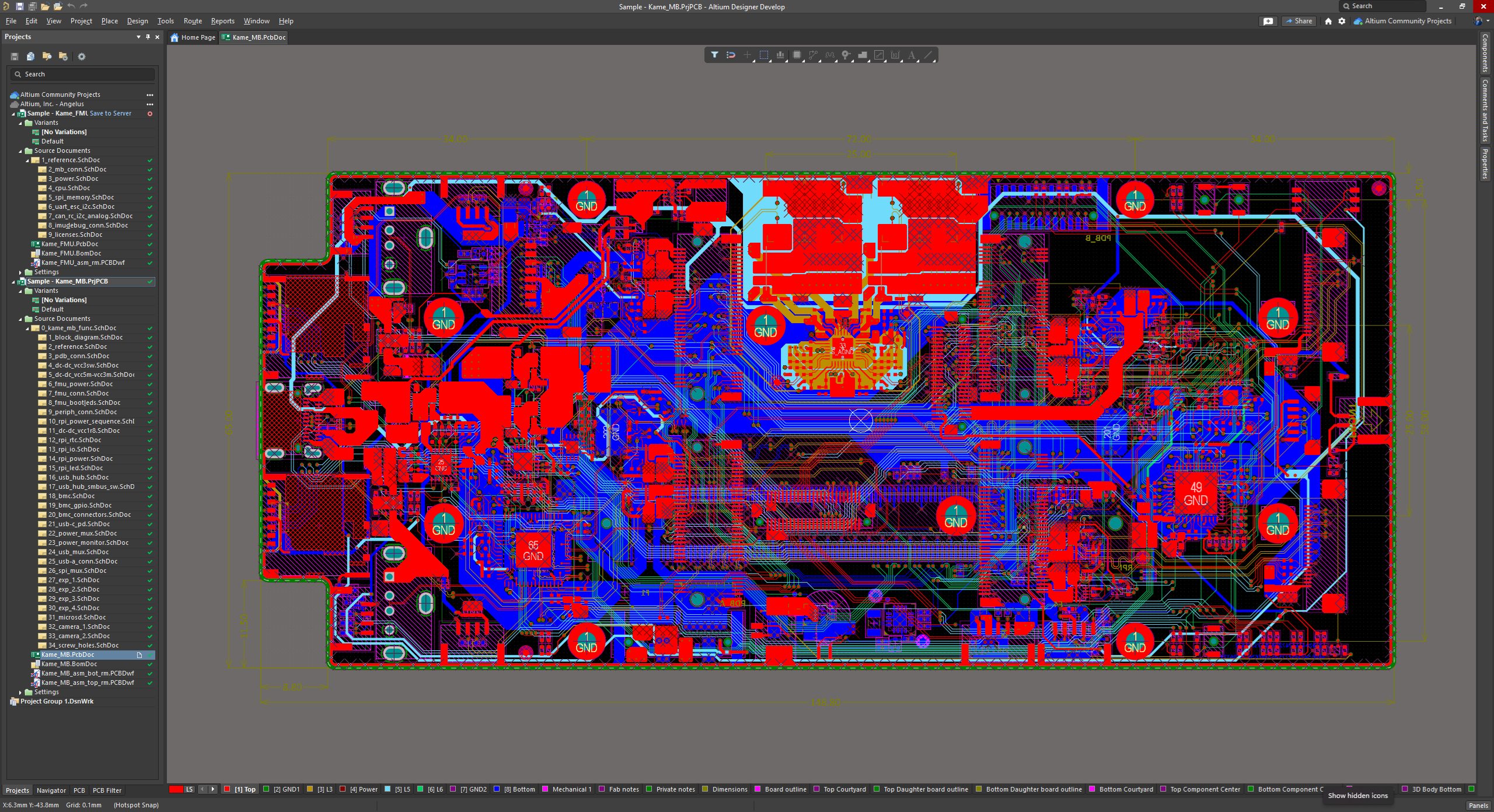
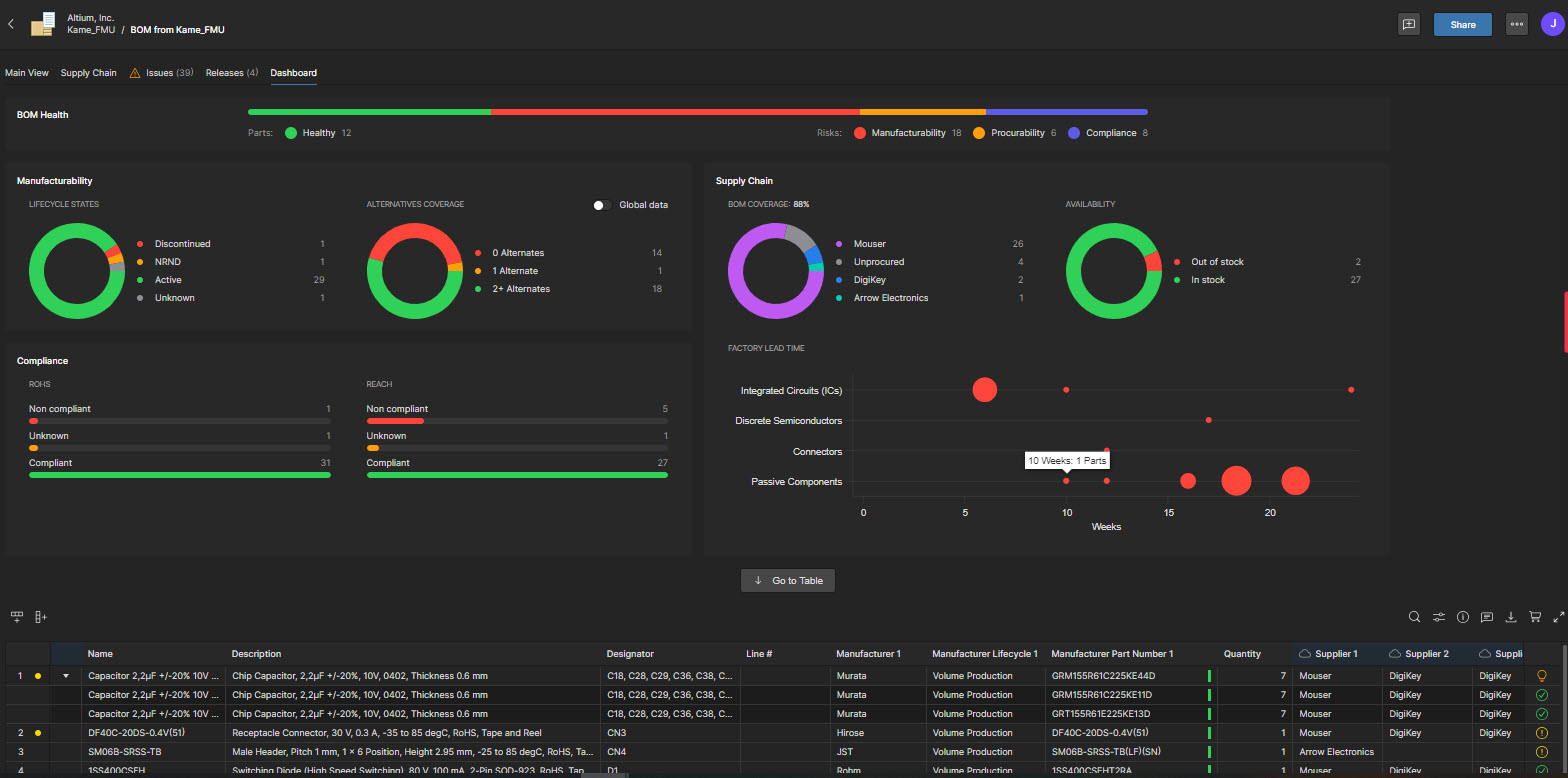
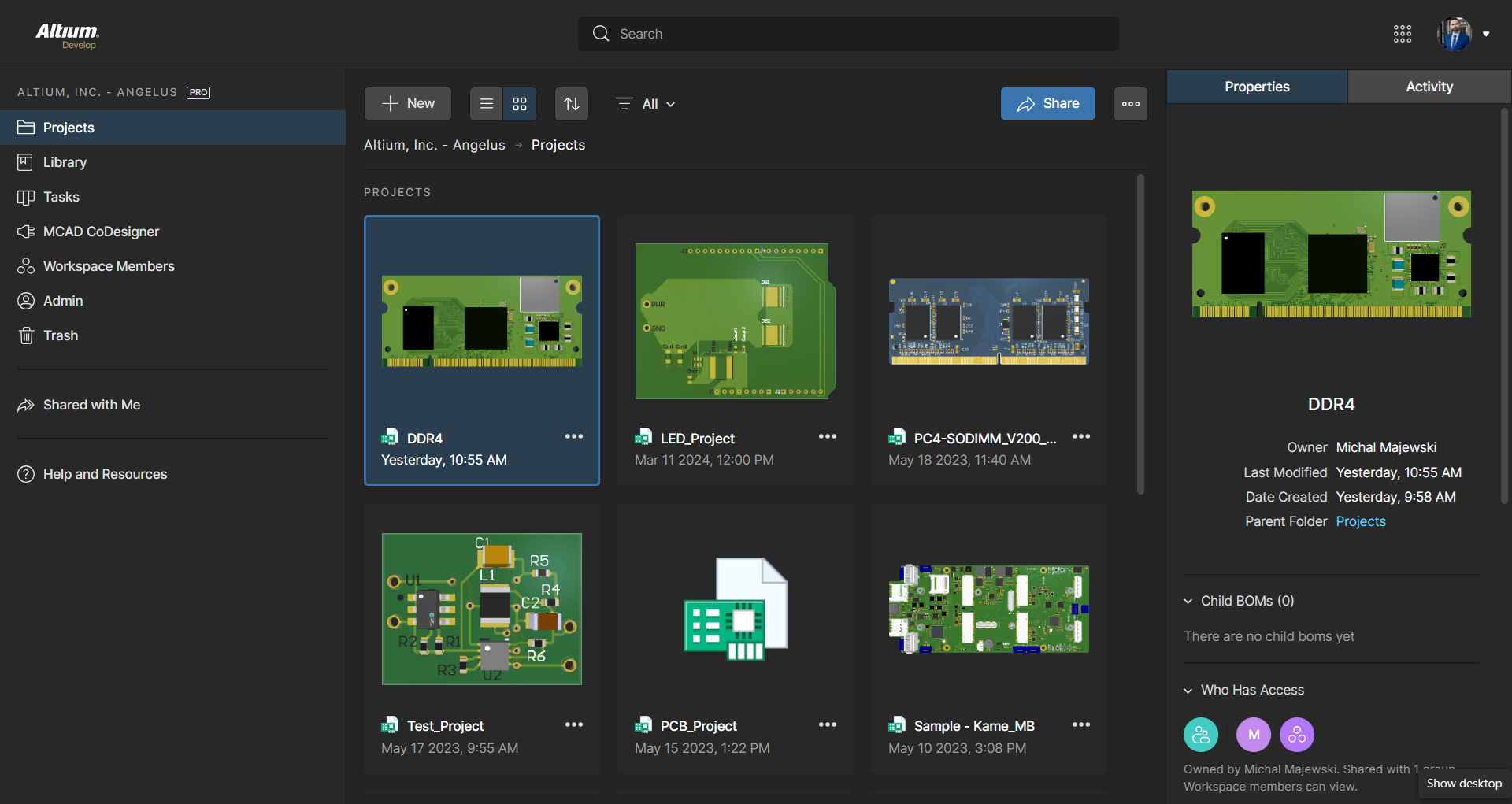
Screenshot of the 3D View Editor in Altium Develop that transforms the standard 2D PCB workspace into a fully interactive, three‑dimensional design environment. Users can toggle between 2D and 3D modes, then zoom, pan, and rotate the board freely using tools like a directional sphere for precise pivot control and adjust display settings (such as transparency or coloring) via the View Configuration panel to visually explore and inspect PCB layouts in realistic detail.Screenshot of Project History in Altium Develop, which provides a browser-based, visually chronological timeline of a project's key events such as: creation, commits, releases, clones, and MCAD exchanges offering version control transparency directly within workspace.Screenshot of Altium Develop's unified design environment built on a single data model. From schematic capture to PCB layout, routing, and assembly preparation, every step flows seamlessly. Smart placement and routing features make complex designs faster, easier, and more reliable.Screenshot of ActiveBOM, which is a dynamic, table-based Bill of Materials (BOM) editor integrated into Altium Develop that elevates component management to a real-time, design-aware process. It automatically aggregates supply chain data such as pricing, stock, lifecycle status, and lead times - from sources like Octopart and IHS Markit, enabling parts selection, alternates, cost calculation, rule-based verification, and traceability - within the same environment as the schematic and PCB design.Screenshot of BOM Portal, which is a cloud-native, procurement-focused tool within Altium Develop that transforms traditional Excel-like Bill of Materials (BOM) workflows by integrating live supply chain, compliance, and pricing data. It enables collaboration between engineering and procurement, helps identify supply risks like obsolescence or shortages, supports BOM consolidation and alternates, and ensures thorough version control and traceability bridging design to manufacturing with real-time visibility and control.Screenshot of Workspace Projects, which provide a cloud-native, version-controlled hub within Altium Develop that simplifies electronic project management with centralized storage, collaboration, and built-in Git-based version control. This interface enables real-time design navigation (including schematic, 2D/3D PCB, BOM, and Draftsman views), task tracking, release and manufacturing management, historical timeline review, and sharing.