
TrustRadius: an HG Insights company

Bonterra Network for Good

Score8.7 out of 10

234 Reviews and Ratings

Request a Demo

Contact about Bonterra Network for Good

Please fill out the form below to get in touch.

Bonterra

Connect with Bonterra

What are you interested in?

Already have an account?

You hereby consent to have TrustRadius share the information supplied on this form with Bonterra so that Bonterra and TrustRadius may contact you in regard to the information requested.

What is Bonterra Network for Good?

Bonterra Network for Good offers a nonprofit fundraising suite of applications, with donor management features like intelligent tracking of donor readiness and targeted messaging.

Read more details.

Media

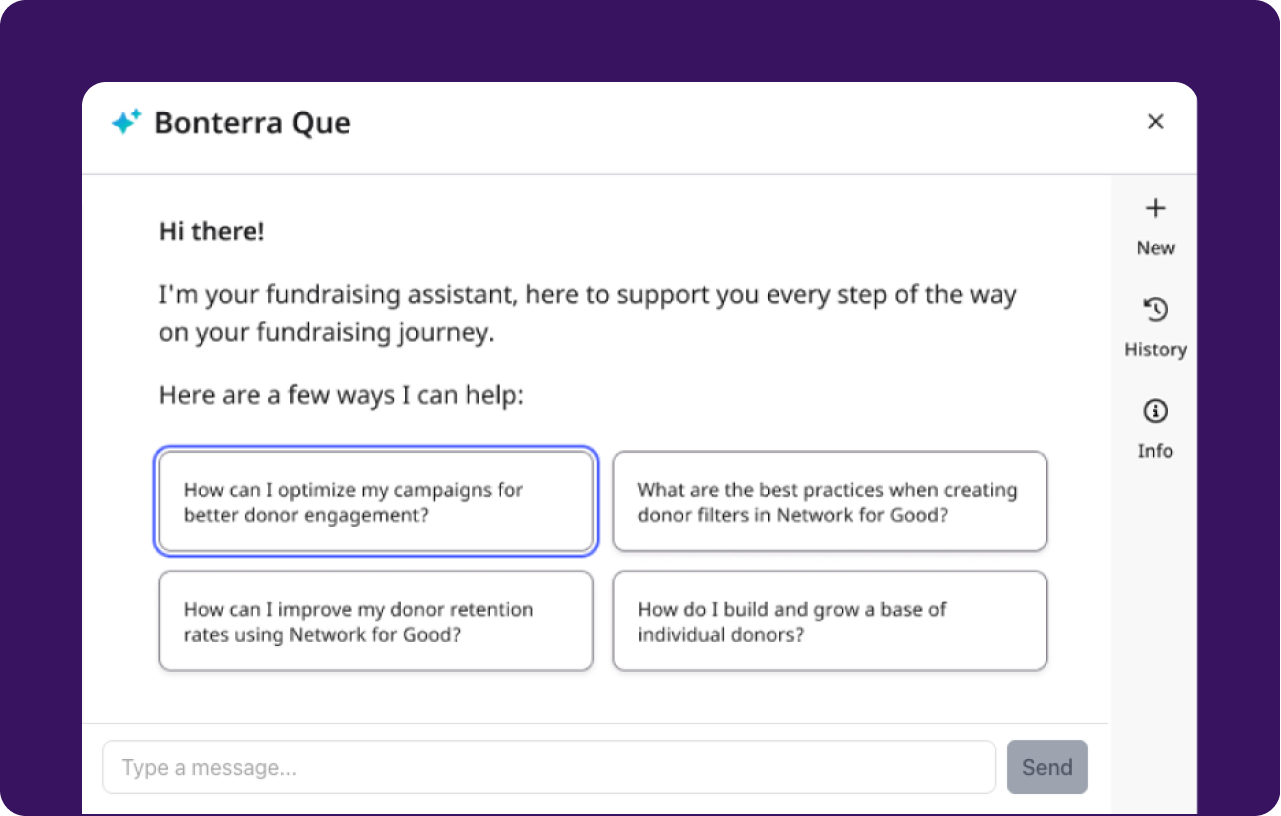
Screenshot of Bonterra Que. Bonterra Que is an AI fundraising assistant built directly into Network for Good. Que helps teams work with more confidence and clarity. No new tools to learn, no technical training required, and clear logic behind every insight. It doesn’t just advise, it acts, providing outputs based on fundraising best practices, and data, to save time and increase impact.
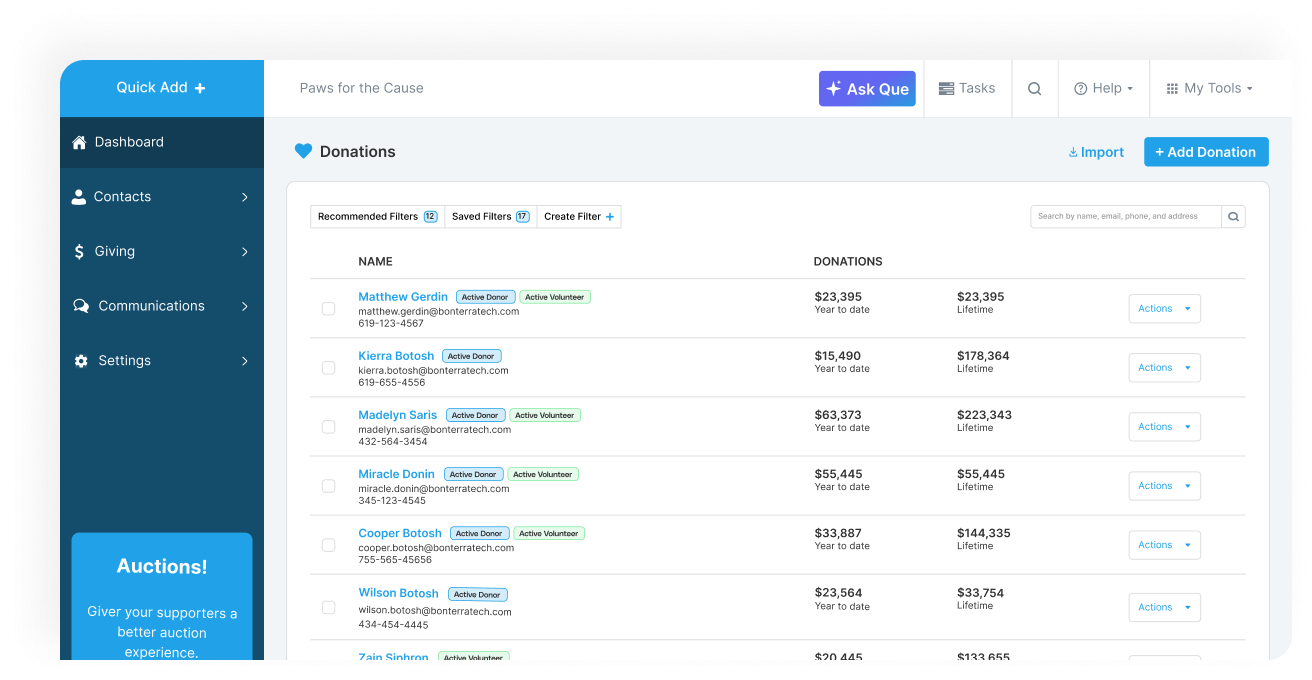
Screenshot of Donor Management. This simple simple donor database tracks every gift, interaction, and relationship. With clear insights and easy segmentation, even small teams can personalize outreach to strengthen donor loyalty.
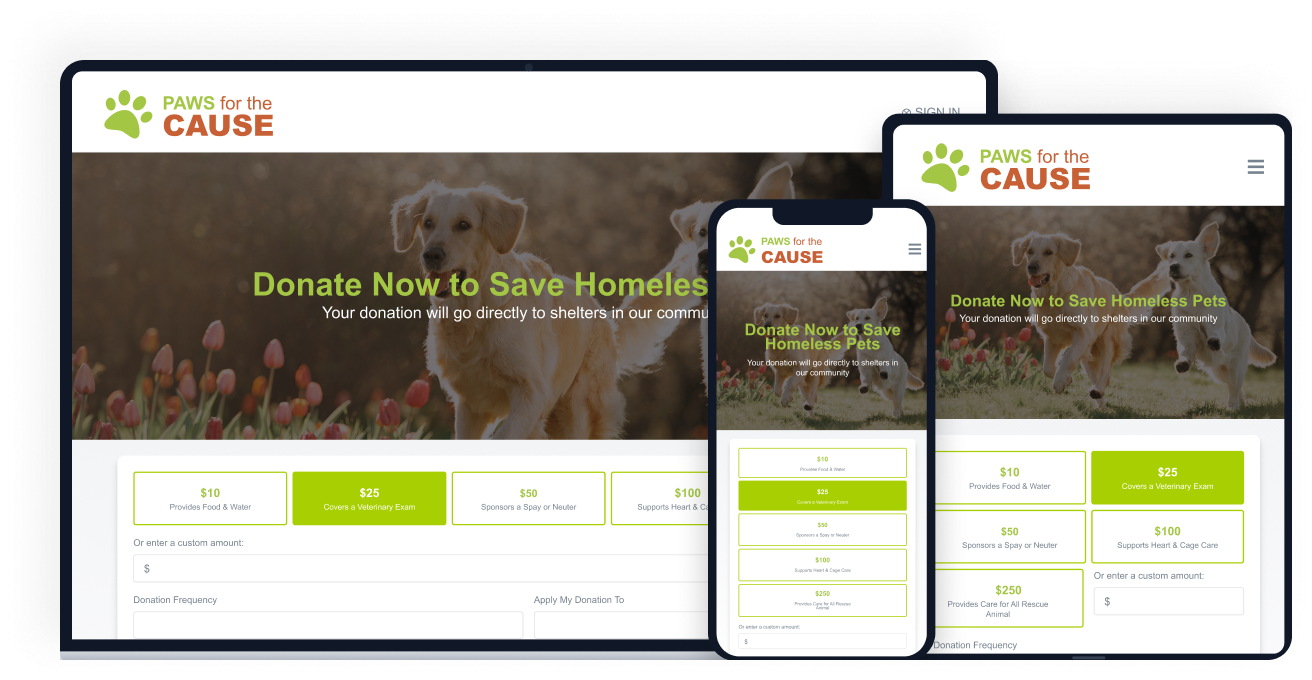
Screenshot of Donation Pages. These mobile-friendly donation pages can be created in minutes, no designer required. Every page is optimized for higher conversion and feeds donor data directly into connected system for instant stewardship.
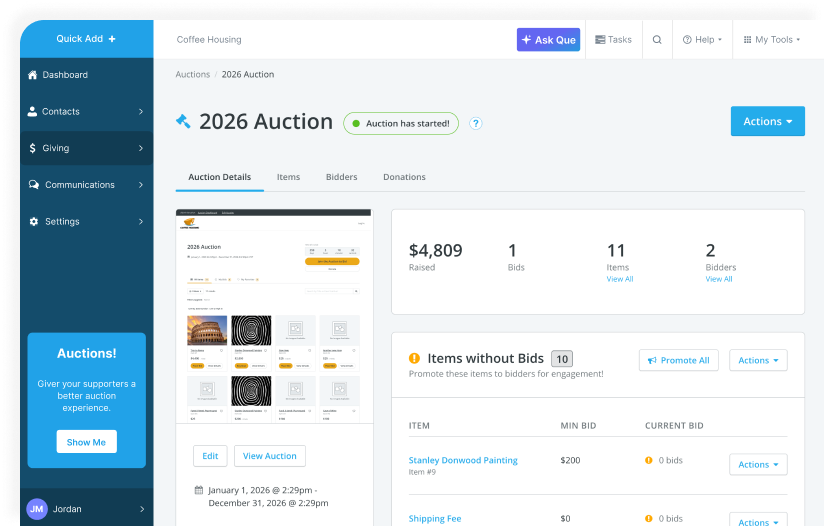
Screenshot of Events & Auctions. This interface lets users plan, promote, and run events or auctions, with ticketing, payments, and donor data automatically connected. Reduce admin work while creating seamless, high-impact experiences for attendees and bidders.
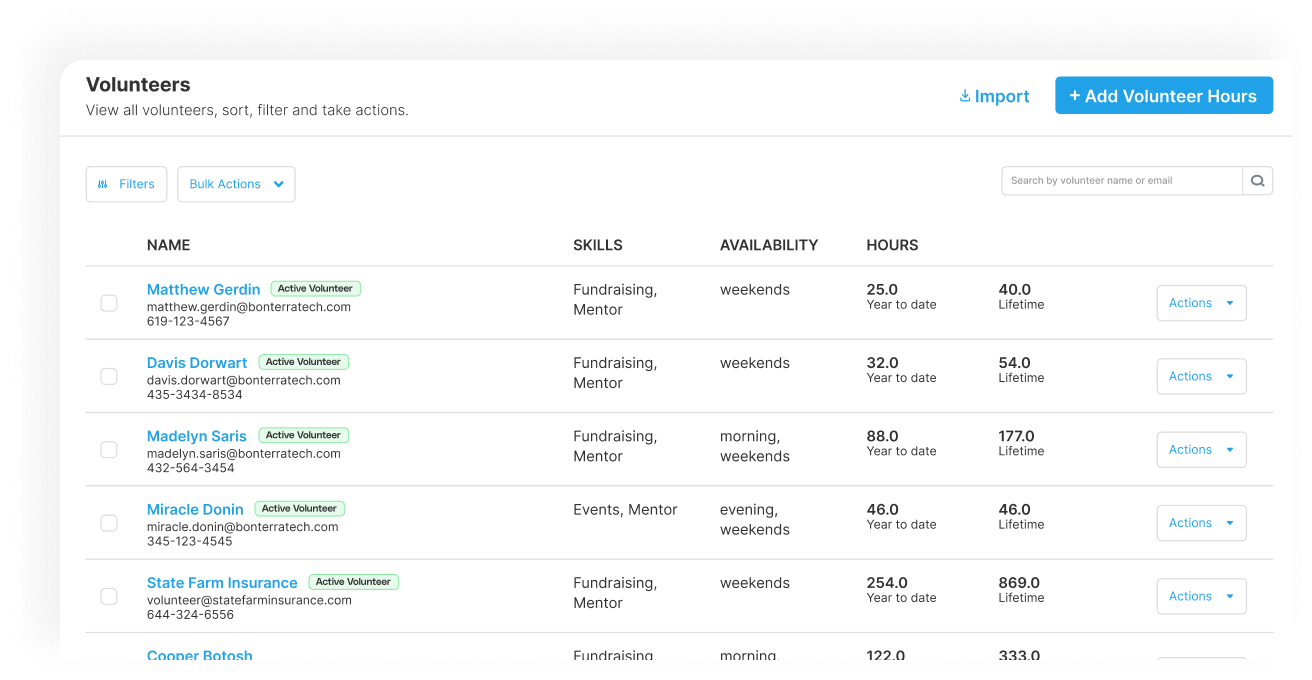
Screenshot of Volunteer Tracking. Volunteer hours and engagement are captured in the supporter profile, next to donation history and communication notes. Plus, users can segment, report, and export data to identify the most valuable supporters.
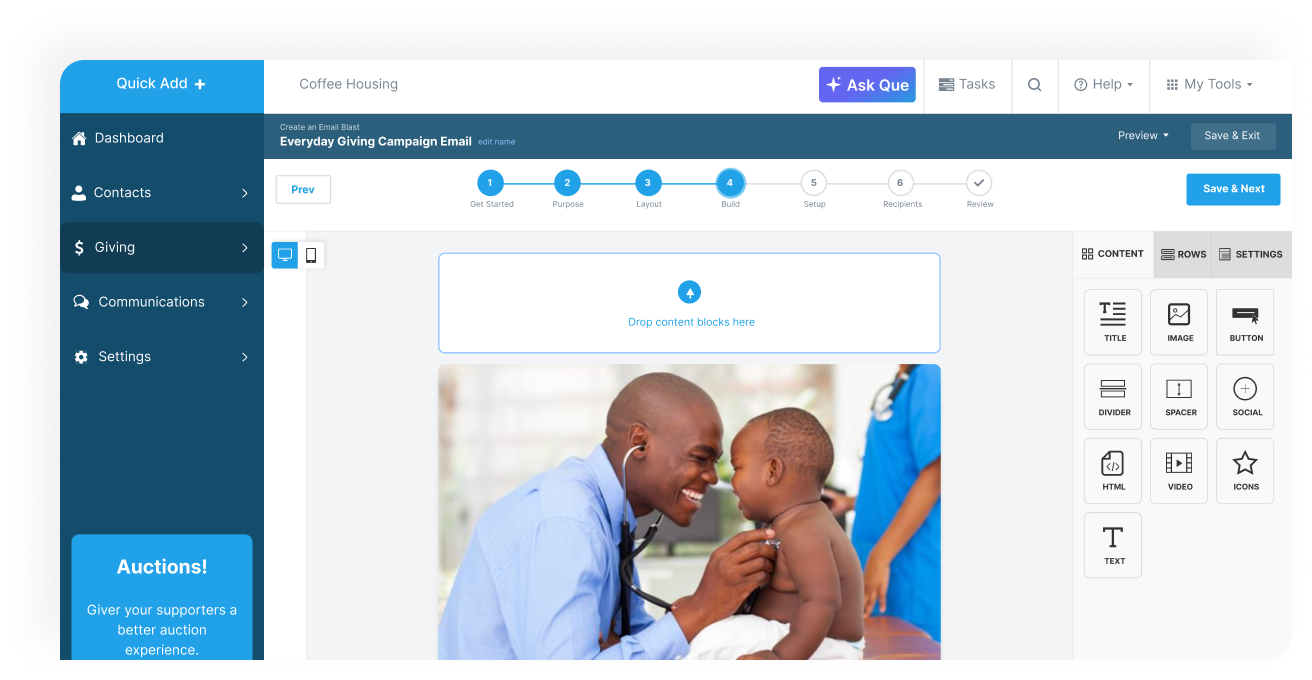
Screenshot of Email Marketing. Bonterra Que can be used to send targeted, on-brand emails using a drag-and-drop editor and 90,000+ fundraising templates. Track results instantly and personalize messages to boost engagement and giving.

1 / 6

Screenshot of Bonterra Que. Bonterra Que is an AI fundraising assistant built directly into Network for Good. Que helps teams work with more confidence and clarity. No new tools to learn, no technical training required, and clear logic behind every insight. It doesn’t just advise, it acts, providing outputs based on fundraising best practices, and data, to save time and increase impact.

Pros

  • Robust donor management with segmentation capabilities
  • Streamlined donation tracking and lifecycle management
  • Effective communication features for donor outreach

Cons

  • Limited reporting and data export functionality
  • Email blast functionality lacks design flexibility and collaboration
  • Inadequate image and picture handling tools

Cest si BONTERRA.

Use Cases and Deployment Scope

We use Bonterra Network for Good to track donors, send acknowledgment letters, segment donors for annual appeal letters, and send email blasts and newsletters. When we need quick answers or want to run a filter, we "Ask Que" and get accurate, time-saving results. We can also add contacts and view their activity. For instance, did Joe Bliss open our latest newsletter? Did he donate shortly after?

Pros

  • As soon as someone makes a donation on our nonprofit organization's website, it appears in our "giving" section.
  • We can send acknowledgment letters and save templates for popular categories like "General Thank You," "Sponsorship Thank You," and "In Memory/Honor Thank You."
  • Email blasts and monthly newsletters can be written and sent immediately or timed for release. We like the "send a test email" ability so that we can double-check everything before clicking "Send Now."

Cons

  • When we have a technical issue or a quick question, it would be great to have live people answer an 800 number. It can be frustrating to sit and wait for an email response.

Return on Investment

  • As a small nonprofit, ROI is critical. Thankfully, we can send out as many email blasts and newsletters as needed. This, in turn, increases donations.

Usability

I love Bonterra Network for Good

Use Cases and Deployment Scope

We use Network for Good as our CRM. The platform allows easy to use features to help keep up with donations, donors and event revenue. Bonterra is exceptional!

Pros

  • Donor management
  • Donor retention data
  • easy to use templates

Cons

  • Setting up a filter could be more user friendly

Return on Investment

  • Time saving
  • higher donor engagement

Usability

Other Software Used

Take Command Health, Bonterra Apricot

Great product horrible customer service.

Use Cases and Deployment Scope

For the last 10 years, we have used Network For Good as our donor platform. We especially like the event management, ticketing, and silent auction features. Being able to spin up a new, attractive, easy-to-use website for a specific campaign in just a few seconds is a huge benefit.

Pros

  • Silent Auction - the max bid features and texting is great.
  • Ticketing for galas / 5k / trail runs - very simple and straight forward.
  • Event check in - very easy to manage.

Cons

  • Customer service is NON existent.
  • No one to contact during serious emergencies (the entire system went down without explanation on the day of our annual fundraising gala...).

Return on Investment

  • Launching a new campaign instantly let us raise $50,000 for a serious local need. We later raised another $ 183,000 for a last-minute need. These fundraisers were driven by pressing, time-sensitive needs, and being able to quickly build a website for them was huge.
  • Multiple campaigns and easy visibility/tracking.

Usability

Alternatives Considered

Bonterra GiveGab, Givebutter, Funraise and Bloomerang CRM

Other Software Used

CampWise, Campminder, QuickBooks Desktop Enterprise

Bonterra Network for Good - For all your donation and fundraising needs

Use Cases and Deployment Scope

Bonterra Network for Good has been an extraordinary resource for our small, fully-remote, international nonprofit. We decided on this software years ago, due to the great reporting, easy access to donor data, fundraising capabilities, and extremely low cost compared to alternatives. Since then, Bonterra Network for Good has only gotten better. They are really quick to respond or assist with any questions or issues, they accept (and even welcome) user suggestions and truly work to implement them, and it's a really easy software program to learn and use!

Pros

  • Donation reporting
  • Fundraising Events
  • Donor communications
  • Cost savings
  • Customer service
  • Value user suggestions

Cons

  • Graph reporting of specific or total donor history would be helpful, that you can download
  • More functionality on how things are shown for fundraisers on the fundraising page
  • More options for types of reports with visuals

Return on Investment

  • Time savings with reporting
  • Return on Investment
  • Increased donations
  • Increased donor engagement
  • Easy access to real-time data, anywhere

Usability

Alternatives Considered

Blackbaud Raiser's Edge NXT and DonorPerfect

Other Software Used

OneDrive, Google Chrome, Microsoft 365, monday.com, Google Meet, QuickBooks Online, Canva, Adobe Acrobat, Meta Business Suite

Bonterra Network for Good Great Product Great Price

Use Cases and Deployment Scope

We use Bonterra Network for Good for donor management, CRM, donation management and tracking, donor communication, ticket sales, donation processing, and donor tax documentation. We continue to find new ways to utilize the software as new functions are rolled-out. The product addresses the majority of needs that a small nonprofit require, all rolled into one product. It allows for communication, financials, CRM, and many other things all under one "roof".

Pros

  • Donation tracking
  • Donor record keeping
  • Donation acknowledgements
  • Donor tax documentation
  • Donor communications (email, text)
  • Donation processing
  • Ticket sales
  • Historical data records

Cons

  • In exporting reports, it would be helpful to have a "select all" option so you can easily select everything without having to manually click each one.
  • In exporting reports, it may be helpful to have the option of saving various options for different needs so you don't have to manually click or unclick each choice every time, as you can currently only save one type.
  • It would be helpful to be able to change an event/ticket information after it has already gone live for sales as we recently had an issue with this.

Return on Investment

  • Increased donations - the majority of our donors do so through this platform
  • Time savings - we are able to take care of a large majority of tasks through one easy portal
  • Higher donor engagement - It's simple for us to pre-plan emails and texts and send them out to donors from the portal
  • Time savings - the various ways we can search our records provides easy access to data which in turn saves time

Usability

Alternatives Considered

Blackbaud DonorCentral

Other Software Used

QuickBooks Online, monday.com, Microsoft 365 Business Premium