
TrustRadius: an HG Insights company

ManageEngine Patch Manager Plus

Score8.2 out of 10

37 Reviews and Ratings

What is ManageEngine Patch Manager Plus?

Patch Manager Plus is an automated patch management solution that enables organizations to manage the entire patching lifecycle from a single console.

It supports patching across Windows, macOS, Linux, and over 1,100 third-party applications, helping IT teams keep endpoints secure and compliant. With Automated Patch Deployment (APD), organizations can streamline the complete patch management process by:

Scanning endpoints to identify missing patches
Testing and approving patches before deployment
Automating patch deployment with customizable deployment policies
Declining or excluding unwanted patches
Rolling back patches when required
Monitoring patch compliance and vulnerabilities through comprehensive reports and dashboards

Patch Manager Plus is available as both a cloud-native and on-premises solution, providing organizations with the flexibility to choose the deployment model that best suits their environment.

Categories & Use Cases

Media

Screenshot of Patch Manager Plus Dashboard
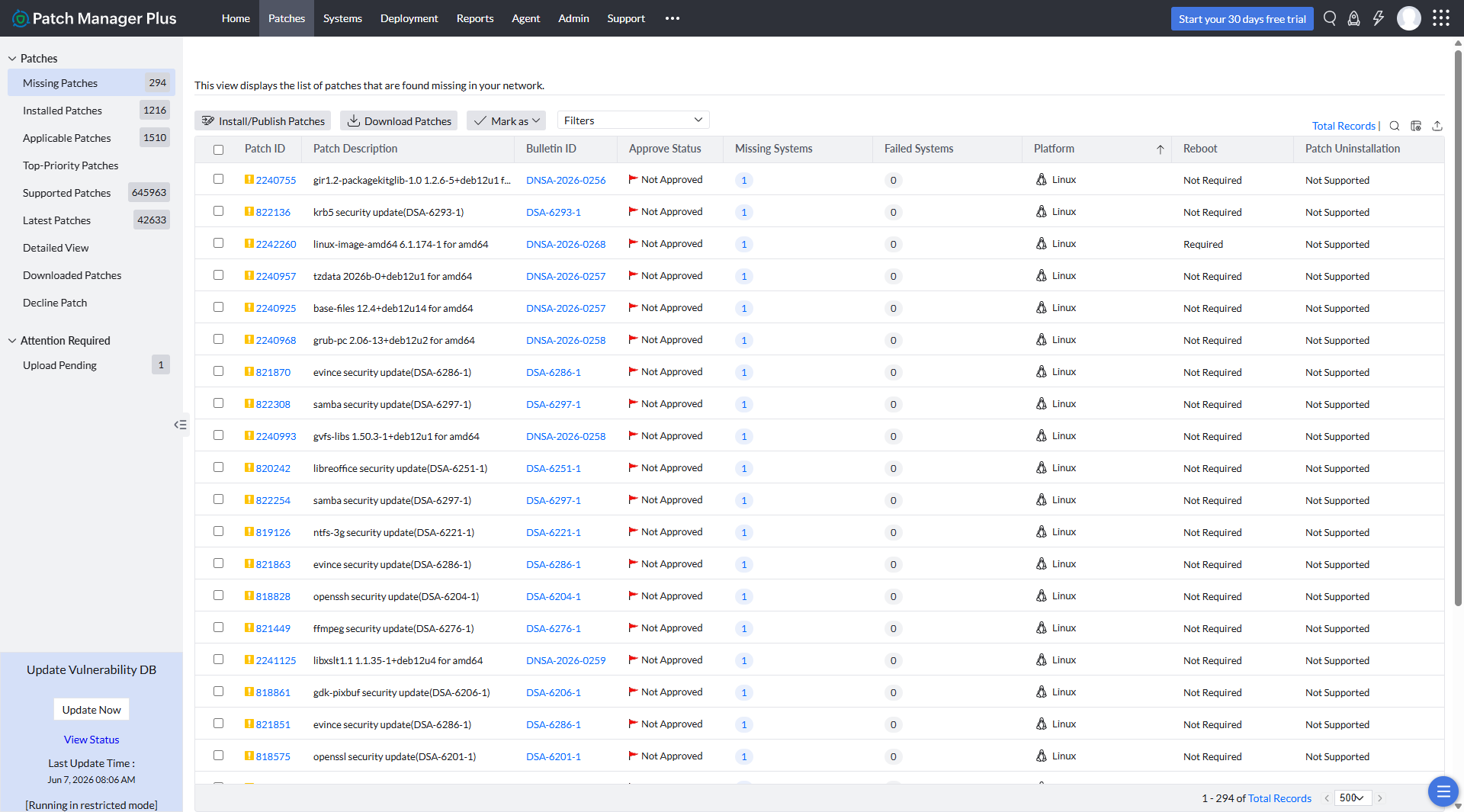
Screenshot of Missing Patches
Screenshot of Manual Patch deployment
Screenshot of Patch Reports

1 / 4

Screenshot of Patch Manager Plus Dashboard

Who Buys & Uses ManageEngine Patch Manager Plus

Pros

  • Automated OS and third-party application patch deployment
  • Scheduled patching with minimal business disruption and managed reboots
  • Comprehensive reporting and dashboard functionalities for oversight

Cons

  • Patching and deployment process can lack transparency or robustness
  • Usability and interface design require improvement, especially for scheduling
  • Limited compatibility for Mac devices and some antivirus manufacturers

ManageEngine Patch Manager Plus Review

Use Cases and Deployment Scope

i use the ManageEngine Plus to deploy patches to my workstations. I also use it to scan my workstations for any vulnerabilities. i also use it to broadcast announcement i look forward to receiving fresh patch releases for my workstation. Its easily identifies affected workstations for it to be worked on.

Pros

  • Detecting vulnerable workstations
  • scanning for vulnerable workstations
  • providing patches to resolve vulnerable systems
  • identifies obsolete workstations to be cleared of the environment

Cons

  • i use kaspersky so i think patches can be released for kaspresky as well

Return on Investment

  • It makes my work very easy
  • it easily identifies vulnerable systems
  • provides patches to the vulnerable or affected machine

Usability

Looking form something simple that does the job.

Use Cases and Deployment Scope

We use ManageEngine Patch Manager Plus as our centralized patch management solution to maintain the security and stability of our infrastructure. Specifically, we leverage the platform to automate the deployment of critical updates, security patches, and hotfixes across our server operating systems. In addition to OS-level patching, we use its third-party application patching capabilities to keep non-OS software up to date, ensuring that common vulnerability vectors are systematically closed without requiring manual per-app updates.

Pros

  • Reporting

Cons

  • Add more 3rd party apps integration rather than manual.

Return on Investment

  • Optimizing internal resource utilization and reducing the high operational overhead associated with infrastructure maintenance.

Usability

Simple yet powerful platform

Use Cases and Deployment Scope

We use it solely to monitor and patch our linux servers. It's easier to manage compared to using an orchestration tool such as Ansible as it's more accessible to the entire IT team and offers a user friendly web interface.

Pros

  • monitor new updates available
  • allows for easy deployments
  • easy management of baselines for security patching

Cons

  • It needs to provide more feedback when a deployment fails

Return on Investment

  • Centralised view of our linux estate and patching status

Usability

Alternatives Considered

Red Hat Ansible Automation Platform

Other Software Used

Patch My PC Patch Management

ManageEngine Patch Manager Plus Review

Use Cases and Deployment Scope

To apply security patches & operating system updates to our Windows Servers.

Pros

  • Patching Windows Servers
  • Identifying Vulnerable Systems
  • Reporting on Patch Levels

Cons

  • Product has a lot of bugs
  • Every update creates additional issues
  • Unable to have multiple distribution groups for various reports

Return on Investment

  • Our ROI is significant
  • Ease of Patching & Updating Windows Operating Systems
  • Staff cost reduction

Usability

Alternatives Considered

Microsoft System Center Operations Manager (SCOM)

Other Software Used

ManageEngine OpManager Plus, ManageEngine Key Manager Plus

Fantastic Product.

Use Cases and Deployment Scope

We use Patch Manager Plus to update both Windows and 3rd party patches to ensure compliance within our organization.

Pros

  • Patches and reboots servers efficiently, allowing us to schedule downtime for after business hours.
  • Patches our laptops and desktops efficiently and lets us force a reboot after postponing a certain number of times.
  • Provides detailed reports for our auditors.

Cons

  • Some of the scheduling can be complicated when initially setting up.

Return on Investment

  • Allowed us to maintain compliance with auditors while also providing minimal impact to both internal and external end users.

Usability

Alternatives Considered

Ivanti Automation and NinjaOne

Other Software Used

ManageEngine ADManager Plus, Lansweeper, SolarWinds Dameware Remote Support (DRS)
