TrustRadius: an HG Insights company

Teamcenter

Score9.3 out of 10

184 Reviews and Ratings

What is Teamcenter?

Teamcenter is a product lifecycle management system designed to help organizations integrate and standardize product development processes across functional silos.

Read more details.

Media

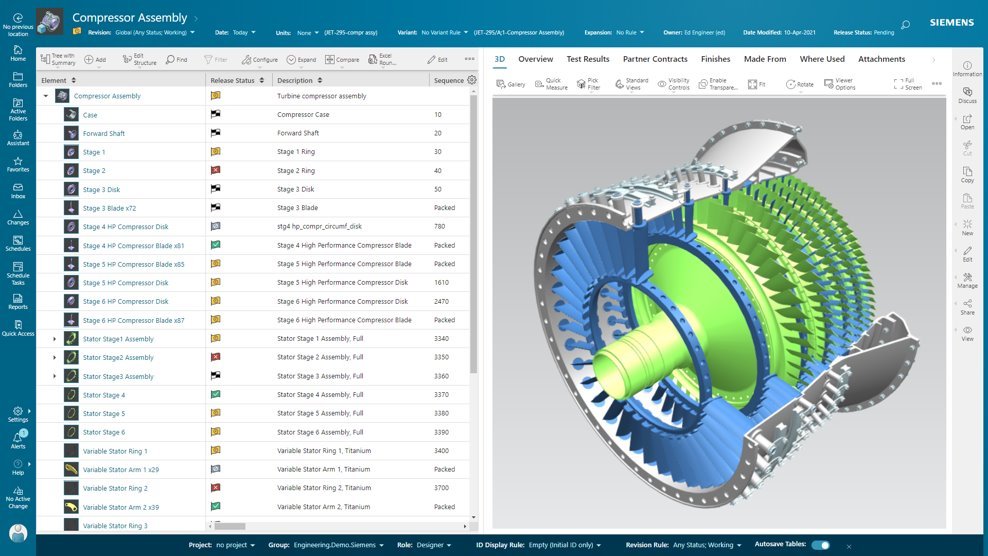
Screenshot of Active Workspace, the User Interface (UI) to drive Teamcenter. With no install required, it is a visual UI to navigate through products and processes, with tooltips to guide users along the way.
Screenshot of BOM configuration, in Teamcenter. With flexibility in how a BOM is managed and defined, it can provide an up-to-date source of information that eliminates the need for standalone spreadsheets and systems. Teamcenter X provides a flexible BOM management strategy that enables a single, accurate product definition for all who interact with the BOM.
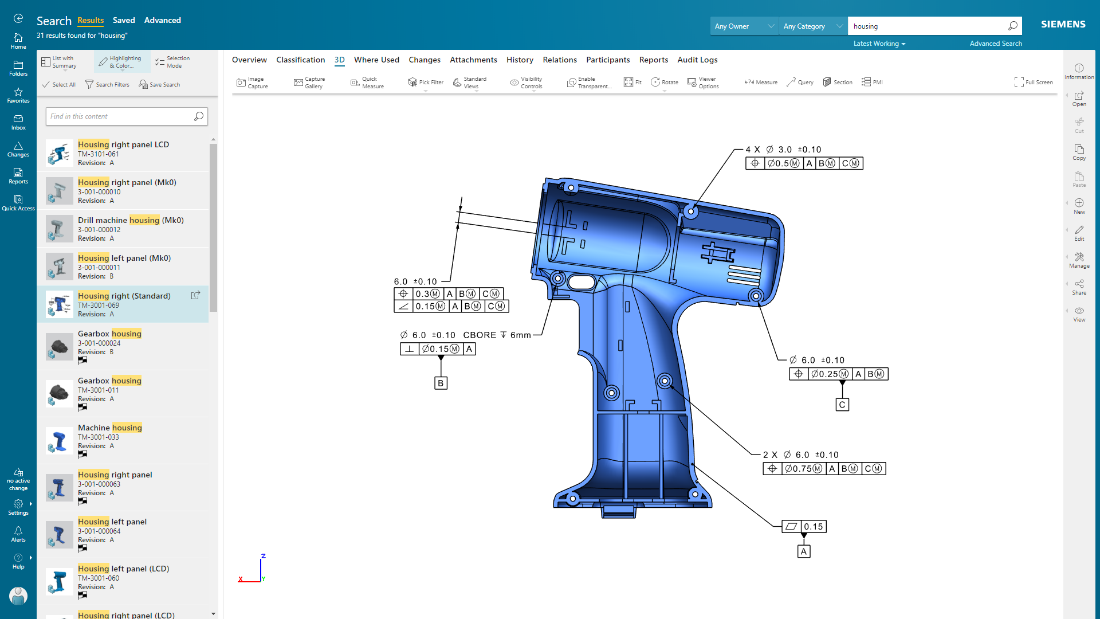
Screenshot of Teamcenter X search and analytics capabilities provides a streamlined product lifecycle management (PLM) search experience to help quickly find data. Teamcenter X visually presents search results in logical groups so users can drill down through product structures and relationships.
Screenshot of Product design intent can be communicated, and product data visualized, in their entirety using 2D and 3D visualization and markup capabilities. The user can also visualize and interrogate Product Manufacturing Information (PMI).
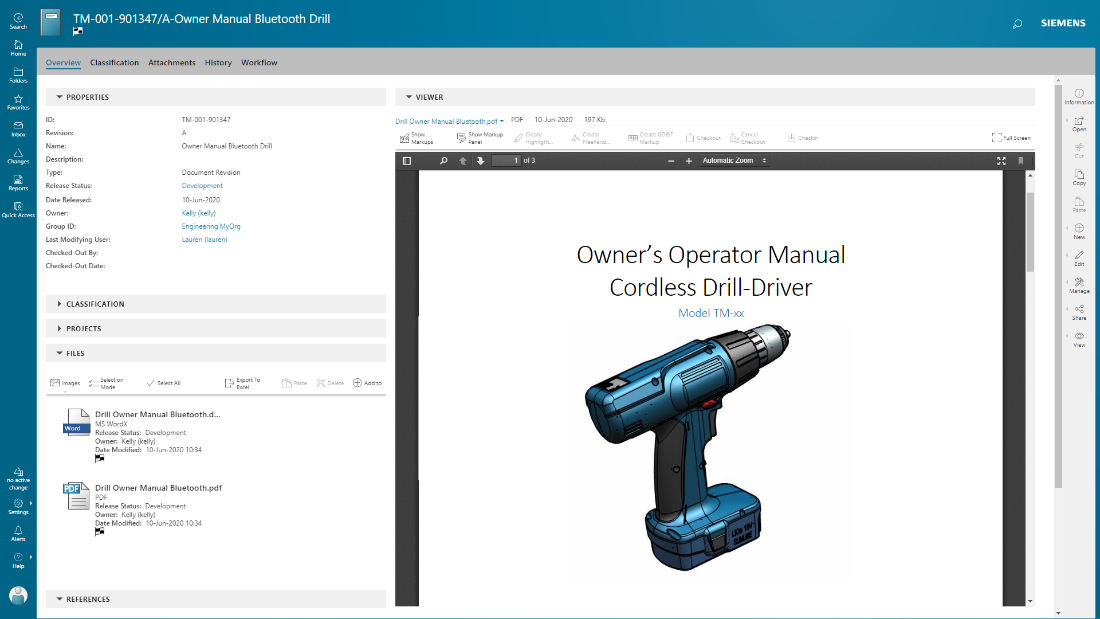
Screenshot of documents are managed in conjunction with product development, with integrated PDF for viewing and markup.

1 / 5

Screenshot of Active Workspace, the User Interface (UI) to drive Teamcenter. With no install required, it is a visual UI to navigate through products and processes, with tooltips to guide users along the way.

Pros

  • Effective data management for complex products
  • Seamless integration with CAD and ERP systems
  • Structured framework for change management

Cons

  • Complex and outdated user interface
  • Customization is time-consuming and requires specialized IT support
  • Performance issues and slow load times with large datasets

The best software for manufacturing teams

Use Cases and Deployment Scope

We use Teamcenter to manage product data, engineering changes, and design collaboration. It helps reduce manual errors, speeds up approvals, and improves version control across teams. Our scope includes CAD management, BOM handling, and workflow automation.

Pros

  • revision control
  • integrates smoothly with CAD tools
  • workflow automation helps manage engineering change orders with proper approvals and traceability

Cons

  • In our experience, the user interface can feel cluttered and slow, especially for new users.
  • I think search performance and filtering options could be faster and more intuitive.
  • For us, customization often requires complex IT support instead of simple configuration options

Return on Investment

  • Teamcenter has delivered strong ROI by improving design collaboration
  • cutting down rework
  • speeding up product releases

Alternatives Considered

PTC Windchill

Other Software Used

Slack, Google Meet, ZoomInfo Sales, Microsoft Teams

A story of Teamcenter in a Energy Manufacturing company

Use Cases and Deployment Scope

We use Teamcenter to manage entire lificycle of our product, from CAD to BOM

Pros

  • Lot of integration available
  • High level of customization
  • Good support

Cons

  • AWC should be more user configurable
  • Preference should be more clear to use and user friendly
  • Error message shold be more clean for the user

Return on Investment

  • Teamcenter with his BOM struvture gives us possibility to control entire product structures
  • Thanks to high level of comatibility we can manage 3D from various format
  • JT integration allow manufacturing users to visualize directly 3D Model and BOM structures

Alternatives Considered

PTC Windchill

Other Software Used

Microsoft 365, ServiceNow Now Platform, SAP Fieldglass

Maximizing our development efficiency

Use Cases and Deployment Scope

Teamcenter in our organization plays an important role of company’s product lifecycle management framework. We use it to interconnect the processes of design, engineering, and production in order to eliminate intermediaries. The system resolves major business issues, such as information organization, version control and the lack of efficient flows. Our solutions cover the integrated product data requirements integration of change management processes and real-time global collaboration.

Pros

  • Teamcenter stands out when it comes to compiling data belonging to a product for easy access by various parties.
  • They are also impressive to know about the capability of the platform regarding large data and complex products. Also integration of Groco with other systems such as CAD tools and ERP has helped in eradicating manual transfer of data thereby improving efficiency.
  • It has an effective change management structure that helps in noting and inputting changes without complications.

Cons

  • Teamcenter can confuse users, especially novices and training employees to use this software may take a lot of time.
  • Customization is also time consuming and most of the time is needed IT assistance. The reporting could be a tad better which is why sometimes, creating extensive reports take several steps. Having a clearer dashboard and easier setting modifications could be a major improvement to the current design.

Return on Investment

  • Teamcenter roll out and customization took us not more than six months and the training was also done concurrently. The changes could be observed immediately and a sense of team work was improved within a period of about three months.
  • After six months one of the areas that we noted improvement was on the reduction of errors and increased efficiency in decision making. It was effective to implement since it did not interrupt other projects that were being worked on.

Provides business proven PLM for intricate projects

Use Cases and Deployment Scope

The case of product creation and management is that we use Teamcenter to consolidate product data for the engineering, purchasing and quality assurance. It expunges issues such as inefficient and inconsistent data, slow approval process and inability to keep track of changes made to a product. Our use case also entails BOM control as well as change orders and technical compliance documentation.

Pros

  • Teamcenter’s strength is in coordinating data and the best feature is that it provides the truth of information.
  • Work flow automation has helped to minimize errors and the audit trail has helped to put into check decisions made. Among all benefits of the system, the integration with CAD tools is especially beneficial for engineering personnel.

Cons

  • There is need for the user interface of the site to be improved and to have more sleek appealing designs.
  • The software is some of the time clumsy and the search itself can be confusing. The licensing model might also be disadvantageous for extended teams that would like to implement the system step by step.

Return on Investment

  • In this case the implementation process took approximately eight months and full adoption not more than a year. It truly became evident discernible increase of improvements with reference to data accuracy and sharing as well as cross departmental co-ordination within the first four months of using the system.

Promoting the development of the organization and its structure

Use Cases and Deployment Scope

We employ Teamcenter as a means of PLM or product lifecycle management that allows it to control change and facilitate approval by design, engineering and manufacturing departments. It eliminates issues such as data isolation ineffective at work or job flows and the inability to track project progress. It also involves managing assemblies and transitions from one team to another as well as facilitating easy transitions between them.

Pros

  • The easy data management and integration of the dataset among the Teamcenter systems is one of the strengths of the product.
  • Its change management allows for change to be managed effectively and ensures that change requests are documented and enacted correctly and the reporting of the platform allows for enforcing accountability with regards to project progress. This article is remarkable for the presentation of the ability to manage BOMs at different stages.

Cons

  • It may take considerable efforts and time to customize some of the features found on the platform and the over all design can prove rather complex more especially to users who are new to such platforms.
  • Some features such as analytics are more complex and time-consuming than others and therefore must have extra preparatory work.
  • A better designed graphical user interface would be even more useful in experience sense.

Return on Investment

  • I could determine enhancements within three months in several aspects for example data extraction and sharing. It was about eight months to fully implement the solution where training and customization were among the processes involved. It was time and money well spent with ML the better answers became apparent and responses were more insightful.
