TrustRadius: an HG Insights company

Skyvia

Score10 out of 10

36 Reviews and Ratings

What is Skyvia?

Skyvia is a no-code cloud data integration platform for ETL, ELT, Reverse ETL, data migration, one-way and bi-directional data sync, workflow automation, and real-time connectivity.

Benefits of Using Skyvia:
• Cost efficiency: With flexible pricing plans for each product, Skyvia suites for businesses of any size.
• Flexibility: Skyvia provides adaptable, no-code integration tools for both basic and advanced business scenarios.

Boasting a vast library of 200+ connectors, Skyvia provides integration among various cloud applications, databases, and data warehouses, including Salesforce, Dynamics CRM, QuickBooks Online, SQL Server, Amazon Redshift, Google BigQuery, and others.

Media

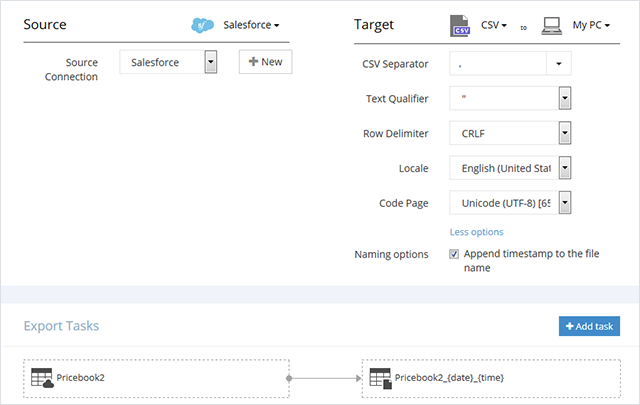
Screenshot of Export
Screenshot of Query
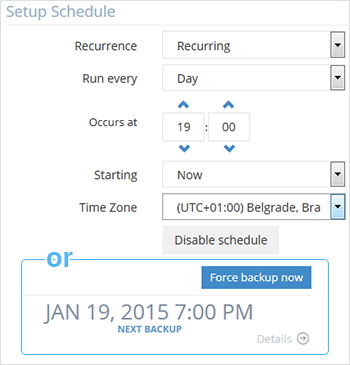
Screenshot of Backup Schedule
Screenshot of Integration

1 / 4

Screenshot of Export

Top Performing Features

  • Business rules and workflow

    Ability to define and manage business rules and workflows

    Category average: 8.2

  • Connect to traditional data sources

    Ability to connect to traditional data sources like relational databases, flat files, XML files and packaged applications

    Category average: 8.9

  • Simple transformations

    Simple data transformations are calculations, data type conversions, aggregations and search and replace operations

    Category average: 8.8

Areas for Improvement

  • Data model creation

    Ability to create and maintain data models using a graphical tool to define relationships between data

    Category average: 8.4

Who Buys & Uses Skyvia

Pros

  • Robust data integration and ETL, including real-time synchronization
  • Broad connectivity to diverse data sources and platforms
  • User-friendly query writing, viewing, and validation capabilities

Cons

  • Occasional slow performance and processing times for tasks
  • Confusing usability and navigation within the interface
  • Query editor limitations, such as lack of warnings for usage limits and streamlined field selection

Using Skyvia with HubSpot

Use Cases and Deployment Scope

We are using Skyvia to connect our Hubspot CRM system to our internal reporting systems by replicating the data into our Azure SQL server. The reporting in Hubspot did not meet our executives needs and could not report effectively on Line Items. By copying the data each day to SQL we can provide all information our business requires.

Pros

  • Simple Interface to build dataflows
  • Alerts are sent if issues incurred
  • Support is very good
  • Minimal maintenance

Cons

  • The accounts team requires Invoices to sent - only proforma invoices are available
  • It is not an issue with Skyvia, but with Hubspot it is not possible to download changed data only for the Line Item table. Therefore a full download is required and therefore limits me to updating the data just once a day

Return on Investment

  • Without Skyvia, we would not have been able to use HubSpot in the way we do which would have increased the workload on the HubSpot users and the Financial departments significantly.

Usability

Other Software Used

Azure Service Fabric, Microsoft Power BI, Notion

Great Value and Easy to Use

Use Cases and Deployment Scope

We were looking for a way to drive our own HubSpot analysis using PowerBI and wanted a data extract that was easy to manage and maintain. Skyvia was so easy to set up and get running that we immediately adopted it for that purpose. Being able to run the extraction from within the PowerBI or Qlik Cloud environment without any code was a huge saving for us. It has continued to provide results week after week, month after month with no maintenance.

Pros

  • Easy to view and validate the data we wanted
  • Simple to write queries that provided the data using ODATA
  • Rugged performance month after month

Cons

  • Sometimes a little confusing to navigate

Return on Investment

  • Sales Reporting was available on demand a big step forward for us
  • From testing to having a working data connection was hours not days
  • Setting and forgetting meant ongoing cost apart from the licensing

Usability

Great product for gaining access to data from 3rd party sources

Use Cases and Deployment Scope

It allows me to access data from a 3rd party source without learning how to program with APIs.

Pros

  • Connection to the data source
  • Listing of available tables
  • Preview and save queries

Cons

  • Selection of fields to be removed could be easier in the query editor
  • Live Chat support
  • Telephone contact

Return on Investment

  • Make it easy to retrieve data from remote data source via API calls
  • Easy integration with MS Excel
  • Reusable stored connections and queries

Usability

[...] Skyvia Usage

Use Cases and Deployment Scope

I replicate my Quickbooks data and my online order information using Skyvia. I'm able to customize my reporting, create a CRM, and marketing campaigns for online orders.

Pros

  • Scheduled data replication
  • Ease of setup
  • Multiple source application interfaces

Cons

  • A couple times I've had a query go awry and eat up my usage limits. Would be nice to be able to get a warning

Return on Investment

  • Helps tremendously with reporting and analysis. And now with integrated AI - I can conquer any data questions

Usability

Alternatives Considered

n8n

Other Software Used

Qbox, Microsoft Access, ChatGPT

Skyvia is great for SMEs

Use Cases and Deployment Scope

Replication of data from our Cin7 to google bigquery. It was difficult to find a solution that could do this automated and reliably. We use Skyvia to be able to pull data from Cin7 Core into bigquery data warehouse for analysis, follow up actions and also to reroute triggers back to Cin7.

Pros

  • ETL
  • Automation
  • Ease of Setup

Cons

  • Pricing Models
  • Sometimes can be slow
  • Handle exceptions better

Return on Investment

  • positive ROI
  • automation
  • ETL

Usability
