TrustRadius: an HG Insights company

IBM Turbonomic

Score8.6 out of 10

319 Reviews and Ratings

What is IBM Turbonomic?

IBM Turbonomic, now part of the Concert platform, is a performance and cost optimization platform for public, private, and hybrid clouds used by cloud, infrastructure operations, and architecture to assure application performance while eliminating inefficiencies by dynamically resourcing applications through automated actions.

Read more details.

Media

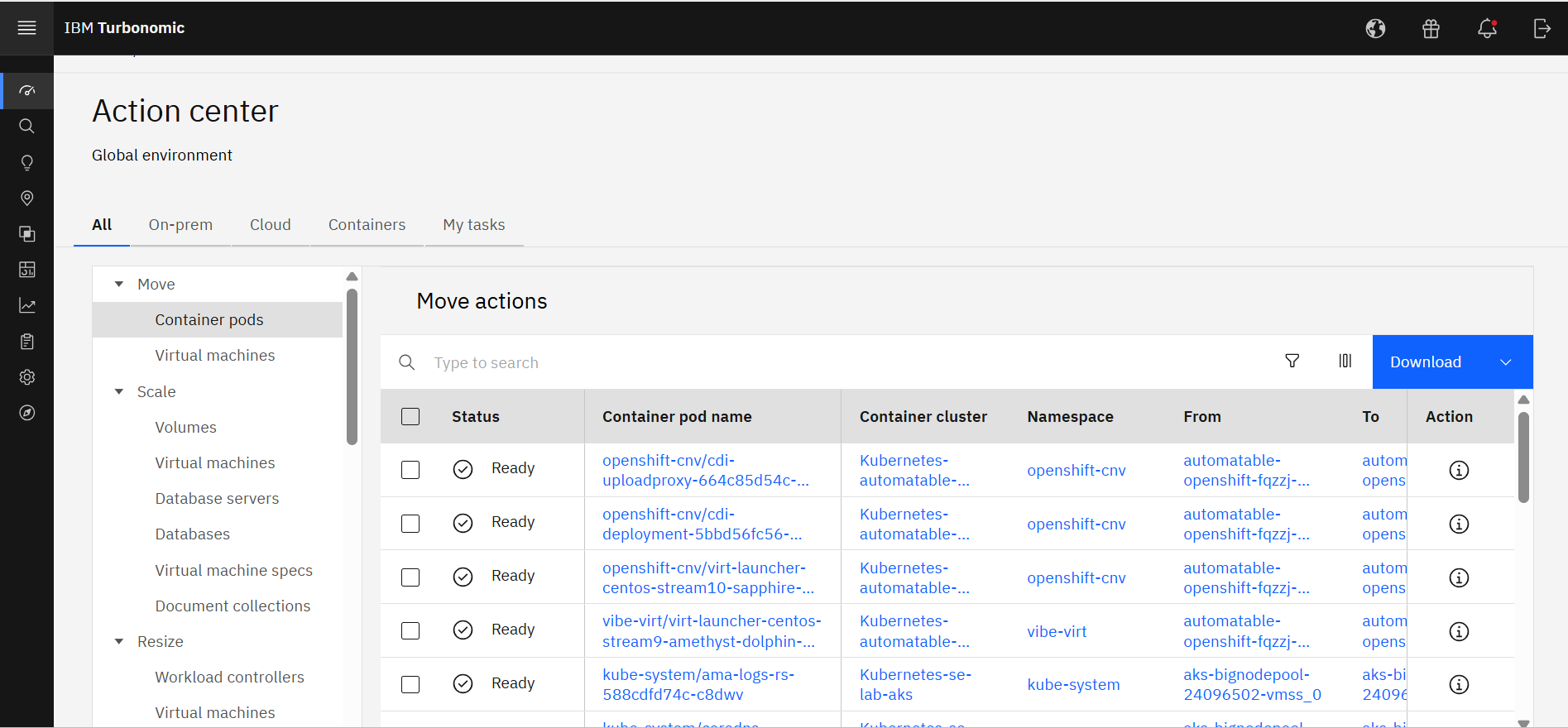
Screenshot of IBM Turbonomic Action Center, where it shows the list of optimization actions across the global environment—on-prem and cloud—that should be taken to minimize cost while assuring performance.
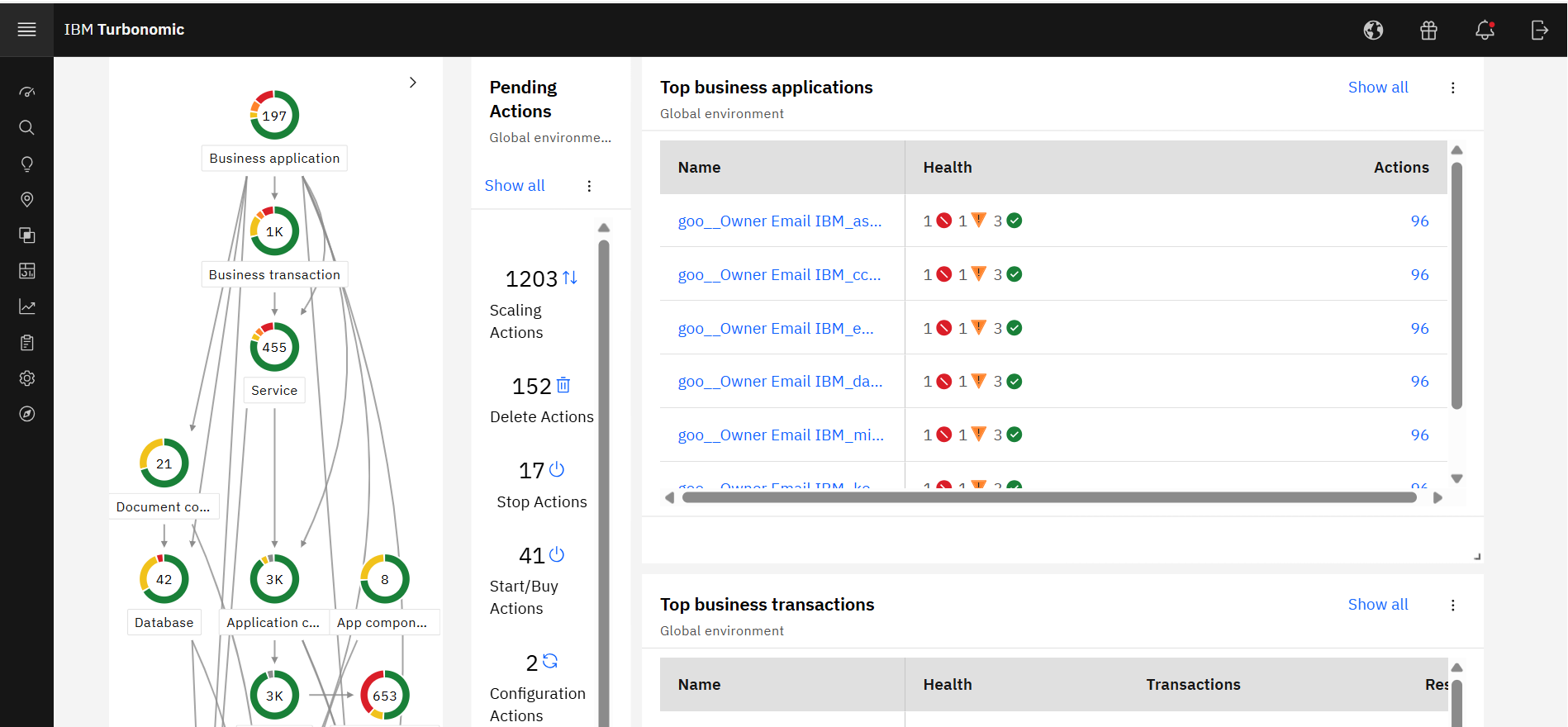
Screenshot of IBM Turbonomic Application, a view that shows the global environment across private and public infrastructure from the context of individual application components. Users can optimize one application at a time by viewing each app's pending actions. The Supply Chain at left shows all of the entities across applications and their interdependencies.
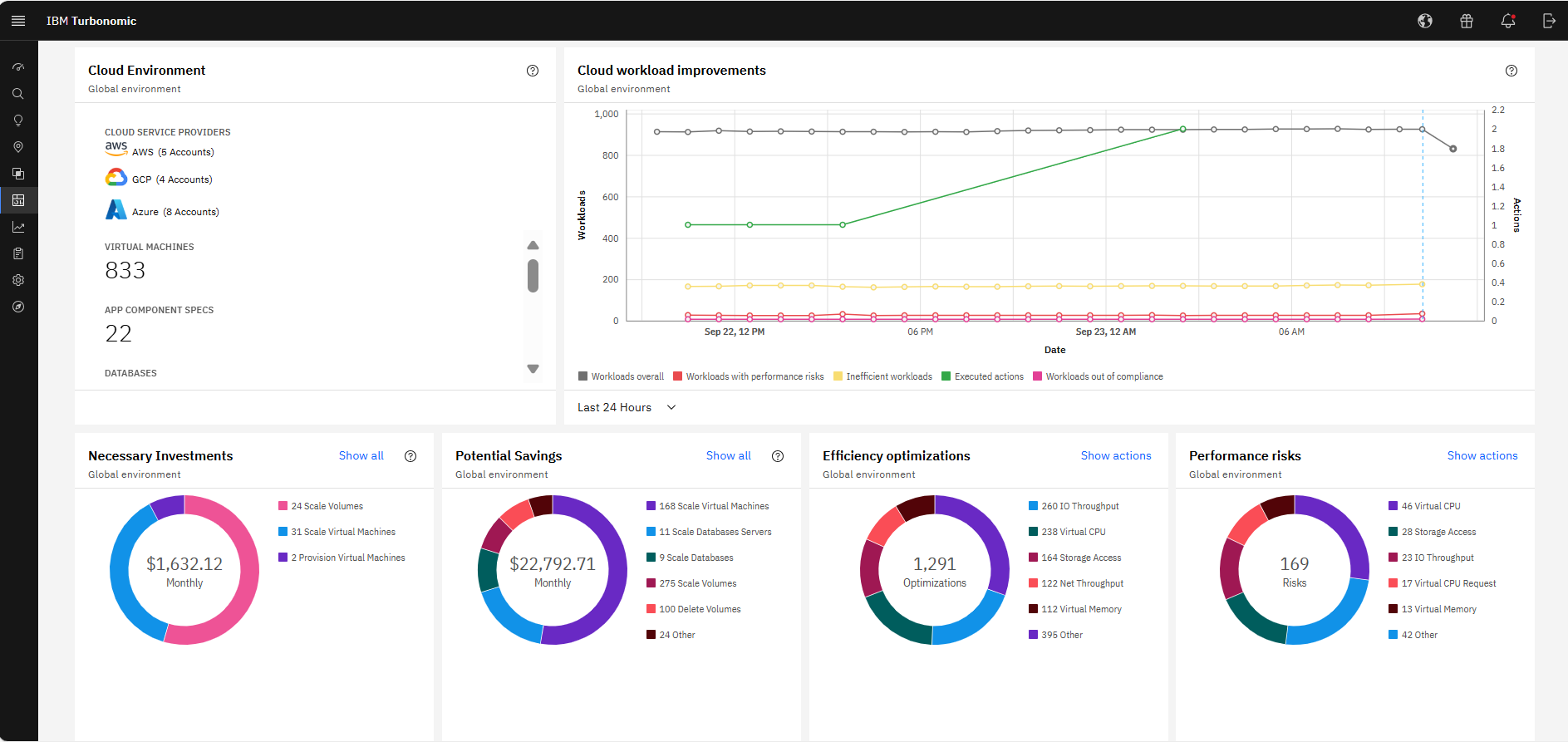
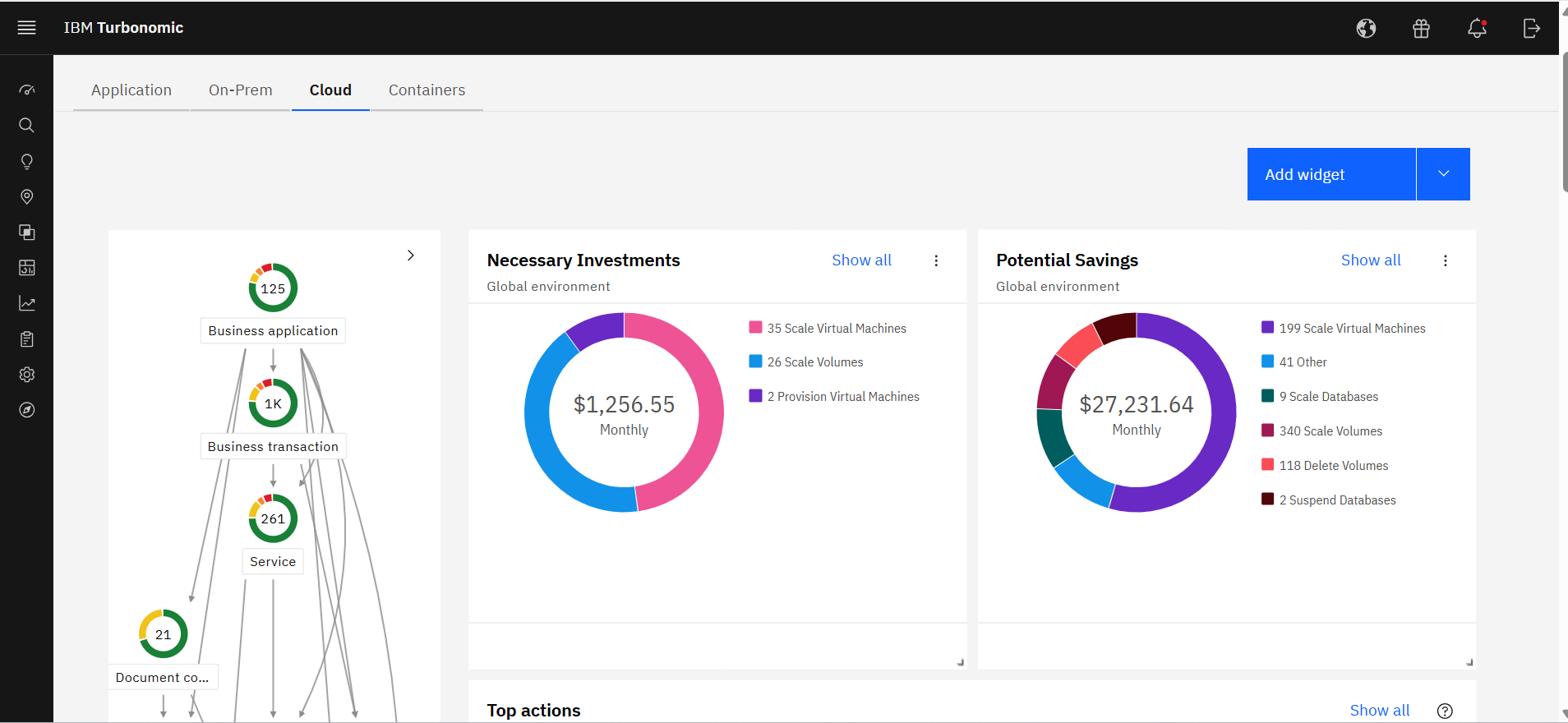
Screenshot of The IBM Turbonomic Cloud Executive Dashboard, an out of the box dashboard that allow users to rapidly communicate value to executives. This view shows the cloud cost savings opportunities realized and not yet realized over any time period.
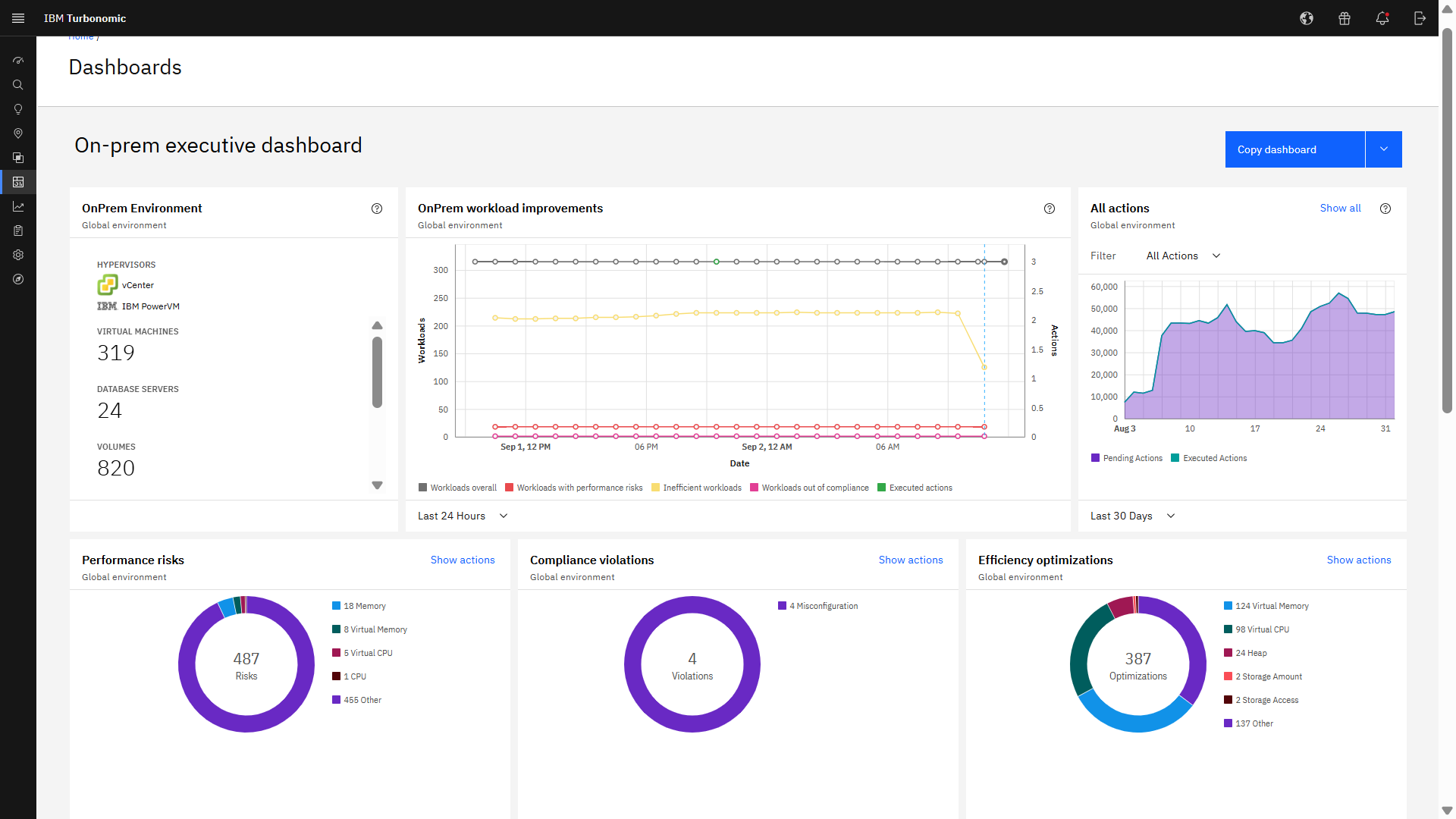
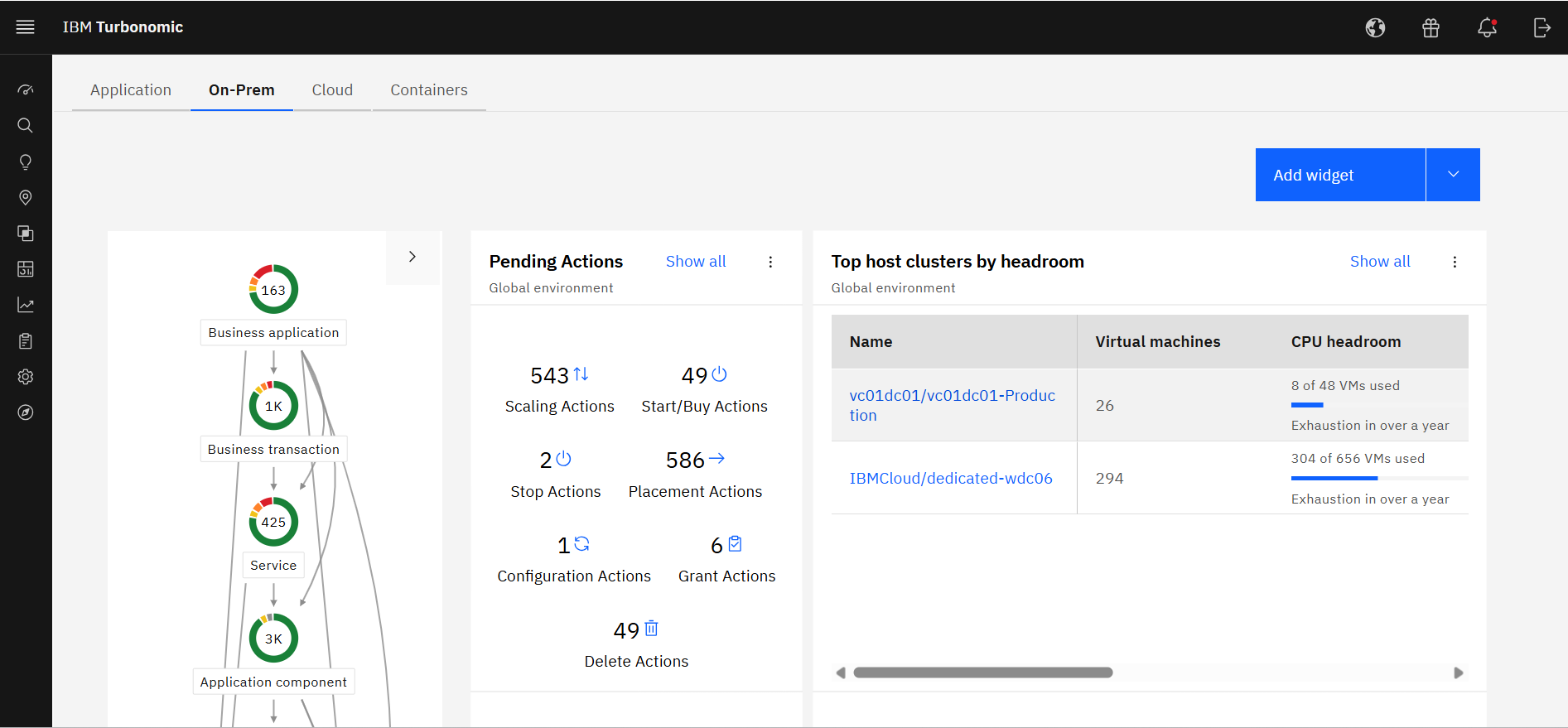
Screenshot of The IBM Turbonomic On-prem Executive Dashboard, an out of the box dashboard that allow users to rapidly communicate value to executives. This view shows the savings opportunities realized and not yet realized over any time period.
Screenshot of an IBM Turbonomic Cloud view, where the public cloud environment(s) and all of the pending actions required to bring them into an efficient, performant state. The Supply Chain at left shows all of the entities in the public cloud(s) and their interdependencies.
Screenshot of The IBM Turbonomic On-Prem view that shows the user's private data center environment(s) and all of the pending actions required to bring them into an efficient, performant state. The Supply Chain at left shows all of the entities in data center(s) and the interdependencies between them.
Screenshot of IBM Turbonomic Action Center displaying the Top Actions widget, which highlights the best actions delivering the highest value, top performance, and top savings.

1 / 7

Screenshot of IBM Turbonomic Action Center, where it shows the list of optimization actions across the global environment—on-prem and cloud—that should be taken to minimize cost while assuring performance.

Top Performing Features

  • Resource Management

    Ability to manage and deliver cloud resources such as resource discovery and tagging, asset and license management and cloud-to-cloud migration

    Category average: 9.2

  • Automation and Orchestration

    Provision of automated services for application migration, VM images, and configuration management

    Category average: 8.7

  • Cloud Management Performance Monitoring

    Monitoring of storage, network and application performance metrics to achieve business service levels

    Category average: 8.6

Areas for Improvement

  • Cloud Management Security

    Provision of various security capabilities such as Identity Access Management, encryption, and endpoint security

    Category average: 8.2

  • Governance and Compliance

    Risk assessment analysis, audits and resource governance capabilities

    Category average: 8.4

  • Systems Integration

    Integration of internal and external systems to support multi-cloud management

    Category average: 8

Who Buys & Uses IBM Turbonomic

Pros

  • Automating IT operations and resource allocation to reduce manual intervention.
  • Optimizing cloud resource consumption to reduce costs by identifying overprovisioned resources.
  • Dynamically adjusting compute, storage, and network resources for consistent application performance.

Cons

  • Complex initial configuration and setup, leading to a challenging "time-to-value."
  • User interface is perceived as dated or unintuitive for new users.
  • Limited integration and support for additional cloud providers (e.g., Oracle OCI).

IBM Turbonomic 2026

Use Cases and Deployment Scope

IBM Turbonomic is not a passive monitoring tool (that only sends alerts); it's an Application Resource Management (ARM) platform that makes real-time decisions. Supply Chain Mapping: Creates a complete topology from the end user and application to the physical hardware (chassis, storage, and network). AI-Driven Decisions: Uses algorithms to determine when to move a workload, when to resize a container, or when to shut down an unused physical server. Closed-Loop Automation: Can be configured to automatically perform actions (e.g., increasing a VM's RAM in the early morning) without human intervention, integrating with approval processes like ServiceNow.

IBM Turbonomic no es una herramienta de monitoreo pasivo (que solo lanza alertas); es una plataforma de Gestión de Recursos de Aplicaciones (ARM) que toma decisiones en tiempo real.Mapeo de la "Cadena de Suministro": Crea una topología completa desde el usuario final y la aplicación hasta el hardware físico (chasis, almacenamiento y red).Decisiones basadas en IA: Utiliza algoritmos para determinar cuándo mover una carga de trabajo, cuándo redimensionar un contenedor o cuándo apagar un servidor físico que no se necesita.Automatización de "Ciclo Cerrado": Se puede configurar para que ejecute las acciones automáticamente (por ejemplo, aumentar la RAM de una VM de madrugada) sin intervención humana, integrándose con procesos de aprobación como ServiceNow.

Pros

  • Managing "Elasticity" in Kubernetes
  • Storage Optimization
  • Arbitrage between Performance and Savings Plans
  • Gestión de la "Elasticidad" en Kubernetes
  • Optimización del Almacenamiento
  • Arbitraje entre Rendimiento y Planes de Ahorro

Cons

  • Complexity in Initial Configuration and "Time-to-Value"
  • Visibility and Management of "Non-Computing" Costs
  • The "Black Box" of AI Decisions
  • Complejidad en la Configuración Inicial y "Time-to-Value
  • Visibilidad y Gestión de Costos "No Relacionados con el Cómputo"
  • La "Caja Negra" de las Decisiones de IA

Return on Investment

  • Financial ROI: Direct Reduction of Expenses
  • Operational ROI: The Time Factor and Automation
  • Impact on Compliance and Agility
  • ROI Financiero: Reducción Directa del Gasto
  • ROI Operativo: El Factor Tiempo y Automatización
  • Impacto en Cumplimiento y Agilidad

Alternatives Considered

Tanzu Observability, VMware Tanzu CloudHealth and Splunk AppDynamics

Other Software Used

IBM Storage Protect, IBM Storage Insights, IBM Storage Scale

IBM Turbonomic Visibility, Optimization, and Operational Efficiency

Use Cases and Deployment Scope

Recently, the client used the IBM Turbonomic tool due to difficulties optimizing resource utilization, which led to incidents on critical operating days. To address this, they decided to implement IBM Turbonomic, as it allows them to automate decisions and improve process efficiency.

Recientemente, el cliente ha utilizado la herramienta IBM Turbonomic debido a la dificultad para optimizar el uso de sus recursos, lo que ha provocado incidentes en días operativos críticos. Para solucionar esta situación, decidió implementar IBM Turbonomic, ya que le permite automatizar decisiones y mejorar la eficiencia de sus procesos.

Pros

  • Automatic resource optimization
  • End-to-end visibility
  • Decision automation
  • Cost savings in the cloud and on-premise
  • Optimización automática de recursos
  • Visibilidad de extremo a extremo
  • Automatización de decisiones
  • Ahorro de costos en la nube y on-premise

Cons

  • Initial learning curve: Although it is a powerful tool, some users find the interface complex at first.
  • Customized reports: It could be improved in terms of flexibility to generate reports better tailored to specific needs, with easier data export.
  • Advanced integrations: While it connects with multiple platforms, in certain hybrid environments it lacks deeper or automated integrations that would further facilitate management.
  • Curva de aprendizaje inicial: Aunque es una herramienta potente, algunos usuarios encuentran compleja la interfaz al inicio.
  • Reportes personalizados: Podría mejorar en la flexibilidad para generar reportes más adaptados a necesidades específicas, con mayor facilidad en la exportación de datos.
  • Integraciones avanzadas: Si bien se conecta con múltiples plataformas, en ciertos entornos híbridos faltan integraciones más profundas o automatizadas que faciliten aún más la administración.

Return on Investment

  • Cost savings: Spending on cloud infrastructure was reduced by 20% thanks to automatic resource adjustment and the elimination of over-provisioning.
  • Improved availability: Incidents on critical days were reduced, achieving a 15% increase in the stability of key applications.
  • Operational efficiency: The time spent by the team on manual tasks of monitoring and adjusting resources was reduced by 30%.
  • Ahorro de costos: Se redujo el gasto en infraestructura en la nube en un 20% gracias al ajuste automático de recursos y la eliminación de sobredimensionamiento.
  • Disponibilidad mejorada: Se disminuyeron incidentes en días críticos, logrando un aumento del 15% en la estabilidad de aplicaciones clave.
  • Eficiencia operativa: Se redujo en un 30% el tiempo dedicado por el equipo a tareas manuales de monitoreo y ajuste de recursos.

Alternatives Considered

IBM SevOne and IBM Cloud Pak for AIOps

Other Software Used

IBM SevOne, IBM Cloud Pak for AIOps, IBM Instana

Turbonomics - One stop destination for Cloud Resource FinOps

Use Cases and Deployment Scope

I had been part of the team that had implemented the various scaling operations and parking oppurtunities provided by Turboonomics team. As part of the implementation, we had implemented start/stop and scale operations for resources hosted on Azure Cloud. Unattached disks deletion was also working as expected. Initial challenges with the tool were to handle the heavy load of operations at a singular time, but with new product fixes implemented and continuos support provided, we were able to overcome the challenges. The IBM tool is coperative and we have great SLA for the issue resolution.

Pros

  • Virtual Machine Parking
  • Unused VM Disk Deletion
  • Scaling of the various PaaS Databases.

Cons

  • VM PaaS database parking

Return on Investment

  • Overall Enterprise Infrasturcture Cost Reduction.

Honest review about IBM Turbonomic

Use Cases and Deployment Scope

I have used IBM Turbonomic to onboard other workloads on the Turbo platform and also in the setup of parking policy and rightsizing policy. The insights provided by IBM Turbonomic are good. But the UI should be more user and developer friendly. Faced scaling issues and anomalies while working on Azure parking policy that should be improved [if already improved, then well and good].

Pros

  • The feature of precedence in terms of the level of policy is quite helpful in terms of mapping workload to a certain policy.
  • Grouping of resources before using them in policy is also good for management.

Cons

  • The search box on the parking page is not working properly, and hence there was a lot of delay in searching the right policy.
  • The workloads that are coming in the view page of the policy were different from the workloads that appear on the edit policy page, hence raising ambiguity.

Return on Investment

  • Efficient resource utilisation by looking at the dashboard is a good feature to know what can we optimisied
  • One click optimisation from action center is a convenient feature

Alternatives Considered

IBM Cloudability

Learning curve but excellent for historical data integration and automation.

Use Cases and Deployment Scope

I use Turbonomic to optimize the cloud environment across GCP. As a large public system, we faced the challenge of maintaining performance across a distributed infrastructure while keeping spending under control. Effective resource control is very important to us. Turbonomic helps us maintain consistent performance across a mix of use cases without requiring constant manual intervention.

Pros

  • Makes resource decisions obvious without requiring deep manual analysis.
  • Once data is properly ingested, the reporting gives meaningful baselines over time.
  • Automates decisions that would otherwise require constant human intervention. This freed up IT staff to assist elsewhere.

Cons

  • The UI really takes time to understand. Not very intuitive.
  • Report customization is very limited.
  • Documentation is limited, which slowed adaptation and effective use for us.

Return on Investment

  • On the performance side, having continuous monitoring across our cloud environment means workload disruptions are caught faster.
  • The historical data migration work we undertook was initially a bit painful....but it has paid off in the quality of reporting we can now produce.
  • Busy-season workload was way smoother; we estimated a 20-30-hour reduction in tickets across the department, resulting in overall work hours.

Alternatives Considered

Splunk AppDynamics and Azure Managed Applications

Other Software Used

Snowflake, Slack, Google Analytics, Amazon CloudWatch