
TrustRadius: an HG Insights company

Workday Adaptive Planning

Score8 out of 10

384 Reviews and Ratings

What is Workday Adaptive Planning?

Workday Adaptive Planning streamlines planning workflows, using AI and real-time data integration to improve collaboration and provide predictive forecasts for better strategic analysis.

Read more details.

Media

Screenshot of Workday Adaptive Planning AI Predictive Forecaster
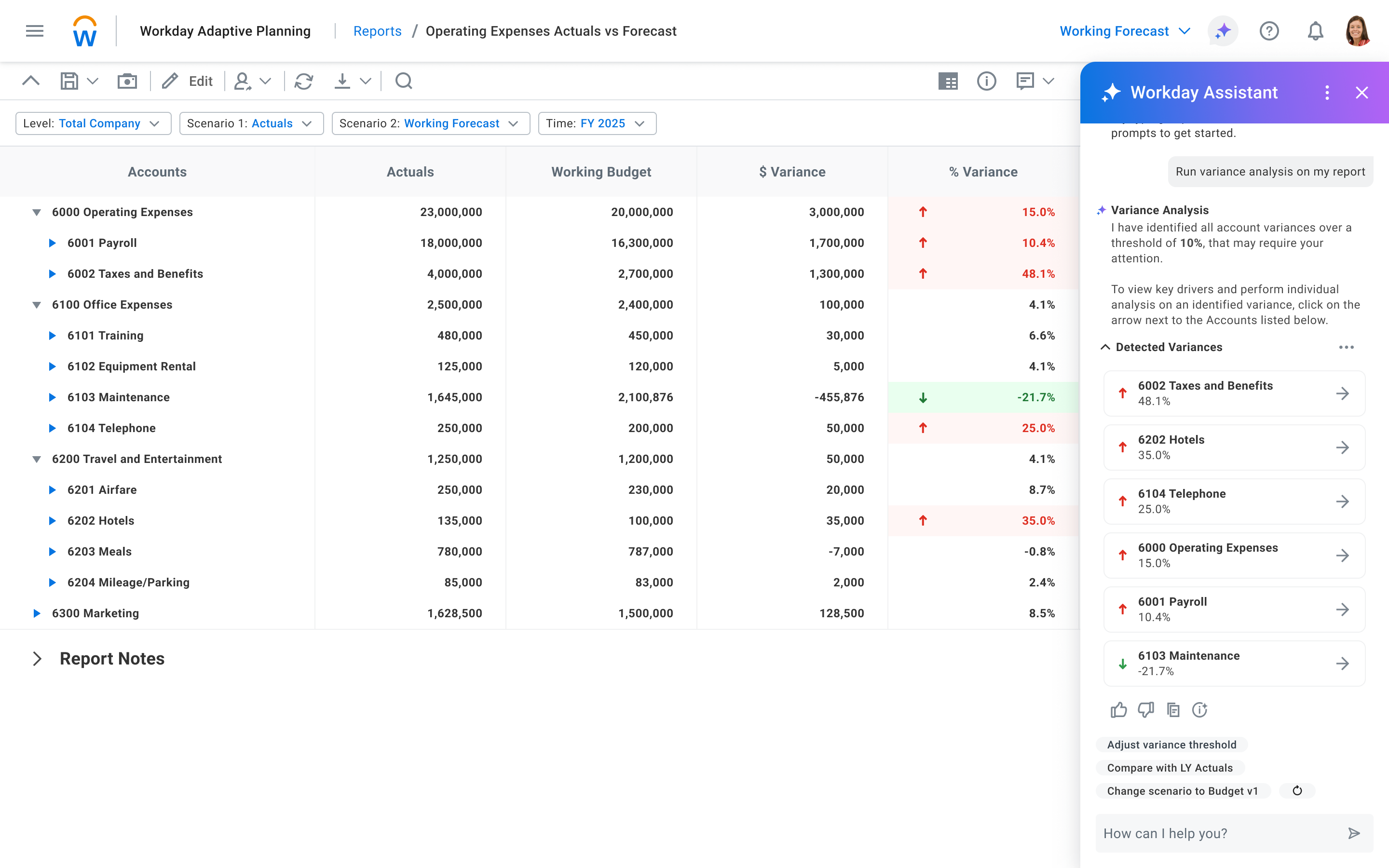
Screenshot of Workday Adaptive Planning AI Assistant
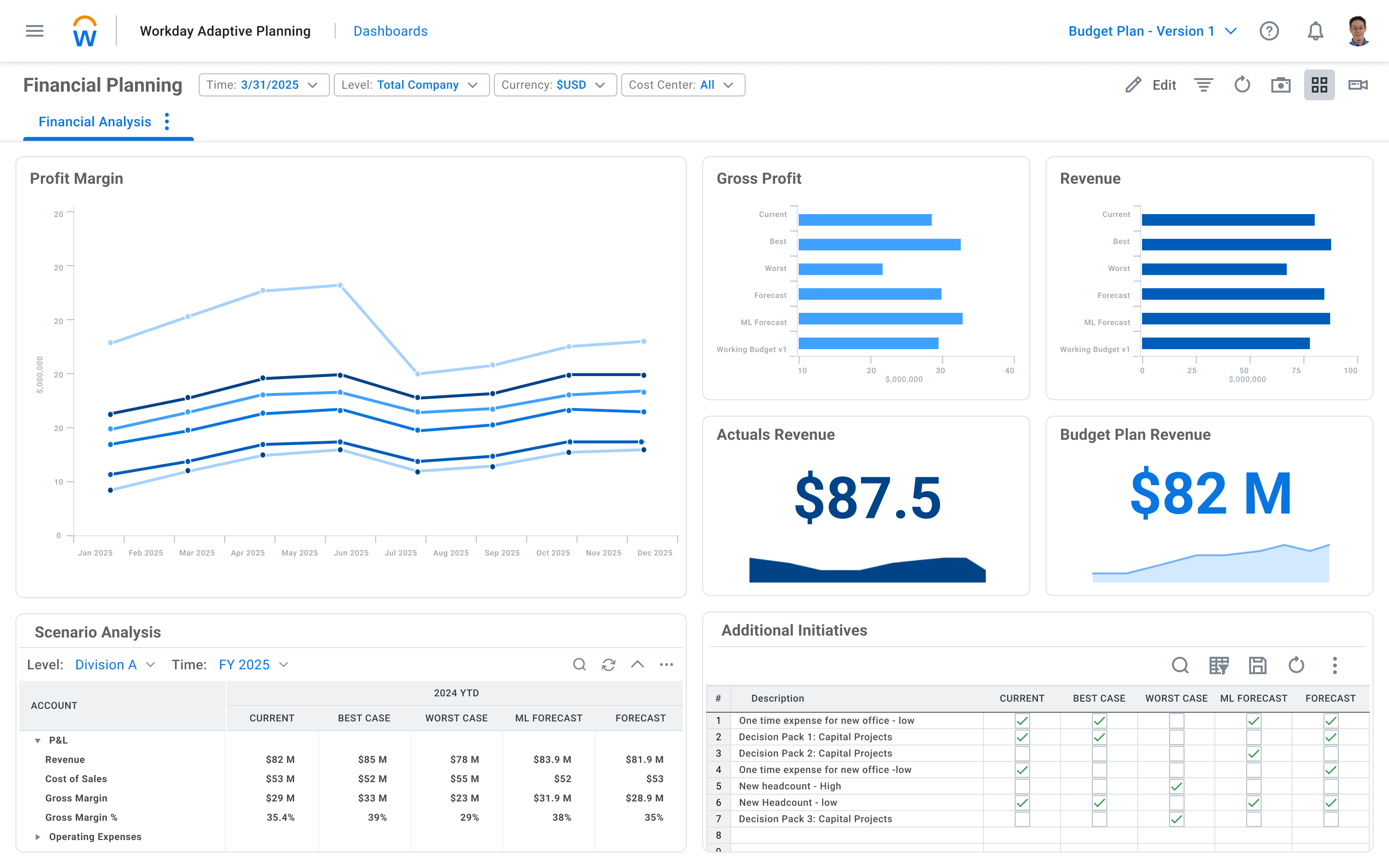
Screenshot of Workday Adaptive Planning Dashboard
Screenshot of Workday Adaptive Planning Financial Planning Dashboard
Screenshot of Workday Adaptive Planning Financial Variance Analysis
Screenshot of Workday Adaptive Planning Process and Workflow Management

1 / 6

Screenshot of Workday Adaptive Planning AI Predictive Forecaster

Top Performing Features

  • Pixel Perfect reports

    Pixel Perfect reports are highly-formatted reports with graphics and ability to preview the report before printing.

    Category average: 7.5

  • Color-coded scorecards

    Track and analyze performances with interactive, color-coded balanced scorecards.

    Category average: 8.1

  • Report-Level Access Control

    Report-level access control means that the type of report determines who has access to it.

    Category average: 8.7

Areas for Improvement

  • XBRL support for regulatory filing

    Support for the XBRL standard reporting format for exchanging financial data.

    Category average: 7.2

  • Intercompany Eliminations

    Matching and elimination of intercompany revenue, expenses, and balance sheet accounts.

    Category average: 7.9

  • Direct links to 3rd-party data sources

    Integration with external applications like ERP, CRM, HCM

    Category average: 7.7

Who Buys & Uses Workday Adaptive Planning

Pros

  • Robust financial modeling and reporting capabilities
  • Efficient data management and integration with other systems
  • Facilitates collaborative planning and simultaneous updates

Cons

  • Limitations and usability issues with reporting and dashboarding features
  • User interface is not consistently intuitive or easy to navigate
  • Performance challenges when processing large datasets

Workday Adaptive Planning at Browne Jacobson

Use Cases and Deployment Scope

It's primarily used by the Commercial Finance team for budgeting and forecasting of the P&L and cashflow, and by HR business partners for Workforce Planning. It replaced a manual, spreadsheet-based planning environment that consumed a great deal time and was overly complex and cumbersome to maintain.

Prior to using Workday Adaptive Planning, the team was managing multiple linked Excel models leaving them with the constant challenge of version control and exposed to potential inaccuracies. This, plus the sheer amount of time my team were spending on budgeting and reporting drove the need for a better solution.

Pros

  • One single source of truth on data shared across the entire team, rather than information shared across many localised files
  • Provides a consistent approach on planning, including workflows and centrally held assumptions, ensuring all planning is managed in line with central policy
  • Easy to build dashboards and reports that are professional and visually appealing
  • The structural design of the system makes it effectively a sandbox environment to build whatever solutions you need to fit your particular business
  • Ultimately, does what the sales team promise at the outset, which is not always common.

Cons

  • Configuring integrations in the system is complex and often requires outside advice from implementation consultants. This area of the system could be improved to make it more intuitive to the user
  • While dashboards are simple to build and effective, they could do with more visualisation options to improve reporting capabilities
  • Having templated solutions for certain use cases would be really good to see. For example, if I wanted to build a simple 13 week cashflow, having something out of the box as a starting point that I could build on rather than designing it from scratch would be a huge benefit

Return on Investment

  • Reduced annual budget timeline from 3 months down to 1 month
  • Reduced quarterly forecast process from 6 weeks to 2 weeks
  • Reduced month end close from WD9 to WD7
  • We went from having just 6 weeks of value-add time available (any week where we weren't involved in a budget, forecast or month end) to 24 weeks of value-add time. That's 18 weeks of additional time each for 5 business partners.

Usability

Alternatives Considered

Vena and OneStream

Workforce planning with Workday Adaptive Planning.

Use Cases and Deployment Scope

It helps us bridge the gap in headcount planning between HR and Finance. When a manager requests a new hire, it can pull the total true-up cost for the loaded salary, including benefits and taxes. It makes what-if scenarios easier to calculate, instead of relying on compiling multiple Excel spreadsheets.

Pros

  • What is scenario.
  • Automate data collection.
  • Budget planning.
  • Update numbers across HR, Finance and Sales.

Cons

  • Complex Initial configuration setup.
  • Restrictive built-in reports.
  • GUI not as intuitive for HR.
  • Big learning curve.

Return on Investment

  • Shorten planning cycle.
  • Reduce significant data consolidation.
  • Improve data accuracy on forecast and reporting.
  • Accelerate data development decision.

Usability

Alternatives Considered

Oracle APEX

Other Software Used

Workday Human Capital Management

Best in budgeting forecasting reporting and in Finance planning.

Use Cases and Deployment Scope

We are using Workday Adaptive Planning for Budgeting, Reporting, Forecasting, and Financial planning. It has helped us solve and manage financial-related matters very well in an organized manner. Mainly, we have implemented this to address budgeting issues and future planning within our organization, enabling us to focus on various financial aspects.

Pros

  • Employees or users can update plans simultaneously.
  • We can easily integrate with salesforce and other applications.
  • Workflows are useful to build the automations.

Cons

  • If there is heavy data it will take much time to load.
  • Reporting feature have to improve.
  • Technical support is always needed for any issues related to application performance or breakdown.

Return on Investment

  • Budget planned very easily.
  • Reporting also became simple.
  • Forecasting become simple with this application.

Usability

Alternatives Considered

ADP Next Gen HCM

Other Software Used

Qlik Analytics Platform, Salesforce CRM Analytics, Salesforce Service Cloud

Workday Review

Use Cases and Deployment Scope

We use Workday Adaptive Planning to do headcount planning at a very granular level. We do headcount planning at a team level. We also do planning for headcount at various international entities at a local currency level. Further we are also able to track our contractor workforce within Adaptive Planning and adjust for any changes to our original Plan.

Pros

  • Headcount Planning
  • International Entities
  • Local Currency Planning
  • Contractors

Cons

  • Somewhat cumbersome to use
  • Not user friendly
  • Hard to navigate and find things

Return on Investment

  • Reduction in manual processes
  • Faster turnarounds
  • Ability to run scenarios

Usability

Alternatives Considered

Planful, Paylocity and BambooHR®

Other Software Used

Sage Intacct, AWS CloudTrail, Anthropic Claude

A great planning platform for all size of companies.

Use Cases and Deployment Scope

We use it for financial and operations planning. We use it to understand the overall expense across the departments, revenue, margin, etc. We use the software as its no-code application with minimal manual intervention required to generate reports.

Pros

  • generation financial reports
  • clearly defined data points and numbers
  • simultaneous report collaboration.

Cons

  • training on how to generate the reports to new users.

Return on Investment

  • time saving
  • centralised visibility
  • better decision making.

Usability

Other Software Used

Salesforce Sales Cloud, HubSpot Sales Hub, Dropbox DocSend