Filter Ratings and Reviews
Filter 255 vetted Workday Adaptive Planning reviews and ratings
Reviews (1-25 of 179)
Companies can't remove reviews or game the system. Here's why.
April 01, 2021
We use Workday Adaptive Planning to create a detailed financial plan for our entire company. The userbase includes Sales, Operations, Finance, and HR. In addition to using Adaptive to develop a bottoms-up financial plan, starting with sales volume/revenue, detailed labor planning, cost of goods sold modeling, we use Adaptive to pull financial results from our ERP system (SAP) and report on Plan vs Actual performance.
- Version Management. Adaptive lets us manage many versions/scenarios all in one platform with the robust ability to compare them to each other.
- Processing Performance. With the Elastic Hypercube technology that was implemented a few years back, we can watch changes flow through a complex web of formulas and arrive at an answer within seconds.
- Audit Trail. Our administrators love the ability to see and report on who made what changes when, which leads to real accountability within the organization.
- Variable Time Roll-ups. Different entities within our company look at "years" differently, but we're only able to specify one global time roll-up for aggregating data quickly, which can lead to some confusion.
- Administrative UI. Management of Access Rules and ordering sheets from an administrative point of view can be a bit tedious and have received less attention than other features recently.
- List Sheet Reporting. Any sheet that is a variable list of things (like People, Capital Projects, Marketing Programs) is somewhat constrained in how it can be reported on. Adaptive provides two kinds of reports but both leave something to be desired when reporting on this kind of data.
March 24, 2021
We use it across the company for budgets/forecasts. The department owner is responsible for entering their own budgets, aside from personnel, into the model. It replaced a system that did not work.
- New hires.
- Personnel planning.
- Detailed expense planning.
- Integrated balance sheet, income statement and cashflow.
- Allocation functionality is cumbersome since every time you want to make a change you have to recreate the allocation (i.e. if you need to add or delete a dept in the allocation).
- Whenever we go into a saved locked version, instead of being at the top level, the system opens the next time at the dept level, even if you have never opened any sheets at that dept.
October 29, 2020
Columbia Helicopters utilizes Workday Adaptive Planning in all budgeting, forecasting, reporting, dashboarding, and financial analysis processes. We conduct monthly cost center reviews [and] quarterly reforecasts with department heads responsible for entering all changes. [The] system is easy to use and organization-wide adoption has been really smooth. Quarterly software updates have kept the software running while introducing new features both visual and technical.
- Report creation and sharing is easy and quick.
- Planning with multiple different dimensions, attributes and timeframes can be set up and compared seamlessly.
- Automated actuals import is well developed and allows for more analytical work and not data input.
- It is not a true BI solution.
- Workflow feature needs improvement.
We use [Workday] Adaptive Planning for our yearly budget process and our monthly forecasting process. It allows our team great flexibility with both of these processes and has moved us out of the age of Excel and into a online Platform that helps eliminate data entry or formula errors. Not only can we report/forecast on GL balances we also have many custom accounts we do this process for as well. The ability to load detailed historical data is a great feature of this product as well.
- Quick ability to update formulas and see the updated outcomes
- Very nice to have ability to have multiple versions and compare them against each other
- Love Office Connect, total game changer for Excel users
- Need the ability to move items within Dashboards from tabs or even other Dashboards
- More graphing abilities within Dashboard
- Enhance Matrix Reporting
March 29, 2021

Workday Adaptive Planning is mostly used by our finance team. However we expanded it to accounting, the data BI team, investor relations, and budget owners. Finance uses it for its typical duties: balance sheet and income statement forecast, OPEX variances, headcount and req tracking, close and board meeting dashboards etc. Accounting uses it to view financial statements on the fly from different angles (by function, by location, department, etc.). The BI team pulls data to create advanced dashboards on their end. Budget owners can view their vendor forecast and spend, view their headcount, reqs, etc.
- Ease of administration (one or two people can handle it versus a whole team plus IT)
- Keep adding really cool features every quarter
- Integration with Workday HCM
- Integration and customization with ERPs, data warehouses, CRMs
- Great customer support--very knowledgeable, efficient, friendly, and fast
- Approachable staff--you can reach out easily to PMs and provide and get feedback
- Office Connect became dynamic (updates of structure, drills, grouping, exclusions, etc.)
- Data mapping feature to overlay or fix mappings from feeding sources
- Small bugs after new releases (but always solved very fast)
- Could use some enhancement on UI side (but they have great improvements on the roadmap)
- Copy to or from sandbox is done via request to support; it would be great to have an automated, on-demand way by admins
March 25, 2021

We use Adaptive as our main reporting tool to create reports for senior management and the board of directors (Finance). Our budgeting tool to create the annual budget. Last year, we rolled out user licenses and budget managers were able to sign in to enter their own budgets and review reports (whole organization). Used for our quarterly and ongoing forecast updates, scenario analysis, GM analysis, and any ad-hoc reporting (finance).
- Reports: Makes beautiful, reliable, and easy to run and customize reports in Office Connect.
- Ability to run multiple complex scenarios and then easily produce reports comparing those scenarios.
- Salary and headcount forecasting.
- Foreign exchange: Works ok for the income statement, but the balance sheet has been a huge challenge and still has many issues.
- Usability for end-users: Input sections are not clear and the only way to see roll-up is by running a report in a separate section.
Adaptive Planning is used by FP&A for financial planning for the whole organization. It addresses the core business problem of having a single point of truth for financial and operational plans. It is dynamic and enables scalability as you refine the model to include more drivers. The real value comes from linking connecting models so a change in one part of the business automatically updates financial projections for a different function (i.e. hiring impacts tech costs).
- Forecasting
- Version control
- Ease of use
- API
- Transactional models (i.e. performance limitations with mass data forecast models +1MM rows).
- Management reporting allocations.
November 05, 2020

The Adaptive Planning tool is been used by FP&A department & sales - FP&A use it for budgeting and forecasting purpose - Sales use to for QAM purpose.
It addresses mostly all the problems related to Headcount & other spend - like capacity planning, Allocations, productivity, retention, etc.
- Versioning/scenario analysis - It is so easy to run scenario analysis and compare live the changes - And one can preserve the data for different scenarios and can compare any number of version against each other in minutes.
- Formulae creation is so easy - everyone can work on Adaptive as it's more or less Excel - creating new accounts and writing formulas has never been this easy.
- Very user friendly - It's very straightforward.
- Actuals - if the company restate the actuals - and if that version is overly in the locked version - it changes the locked version id we updated the new actuals - It would be great if there is some way to preserve the forecast version without creating a new actual version.
- The audit trail for the forecast changes - if that can be added it will be great.
- Personnel sheet filters - it's very time consuming that we have to make the change and save it every time- before when we use the filter we use to get to that row/cell and still could see full sheet & were able to save after doing bunch of changes but this new way makes it mandatory to save after every change, very time consuming.
Adaptive Insights is currently used in our finance department to help plan, budget, and forecast for our company. Ultimately, it helps us as we work with the business leaders to track expenses as they come in. We review expenses each month and compare our budgeted numbers to actual numbers with our business leaders to identify the reasons behind any variances.
- It is much nicer than having Excel because you don't have to worry nearly as much about breaking formulas.
- It enables analysts and business partners to plan together by both having access to the same numbers in the same software thus reducing confusion and helping to keep everyone on the same page.
- It helps a lot with reporting and doing analyses on budgets vs. actuals.
- I wish that there were a way to select multiple levels when viewing sheets instead of having to build a report.
- It would be nice if there were slightly more access controls so that different analysts could see the headcount for their groups without giving them access to the entire company's headcount data.
September 24, 2020

We use Workday Adaptive Planning for budget and forecast planning, reporting (utilizing both web and office connect excel reports), and analytics. The system is primarily used by finance now, until we role it out to other departments in our business; which we’ve already begun to do. With Workday Adaptive Planning we are able to compile large amounts of data from the bottoms up but also have the flexibility of modeling at a high level. The system is versatile and can be used for not only financials, but headcount, and performance data as well.
- Creation of Versions.
- Reporting and Dashboarding.
- Model Flexibility.
- Web reports within Dashboard would be great.
- Version to Version referencing within model formulas.
- Calculations within reports that allow you to add data across different versions.
November 14, 2019
Phase 1 of our project included our Administrative team and C-Suite only. Adaptive has helped with 'real time' collaboration efforts among our team using Process Tracker for Task Assignments and a communication medium, as well as Workflow for protecting data integrity during the planning process. It helped streamline and gain efficiencies in planning, 'what if' scenarios, and reporting; it's also reduced the inevitable, unintentional Excel workbook errors.
- The design of the planning sheets, flexible functioning of the assumptions/drivers, and familiar formula creation has great user appeal since it simulates the similarities with the Excel worksheet interface, so buy-in/ownership from a Finance group perspective is easily overcome even for those that have a bit of 'change-phobia'.
- The Finance group REALLY can run this CPM product. No IT support needed which is critical from a resource standpoint.
- User collaboration is made simple and easy with the Process Tracker functionality and further supported by offering users the ability to enter cell notes on planning items, sheet notes, line notes in analysis reporting, share reports via email, snapshot reports, and attach documents related to quotes for the planning process - just to name a few little hidden gems that serve us well in the planning process resulting in greater efficiencies.
- The Adaptive Learning Center provides a wealth of information for users in a how-to-do well-guided format with both written and video learning mediums. In addition, the involvement in the Torchbearers Community provides a community chat portal to pose questions and gain additional information on best practices from other Adaptive users of varying levels of expertise.
- Being rather new to the Adaptive product and our laser focus on capitalizing on the advantages we were severely lacking in our former budgeting tool, I don't have any solid examples of areas or room for improvement yet. As we continue to gain familiarity and begin our implementation of Phase 2 with our Program areas, I will be able to assess more in-depth whether Adaptive meets our needs fully as more individuals with varying capacities and capabilities will be involved in our Phase 2 roll out, so feedback will be plentiful.
October 30, 2019
Our company uses the Adaptive Planning module. Although some of our sales managers and human resources are occasional users, it is mainly used by our Financial Planning and Analysis department. Our financials are in SAP and our company does not have an adequate reporting tool to get useful information from SAP. We use Adaptive to download and populate our profit and cost center structure into Adaptive Planning. We also build our annual budget and forecasts using Adaptive Planning. Perhaps the most used function is the reporting, where we compare actual performance to budget across hundreds of cost centers each month. Using the product we are able to streamline our reporting process and do the work of an army of analysts with just two people.
- Adaptive Planning is very good at letting you create reports on the fly. We constantly create, modify and run reports to help analyze and find solutions.
- Although it took a while to setup, the Adaptive Connector makes it super easy to load all of the detailed financial information from SAP into our reporting system.
- Managing multiple versions of our budget and forecasts is quite easy with Adaptive Planning.
- We have had some customer service issues in the past but have worked through them with the Adaptive team.
- The compatibility with javascript has been an issue in the past and has caused some lost productivity, but I think this issue has been resolved with the latest release.
We use Adaptive Insights, a Workday company as our budgeting - forecasting and financial reporting tool. Our financial analyst is the primary users of the system - they meet with department heads and enter any budgeting or forecasting information into the system. We use Adaptive Insights, a Workday company across the whole organization. We also use Adaptive Insights, a Workday company, as our financial reporting system. We export our financial results from our financial accounting system into Adaptive Insights, a Workday company, and use it to provide consolidated financial reporting.
- Budgeting
- Forecasting
- Reporting
- Changing the formatting
December 30, 2019
We are working towards Adaptive Insights being the single source of truth for Financial Reporting within the Comcast Technology Solutions by combining Business Data to drive forecasting. We were the first group within Comcast to implement Adaptive. There are other instances that are currently being launched as well.
Right now it is primarily the FP&A team that makes changes, and for revenue, for we have business operations partners that input their customer revenue forecast.
We previously were using Essbase to do all of our planning, but the CTS group operates quite differently compared to the rest of Comcast. Imagine operating a startup inside a cable box. Adaptive gives us the flexibility to make detailed changes to our business units and accounts quickly and have immediate reporting results. As opposed to keeping track of detailed Essbase strings, making changes and then waiting every two hours to make sure they were made correctly.
Right now it is primarily the FP&A team that makes changes, and for revenue, for we have business operations partners that input their customer revenue forecast.
We previously were using Essbase to do all of our planning, but the CTS group operates quite differently compared to the rest of Comcast. Imagine operating a startup inside a cable box. Adaptive gives us the flexibility to make detailed changes to our business units and accounts quickly and have immediate reporting results. As opposed to keeping track of detailed Essbase strings, making changes and then waiting every two hours to make sure they were made correctly.
- Live Reporting - The ability to constantly see your change impacts, using the Audit Trail to identify the users making the change, and transaction details for actual significantly freed up valuable bandwidth to spend more time on forecast accuracy.
- Flexibility to change Business Structure and have those changes flow through historically without any effort. Used to have various Xref files everywhere.
- Corporate Consolidation - Being able to have multiple Organizations roll up into a group that is not managed by us. We still need to use export into Essbase for our HQ partners until Adaptive can fully integrate the two seamlessly.
- Web Reporting can be inflexible at times, especially when it comes to notes. Office Connect helps to fill that gap, but we would rather use web reporting when we can.
November 14, 2019
Adaptive Insights is used company-wide at Goodwill of Central & Southern Indiana. We import and distribute actual figures related to our company's profit & loss statement and balance sheet. In addition, we complete two annual budget planning cycles in the system.
Adaptive Insights has allowed us to complete more accurate and timely forecasts, consolidate our company's financials, and plan dynamically.
- Adaptive Insights provides excellent customer service. If a user has a question about the product, the employees at Adaptive are quick to respond and are very helpful.
- The team at Adaptive Insights listens to their customers and are always working to improve the software.
- N/A
Adaptive Insights is used globally within Finance and within each department. Adaptive Insights addressed the issue of efficiency, user error, real-time data, and the ability to stop being so reliant on Excel spreadsheets.
- Adaptive is a cloud-based system that allows our users to interact with Finance from anywhere in the world.
- Office Connect is a great add-on to Excel that allows us to set-up reports and refresh them in an instant for more detailed information needed throughout the company.
- The report section is great but it doesn't quite give you the flexibility that Office Connect (Excel Add-On) does.
- Online training
- in-person training
Yes - I would say for the most part the upgrade of my model went okay. The issue I had was that the implementer was not consistent and didn't test changes before he told me they were done. Testing the logic, once you've made changes in the model goes along way to ensuring validation.
We use Adaptive for our financial reporting. One of our many challenges is our multicurrency reporting as we have a presence in both the UK and APAC.
- Version Control.
- Ad-hoc Matrix Reporting.
- Management of Custom Elements/Dimensions.
- OfficeConnect does not function like Excel in all aspects. Can be a little buggy.
- I would like to customize the view of the Levels and dimension field to show when the new attribute was added. Basically an audit trail.
November 18, 2019

We are only using the product in our Accounting and Finance department. Mainly, Adaptive Insights has enabled us to perform a plethora of tasks, ranging from month-end reporting, break-even analysis, ad-hoc requests, and as a data warehouse to store multiple systems worth of necessary data that helps with business decisions. We have not fully used every aspect of the system, however, we are driving towards that now. I have only been using the system for the last 4 months and all I can say is, the features, the cleanliness and the organization of Adaptive Insights has given, not only myself, but our overall team a very useful, business tool.
- The customer support services have been very quick and useful to all my pertinent questions relating to the development and issues associated with the sheets, formulas and any other question I may have.
- Many of the instructional guides and examples enabled me to ramp up quickly, learning the system. This not only benefited myself, but the team as a whole.
- The Torchbearer Community has been a wonderful resource. I have been able to explore similar questions other analysts have had, that I had, and examine how they resolved nuances or issues with their associated questions.
- It would be beneficial to me, as a user, if there was a library of documentation for every type of feature. This could be something regarding formula building, understanding how attributes work, with examples, or a location for basic and advance documentation on Sheet/Model/Cubes.
- I would like to have the ability to directly assign some dimensions to accounts easier. A drag and drop feature for that would be interesting. This has been a challenge for me when new dimensions are built and I am unable to assign them to new accounts.
- I would also like to see some more formulas or an easier way to do some basic tasks. For example a simple YTD function instead of running a simple, yet long string of texts for the formulas. Or the option for selecting YTD features, removing the need of the formula all together.
January 31, 2020

We use Adaptive Insights for all of our reporting, budgeting, forecasting, and KPI needs. Currently, all of our Operations leaders, CFO, COO, Finance, Accounting, and some of our department heads are users of this tool. Adaptive Insights has allowed us to scale the business efficiently as well as distribute results in a timely and accurate manner. We've also been able to improve our accountability and drive towards our desired results.
- Implementation through the 3rd party was quick, efficient, and cost-effective.
- It's a very flexible tool and is very easily customized for our evolving needs.
- An ability to customize standard sheet views such as fonts/size.
- Promote and push the training before and during implementation.
January 21, 2020

We currently use Adaptive Insights in the finance department, utilizing its capabilities for financial forecasting. We use it for a full P&L, balance sheet and cash flow solution, and use it for all financial reporting when it comes to forecasted numbers. It makes our department much more malleable and quicker, able to turn data around in hours as opposed to the days it might have taken in the past.
- Full solution to replace Excel in your planning instance.
- Very versatile, you can suit it to your business needs very well. The sky is the limit.
- Because it is so open and versatile, sometimes you can get lost on what you are trying to accomplish. There are not as many templates as some might want.
- It can be difficult to model solutions that aren't necessarily calendar based, but might be time based. Month1, Month2, etc. as opposed to Jan 2020, Feb 2020, etc.
December 30, 2019

We purchased Adaptive Insights three months ago and are currently still in the implementation phase. We have our PnL currently up and running but it is our intention to build a full three statement model in Adaptive. The very intuitive interface allowed us to progress quickly with the implementation. At this moment all of our users are from the local finance teams but as we progress with the roll-out of our functional budgeting we will give other departments viewing and reporting access as well.
- A very intuitive solution from a budget contributor point of view. The sheets are clean and the drag and drop functionalities make it easy to get started.
- The many different custom dimensions and attributes make it easy to slice and dice the data to your liking.
- The Adaptive logic is different than the Excel logic so it does require you to revise your current Excel models to bring them onto the platform.
- We are still trying to figure out if, and how easy it is to bring more complex models to Adaptive (predictive modeling, Monte Carlo simulations etc).
December 20, 2019

Adaptive Insights is our primary budgeting, forecasting and reporting tool. It is used by our finance team for projecting P&L's, Balance Sheets and Cash Flows. Adaptive has allowed us to complete our annual Planning cycle more timely and accurately and is great for producing multiple "what-if" scenarios. Best of all, there is no more searching through file after file for the "Final" plan version.
- Easy to import or export data
- The levels, dimensions and attributes allow us to slice data in many different ways
- Building reports in Adaptive is not intuitive to me as a user
- When exporting reports to Excel, you always have to reformat the report
December 19, 2019

Adaptive Insights is our main budgeting and forecasting software used by the entire organization. Our finance team is responsible for making all updates to our operating model within Adaptive, and budget owners currently use Adaptive for its reporting functionalities so they can see what is currently in their approved budget and any budget versus actuals analysis they need.
- Dimensions and attributes that allow us to slice up data in many different views depending on what is needed
- Ease of importing and downloading data
- Sheets can be slow to load at times
- There is a relatively steep learning curve for formula syntax/logic (but this applies to most other software)
December 10, 2019

Adaptive Insights is used as a budgeting, forecasting, and financial statement tool for the Finance and Accounting group. The tool also supports senior leadership for tracking financials and targets that have been approved by management.
- Adaptive Insights does a good job allowing the user to build in automatic calculations for forecasting. E.g. employee benefit cost by plan type chosen by employees.
- Another beneficial feature of adaptive is the office connect feature that allows financials to be populated directly into a board deck.
- It can be difficult to learn how to build the references needed to make sheets and versions connect.
- The service can be slow to load at times. Many times I'm just waiting on the data to refresh before I can update the next step.
December 09, 2019

Adaptive Insights is being used to generate reports for quarterly and yearly reporting across many of our clients (external and internal). It helps keep all the data centralized and organized for report building. There are a multitude of features that adaptive insights has that make extraction of data as well as implementation smooth.
- Organized
- Many Features
- Efficient
- User interface is tricky
- Steep learning curve
- Freezes occasionally
Workday Adaptive Planning Scorecard Summary
Feature Scorecard Summary
What is Workday Adaptive Planning?
Workday Adaptive Planning aims to power a new generation of business planning, and drive business agility in a fast-moving world. The Workday Adaptive Planning Business Planning Cloud offers modeling capabilities for organizations of any size, and helps users to collaborate, gain insights, and make smarter decisions faster.
The vendor states that more than 3,800 organizations across 50-plus countries use Workday Adaptive Planning, and boasting its ease of use, they state that Workday Adaptive Planning ranks #1 in customer satisfaction in independent industry surveys from leading market analysts such as Gartner, Forrester, and BPM Partners.
According to the vendor, Adaptive Planning helps mid-size & enterprise organizations’ leaders better manage their business:
- Adaptive Planning enables organizations to break free from static planning, to active planning
- Active planning is collaborative, comprehensive, and continuous
- Active planning requires a solution that’s easy, powerful, and fast
- Automated Budgeting and Forecasting to increase productivity
- Self-Service Financial Reporting allowing users to create, share and personalize reports
- Integration with Salesforce.com, NetSuite, Intacct, & MS Dynamics
Categories: Corporate Performance Management (CPM)
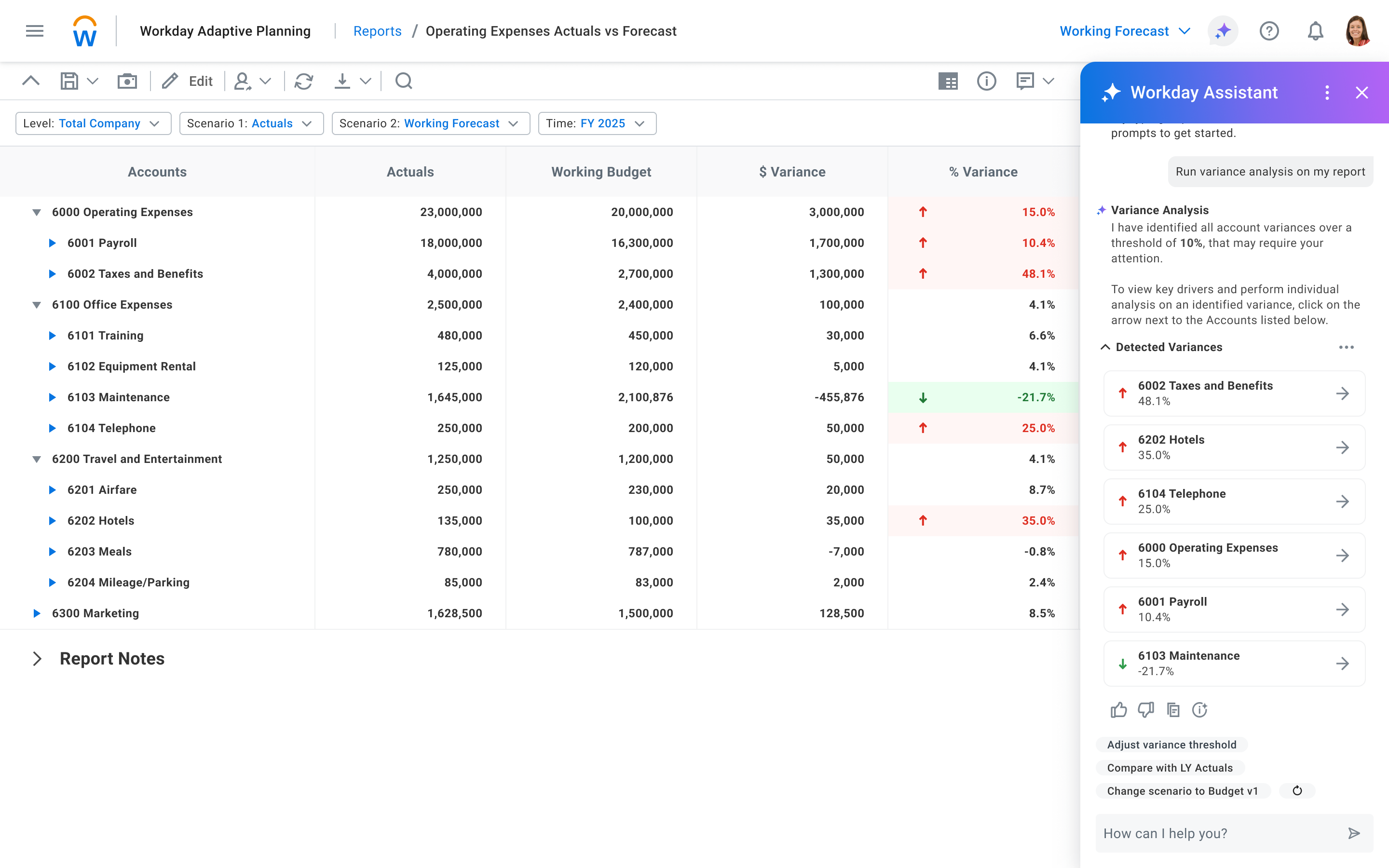
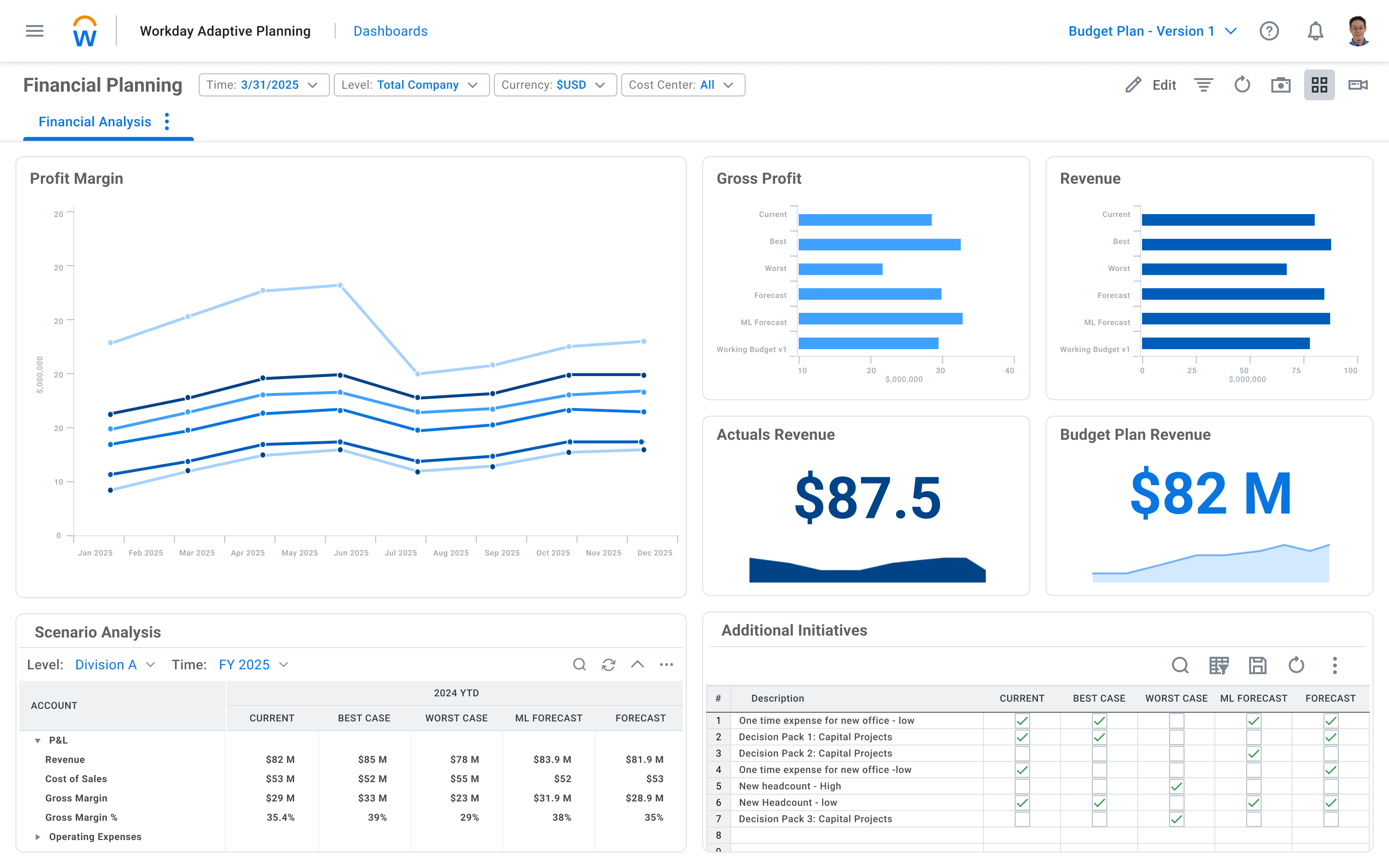
Workday Adaptive Planning Screenshots
Workday Adaptive Planning Video
Don’t settle for static plans. Get active planning with Adaptive Insights – your source for business budgeting software that is easy, powerful, and fast.
Workday Adaptive Planning Integrations
Workday Adaptive Planning Competitors
Workday Adaptive Planning Pricing
- Has featureFree Trial Available?Yes
- Does not have featureFree or Freemium Version Available?No
- Has featurePremium Consulting/Integration Services Available?Yes
- Entry-level set up fee?Optional
Workday Adaptive Planning Customer Size Distribution
| Consumers | 0% | |
| Small Businesses (1-50 employees) | 0% | |
| Mid-Size Companies (51-500 employees) | 60% | |
| Enterprises (> 500 employees) | 40% |
Workday Adaptive Planning Support Options
| Free Version | Paid Version | |
|---|---|---|
| Phone | ||
| Forum/Community | ||
| FAQ/Knowledgebase | ||
| Video Tutorials / Webinar |
Workday Adaptive Planning Technical Details
| Deployment Types: | SaaS |
|---|---|
| Operating Systems: | Unspecified |
| Mobile Application: | Apple iOS, Android, Windows Phone, Mobile Web |
| Supported Countries: | United States, Canada, United Kingdom, Ireland, Australia, New Zealand, and many more! |
| Supported Languages: | English, Spanish, French, Japanese, Portuguese (Brazilian), Russian, Polish, Dutch |