Adobe Acrobat vs. DocBoss

Overview
ProductRatingMost Used ByProduct SummaryStarting Price
Adobe Acrobat
Score 8.8 out of 10
N/A
Adobe Acrobat DC is the current version of the well-established document / PDF management solution, part of the Adobe Document Cloud (the other part being Adobe's eSign services based on technology acquired with EchoSign in 2011).
$29.99
per month per seat
DocBoss
Score 0.0 out of 10
N/A
DocBoss is cloud-based document control software built exclusively for equipment suppliers, manufacturers, fabricators, and distributors managing vendor documentation on EPC capital projects. DocBoss automates the most time-consuming document control tasks: building and maintaining the document register, applying customer-specific cover sheets, formatting, and numbering, generating transmittals and submittal packages, routing documents for internal review, and producing…N/A
Pricing
Adobe AcrobatDocBoss
Editions & Modules
Acrobat Pro for Individuals
$19.99
per month
Acrobat Pro for Teams
$23.99
per month per user
Acrobat Studio for Individuals
$24.99
per month
No answers on this topic
Offerings
Pricing Offerings
Adobe AcrobatDocBoss
Free Trial
YesNo
Free/Freemium Version
NoNo
Premium Consulting/Integration Services
YesNo
Entry-level Setup FeeOptionalNo setup fee
Additional Details
More Pricing Information
Community Pulse
Adobe AcrobatDocBoss
Best Alternatives
Adobe AcrobatDocBoss
Small Businesses
Square 9 Softworks
Square 9 Softworks
Score 9.3 out of 10
Square 9 Softworks
Square 9 Softworks
Score 9.3 out of 10
Medium-sized Companies
MSB Docs
MSB Docs
Score 9.4 out of 10
MSB Docs
MSB Docs
Score 9.4 out of 10
Enterprises
M‑Files
M‑Files
Score 8.9 out of 10
M‑Files
M‑Files
Score 8.9 out of 10
All AlternativesView all alternativesView all alternatives
User Ratings
Adobe AcrobatDocBoss
Likelihood to Recommend
8.9
(911 ratings)
-
(0 ratings)
Likelihood to Renew
9.0
(46 ratings)
-
(0 ratings)
Usability
8.9
(325 ratings)
-
(0 ratings)
Availability
9.1
(3 ratings)
-
(0 ratings)
Performance
5.3
(10 ratings)
-
(0 ratings)
Support Rating
9.5
(64 ratings)
-
(0 ratings)
Online Training
9.0
(1 ratings)
-
(0 ratings)
Implementation Rating
9.9
(16 ratings)
-
(0 ratings)
Configurability
7.9
(4 ratings)
-
(0 ratings)
Contract Terms and Pricing Model
4.5
(2 ratings)
-
(0 ratings)
Ease of integration
8.0
(8 ratings)
-
(0 ratings)
Product Scalability
7.1
(4 ratings)
-
(0 ratings)
Vendor post-sale
1.0
(2 ratings)
-
(0 ratings)
Vendor pre-sale
1.0
(1 ratings)
-
(0 ratings)
User Testimonials
Adobe AcrobatDocBoss
Likelihood to Recommend
Adobe
Acrobat is well suited when sharing information with different parts/levels of my company where access to specific software is unavailable to all employees who need to see the information. For example, my tradesmen do not have access to MS Excel in the field, so a PDF creates that accessibility. As for a scenario where it is less appropriate, I cannot think of one.
Read full review
DocBoss
No answers on this topic
Pros
Adobe
  • OCR on scanned documents actually works well for standard business docs; it makes old vendor contracts searchable without manual retyping.
  • Page organization is genuinely useful, helping with merging, reordering, and splitting PDFs in one place without needing a separate tool or script.
  • Editing PDFs you didn't create without breaking the original formatting works more reliably than anything else.
Read full review
DocBoss
No answers on this topic
Cons
Adobe
  • The UI is awkward to navigate in professional workflows.
  • Major UI changes are much too frequent, which affects productivity adversely even when the changes are "improvements." Muscle memory is a thing.
  • The new AI features tend to be intrusive and distracting if you turn them on, and there are better alternatives for document summary and analysis.
Read full review
DocBoss
No answers on this topic
Likelihood to Renew
Adobe
Adobe Acrobat works seamlessly with the other Adobe products we use that are industry-standard. We will certainly continue to use Adobe InDesign, Photoshop, and Illustrator, meaning it will always be convenient to work seamlessly with Adobe Acrobat for our organization. We are happy with the performance of Acrobat and it's meets our expectations.
Read full review
DocBoss
No answers on this topic
Usability
Adobe
I am able to rely on the software. I am aware that I barely scratch the surface of what it can do outside of the basics on a pc, but it is reassuring to know whatever I need it to do and whatever platform, it will work well.
Read full review
DocBoss
No answers on this topic
Reliability and Availability
Adobe
We have not had availability issues with Adobe Acrobat, or at least none that I am personally aware of. Some may encounter crashes of the software during outages of electricity in their city or neighborhood, which no one can plan for, but with generators in our organization, we have been lucky not to have outages
Read full review
DocBoss
No answers on this topic
Performance
Adobe
One of the best features of Adobe Acrobat is its speed and stability. When dealing with massive multi-page files, having to reload a crashed program over and over again would slow down progress unnecessarily. And expanding on that, having the table of contents generated allows me to skip to different pages with ease, a necessary feature with exceptionally long files. word searches are even more helpful with text recognition.
Read full review
DocBoss
No answers on this topic
Support Rating
Adobe
For a while, Acrobat DC crashed pretty frequently. I contacted Adobe Acrobat support about the problem. At first support was unable to provide a solution. After about a month Adobe's software engineers provided a fix. I just wish it had taken less than a month to solve the problem.
Read full review
DocBoss
No answers on this topic
Online Training
Adobe
Answered basic questions.
Read full review
DocBoss
No answers on this topic
Implementation Rating
Adobe
I was not involved with the implementation process, so I cannot answer this question. However, when it was installed on my computer system, they did so virtually. I just sat there while they took control of my computer over the network and watch them install it, lickety split
Read full review
DocBoss
No answers on this topic
Alternatives Considered
Adobe
I don't know if it's the many years of experience I have using Adobe Acrobat or that they just seem to evolve along with the industry, the other programs I have tried (not by choice) just don't seem to have the abilities I have found and used with Adobe Acrobat.
Read full review
DocBoss
No answers on this topic
Contract Terms and Pricing Model
Adobe
I am not responsible for sales or purchasing
Read full review
DocBoss
No answers on this topic
Scalability
Adobe
I find that many users aren't aware of many features of the software they use, nor may they be comfortable with learning multiple-step processes. For the simplest of PDF purposes (scanning, downloading, exporting), it gets a thumbs-up. For anything involving electronic signatures, meh--causes eyes to glaze over, or forgetting what all is involved.
Read full review
DocBoss
No answers on this topic
Return on Investment
Adobe
  • Again, the ability to make multiple versions of a PDF has helped speed up getting them to the warehouse and making it easier to print for them!
  • In marketing, there are multiple uses of Adobe Acrobat where it speeds up our process making us more efficient.
Read full review
DocBoss
No answers on this topic
ScreenShots

Adobe Acrobat Screenshots

Screenshot of where to create, edit, convert, and share PDF files all from within Microsoft Teams – as part of Acrobat integrations with Microsoft 365 apps.Screenshot of Liquid Mode in Adobe Acrobat Reader mobile app, where users can read PDFs on phones and tablets without having to pinch and zoom. Navigate lengthy documents with intelligent outline and search tools, while maximizing readability and comfort with font size and line spacing that are adjustable.Screenshot of where to fill and sign PDF forms from anywhere and on any device. Here, users can collect signatures, digitally track progress, and automatically archive the signed document.Screenshot of the Adobe Scan mobile app, used to capture and convert documents into high-quality, interactive PDF documents that can be filled out, signed, and shared. This eliminates the hassle of finding a printer, filling a form by hand, and scanning it again.

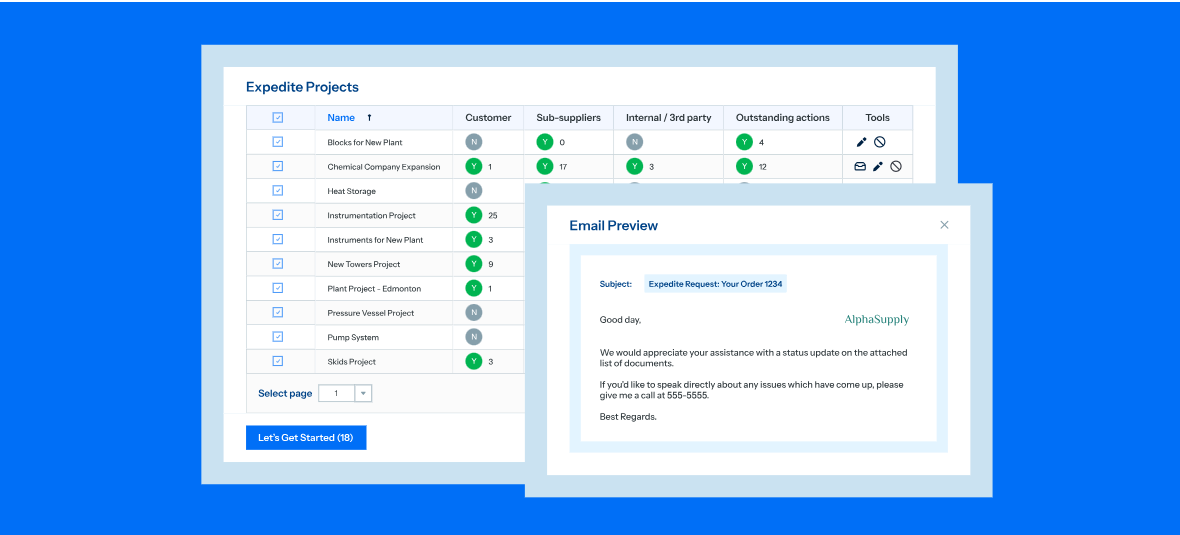
DocBoss Screenshots

Screenshot of the interface for automated document flow between teams, customers, and suppliers to speed up approvals and reduce manual tracking.Screenshot of the dashboard to create and manage document placeholders.Screenshot of where to uto-fill customer cover pages in seconds, or all templates. Auto-fill supplier document indexes (SDIs), transmittal sheets, stamps—even the content of submittal emails.Screenshot of where to generate fully bookmarked and hyperlinked databooks with a click, tailored to your customer’s specifications.Screenshot of real-time reporting, used to track document status, get automated reminders, and send expedite requests.Screenshot of an example of visibility into document status, including history and location.