Adobe Customer Journey Analytics B2B Edition vs. Hotjar

Overview
ProductRatingMost Used ByProduct SummaryStarting Price
Adobe Customer Journey Analytics B2B Edition
Score 0.0 out of 10
N/A
Launched in June of 2025, Adobe Customer Journey Analytics B2B Edition gives marketing sales teams actionable insights that let them optimize customer experiences, expand the sales pipeline, and drive strategic growth across the buyer’s journey.N/A
Hotjar
Score 8.3 out of 10
N/A
Hotjar is a conversion rate optimization tool for digital marketers. Features include heatmapping, visual session recording, conversion funnel analytics, form analytics, feedback polls and surveys, and usability testing. The tool is used by digital analysts, UX designers, web developers and product marketers. Hotjar was acquired by Contentsquare September 2021, and is now a Contentsquare brand.
$39
per month 100 daily sessions
Pricing
Adobe Customer Journey Analytics B2B EditionHotjar
Editions & Modules
No answers on this topic
Hotjar Observe - Plus
$39
per month 100 daily sessions
Hotjar Ask - Plus
$59
per month 250 monthly responses
Hotjar Ask - Business
$79
per month Starting from 500 monthly responses
Hotjar Observe - Business
$99
per month Starting from 500 daily sessions
Hotjar Scale - Business
$213
per month Starting from 500 daily sessions
Hotjar Ask - Scale
Contact Sales
per month unlimited volume
Offerings
Pricing Offerings
Adobe Customer Journey Analytics B2B EditionHotjar
Free Trial
NoYes
Free/Freemium Version
NoYes
Premium Consulting/Integration Services
NoNo
Entry-level Setup FeeNo setup feeNo setup fee
Additional DetailsContact Adobe for pricing information.Discount available for annual pricing.
More Pricing Information
Community Pulse
Adobe Customer Journey Analytics B2B EditionHotjar
Best Alternatives
Adobe Customer Journey Analytics B2B EditionHotjar
Small Businesses
Ortto
Ortto
Score 8.9 out of 10
Smartlook
Smartlook
Score 8.5 out of 10
Medium-sized Companies
Quadient Inspire
Quadient Inspire
Score 9.3 out of 10
Siteimprove
Siteimprove
Score 9.1 out of 10
Enterprises
Quadient Inspire
Quadient Inspire
Score 9.3 out of 10
Contentsquare
Contentsquare
Score 7.7 out of 10
All AlternativesView all alternativesView all alternatives
User Ratings
Adobe Customer Journey Analytics B2B EditionHotjar
Likelihood to Recommend
-
(0 ratings)
10.0
(103 ratings)
Likelihood to Renew
-
(0 ratings)
5.1
(2 ratings)
Usability
-
(0 ratings)
9.7
(6 ratings)
Support Rating
-
(0 ratings)
9.6
(4 ratings)
Ease of integration
-
(0 ratings)
9.0
(1 ratings)
User Testimonials
Adobe Customer Journey Analytics B2B EditionHotjar
Likelihood to Recommend
Adobe
No answers on this topic
Contentsquare
Hotjar is good for a first pass at understanding user sentiment or locating potential usability issues. There are features such as "rage clicked" which shows recordings or instances when a user rage clicked or had an issue with your site. Hotjar has also been helpful to launch intercept surveys on mobile, desktop, and app, which not all competitor software allow. Hotjar recordings are fun to watch. "Watching Hotjar like Netflix" is a favorite pastime at work.
Read full review
Pros
Adobe
No answers on this topic
Contentsquare
  • Heat mapping is great on Hotjar. It is a good place to start when you are looking at the UX & CRO on your website. You can see the % of people clicking on elements on a page, how far they scroll, and mouse movements.
  • Hotjar is great for session recordings. These record the mouse movements, clicks, pages and scrolls of a user in video format. You can watch these to investigate what works well on a site and identify potential roadblocks and bugs.
  • Hotjar is great as it ensures that users details are anonymous; for instance, if you are watching a session recording, you cannot see what a user types in a form field, as Hotjar blanks this out.
  • Hotjar has a poll function, so you can have polls on your website.
Read full review
Cons
Adobe
No answers on this topic
Contentsquare
  • Hotjar is primarily used for web-based experiences. Not that easy to use on mobile apps.
  • I'd love to see Hotjar integrated with Google Analytics for an even deeper view.
  • Hotjar is primarily used by smaller organizations...pricing can get steep quickly for larger organizations.
Read full review
Likelihood to Renew
Adobe
No answers on this topic
Contentsquare
Even though the heat maps and user recordings were useful, our website was significantly slowed down after we installed Hotjar, so much so, that it took over a minute for our blog to load. The data that we gathered was not worth the length that it took our website to load.
Read full review
Usability
Adobe
No answers on this topic
Contentsquare
So easy and simple to use! Straightforward anyone in the team is able to easily go in and set up anything in Hotjar. The UI is really simple. Whenever you give feedback to Hotjar they continously take on board the feedback and improve the tool.
Read full review
Support Rating
Adobe
No answers on this topic
Contentsquare
Hotjar is a SaaS-based company, and as such has a good support service. Users can quickly submit support tickets through Hotjar's online portal. Enterprise customers get access to additional support members and have SLAs to support their larger, more complex needs. Overall, Hotjar is extremely reliable and I've never had to reach out to customer support.
Read full review
Alternatives Considered
Adobe
No answers on this topic
Contentsquare
HotJar was selected for a few reasons:
  • Video Capture - HotJars video capture of user sessions is nothing short of amazing. It is so useful (not to mention cool) to see, in real time, how users interact with our software. It makes our jobs so much easier and more enjoyable to get this type of d
  • User Surveys - The ease and flexibility of surveys we can make available on our website are an awesome tool to get additional data.
  • Simple implementation - Adding a very small amount of code to our website gives us the ability to use all of HotJars features without having to touch our code again.
Read full review
Return on Investment
Adobe
No answers on this topic
Contentsquare
  • We have fixed many issues, for example, checkout usability problems with the video recording feature. You can catch bugs and get an overall idea of how a particular page is working.
  • Polls have helped us pair intent with the video sessions, so we can understand better why certain users answered different things. You get greedy and try to ask everything but that won't work. Keep it simple and it will give you small but important insights.
Read full review
ScreenShots

Adobe Customer Journey Analytics B2B Edition Screenshots
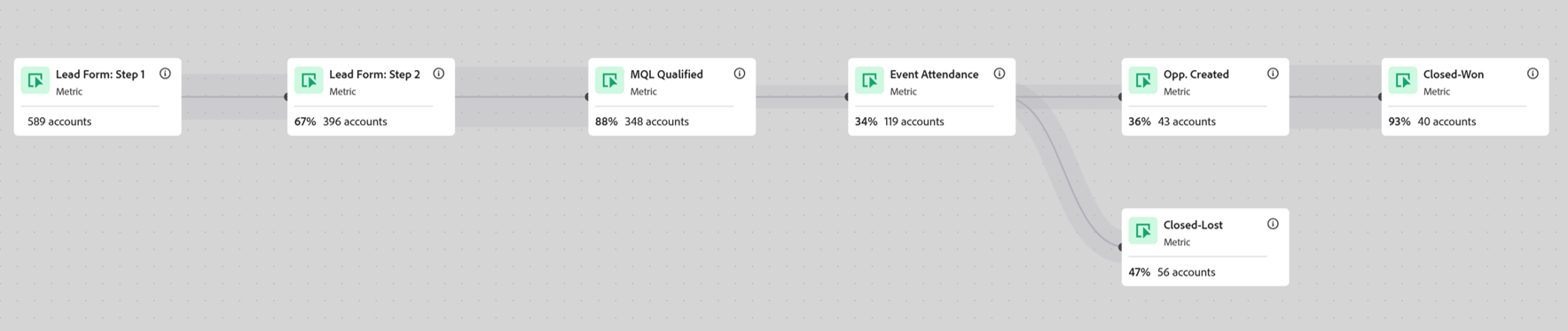
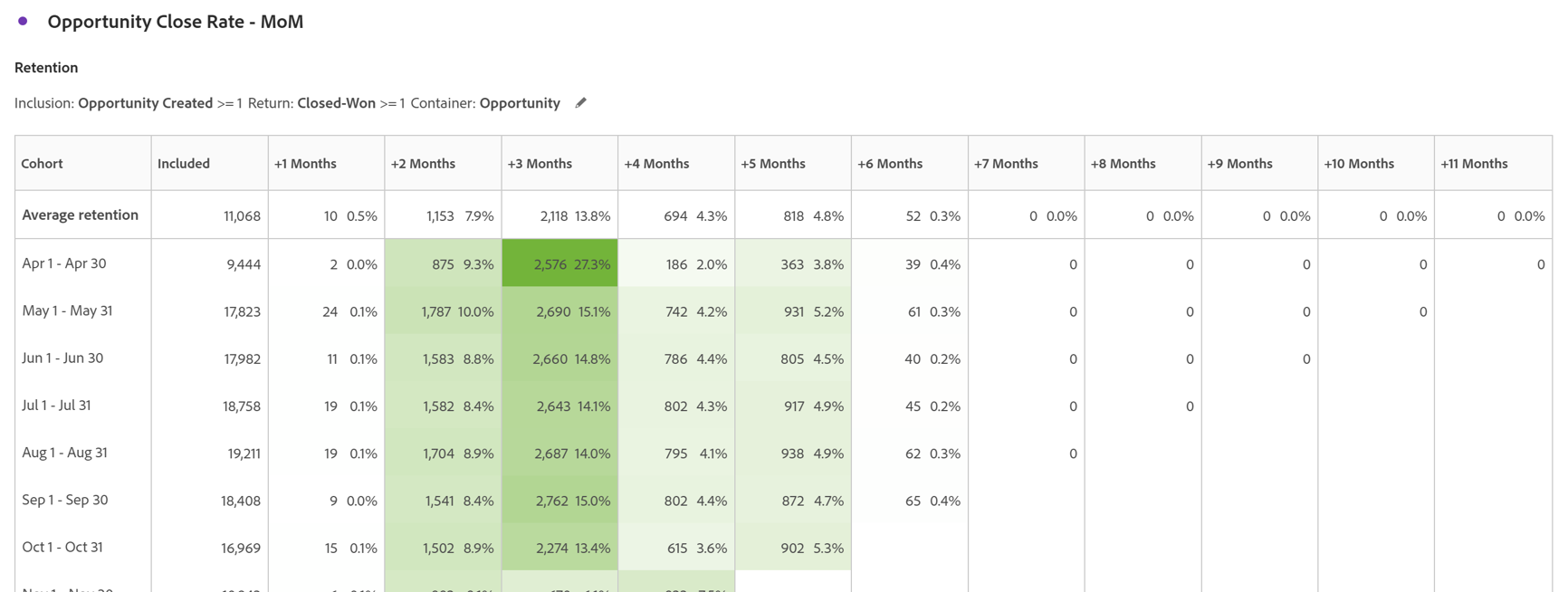
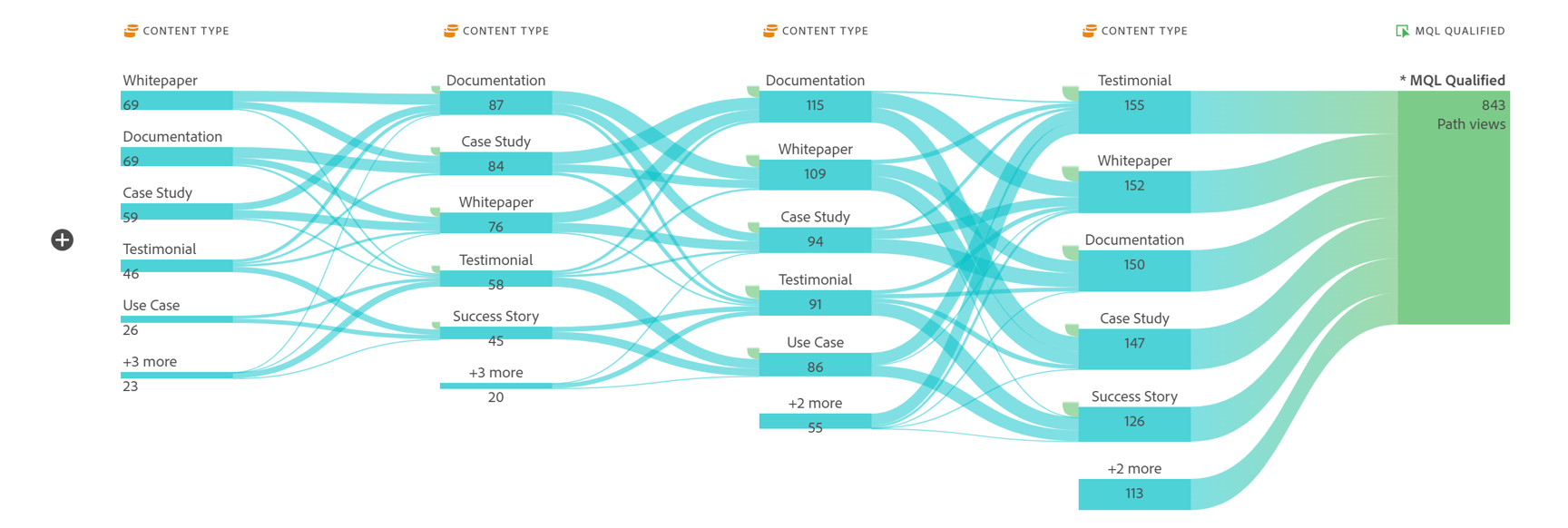
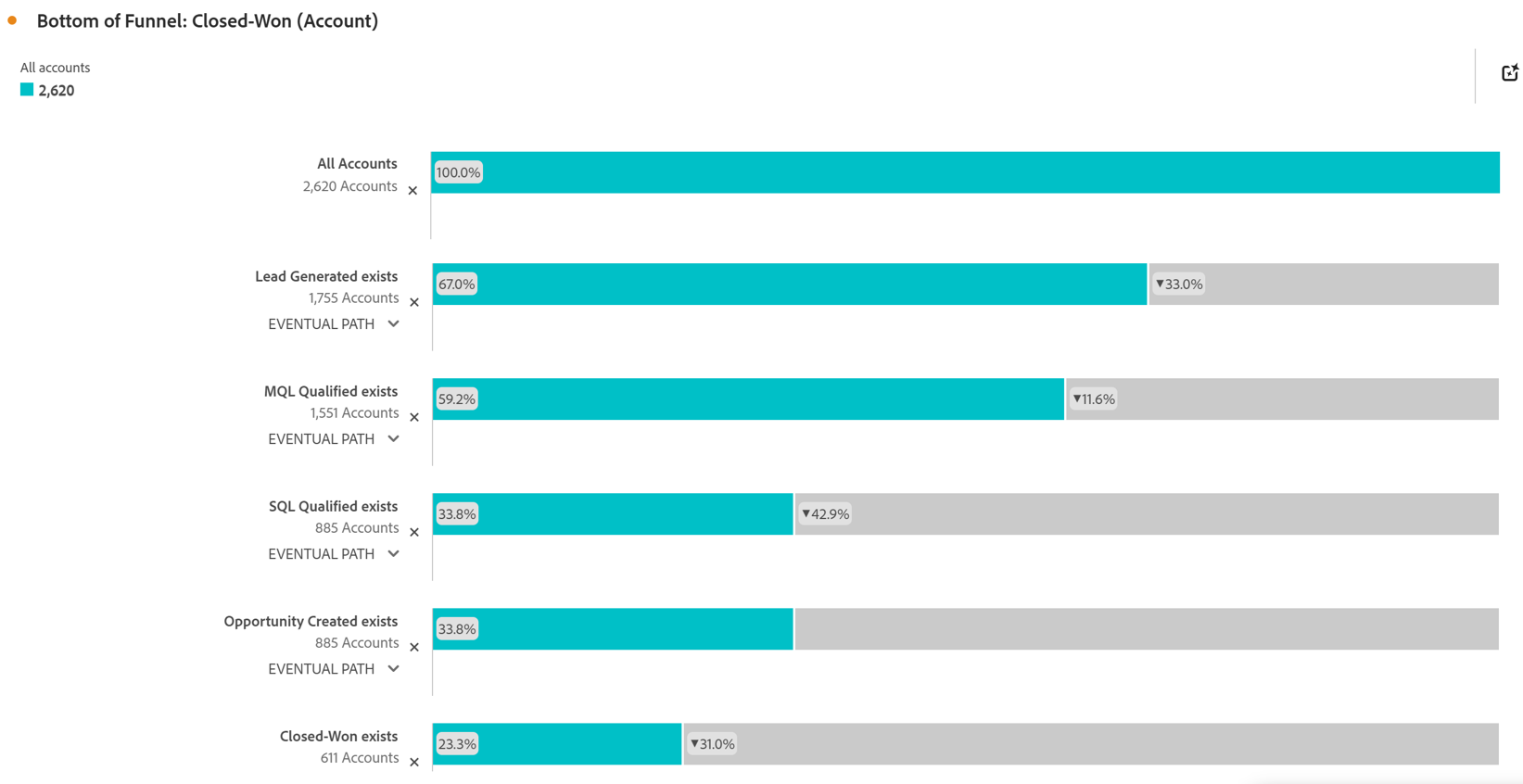
Screenshot of Account Based Marketing Engagement using the Journey Canvas feature. Effective Account Based Marketing requires a deep understanding of the buying journey at the account level to determine the most impactful marketing activities to drive deal closer. Identify which experiences - both online and offline - are most impactful in driving closed opportunities. Journey canvas maps every interaction across accounts, buying groups, opportunities, campaigns and channels for clarity on what's working and what isn't. The Journey Canvas feature in CJA B2B Edition lets users see a detailed path for a specific high value account or buying group, including all known online and offline interactions. And users can contextualize key events, such as an MQL trigger and an Opportunity creation. Plus, Sales Development Reps can see the interaction history for specific accounts before outreach, allowing for highly relevant conversations.Screenshot of Cohort Segmentation. This identifies key groups of buyers to publish to CDP for activation in paid media, personalization or email orchestration. Cohort tables lets users group B2B entities - Accounts, Opportunities, Buying Groups - based on a shared starting point and track their progress across pipeline stages over time. By analyzing behavior patterns of buying groups, marketing and sales teams can understand the time to reach key milestones in the buying journey and determine which marketing efforts lead to faster pipeline progression.Screenshot of In-Person Events. The impact of in-person event attendance can be optimized by reporting on engaged accounts and viewing activity across multiple in-person events. Flow lets you visualize the paths accounts and buying groups take between key interactions or stages over time. Understanding what behaviors led to a key milestone, such as registering for an in-person event or flagging a lead as an MQL, helps both marketing and sales teams understand the most influential experiences that lead to conversion. For in-person events, the steps leading up to registration may include previous in-person event attendance, as well as digital experiences such as downloading white papers and case studies.Screenshot of Sales Stage Progression. The fallout report in CJA B2B Edition gives you sales funnel insights by letting you visualize conversion and drop off rates between predefined steps in a sequential journey. The fallout report can answer key questions around which steps in the sales stages caused the most drop off towards deal close.