Chose Adobe Journey Optimizer
Adobe Commerce

| Product | Rating | Most Used By | Product Summary | Starting Price |
|---|---|---|---|---|
 Adobe Journey Optimizer | N/A | Adobe Journey Optimizer is a customer engagement solution, enabling brands to orchestrate and deliver personalized customer engagement across all channels — including email, web, app, mobile, and more — in the moments that matter to customers. | N/A | |
 MailUp | N/A | MailUp is the eponymous email & SMS platform from the Italian company that was founded in 2002 that now has a modest but respectable presence across the western world with a diverse customer base (Yamaha, Amnesty International, Korean Air, etc.). Mailup's platform combines email marketing, with transactional email and SMS features, and offers SMTP relay and plugins for ecommerce, CRM and CMS systems. Their unusual pricing scheme is tiered just on subscribers but on volume of sends and that… | N/A |
| Adobe Journey Optimizer | MailUp | |||||||||||||||
|---|---|---|---|---|---|---|---|---|---|---|---|---|---|---|---|---|
| Editions & Modules | No answers on this topic | No answers on this topic | ||||||||||||||
| Offerings |
| |||||||||||||||
| Entry-level Setup Fee | Optional | Optional | ||||||||||||||
| Additional Details | — | — | ||||||||||||||
| More Pricing Information | ||||||||||||||||
| Adobe Journey Optimizer | MailUp | |
|---|---|---|
| Considered Both Products |  Adobe Journey Optimizer  Rohn Jose Domain Solution Architect Chose Adobe Journey Optimizer Adobe Experience Platform, Adobe Real-Time Customer Data Platform, Adobe Campaign, Adobe Marketo Engage, Adobe Analytics and Adobe Experience Manager  Daniel Cardoso specialist Chose Adobe Journey Optimizer Adobe Experience Platform, Adobe Customer Journey Analytics and Adobe Real-Time Customer Data Platform |  MailUp  Tory Reiff Graphic Designer, Digital Chose MailUp Mailup has hands down the best editor for creating responsive emails, I've tried almost everything out there and this is the best, I recommend this to colleagues all the time! |
| Adobe Journey Optimizer | MailUp | |||||||||||||||
|---|---|---|---|---|---|---|---|---|---|---|---|---|---|---|---|---|
| Email & Online Marketing |
|
| Adobe Journey Optimizer | MailUp | |
|---|---|---|
| Small Businesses |  Simplify360 Score 7.8 out of 10 |  Mad Mimi Score 10.0 out of 10 |
| Medium-sized Companies |  Dialpad Support Score 9.1 out of 10 |  VerticalResponse Score 10.0 out of 10 |
| Enterprises |  Verint Community Score 10.0 out of 10 |  Emma by Marigold Score 8.6 out of 10 |
| All Alternatives | View all alternatives | View all alternatives |
| Adobe Journey Optimizer | MailUp | |
|---|---|---|
| Likelihood to Recommend | 8.0 (0 ratings) | 10.0 (0 ratings) |
| Likelihood to Renew | 7.9 (0 ratings) | - (0 ratings) |
| Usability | 7.5 (0 ratings) | - (0 ratings) |
| Availability | 7.3 (0 ratings) | - (0 ratings) |
| Performance | 6.4 (0 ratings) | - (0 ratings) |
| Support Rating | 6.4 (0 ratings) | - (0 ratings) |
| In-Person Training | 4.5 (0 ratings) | - (0 ratings) |
| Online Training | 4.5 (0 ratings) | - (0 ratings) |
| Implementation Rating | 8.2 (0 ratings) | - (0 ratings) |
| Configurability | 5.5 (0 ratings) | - (0 ratings) |
| Product Scalability | 7.3 (0 ratings) | - (0 ratings) |
| Vendor post-sale | 9.1 (0 ratings) | - (0 ratings) |
| Vendor pre-sale | 9.1 (0 ratings) | - (0 ratings) |
| Adobe Journey Optimizer | MailUp | |
|---|---|---|
| Likelihood to Recommend |
|
Tory Reiff Graphic Designer, Digital |
| Pros |
|
Tory Reiff Graphic Designer, Digital |
| Cons |
|
Tory Reiff Graphic Designer, Digital |
| Likelihood to Renew |
| No answers on this topic |
| Usability |
| No answers on this topic |
| Reliability and Availability |
| No answers on this topic |
| Performance |
| No answers on this topic |
| Support Rating |
| No answers on this topic |
| In-Person Training |
| No answers on this topic |
| Online Training |
| No answers on this topic |
| Implementation Rating |
| No answers on this topic |
| Alternatives Considered |
|
Tory Reiff Graphic Designer, Digital |
| Scalability |
| No answers on this topic |
| Return on Investment |
Rohn Jose Domain Solution Architect |
Tory Reiff Graphic Designer, Digital |
| ScreenShots | Adobe Journey Optimizer Screenshots      | MailUp Screenshots     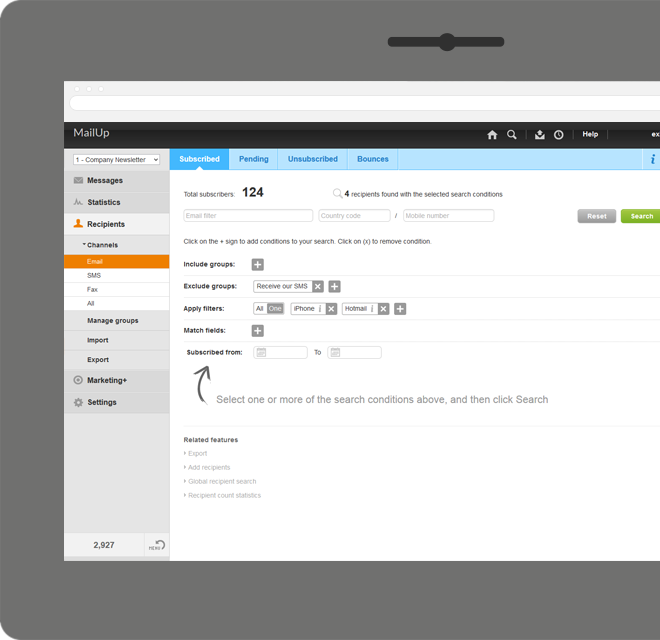 |