Overview
ProductRatingMost Used ByProduct SummaryStarting Price
AI SoloHR
Score 0.0 out of 10
N/A
AI SoloHR is HR case management software for U.S. small businesses and lean HR teams that need a structured way to manage sensitive HR workflows. The product is designed for teams that handle HR in-house and need more than spreadsheets, inbox threads, and shared folders to track case activity. AI SoloHR helps users organize FMLA, ADA accommodation, employee relations, benefits renewal, leave-related, and other HR follow-up workflows in a case-based workspace. Each…
$79
per month per workspace
Gusto
Score 8.9 out of 10
N/A
Gusto offers payroll, benefits and compliance capabilities. Gusto is scaled for small to mid-sized businesses, and emphasizes an easy to use interface.
$49
per month
Pricing
AI SoloHRGusto
Editions & Modules
Starter
$79
per month Per workspace
Solo HR
$199
per month Per workspace
HR Ops Team
$399
per month Per workspace
Compliance Plus
$799
per month Per workspace
Simple: A streamlined set of automatic payroll features and benefits integrations
$49/month + $6/mo per person
per month
Plus: Comprehensive payroll, benefits, and HR tools for employers building a great place to work
$80/month + $12/mo per person
per month
Premium: Scalable payroll and benefits, expert HR, and dedicated support for the complex needs of growing teams
$180/month + $22/mo per person
per month
Offerings
Pricing Offerings
AI SoloHRGusto
Free Trial
YesYes
Free/Freemium Version
NoNo
Premium Consulting/Integration Services
NoYes
Entry-level Setup FeeNo setup feeNo setup fee
Additional DetailsAI SoloHR is sold as subscription SaaS with four monthly plan tiers. Starter begins at $79/month. Solo HR is $199/month, HR Ops Team is $399/month, and Compliance Plus is $799/month. Plans are based on workspace tier and operational limits such as active cases, people records, seats, AI drafts, intake links, outbound email, audit exports, and advanced controls. A 14-day free trial is available with no credit card required.Gusto offers three pricing plans for payroll, benefits, and HR.
More Pricing Information
Community Pulse
AI SoloHRGusto
Features
AI SoloHRGusto
Payroll Management
Comparison of Payroll Management features of Product A and Product B
AI SoloHR
-
Ratings
Gusto
9.1
609 Ratings
9% above category average
Pay calculation00 Ratings9.5585 Ratings
Support for external payroll vendors00 Ratings8.58 Ratings
Benefit plan administration00 Ratings8.8416 Ratings
Direct deposit files00 Ratings9.6590 Ratings
Salary revision and increment management00 Ratings9.1461 Ratings
Reimbursement management00 Ratings9.1195 Ratings
User Ratings
AI SoloHRGusto
Likelihood to Recommend
-
(0 ratings)
9.1
(630 ratings)
Likelihood to Renew
-
(0 ratings)
10.0
(14 ratings)
Usability
-
(0 ratings)
9.5
(454 ratings)
Support Rating
-
(0 ratings)
2.9
(27 ratings)
Implementation Rating
-
(0 ratings)
9.1
(3 ratings)
User Testimonials
AI SoloHRGusto
Likelihood to Recommend
DragonVerse Media Inc
No answers on this topic
Gusto
I think Gusto is well-suited for any business, big or small, to use for accounting purposes. It makes it easy to keep track of many things, such as pay stubs, benefits, paid time off, and much more. Where I could see it being less useful is maybe for enterprise businesses with way more employees.
Read full review
Pros
DragonVerse Media Inc
No answers on this topic
Gusto
  • New employee/contractor onboarding - all the documents are stored and easily accessible (the same goes for off-boarding).
  • A one-click option for syncing hours worked with payroll.
  • The option to run payroll on auto-pilot.
  • Ensuring I'm tax compliant with the states we have employees in.
  • Always having digital records of payroll runs.
Read full review
Cons
DragonVerse Media Inc
No answers on this topic
Gusto
  • Digital compliance tools for remote teams
  • Gusto upsold us labor law posters, but I later found them available for free online. Since we’re a fully remote team, I had to manually download and distribute them digitally. It would be much more efficient if Gusto offered free, auto-distributed digital posters tailored to remote compliance.
  • Benefits setup is unintuitive for startups
  • While our rep was helpful, navigating the benefits system felt complex and not tailored to early-stage companies. More guided flows or simplified options for small, remote startups would be a big help.
  • Limited dashboard customization for remote workflows
  • As a fully online company, we’d benefit from dashboard options that highlight relevant tools for remote operations—like compliance tracking, digital communications, or onboarding checklists.
Read full review
Likelihood to Renew
DragonVerse Media Inc
No answers on this topic
Gusto
Unless they break it, I'm never leaving. It's just too easy. Gusto is also really affordable, and for what I pay, it's worth having the historical record within the system. I like that I can go back and pull up W2's for year's past. This sort of easy access reporting, has been helpful especially when getting reports for PPP loans.
Read full review
Usability
DragonVerse Media Inc
No answers on this topic
Gusto
Gusto is pretty user-friendly, and the website is easy to navigate overall. They also offer good, responsive customer support and have helpful articles available when needed. So far, I have not had any major issues with the platform and am overall very happy with it.
Read full review
Support Rating
DragonVerse Media Inc
No answers on this topic
Gusto
Gusto's customer service has really deteriorated lately and they seem to have really changed their focus. It used to be when you called you were routed to an individual who knew about payroll, benefits, reporting, etc. but now you get someone who seems to have not received the correct training. My last call about a dismissal payroll took me over an hour of my time and the person still could not help me and finally transferred me to someone else.
Read full review
Implementation Rating
DragonVerse Media Inc
No answers on this topic
Gusto
Reach out to support immediately if you are having trouble setting up Gusto. Rather than being confused and trying to figure it out yourself, it's much better to talk to someone who knows what they are doing. Save yourself time and frustration and reach out to support
Read full review
Alternatives Considered
DragonVerse Media Inc
No answers on this topic
Gusto
While I never actually got to the point of trying out ADP, I had several conversations with an ADP representative, and it seemed that they would be able to provide the same (if not less) level of service for a significantly higher price
Read full review
Return on Investment
DragonVerse Media Inc
No answers on this topic
Gusto
  • Time tracking + payroll calculations me 30-60 minutes every time I run payroll.
  • Integrated workers' comp, so I didn't have to find an outside carrier and get quotes—it's all taken care of in the same platform.
  • Improved employee experience with onboarding.
Read full review
ScreenShots

AI SoloHR Screenshots

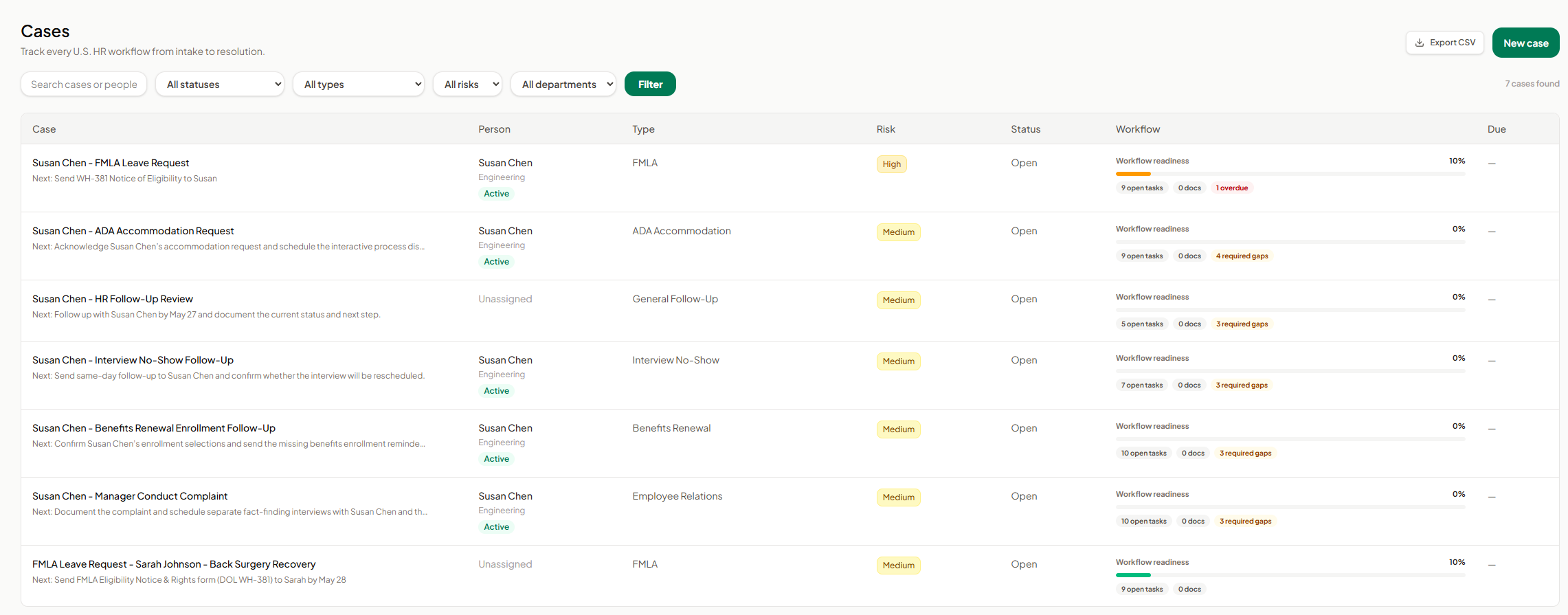
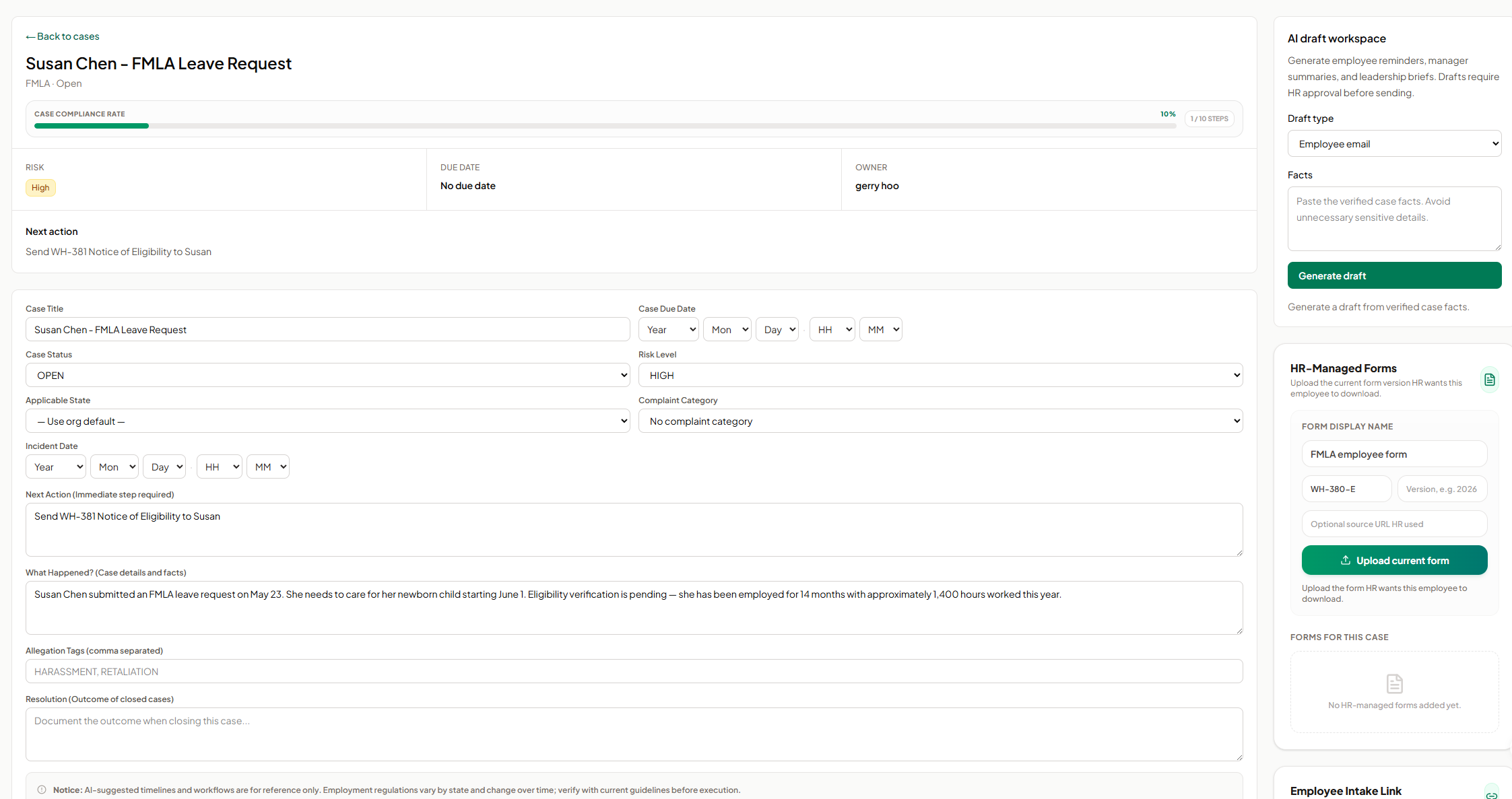
Screenshot of AI SoloHR FMLA workflow screen showing how HR teams can track leave request details, eligibility review, notice dates, certification deadlines, designation status, payroll or benefits status, and return-to-work readiness in one structured case workflow. The screen shows a case moving from intake through certification and designation, with workflow state, blocking reason, key dates, status fields, notes, and a save action for maintaining an organized FMLA case record.Screenshot of AI SoloHR HR-managed forms screen showing how HR can upload and organize the current form version for an employee case. The panel includes fields for form display name, form code, version, optional source URL, and an upload action, helping HR keep case-specific forms such as FMLA employee forms connected to the relevant case record.Screenshot of AI SoloHR AI draft workspace showing how HR can generate draft communications from verified case facts. The screen includes a draft type selector for employee emails, manager summaries, or leadership briefs, a case facts field, and a generate action, with drafts positioned for HR review before sending.Screenshot of AI SoloHR cases dashboard showing a centralized list of HR workflows from intake to resolution. The screen includes search, status, type, risk, and department filters, plus case rows for FMLA, ADA accommodation, interview no-show, benefits renewal, employee relations, and general follow-up workflows. Each row shows the related person, case type, risk level, status, workflow readiness, open tasks, document count, required gaps, overdue items, and export or new case actions.Screenshot of AI SoloHR case detail screen for an FMLA leave request, showing the case summary, compliance progress, risk level, owner, next action, due date, editable case fields, incident details, case facts, tags, and resolution notes. The screen also includes side panels for AI draft generation and HR-managed forms, helping HR keep case tracking, communication drafts, and required form uploads connected to the same employee case record.Screenshot of AI SoloHR new case screen showing how HR can create a structured HR case by capturing the minimum facts first. The form includes primary person, case title, workflow type, risk level, applicable state, next action, and case summary fields, with a disclaimer reminding users to verify AI-generated workflow guidance against current official requirements.

Gusto Screenshots

Screenshot of Gusto's automated payrollScreenshot of the time-off tracking interfaceScreenshot of the source of truth for HR data