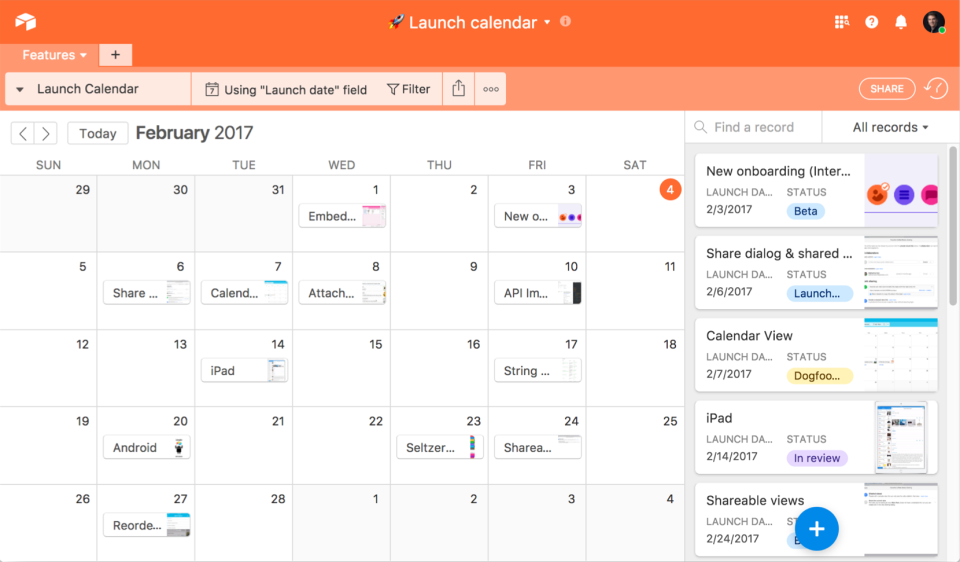
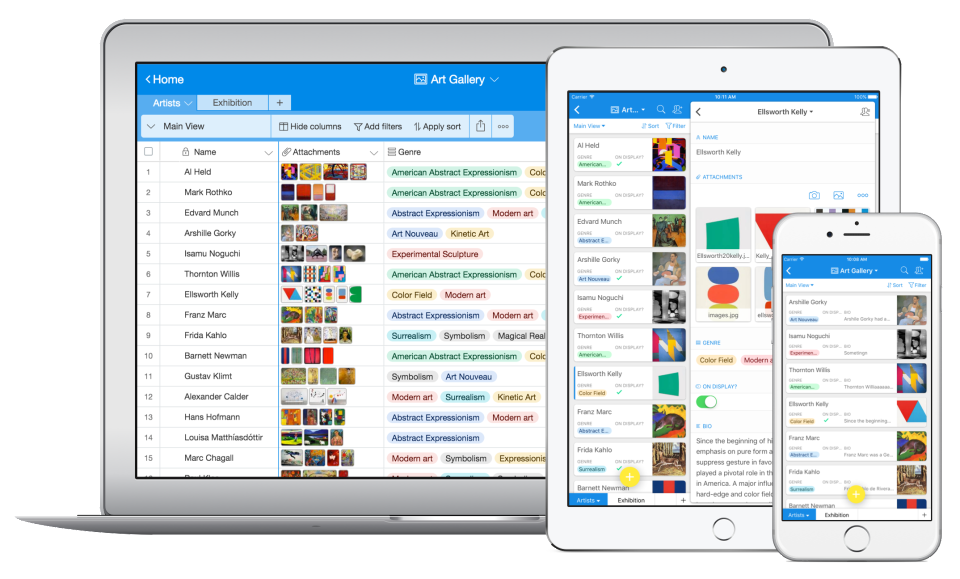
Airtable is a web-based application builder that combines spreadsheet usability with relational database architecture. The platform enables users to construct custom operational applications, configure automated workflows, and design tailored interfaces without traditional software development.
$24
per month per seat
Claris FileMaker
Score6.7 out of 10
N/A
Claris' FileMaker is presented as a Workplace Innovation Platform, and is used to create a custom app. Manual processes can be automated with Claris FileMaker Pro, and apps can be created to manage contacts, track inventory, organize projects, etc.
$21
per month per user
Muse mBaaS
N/A
N/A
N/A
N/A
Pricing
Airtable
Claris FileMaker
Muse mBaaS
Editions & Modules
Team
$24
per month per user
Business
$54
per month per user
Enterprise
Custom Pricing
Platform Subscription
$21
per month per user
Individual desktop license
$594
one-time fee
No answers on this topic
Offerings
Pricing Offerings
Airtable
Claris FileMaker
Muse mBaaS
Free Trial
Yes
No
Yes
Free/Freemium Version
Yes
No
No
Premium Consulting/Integration Services
No
No
No
Entry-level Setup Fee
No setup fee
No setup fee
No setup fee
Additional Details
—
—
—
More Pricing Information
Community Pulse
Airtable
Claris FileMaker
Muse mBaaS
Considered Multiple Products
Airtable
Verified User
Chose Airtable
Our existing database was created for us several years ago in Filemaker. It is incredibly sophisticated but often times is proving to be challenging to operate or update for current uses. Airtable has provided a level of flexibility to create a number of workarounds outside of …
A de minimis incentive was given to thank the reviewer for their time. The incentive was not used to bias or drive a particular response, nor was the incentive contingent on a positive endorsement. More Info
Verified User
Chose Airtable
Airtable offers fewer features when it comes to HTML/web forms and user management, but has great plugins, and its straight-forward, intuitive UI offers a solution for users looking for an immediate answer on cloud-based relational database challenges.
A de minimis incentive was given to thank the reviewer for their time. The incentive was not used to bias or drive a particular response, nor was the incentive contingent on a positive endorsement. More Info
Verified User
Chose Airtable
Airtable is much more intuitive to a naive user than Filemaker. Development time is also greatly reduced.
A de minimis incentive was given to thank the reviewer for their time. The incentive was not used to bias or drive a particular response, nor was the incentive contingent on a positive endorsement. More Info
Executive Director in Corporate at Black LGBT Alliance of New York, Inc. (Non-Profit Organization Management, 1-10 employees)
Chose Airtable
I am very familiar with FileMaker Pro. I grew up on FMP. But unless you "grew up" with FMP, the learning curve for newbies is really steep. Also, we are a very small, start-up nonprofit and Airtable not only fits our immediate needs but it also will allow us to grow into the …
A de minimis incentive was given to thank the reviewer for their time. The incentive was not used to bias or drive a particular response, nor was the incentive contingent on a positive endorsement. More Info
A de minimis incentive was given to thank the reviewer for their time. The incentive was not used to bias or drive a particular response, nor was the incentive contingent on a positive endorsement. More Info
Archives Manager at Trisha Brown Dance Company (Libraries, 11-50 employees)
Chose Airtable
I've stated this in earlier sections but to put it simply, Airtable provides a way to create a customizable database with standardized metadata across archival collections without being overly complex or costly. This has supported our description of paper materials. The pro–a …
A de minimis incentive was given to thank the reviewer for their time. The incentive was not used to bias or drive a particular response, nor was the incentive contingent on a positive endorsement. More Info
Project Lead, Gilbert Kaplan Digital Mahler Archives in Research & Development at The Hampsong Foundation (Music, 1-10 employees)
Chose Airtable
Airtable was a more affordable, more mobile, and more versatile platform. The options for future integration were greater for us with Airtable; the mobile opportunities give our Foundation flexibility; and since our team is based in several locations, the sharing and cloud …
A de minimis incentive was given to thank the reviewer for their time. The incentive was not used to bias or drive a particular response, nor was the incentive contingent on a positive endorsement. More Info
A de minimis incentive was given to thank the reviewer for their time. The incentive was not used to bias or drive a particular response, nor was the incentive contingent on a positive endorsement. More Info
dispatcher in Customer Service at Octopus (Computer Networking, 1001-5000 employees)
Chose Claris FileMaker
Easy to get started and Includes starter solutions for every situation by Anyone with access can edit the program by using many plugins available to extend functionality such as Changing field/database/script names after the fact is free specially For the most part, drag and …
A de minimis incentive was given to thank the reviewer for their time. The incentive was not used to bias or drive a particular response, nor was the incentive contingent on a positive endorsement. More Info
Airtable is an ideal platform for small and growing businesses to keep track of just about EVERYTHING they need to keep things running smoothly. It's a great way to keep tasks organized, and keep everyone on the same page with progress on all things. Our company finds the kanban particularly useful, as products go through a lifecycle from ideation to retirement, it's good to keep a database of what is in production, what's working, and what we've tried before. I can see the platform being challenging with much larger businesses, but for the small to medium businesses I've used the platform with, it is ideal.
A de minimis incentive was given to thank the reviewer for their time. The incentive was not used to bias or drive a particular response, nor was the incentive contingent on a positive endorsement. More Info
If your company is really small, I can understand the need for a product like this. However, I would go for MS Access... FileMaker Pro can not be integrated with other systems (like MS Access can at least be handled by C# for instance, and can be integrated with MS Excel or even SQL server). I'm really not sure in what scenario one would choose for FileMaker Pro. If your application or company grows bigger, you're going to have a problem to move to another environment. Also, the fact that only one person can work with the backend at any given time is a problem in a somewhat larger company.
A de minimis incentive was given to thank the reviewer for their time. The incentive was not used to bias or drive a particular response, nor was the incentive contingent on a positive endorsement. More Info
Airtable has capabilities commonly found in spreadsheet applications, but also has some of the features found in databases.
The ability to filter fields. I set up a filter on the status field, so when a project is marked, complete, on hold, or canceled, that record is hidden from my current projects table view. If it is marked complete, the record is moved to the completed projects table view. In this way I can easily access a record of past projects
Being able to duplicate tables and create alternate views
Collapse and expand records. When I collapse the rows, I can easily scan current projects, next steps, project status, and due dates. When I expand the row, or field, I can see more detailed information about that field or record very easily. I can also expand or open the entire record. This is is helpful, when I am entering a lot of information to multiple fields in that record.
A de minimis incentive was given to thank the reviewer for their time. The incentive was not used to bias or drive a particular response, nor was the incentive contingent on a positive endorsement. More Info
The relational database management system makes the program highly customizable to fit the needs of any product. You can add a ton of information to each record and update your inventory on a regular basis with an Excel import or manually inside of the record. It has the capability to incorporate barcoding, which can manage your available inventory with ease.
The scripting language allows FileMaker to automatically calculate complex algorithms automatically or generate report outs with the click of a button. This allows for greater UI, especially with active users who are not familiar with writing code. Almost all of our internal data is linked to the FileMaker database
The server license allows many users to update the database in real time, which is handy if your inventory is constantly changing. We have users with Macs, PCs, iPhones and handheld tablets linked to our FileMaker database and they are updating the information constantly throughout the day.
If you invest some time into formatting and scripting the database, there is a high ease of use for users without knowledge of any programming or FileMaker itself.
A de minimis incentive was given to thank the reviewer for their time. The incentive was not used to bias or drive a particular response, nor was the incentive contingent on a positive endorsement. More Info
A de minimis incentive was given to thank the reviewer for their time. The incentive was not used to bias or drive a particular response, nor was the incentive contingent on a positive endorsement. More Info
Developer features need to be beefed up - namely adding the ability to search code for a phrase or keyword and the ability to do the same in the "relationship graph" in the database.
Add ability for users to edit the same table record at the same time by version control.
Allow Filemaker Server to use more than 1 core; currently multi-processing is not supported and it can be tricky to find just the right server to support the application you've built to the fullest capacity.
A de minimis incentive was given to thank the reviewer for their time. The incentive was not used to bias or drive a particular response, nor was the incentive contingent on a positive endorsement. More Info
We will 10/10 renew the use of Airtable because it has brought great value to our team. Not only is Airtable affordable, but it's also user-friendly and helps our team be efficient. We no longer need to rely on Excel spreadsheets being passed from person to person via email. Furthermore, we aren't dealing with corrupt Excel spreadsheets and the need to salvage data when a file is accidentally altered.
It it not really up to me but my opinion does have some weight in the decision and the reason I would renew my use FileMaker Pro 8.5 is because I am finally getting used to it! Now that I have been working with the program, tasks have become quicker and projects are getting done faster. File Maker Pro 8.5 really is a versatile tool and I think we are just scratching the surface with it's abilities.
A de minimis incentive was given to thank the reviewer for their time. The incentive was not used to bias or drive a particular response, nor was the incentive contingent on a positive endorsement. More Info
IMO the usability of this product is its greatest asset. The UI is clean and the menus are intuitive to the point where I'd feel confident having a non-spreadsheety colleague take on building an Airtable for the first time with next to no training. I can't say that about every table-like software product that I've used such as Notion.
A de minimis incentive was given to thank the reviewer for their time. The incentive was not used to bias or drive a particular response, nor was the incentive contingent on a positive endorsement. More Info
It's almost what it should be after so may years and with Apple's longevity and strength behind it. For people who earn their living based on efficiency I think there are too many developer obstacles that waste time and therefore money.
A de minimis incentive was given to thank the reviewer for their time. The incentive was not used to bias or drive a particular response, nor was the incentive contingent on a positive endorsement. More Info
I have rarely experience downtime, compared to other tools, and given how much time we spend on the tool. Even if there were to be, their updates on it are very timely, and our support team are able to provide any questions regarding
A de minimis incentive was given to thank the reviewer for their time. The incentive was not used to bias or drive a particular response, nor was the incentive contingent on a positive endorsement. More Info
A de minimis incentive was given to thank the reviewer for their time. The incentive was not used to bias or drive a particular response, nor was the incentive contingent on a positive endorsement. More Info
I never had any issues with load time, even with the integrations that we use today (google sheets) However, I'm curious if adding additional layers of integrations would slow down performance. We do carry quite a bit of data in Airtable, but, again, no impact on overall performance
A de minimis incentive was given to thank the reviewer for their time. The incentive was not used to bias or drive a particular response, nor was the incentive contingent on a positive endorsement. More Info
A de minimis incentive was given to thank the reviewer for their time. The incentive was not used to bias or drive a particular response, nor was the incentive contingent on a positive endorsement. More Info
Airtable has great support. They have a variety of support features to answer any questions. They have great self teaching instructions for templates and product tours. They also have support for teams and project management. They also have a fantastic customer help line. They are able and willing to answer customer questions and never have customers waiting long
A de minimis incentive was given to thank the reviewer for their time. The incentive was not used to bias or drive a particular response, nor was the incentive contingent on a positive endorsement. More Info
The forums are great with lots of helpful experts and the staff monitor them to provide help where needed. There have been a couple of unique technical issues I've had to deal with that I haven't been able to get resolved so I chose to score this a 9 instead of a 10.
A de minimis incentive was given to thank the reviewer for their time. The incentive was not used to bias or drive a particular response, nor was the incentive contingent on a positive endorsement. More Info
A de minimis incentive was given to thank the reviewer for their time. The incentive was not used to bias or drive a particular response, nor was the incentive contingent on a positive endorsement. More Info
A de minimis incentive was given to thank the reviewer for their time. The incentive was not used to bias or drive a particular response, nor was the incentive contingent on a positive endorsement. More Info
Recorded trainings were provided by the Airtable team. Great as an evergreen resources to new team members and for anyone that wants to refresh their Airtable knowledge
A de minimis incentive was given to thank the reviewer for their time. The incentive was not used to bias or drive a particular response, nor was the incentive contingent on a positive endorsement. More Info
Training all users was an important part of the implementation, which did take considerable time and effort. At first glance without training, the content calendar can be overwhelming because of the amount of data. The features within Airtable seem to be endless but our team was able to identify the most important to be successful.
Suggest you use an iterative R.A.D. or AGILE development approach. (i.e. rather than writing a gigantic spec for a system, then building it). FileMaker facilitates quick prototypes. Developing an example, then allowing users to "try it out" is a snap.
A de minimis incentive was given to thank the reviewer for their time. The incentive was not used to bias or drive a particular response, nor was the incentive contingent on a positive endorsement. More Info
Airtable was a really good fit for this specific use case as it provided a huge number of collaboration features in an intuitive and pleasant-to-use interface. The free tier worked initially with our work, and the upgrade pathway was fair and made sense for us.
A de minimis incentive was given to thank the reviewer for their time. The incentive was not used to bias or drive a particular response, nor was the incentive contingent on a positive endorsement. More Info
FileMaker is still the quickest way to go from zero to having a minimum viable working solution. Simple solutions can be built in as little as a afternoon of development. It is the only tool I am aware of which allows tech savy end users with domain knowledge to build bespoke apps for their businesses without undertaking professional software development training.
A de minimis incentive was given to thank the reviewer for their time. The incentive was not used to bias or drive a particular response, nor was the incentive contingent on a positive endorsement. More Info
There are TONS of opportunity to scale, but I think it's a matter if you have the time and resources to do so because the initial setup can be fairly time consuming and prioritized dedication
A de minimis incentive was given to thank the reviewer for their time. The incentive was not used to bias or drive a particular response, nor was the incentive contingent on a positive endorsement. More Info
A de minimis incentive was given to thank the reviewer for their time. The incentive was not used to bias or drive a particular response, nor was the incentive contingent on a positive endorsement. More Info
Through this platform, I always have the idea bout which of my team member is working on which particular part of the project, I can easily track their progress, and also I can easily correct them where it is required by adding sticky notes, by sending the attachments and URLs.
A de minimis incentive was given to thank the reviewer for their time. The incentive was not used to bias or drive a particular response, nor was the incentive contingent on a positive endorsement. More Info
We are a more agile company because of FileMaker. A few of us who are tech-savvy enough to manage the database (but are not professional developers) can make needed adjustments to our database without having to employ an in-house developer or contract with a 3rd party. As our business processes evolve and change, it's easy to update the database to accommodate those changes.
A de minimis incentive was given to thank the reviewer for their time. The incentive was not used to bias or drive a particular response, nor was the incentive contingent on a positive endorsement. More Info