Apache OpenOffice vs. Resource Guru

Overview
ProductRatingMost Used ByProduct SummaryStarting Price
Apache OpenOffice
Score 9.9 out of 10
N/A
Apache OpenOffice is a free open source office suite that includes six applications: Writer (word processor), Calc (spreadsheets), Impress (presentations), Draw (diagramming and graphics), Base (database), and Math (formulas).N/A
Resource Guru
Score 8.0 out of 10
N/A
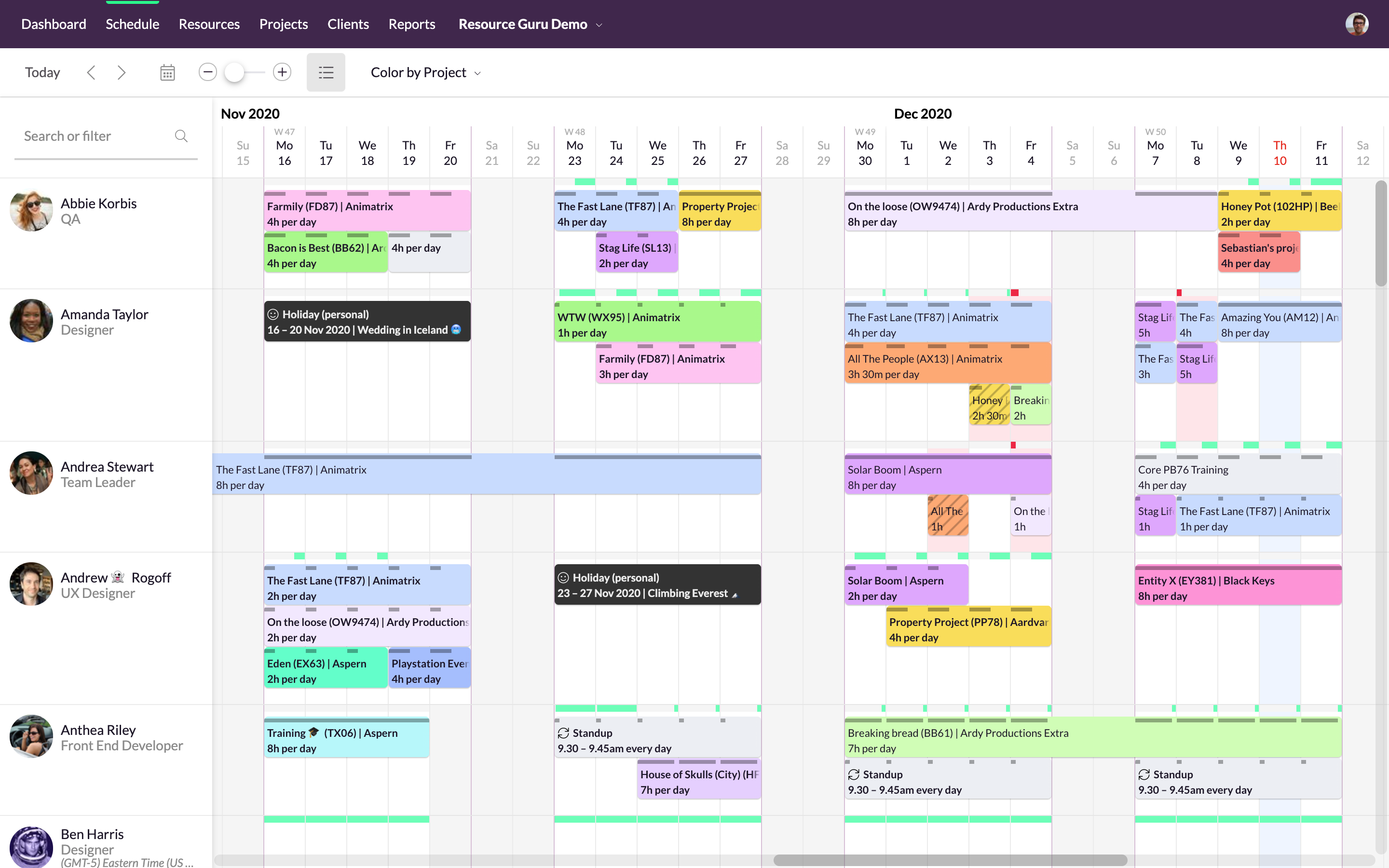
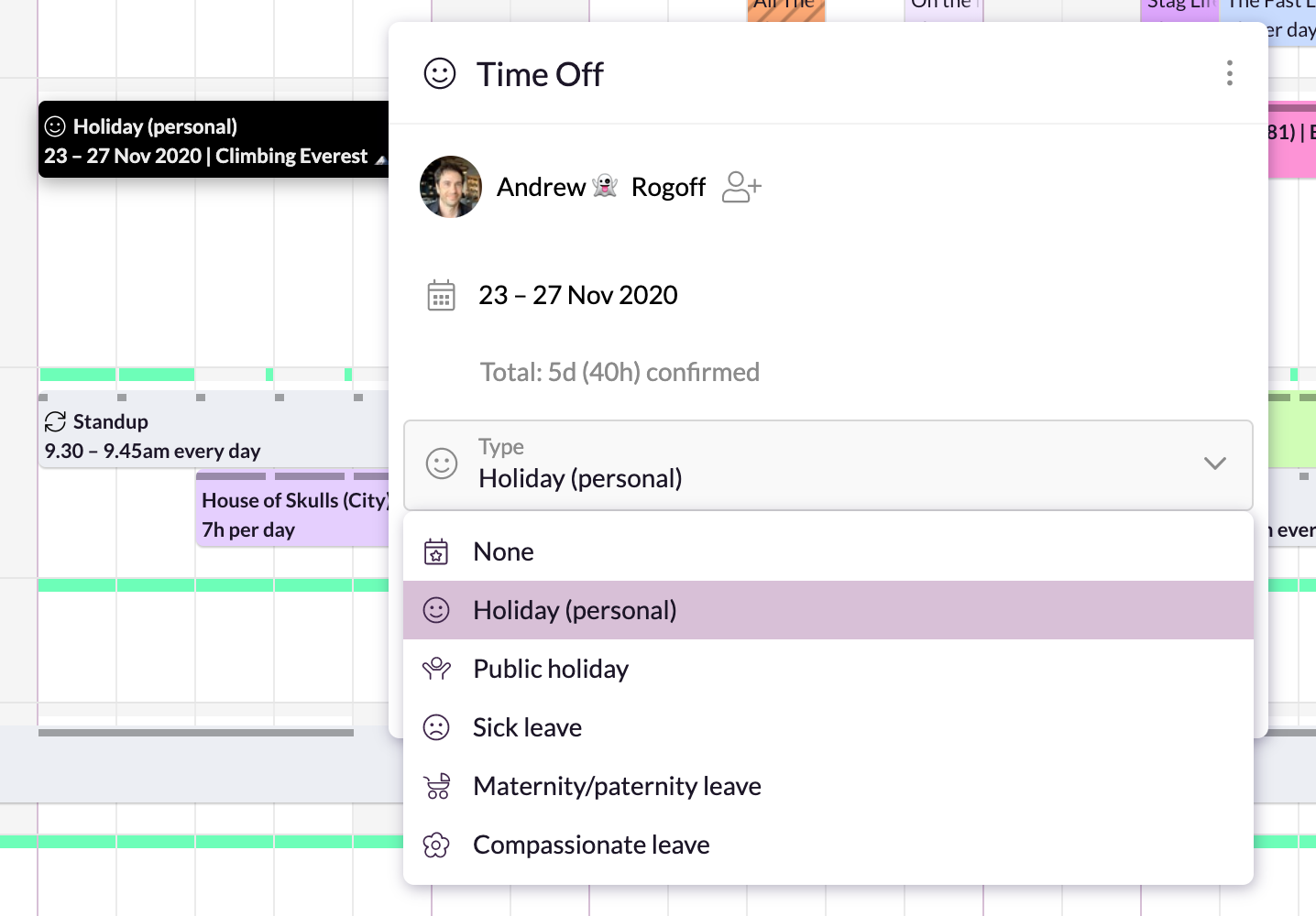
Resource Guru is presented as a fast, flexible way to schedule teams and projects. It enables users to: Manage people, equipment, and meeting rooms in one place Assign work, book time off, and edit schedules in seconds Track availability in real-time and avoid unrealistic workloads Keep a team up-to-date with personal dashboards and daily schedule emails Analyze utilization rates, clients, and projects for more accurate project forecasts and…
$4.16
per month per user
Pricing
Apache OpenOfficeResource Guru
Editions & Modules
No answers on this topic
Grasshopper Plan
$4.16
per user, per month
Blackbelt Plan
$6.65
per user, per month
Master Plan
$10
per user, per month
Offerings
Pricing Offerings
Apache OpenOfficeResource Guru
Free Trial
NoYes
Free/Freemium Version
NoNo
Premium Consulting/Integration Services
NoNo
Entry-level Setup FeeNo setup feeNo setup fee
Additional Details
More Pricing Information
Community Pulse
Apache OpenOfficeResource Guru
Features
Apache OpenOfficeResource Guru
Project Management
Comparison of Project Management features of Product A and Product B
Apache OpenOffice
-
Ratings
Resource Guru
8.8
3 Ratings
13% above category average
Resource Management00 Ratings8.93 Ratings
Scheduling00 Ratings8.63 Ratings
Team Collaboration00 Ratings9.02 Ratings
Professional Services Automation
Comparison of Professional Services Automation features of Product A and Product B
Apache OpenOffice
-
Ratings
Resource Guru
8.0
2 Ratings
3% above category average
Project & financial reporting00 Ratings8.02 Ratings
Best Alternatives
Apache OpenOfficeResource Guru
Small Businesses
Google Workspace
Google Workspace
Score 9.0 out of 10
Stackby
Stackby
Score 8.9 out of 10
Medium-sized Companies
Google Workspace
Google Workspace
Score 9.0 out of 10
InEight
InEight
Score 8.3 out of 10
Enterprises
Microsoft 365 Business Premium
Score 8.9 out of 10
InEight
InEight
Score 8.3 out of 10
All AlternativesView all alternativesView all alternatives
User Ratings
Apache OpenOfficeResource Guru
Likelihood to Recommend
9.9
(20 ratings)
8.0
(3 ratings)
Likelihood to Renew
8.0
(1 ratings)
-
(0 ratings)
Usability
9.0
(4 ratings)
-
(0 ratings)
Support Rating
5.0
(2 ratings)
-
(0 ratings)
Implementation Rating
9.0
(1 ratings)
-
(0 ratings)
User Testimonials
Apache OpenOfficeResource Guru
Likelihood to Recommend
Apache
In my opinion, Apache OpenOffice is best suited for writing, editing and proofreading texts in any language. You can also download additional language packages that really take up little space in your PC's storage. Of course, Apache OpenOffice is comprehensive of spreadsheet-/drawing-/database-related softwares and so on, but I primarily use it for writing and editing my own texts. I don't see any scenarios where it is less appropriate, at least so far.
Read full review
Resource Guru
It is very well suited when different branches of the company reside in different countries or time zones. It allows the project manager to efficiently keep track of the progress of their team members. It reduces the need for intensive calls where the manager asks for an extensive check in and update from each individual person. It also allows the project manager to update tasks and timelines as needed.
Read full review
Pros
Apache
  • The number one strength of OpenOffice is the flexibility it gives. We can open any file type, save any file type - it's pretty much invincible. Even if we're going to work on this in a different program, just being able to open some of these ancient files that we get from local city governments is a huge win for us.
  • It's also administrator friendly - I'll use it a lot on the road because the licensing is so much easier to deal with than trying to check out a license from a server or make sure that everybody has internet connectivity.
  • It just looks pretty! It's legitimately a quality product, the layout looks good, it's not nearly as pushy as "other suites," and for the money it's the best!
Read full review
Resource Guru
  • We can color by client, project, booker for clear picture.
  • There are filters to select particular resources for need of our event.
  • We can easily see booked and free time.
Read full review
Cons
Apache
  • Some people used to Microsoft products can feel it's a little bit old in its style
  • I saves documents in its native format, which is incompatible with MS Word or Excel, unless you change that in the preferences tab
  • The UI is not very pretty
Read full review
Resource Guru
  • lacks real-time logging button
Read full review
Likelihood to Renew
Apache
It is a cheap alternative; however, with Microsoft 365 licenses also dropping significantly, we might opt to go in that direction to maintain uniformity.
Read full review
Resource Guru
No answers on this topic
Usability
Apache
It's good overall, just the UI it's not the prettiest, feels like an older version of MS office, but gets the job done. Once get the hang of it it's easy to use, besides it has great documentation on how to use it and there are many forums that discuss many related topics.
Read full review
Resource Guru
No answers on this topic
Support Rating
Apache
Is there really support? There is a user forum but I do not see much developer input. Support options are limited. The most recent (Sept 2019) version of the product seems to have issues operating under Windows 10, yet there are few recent comments in the community forum, most comments are regarding older versions.
Read full review
Resource Guru
No answers on this topic
Implementation Rating
Apache
We found that it is possible to use Open Office to accomplish everything we need. Some tasks required searching for steps on Google.
Read full review
Resource Guru
No answers on this topic
Alternatives Considered
Apache
Apache OpenOffice is less intense on our computer systems and saves us a ton of financial resources. Since our document creation and editing needs are typical of a small business and not very complex, Apache OpenOffice is sufficient for us. We think that almost any smaller to medium sized business would feel the same way if they don't have a need to make or edit complex documents.
Read full review
Resource Guru
Resource Guru is the only product of it's kind that I have used regularly. Slack is comparable in allowing communication between teams, but doesn't have nearly the functionality of Resource Guru. Resource Guru is the only product that I am aware of that manages tasks and deadlines between various team members, and can be accessed by all members.
Read full review
Return on Investment
Apache
  • Moving to OpenOffice will save the company the cost of 500+ of Microsoft Office licenses in our company.
  • Because it is cross-platform, we could also save 500+ of Microsoft Windows licenses if we move everyone to Linux.
  • On the negative side, the lack of online collaboration and browser support may be an issue when you use clouds like Box, Workboard etc.
Read full review
Resource Guru
  • It's easy to assign work to the resources.
  • Resources can be filtered with various criteria as per the project needs.
  • We get clear picture of assigned tasks and hence project progress.
Read full review
ScreenShots

Resource Guru Screenshots

Screenshot of Simple, drag-and-drop schedulingScreenshot of Focus in on specific groups of resourcesScreenshot of Helps with utilization and capacity managementScreenshot of Manages sick days, holidays, and any other types of time off.Screenshot of A single resource poolScreenshot of Repeats weekly, fortnightly, monthly and yearly