Autodesk Construction Cloud vs. IFS Applications

Overview
ProductRatingMost Used ByProduct SummaryStarting Price
Autodesk Construction Cloud
Score 8.7 out of 10
N/A
The Autodesk Construction Cloud provides a bundle of construction management products to suite various use cases. Current bundles include Construction Operations, Preconstruction, as well as Virtual Design and Construction.N/A
IFS Applications
Score 7.7 out of 10
N/A
IFS Applications is presented by the vendor as an agile application suite that offers enterprise resource planning (ERP), enterprise asset management (EAM) and enterprise project management, handling 4 core processes: Service & Asset Management Full Enterprise Asset Management (EAM), Maintenance Repair and Overhaul (MRO) and Field Service Management (FSM) Manufacturing Enterprise Resource Planning (ERP) with support for process manufacturing, discrete manufacturing…N/A
Pricing
Autodesk Construction CloudIFS Applications
Editions & Modules
No answers on this topic
Offerings
Pricing Offerings
Autodesk Construction CloudIFS Applications
Free Trial
NoNo
Free/Freemium Version
NoNo
Premium Consulting/Integration Services
NoNo
Entry-level Setup FeeNo setup feeNo setup fee
Additional Details
More Pricing Information
Community Pulse
Autodesk Construction CloudIFS Applications
Features
Autodesk Construction CloudIFS Applications
Human Resource Management
Comparison of Human Resource Management features of Product A and Product B
Autodesk Construction Cloud
4.6
4 Ratings
41% below category average
IFS Applications
-
Ratings
Employee demographic data3.73 Ratings00 Ratings
Employment history3.03 Ratings00 Ratings
Job profiles and administration5.64 Ratings00 Ratings
Workflow for transfers, promotions, pay raises, etc.3.83 Ratings00 Ratings
Organizational charting4.73 Ratings00 Ratings
Organization and location management5.73 Ratings00 Ratings
Compliance data (COBRA, OSHA, etc.)5.93 Ratings00 Ratings
Payroll Management
Comparison of Payroll Management features of Product A and Product B
Autodesk Construction Cloud
3.6
3 Ratings
61% below category average
IFS Applications
4.4
3 Ratings
50% below category average
Pay calculation3.43 Ratings7.33 Ratings
Support for external payroll vendors3.53 Ratings00 Ratings
Off-cycle/On-Demand payment3.13 Ratings00 Ratings
Benefit plan administration3.53 Ratings6.83 Ratings
Direct deposit files3.83 Ratings5.83 Ratings
Salary revision and increment management3.83 Ratings00 Ratings
Reimbursement management3.83 Ratings00 Ratings
Asset Management
Comparison of Asset Management features of Product A and Product B
Autodesk Construction Cloud
5.4
4 Ratings
23% below category average
IFS Applications
-
Ratings
Tracking of all physical assets5.44 Ratings00 Ratings
Reporting & Analytics
Comparison of Reporting & Analytics features of Product A and Product B
Autodesk Construction Cloud
6.9
5 Ratings
10% below category average
IFS Applications
8.5
5 Ratings
15% above category average
Dashboards6.75 Ratings8.25 Ratings
Standard reports7.15 Ratings8.15 Ratings
Custom reports7.05 Ratings9.45 Ratings
Data exportability6.95 Ratings00 Ratings
Construction Project & Field Management
Comparison of Construction Project & Field Management features of Product A and Product B
Autodesk Construction Cloud
7.5
8 Ratings
1% above category average
IFS Applications
-
Ratings
Plan distribution & viewing7.57 Ratings00 Ratings
Plan markups & sharing7.18 Ratings00 Ratings
Issue tracking & punchlists8.08 Ratings00 Ratings
Photo documentation7.27 Ratings00 Ratings
Jobsite reports7.46 Ratings00 Ratings
Document sharing8.58 Ratings00 Ratings
RFI tools8.07 Ratings00 Ratings
Collaboration & approvals8.67 Ratings00 Ratings
As-built drawings6.26 Ratings00 Ratings
Mobile app6.26 Ratings00 Ratings
Submittal design and management7.88 Ratings00 Ratings
Checklists7.87 Ratings00 Ratings
Meeting Minutes8.26 Ratings00 Ratings
Specifications7.07 Ratings00 Ratings
Change orders7.06 Ratings00 Ratings
Estimating
Comparison of Estimating features of Product A and Product B
Autodesk Construction Cloud
5.5
3 Ratings
32% below category average
IFS Applications
-
Ratings
Takeoff tools5.73 Ratings00 Ratings
Job costing5.03 Ratings00 Ratings
Cost databases5.03 Ratings00 Ratings
Cost calculator5.43 Ratings00 Ratings
Bid creation6.53 Ratings00 Ratings
Customization
Comparison of Customization features of Product A and Product B
Autodesk Construction Cloud
-
Ratings
IFS Applications
8.7
5 Ratings
16% above category average
API for custom integration00 Ratings8.75 Ratings
Plug-ins00 Ratings8.75 Ratings
Security
Comparison of Security features of Product A and Product B
Autodesk Construction Cloud
-
Ratings
IFS Applications
9.8
5 Ratings
16% above category average
Single sign-on capability00 Ratings10.05 Ratings
Role-based user permissions00 Ratings9.75 Ratings
General Ledger and Configurable Accounting
Comparison of General Ledger and Configurable Accounting features of Product A and Product B
Autodesk Construction Cloud
-
Ratings
IFS Applications
7.5
5 Ratings
2% below category average
Accounts payable00 Ratings9.45 Ratings
Accounts receivable00 Ratings9.45 Ratings
Global Financial Support00 Ratings9.04 Ratings
Primary and Secondary Ledgers00 Ratings9.14 Ratings
Journals and Reconciliations00 Ratings8.84 Ratings
Configurable Accounting00 Ratings8.74 Ratings
Standardized Processes00 Ratings9.04 Ratings
Inventory Management
Comparison of Inventory Management features of Product A and Product B
Autodesk Construction Cloud
-
Ratings
IFS Applications
9.0
5 Ratings
13% above category average
Inventory tracking00 Ratings9.15 Ratings
Automatic reordering00 Ratings9.45 Ratings
Location management00 Ratings9.45 Ratings
Order Management
Comparison of Order Management features of Product A and Product B
Autodesk Construction Cloud
-
Ratings
IFS Applications
6.1
5 Ratings
25% below category average
Pricing00 Ratings8.85 Ratings
Order entry00 Ratings8.35 Ratings
Credit card processing00 Ratings8.24 Ratings
Cost of goods sold00 Ratings7.85 Ratings
Order Orchestration00 Ratings7.54 Ratings
Subledger and Financial Process
Comparison of Subledger and Financial Process features of Product A and Product B
Autodesk Construction Cloud
-
Ratings
IFS Applications
3.8
4 Ratings
65% below category average
Billing Management00 Ratings7.84 Ratings
Cash and Asset Management00 Ratings8.54 Ratings
Travel & Expense Management00 Ratings8.54 Ratings
Budgetary Control & Encumbrance Accounting00 Ratings7.54 Ratings
Period Close00 Ratings9.14 Ratings
Project Financial Management
Comparison of Project Financial Management features of Product A and Product B
Autodesk Construction Cloud
-
Ratings
IFS Applications
2.7
1 Ratings
95% below category average
Budgeting and Forecasting00 Ratings3.01 Ratings
Project Costing00 Ratings6.01 Ratings
Cost Capture00 Ratings5.01 Ratings
Capital Project Management00 Ratings2.01 Ratings
Customer Contract Compliance00 Ratings2.01 Ratings
Project Revenue Recognition00 Ratings2.01 Ratings
Project Execution Management
Comparison of Project Execution Management features of Product A and Product B
Autodesk Construction Cloud
-
Ratings
IFS Applications
3.5
4 Ratings
67% below category average
Project Planning and Scheduling00 Ratings9.64 Ratings
Task Insight for Project Managers00 Ratings8.64 Ratings
Project Mobile Functionality00 Ratings7.64 Ratings
Definable Resource Pools00 Ratings8.44 Ratings
Grants Management
Comparison of Grants Management features of Product A and Product B
Autodesk Construction Cloud
-
Ratings
IFS Applications
9.4
2 Ratings
24% above category average
Award Lifecycle Management00 Ratings9.42 Ratings
Procurement
Comparison of Procurement features of Product A and Product B
Autodesk Construction Cloud
-
Ratings
IFS Applications
3.5
4 Ratings
67% below category average
Bids Analyzed and Compared00 Ratings9.13 Ratings
Contract Authoring00 Ratings8.13 Ratings
Contract Repository00 Ratings8.13 Ratings
Requisitions-to-Purchase Orders Integrated00 Ratings9.34 Ratings
Supplier Management00 Ratings9.34 Ratings
Risk Management
Comparison of Risk Management features of Product A and Product B
Autodesk Construction Cloud
-
Ratings
IFS Applications
4.9
4 Ratings
30% below category average
Risk Repository00 Ratings8.44 Ratings
Control Management00 Ratings8.74 Ratings
Control Efficiency Assessments00 Ratings8.44 Ratings
Issue Detection00 Ratings7.24 Ratings
Remediation and Certification00 Ratings7.84 Ratings
Logistics
Comparison of Logistics features of Product A and Product B
Autodesk Construction Cloud
-
Ratings
IFS Applications
7.5
4 Ratings
9% above category average
Transportation Planning and Optimization00 Ratings8.12 Ratings
Transportation Execution Management00 Ratings8.72 Ratings
Trade and Customs Management00 Ratings7.72 Ratings
Fulfillment Management00 Ratings7.23 Ratings
Warehouse Workforce Management00 Ratings8.44 Ratings
Manufacturing
Comparison of Manufacturing features of Product A and Product B
Autodesk Construction Cloud
-
Ratings
IFS Applications
6.7
4 Ratings
10% below category average
Production Process Design00 Ratings9.13 Ratings
Production Management00 Ratings8.84 Ratings
Configuration Management00 Ratings8.54 Ratings
Work Execution00 Ratings9.14 Ratings
Manufacturing Costs00 Ratings9.44 Ratings
Supply Chain
Comparison of Supply Chain features of Product A and Product B
Autodesk Construction Cloud
-
Ratings
IFS Applications
8.9
4 Ratings
22% above category average
Forecasting00 Ratings8.54 Ratings
Inventory Planning00 Ratings9.44 Ratings
Performance Monitoring00 Ratings9.03 Ratings
Product Lifecycle Management
Comparison of Product Lifecycle Management features of Product A and Product B
Autodesk Construction Cloud
-
Ratings
IFS Applications
4.6
4 Ratings
45% below category average
Proposal Management00 Ratings8.13 Ratings
Product Master Data Management00 Ratings8.53 Ratings
Best Alternatives
Autodesk Construction CloudIFS Applications
Small Businesses
FollowUp CRM
FollowUp CRM
Score 2.1 out of 10
Zoho One
Zoho One
Score 9.3 out of 10
Medium-sized Companies
InEight
InEight
Score 8.4 out of 10
Infor VISUAL
Infor VISUAL
Score 7.4 out of 10
Enterprises
InEight
InEight
Score 8.4 out of 10
24SevenOffice
24SevenOffice
Score 9.0 out of 10
All AlternativesView all alternativesView all alternatives
User Ratings
Autodesk Construction CloudIFS Applications
Likelihood to Recommend
10.0
(1 ratings)
8.4
(5 ratings)
Usability
10.0
(1 ratings)
8.4
(4 ratings)
Support Rating
-
(0 ratings)
1.0
(1 ratings)
User Testimonials
Autodesk Construction CloudIFS Applications
Likelihood to Recommend
Autodesk
Well Suited: Autodesk Construction Cloud is cost effective, user friendly, and robust. They aren't nickel and diming you for use of each module. Once users are on-board with the system it creates an ecosystem that all users "go to first" for an answer. Less Appropriate: As a Developer, there are some hiccups as it is designed more for the GC (general contractor). A template option that is Developer forward would an improvement.
Read full review
IFS
Order to cash processes and scenario are implemented natively in IFS. An HR module exists for career management also (objectives, comportments, training, mobility) but may be improved in terms of workflow validation (e.g. training to validate by a manager) or reporting.
Read full review
Pros
Autodesk
  • Meeting Minutes: Simple to use and adapt from Agenda to Minutes, attach reference documents efficiently, and assign accountability to attendees.
  • Budget/Cost Reporting: There is a learning curve, but the visibility of budgets and costs from inception to closeout is beneficial for the user and makes reporting to investors simple and consistent.
  • Document Management: The version history on drawings "sheets" is very helpful when managing a project through design and construction. Issuing addenda, drawings, or tracking down a change in design is simple.
  • Pay Applications/Change Order Workflow: the customizable workflows along with time stamps of reviews and response makes tracking down status and bottlenecks very easy.
Read full review
IFS
  • It supports the web version in most later versions.
  • It provides various mobile versions of the applications as mobile apps to cater various areas.
  • IFS Applications allows easy configurations of the application without going for costly customization.
  • It covers almost every areas of an industrial company so any other third party applications are minimum.
  • It allows safer and easier built-in options for integrations capabilities.
Read full review
Cons
Autodesk
  • Managing Data
  • The footprint large projects leave within Desktop Connector and Mitigating that data
  • REMOVE "add up to 80 projects" from the Desktop Connector Select Projects Screen! It is better to cycle the project data in/out for syncing latest greatest rather than have users load up their desktop connector full of projects and let data stagnate/have to be racked to update.
Read full review
IFS
  • Handling massive volumes of data can be improved.
Read full review
Likelihood to Renew
Autodesk
I don't make these decisions and its what the company wants
Read full review
IFS
No answers on this topic
Usability
Autodesk
It is overall a very great product in terms of usability. Some features need some work like RFI tools and contruction administration tools. As the product develops I imagine these becoming more important and easier to use
Read full review
IFS
The system is very difficult to use, overly complex, and difficult to learn. It also has limitations that are hard to overcome.
Read full review
Reliability and Availability
Autodesk
5 major outages in the last year, some on days of major deliverables or deadlines... dependent upon AWS
Read full review
IFS
No answers on this topic
Performance
Autodesk
The data mitigation is complete garbage. Any cloud collaborated model takes 2x to load in the Autodesk Construction Cloud environment that if it was saved locally or to on prem servers. We had our systems and bandwidth all evaluated to be applicable but the data downloads and sequencing through Desktop Connector leaves much to be desired.
Read full review
IFS
No answers on this topic
Support Rating
Autodesk
Autodesk staff intervention often required to support IT when normal installs and direction was erroneous
Read full review
IFS
We have been unable to get answers to our questions, solutions to our problems, and they don't seem interested in working in the construction industry.
Read full review
In-Person Training
Autodesk
Great to have hands on folks to answer questions. Live training worked better for real time scenarios.
Read full review
IFS
No answers on this topic
Online Training
Autodesk
Good as any other online content, not incredible. There was a cost associated with this training
Read full review
IFS
No answers on this topic
Implementation Rating
Autodesk
Be prepared for nothing to work originally, and support staff to fight change and be cumbersome at properly learning how to use in my opinion.
Read full review
IFS
No answers on this topic
Alternatives Considered
Autodesk
Procore's user interface is not as user-friendly. Next steps are not as obvious and the overall graphic design is more old-school. I do however like how Procore lists the specific issues that you are assigned on the home page. Procore can be more difficult to navigate and it's hard to find attachments.
Read full review
IFS
IFS Applications is based on Agile Technology which allows organizations to reconfigure user interface as per user requirements and make it user-friendly. Other applications are lagging on many fronts like User Interface, Online help document availability, Implementation methodology, and post-implementation expenses.
Read full review
Contract Terms and Pricing Model
Autodesk
Required yearly upgrades and contracts a opposed to one-time purchases
Read full review
IFS
No answers on this topic
Scalability
Autodesk
Not applicable/harder to implement across larger workforces or large-scale projects
Read full review
IFS
No answers on this topic
Professional Services
Autodesk
They were attentive and thorough when their software releases caused errors
Read full review
IFS
No answers on this topic
Return on Investment
Autodesk
  • Make us easier to manage files
  • Coordination model more easier
  • Keep internal file secret to external by managing access to our Autodesk Construction Cloud system
Read full review
IFS
  • Reporting is now centralized and managed. Previously, reports were outside the information systems and there was a risk of incoherence.
  • Accounting controls are now in place on the overall processes, including production, which helped the company to reduce closing periods or to produce more easily official mandatory accounting files yearly.
  • Interfaces between the CRM forecast tool and IFS helped to keep the tools in sync, and to decrease the processing times prior to production launch.
Read full review
ScreenShots

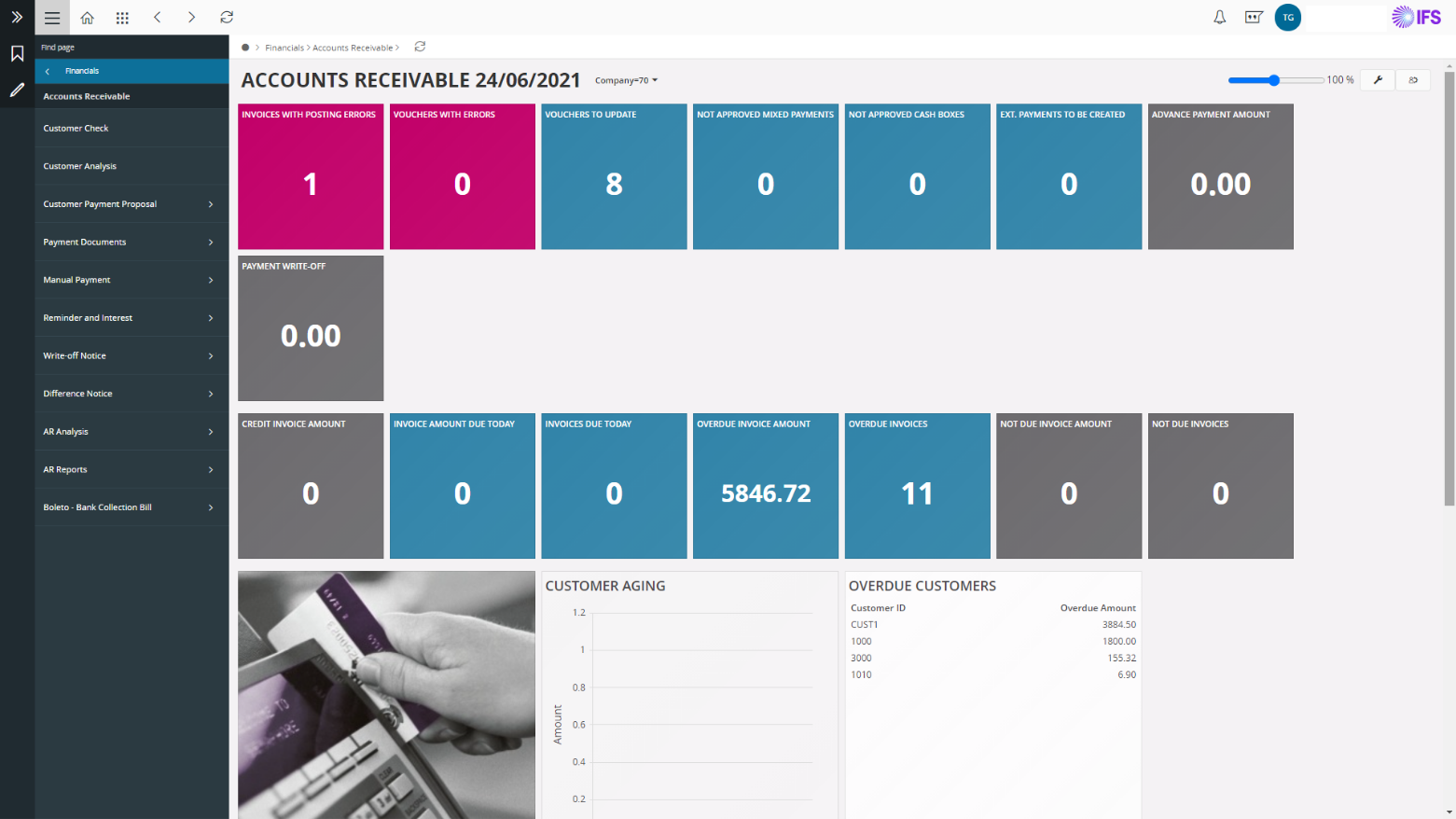
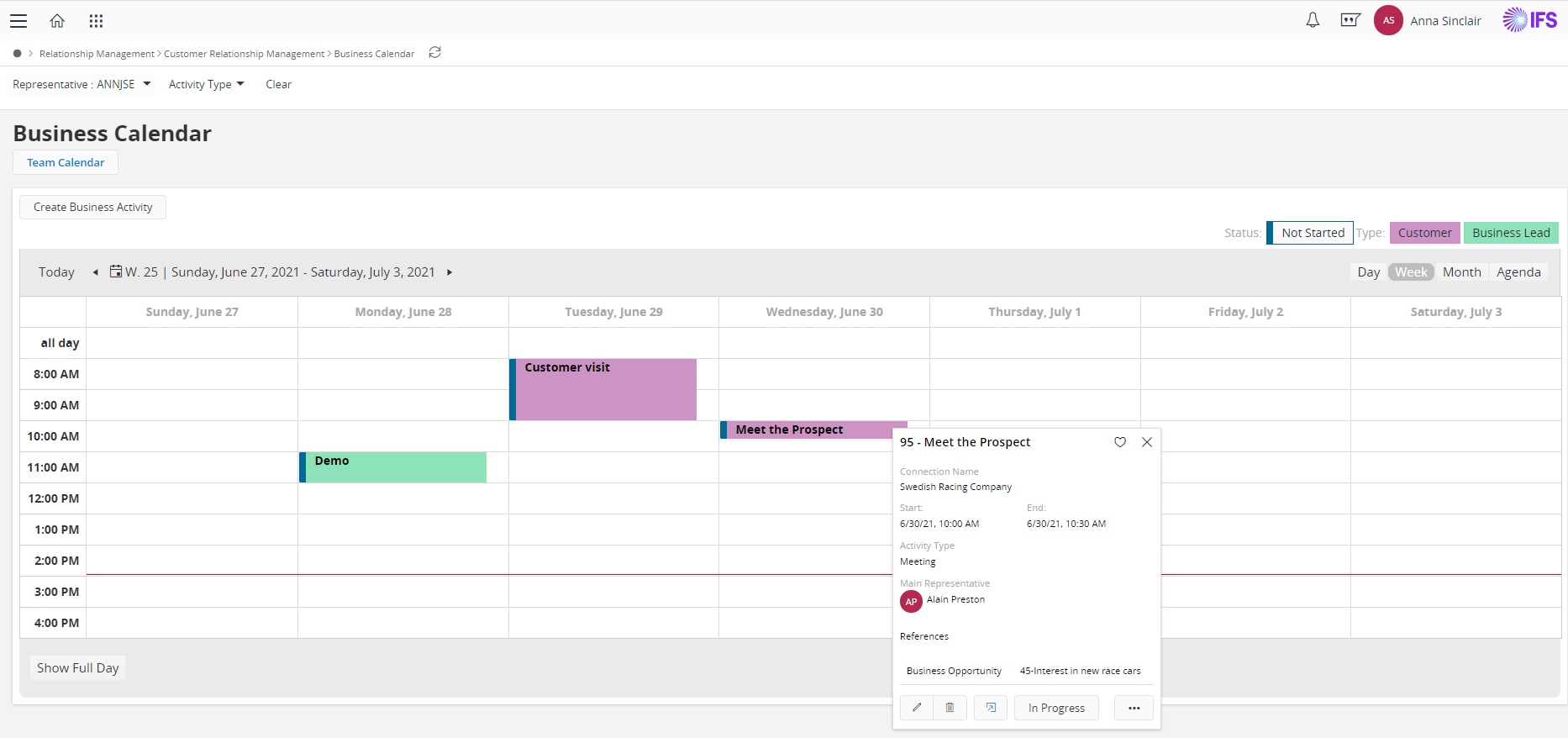
IFS Applications Screenshots

Screenshot of Screenshot of Screenshot of Screenshot of Screenshot of