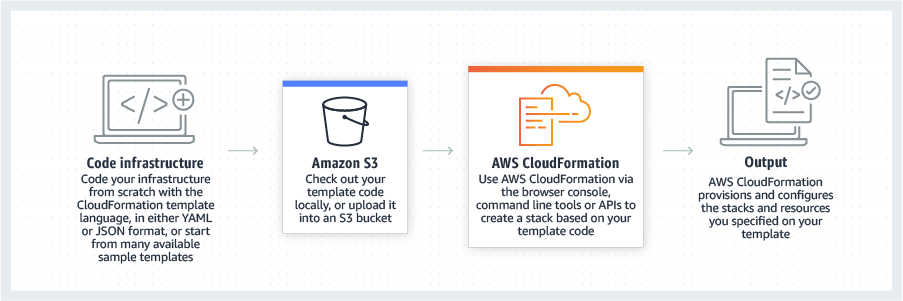
AWS CloudFormation gives developers and systems administrators a way to create and manage a collection of related AWS resources, provisioning and updating them in a predictable fashion. Use AWS CloudFormation’s sample templates or create templates to describe the AWS resources, and any associated dependencies or runtime parameters, required to run an application. Users don’t need to figure out the order for provisioning AWS services or the subtleties of making those dependencies work.…
$0
Hitachi Enterprise Cloud
Score 7.0 out of 10
N/A
Hitachi Vantara offers the Hitachi Enterprise Cloud, an infrastructure-as-a-service platform. Hitachi provides a full portfolio of integrated hardware, software and enablement services designed to bring a pre-engineered level of efficiency and predictability to creating a cloud platform.
N/A
Pricing
AWS CloudFormation
Hitachi Enterprise Cloud
Editions & Modules
Free Tier - 1,000 Handler Operations per Month per Account
$0.00
Handler Operation
$0.0009
per handler operation
No answers on this topic
Offerings
Pricing Offerings
AWS CloudFormation
Hitachi Enterprise Cloud
Free Trial
Yes
No
Free/Freemium Version
Yes
No
Premium Consulting/Integration Services
Yes
No
Entry-level Setup Fee
No setup fee
No setup fee
Additional Details
There is no additional charge for using AWS CloudFormation with resource providers in the following namespaces: AWS::*, Alexa::*, and Custom::*. In this case you pay for AWS resources (such as Amazon EC2 instances, Elastic Load Balancing load balancers, etc.) created using AWS CloudFormation as if you created them manually. You only pay for what you use, as you use it; there are no minimum fees and no required upfront commitments.
When you use resource providers with AWS CloudFormation outside the namespaces mentioned above, you incur charges per handler operation. Handler operations are create, update, delete, read, or list actions on a resource.
—
More Pricing Information
Community Pulse
AWS CloudFormation
Hitachi Enterprise Cloud
Features
AWS CloudFormation
Hitachi Enterprise Cloud
Infrastructure-as-a-Service (IaaS)
Comparison of Infrastructure-as-a-Service (IaaS) features of Product A and Product B
I still give it an 8 because it's one of those tools that just quietly does the heavy lifting for you but it can really test your patience when it breaks esp with deep nested stacks. It's perfect for projects where we need clean consistent environments every time. It's less ideal for quick experimental setups like new EC2 configs or Lambda permission tweaks.
1) If you are gathering lots of data from many different points and transforming that data into something customized, and you need it secure yet accessible, this is a great option. 2) If you are looking for a platform and not just a service provider, this would be a great option. As a platform, there is a one-stop-shop feeling that gets you some better customer service and performance. But it also locks you into one provider, so don’t jump in if you feel like you’ll want a lot of flexibility. 3) Building or running VMware is really what this platform is all about. If you’re creating an app drawing from some complex data/sources, it’s an easier go with this tool than most others.
It fills a niche that was needed before we as a company fully embraced the cloud with Azure. It was a great introduction to the cloud and there are some features I wish were more readily available with some of our Azure tools. Staying on top of your expenses is much harder without the transparency Hitachi provides.
It allows the small team managing it to simplify cloud operations using prebuilt computing and storage templates. Very easy to monitor, manage and optimize cloud operations.
Pre-Engineered, turnkey solutions with prebuilt services make it quick and easy to select the service needed for each app. With many different suppliers, we cater to many different connectors.
Their ability to offer a public cloud solution that feels like a private cloud solution is a great feature, but not one that is easily understood outside of someone using the tool. I think they need more training and marketing around what they can do for cloud-native development.
I think they are lacking a solution to play in other playgrounds easily. Many of their offerings are better than what Azure provides, so I think there is room for them to leverage Azure size with customized, personalized features.
They really need something big to set them apart from the larger players in this space. I think of Snowflake with their amazing pricing model and the “oops!” button that undoes serious accidental deletes. Something like that would grow the user base and make it a major player.
It's easy enough to get a shared template & apply it. You don't even have to download-then-upload or copy-and-paste, a publicly-accessible url works.
Diving deeper, it has enough powerful capabilities to make the life of a platform / DevOps engineer bearable.
However, you need equally deep knowledge to troubleshoot issues, when they inevitably pop up. This is the same for all IaC technologies, as they are additional abstraction layers on top of the native API provided by the cloud providers.
Cloning a virtual machine creates a virtual machine that is cloning a virtual machine creates a virtual machine that is a copy of the original. The new virtual machine is configured with the same virtual hardware, installed software, and other properties that were configured for the original virtual machine. For information about persistent memory and PMem storage, see the vSphere Cloning a virtual machine creates a virtual machine that is a copy of the original. The new virtual machine is configured with the same virtual hardware, installed software, and other properties that were configured for the original virtual machine. For information. Management guide.For information copy of the original. The new virtual Cloning virtual machine creates a virtual machine that is a copy of the original. The new virtual machine is configured with the same virtual hardware, installed software, and other properties that were configured for the original virtual machine. For information about persistent memory and PMem storage, see the vSphere Resource Management Guide. For information is configured with the same virtual hardware, installed software, and other properties that were configured for the original virtual machine. For information about persistent memory and PMem storage, see the vSphere Resource Management Guide. For information
Hitachi Enterprise Cloud is a pleasant surprise, offering better management and control of your cloud containers and VMware. It is a platform and contains all you need to get going, so there is great appeal in smaller companies and isolated divisions/departments in larger companies. If I were managing a small group with a specific endpoint I would no doubt choose a solution like this, but being a large corporation we tend to drive towards larger solutions with internal competencies to support those larger roll-outs.
The positive pricing aspect has been with the rate card and compute pricing transparency, being better able to manage the budget.
It is a small solution for us, so we are probably not realizing the potential savings we could get by rolling all our corporate cloud work into a single solution, but it is also good to keep multiple irons in the fire, so to speak.
The implementation has done very well in a small, controlled atmosphere. So while the ROI may not have been as high as we’d like to see, the success of the project has made it valuable none the less.