Azure Analysis Services vs. Qlik Cloud Analytics (Qlik Sense)

Overview
ProductRatingMost Used ByProduct SummaryStarting Price
Azure Analysis Services
Score 8.6 out of 10
N/A
Azure Analysis Services delivers enterprise-grade BI semantic modeling capabilities with the scale, flexibility, and management benefits of the cloud. Azure Analysis Services helps transform complex data into actionable insights. Azure Analysis Services is built on the analytics engine in Microsoft SQL Server Analysis Services.N/A
Qlik Cloud Analytics (Qlik Sense)
Score 8.3 out of 10
N/A
Qlik Sense® is a self-service BI platform for data discovery and visualization. It supports a full range of analytics use cases—data governance, pixel-perfect reporting, and collaboration. Its Associative Engine indexes and connects relationships between data points for creating actionable insights.
$200
per month
Pricing
Azure Analysis ServicesQlik Cloud Analytics (Qlik Sense)
Editions & Modules
No answers on this topic
Starter
$200
per month
Standard
$825
per month
Premium
$2750
per month
Qlik Sense (On-Premise)
Contact Sales
Offerings
Pricing Offerings
Azure Analysis ServicesQlik Cloud Analytics (Qlik Sense)
Free Trial
NoNo
Free/Freemium Version
NoNo
Premium Consulting/Integration Services
NoNo
Entry-level Setup FeeNo setup feeNo setup fee
Additional Details
More Pricing Information
Community Pulse
Azure Analysis ServicesQlik Cloud Analytics (Qlik Sense)
Considered Both Products
Azure Analysis Services
Chose Azure Analysis Services
Microsoft Azure Analysis Services is the best tool available in market in present scenario and it justifies it's role. The solution is packed with lot of functionalities which helps in taking useful decision. The integration and deployment part is easy and need less time and …
Chose Azure Analysis Services
Azure Data Factory
Chose Azure Analysis Services
The best thing about it is the ability to create a query and drill down the data to a more granular level when needed. The best thing about Azure Analysis Services is. It provides secured access anytime from anywhere, it also provides REST API for this, which is very easy to …
Chose Azure Analysis Services
The platform has vast number of features and modules. The UI is sleek and once you get to use to it, you will be able to do a lot of stuff. Also support for data sources is more in Azure Analysis Services.
Chose Azure Analysis Services
We have used the IBM cloud which was truly a specific nightmare for our team. User experience, layout, and design is big for us as it understandably is with many people. Even if any type of program can technically do all that we need it to, we still found our team will not be …
Chose Azure Analysis Services
I had used SAP at a different Organization and the organization where I used Azure Analysis Services was already having it and hence I had to use it. Both have their own sets of pros and cons to look into. To be honest I liked SAP more than Azure Analysis Services
Chose Azure Analysis Services
A different UIUX between both products, but some would say Cloud Platform is easier to be used. Performance-wise both functions to their fullest ability so it boils down to the company's decision to select which products to be implemented. Would definitely not go wrong choosing …
Qlik Cloud Analytics (Qlik Sense)
Chose Qlik Cloud Analytics (Qlik Sense)
The main difference between Qlik and power bi is related to the integration of the tool into the Microsoft world, which can be useful for big companies already equipped with several ms systems. On the other hands, Qlik is simpler, more straightforward and easier to use with a …
Chose Qlik Cloud Analytics (Qlik Sense)
Microsoft Power BI and IBM Cognos Analytics
Chose Qlik Cloud Analytics (Qlik Sense)
We use both Qlik Sense and QlikView. Both bring valué. However, due to simpler development Qlik Sense is the main tool.
Chose Qlik Cloud Analytics (Qlik Sense)
Qlik Sense cost of licensing is cheaper compared with other tools which always gives an upper edge in analytics industry with good functionality. More enhanced level of security with better user community group available to discuss about new updates. Understanding of Qlik Sense …
Chose Qlik Cloud Analytics (Qlik Sense)
We use Microsoft Power BI too as a BI tool, in my point of view, Qlik Sense's ETL is much better than PowerBi. In another side, PowerBI learning curve is small than Qlik Sense, especially the PowerBI Desktop.
Chose Qlik Cloud Analytics (Qlik Sense)
Kibana is data visualization tool in Elastic Stack to visualize and analyze Real Time Logs Capture.
It captures Live Streaming data and helps to detect any anomalies, error and bugs, monitoring aspects of any service/ IOT Device.
Chose Qlik Cloud Analytics (Qlik Sense)
Sometimes as competing solutions, other times as completing one another.
Chose Qlik Cloud Analytics (Qlik Sense)
The customization of the platform opens up plenty of other options depending on the use cases. The API layer is incredibly rich and makes integration of Qlik based visualization into web pages a simple and effective pattern. It's been very easy to use with a great community …
Chose Qlik Cloud Analytics (Qlik Sense)
Both are good data visualisation platforms; with certain applications where one is better than the other
Chose Qlik Cloud Analytics (Qlik Sense)
Qlik Sense offers a broad variety of functions that are not easily achievable using PowerBi. However, I was not involved with the selection.
Chose Qlik Cloud Analytics (Qlik Sense)
Qlik Sense is a fast tool to implement; you can have a functional dashboard in a few days, and the ETL processes are quite easy to build it. You can have the ROI in a short period of time.
Chose Qlik Cloud Analytics (Qlik Sense)
Qlik Sense comes out as a superior product as well as more cost efficient than some of the other products we evaluated as a part of our Enterprise Business Intelligence stack. It offers unified view of our data and extensibility. Qlik Sense being the most interactive …
Chose Qlik Cloud Analytics (Qlik Sense)
Qlik Sense is relatively cheaper and more futuristic
Chose Qlik Cloud Analytics (Qlik Sense)
Qlik Sense is one of the best reporting systems. It is stronger than PBI and Tableau when speaking about complex KPIs. It is really similar to Microstrategy Analytics when you speak about obtained results, but it is easier to use, especially as it is more code-based. But is it …
Chose Qlik Cloud Analytics (Qlik Sense)
Microsoft Power BI
Chose Qlik Cloud Analytics (Qlik Sense)
Qlik Sense can easily integrate multiple data models to visualize customer data. Tableau is easy to use—perhaps more manageable than Qlik—but expensive. Microsoft BI was chosen because it was similar to previously used
Chose Qlik Cloud Analytics (Qlik Sense)
We originally went with Qlik Sense because the desktop version used to be free for single users and was a very good proposition for us (we are a non-profit with a limited budget). However, from what I see, the functionality is comparable, and Qlik Sense stacks up well.
Chose Qlik Cloud Analytics (Qlik Sense)
On the long run we will not stay with Qlik as the management chose to switch to the Microsoft suite. We think that this will not impact us as a team as both tools are worthy competitors
Chose Qlik Cloud Analytics (Qlik Sense)
As soon as you want to pull data from two or more separate tables, Qlik Sense leaves the rest in the dust, since it does not require joins or complex transformations. Zoho CRM analytics are limited to the data located in the product itself. No external tables can be combined.
Chose Qlik Cloud Analytics (Qlik Sense)
Other tools were not able to handle complex business requirements and performance was not too good with very huge volume data. we were required to maintain history, time-based data backups, and snapshots. Also, some of the tools were too costly compare to Qlik [Sense] solutions.
Chose Qlik Cloud Analytics (Qlik Sense)
QlikView is still KING.
Chose Qlik Cloud Analytics (Qlik Sense)
We had a QlikView deployment and it made sense to utilize what was existing for our Qlik Sense use.
Chose Qlik Cloud Analytics (Qlik Sense)
When it comes to working with large datasets out of the box, Qlik in my opinion is unrivaled amongst the competitor. However, the overall user experience and customization options available to developers require a lot of work. When compared to other options on the market, …
Features
Azure Analysis ServicesQlik Cloud Analytics (Qlik Sense)
BI Standard Reporting
Comparison of BI Standard Reporting features of Product A and Product B
Azure Analysis Services
8.6
Ratings
5% above category average
Qlik Cloud Analytics (Qlik Sense)
7.9
Ratings
4% below category average
Pixel Perfect reports8.80 Ratings8.30 Ratings
Customizable dashboards8.70 Ratings7.90 Ratings
Report Formatting Templates8.50 Ratings7.40 Ratings
Ad-hoc Reporting
Comparison of Ad-hoc Reporting features of Product A and Product B
Azure Analysis Services
8.8
Ratings
9% above category average
Qlik Cloud Analytics (Qlik Sense)
7.0
Ratings
14% below category average
Drill-down analysis8.90 Ratings8.00 Ratings
Formatting capabilities8.70 Ratings6.10 Ratings
Integration with R or other statistical packages8.70 Ratings6.10 Ratings
Report sharing and collaboration9.00 Ratings7.80 Ratings
Report Output and Scheduling
Comparison of Report Output and Scheduling features of Product A and Product B
Azure Analysis Services
9.0
Ratings
10% above category average
Qlik Cloud Analytics (Qlik Sense)
7.7
Ratings
6% below category average
Publish to Web9.00 Ratings6.10 Ratings
Publish to PDF8.90 Ratings7.10 Ratings
Report Versioning9.30 Ratings7.90 Ratings
Report Delivery Scheduling9.00 Ratings8.80 Ratings
Delivery to Remote Servers8.50 Ratings8.30 Ratings
Data Discovery and Visualization
Comparison of Data Discovery and Visualization features of Product A and Product B
Azure Analysis Services
9.0
Ratings
12% above category average
Qlik Cloud Analytics (Qlik Sense)
6.7
Ratings
17% below category average
Pre-built visualization formats (heatmaps, scatter plots etc.)9.40 Ratings6.70 Ratings
Location Analytics / Geographic Visualization9.00 Ratings8.30 Ratings
Predictive Analytics8.60 Ratings6.10 Ratings
Pattern Recognition and Data Mining00 Ratings5.70 Ratings
Access Control and Security
Comparison of Access Control and Security features of Product A and Product B
Azure Analysis Services
9.3
Ratings
9% above category average
Qlik Cloud Analytics (Qlik Sense)
7.7
Ratings
10% below category average
Multi-User Support (named login)9.20 Ratings6.60 Ratings
Role-Based Security Model9.30 Ratings8.40 Ratings
Multiple Access Permission Levels (Create, Read, Delete)9.30 Ratings7.40 Ratings
Single Sign-On (SSO)9.40 Ratings8.90 Ratings
Report-Level Access Control00 Ratings7.40 Ratings
Mobile Capabilities
Comparison of Mobile Capabilities features of Product A and Product B
Azure Analysis Services
8.6
Ratings
10% above category average
Qlik Cloud Analytics (Qlik Sense)
7.5
Ratings
3% below category average
Responsive Design for Web Access8.40 Ratings8.00 Ratings
Mobile Application9.30 Ratings8.00 Ratings
Dashboard / Report / Visualization Interactivity on Mobile8.30 Ratings9.00 Ratings
Application Program Interfaces (APIs) / Embedding
Comparison of Application Program Interfaces (APIs) / Embedding features of Product A and Product B
Azure Analysis Services
8.8
Ratings
13% above category average
Qlik Cloud Analytics (Qlik Sense)
8.4
Ratings
8% above category average
REST API8.90 Ratings8.00 Ratings
Javascript API8.70 Ratings8.40 Ratings
iFrames8.80 Ratings8.00 Ratings
Java API8.70 Ratings8.40 Ratings
Themeable User Interface (UI)8.30 Ratings8.40 Ratings
Customizable Platform (Open Source)9.30 Ratings8.90 Ratings
Best Alternatives
Azure Analysis ServicesQlik Cloud Analytics (Qlik Sense)
Small Businesses
Yellowfin
Yellowfin
Score 8.6 out of 10
Yellowfin
Yellowfin
Score 8.6 out of 10
Medium-sized Companies
Reveal
Reveal
Score 10.0 out of 10
Reveal
Reveal
Score 10.0 out of 10
Enterprises
Kyvos Semantic Layer
Score 9.5 out of 10
Kyvos Semantic Layer
Score 9.5 out of 10
All AlternativesView all alternativesView all alternatives
User Ratings
Azure Analysis ServicesQlik Cloud Analytics (Qlik Sense)
Likelihood to Recommend
9.0
(0 ratings)
8.3
(0 ratings)
Likelihood to Renew
-
(0 ratings)
8.4
(0 ratings)
Usability
-
(0 ratings)
8.3
(0 ratings)
Support Rating
-
(0 ratings)
7.3
(0 ratings)
In-Person Training
-
(0 ratings)
9.1
(0 ratings)
Online Training
-
(0 ratings)
9.1
(0 ratings)
Implementation Rating
-
(0 ratings)
7.3
(0 ratings)
Vendor post-sale
-
(0 ratings)
9.1
(0 ratings)
Vendor pre-sale
-
(0 ratings)
9.1
(0 ratings)
User Testimonials
Azure Analysis ServicesQlik Cloud Analytics (Qlik Sense)
Likelihood to Recommend
Microsoft Azure Analysis Services is best tool which is well suited for many type of scenarios. Like if the organization is dealing with a lot of critical data and need some better analysis and insights for that data then tool serves the best. It helps in depth analysis and getting the desired result which helps in making big decision for any organization. We can create role based access for sensitive data hence it is very helpful for security point of view. Helps in making the business more productive and taking decision based on facts. It is less appropriate for scenarios like where data amount is less and the solution is very costly and someone can get a cheaper solution. Also not suited for environment where user directory do not exist because without the help of user directory role could not be created hence proper utilization of this tool will not be possible.
Read full review
Qlik Sense is a program whose purpose is to greatly improve all your operations and use of all data in an organic way. The mission will always be to increase the economic and commercial processes of the company in a short time. I recommended it for its high technology, which was Created for this area, the results are successful. We have noticed how it has increased relationships with our clients thanks to the credibility and security that we provide.
Read full review
Pros
  • You can import data from various sources (i.e. Oracle, Azure SQL...)
  • You can store data models
  • You can elaborate data and create insights
  • Perfect integration with Excel and Power BI
Read full review
  • Self-Service Visualization and Discovery
  • Fullstack BI from ETL to Visualization, its built-in ETL engine can transform disparate data sets into a common data structure
  • Uses HTML5 based responsive design which visualization automatically adapt to the screen size and orientation of the users device
  • Actively engaged community and resources to help you learn this software in the best possible manner
Read full review
Cons
  • Microsoft Azure Analysis Services is very costly solution and in that price we can get some better business intelligence tool with lot more of capabilities
  • The dashboard or we can say user interface is complex and need time to understand and gain expertise in order for proper working.
  • It needs continuation monitoring which is sometime a big task.
  • Sometime, the tool shows unusual behavior and become unstable, so we need to clear temp files for proper functioning.
Read full review
  • Not a lot of room for customization as we were used to in QlikView
  • UI and default navigation can be very clunky and not user friendly
  • Although the backend is fantastic, the front end experience leaves a lot to be desired. As a developer you don't have a lot of options to customized your app unless you turn to Javascript, CSS and HTML. This is not a common stack you would find in most BI developers
Read full review
Likelihood to Renew
No answers on this topic
Qlik Sense is a constantly improving it's software and working with its' users to make it better. They are great at keeping their users informed of progress and care about delivering a quality product
Read full review
Usability
No answers on this topic
Qlik Sense has a better and easy to learn user interface compared with other analytics tool which always help us to create regular and adhoc reports within the stipulated time frame and can be easily refreshed at a scheduled time and sent to multiple stakeholders for timely update regarding the Key metrics indicator.
Read full review
Support Rating
No answers on this topic
Qlik is great for companies with lots of business domains and departments because it scales well, especially if data that is reported is saved in SQL and similar structures. Its ease of use and good UI enables business units to create and manage their own reports. That removes a great burden of creating and managing/modifying these pages from the IT team. Overall, it's a win-win for both IT and business units.
Read full review
In-Person Training
No answers on this topic
The instructor was very knowledgeable.
Read full review
Online Training
No answers on this topic
The online instructor was very knowledgeable.
Read full review
Implementation Rating
No answers on this topic
Hire Qlik consultants. It's better done by them or with their aid.
Read full review
Alternatives Considered
We have used the IBM cloud which was truly a specific nightmare for our team. User experience, layout, and design is big for us as it understandably is with many people. Even if any type of program can technically do all that we need it to, we still found our team will not be as motivated or satisfied using it compared to something more visually appealing and smooth.
Read full review
The customization of the platform opens up plenty of other options depending on the use cases. The API layer is incredibly rich and makes integration of Qlik based visualization into web pages a simple and effective pattern. It's been very easy to use with a great community made up of professionals. Qlik Sense has introduces artificial Intelligence into my data visualization and reporting activity.
Read full review
Return on Investment
  • Website analytics; We have realized so many benefits like traffic analysis, CRM, click-through funnels, and many more.
  • Aas allows us to do complex calculations and aggregations at slight efforts. It accommodates DAX expression, which in return is simple to apply.
Read full review
  • The impact has undoubtedly been positive, it is difficult to quantify it, however in terms of effectiveness or efficiency I give it a 90%.
  • I don't give it 100% because to use the complete package you have to pay, and it's not that cheap and on the other hand because it has some deficiencies, such as technical support and some issues like windows that are not so friendly and easy to work with.
  • Still, I can't stop using it.
Read full review
ScreenShots

Qlik Cloud Analytics (Qlik Sense) Screenshots

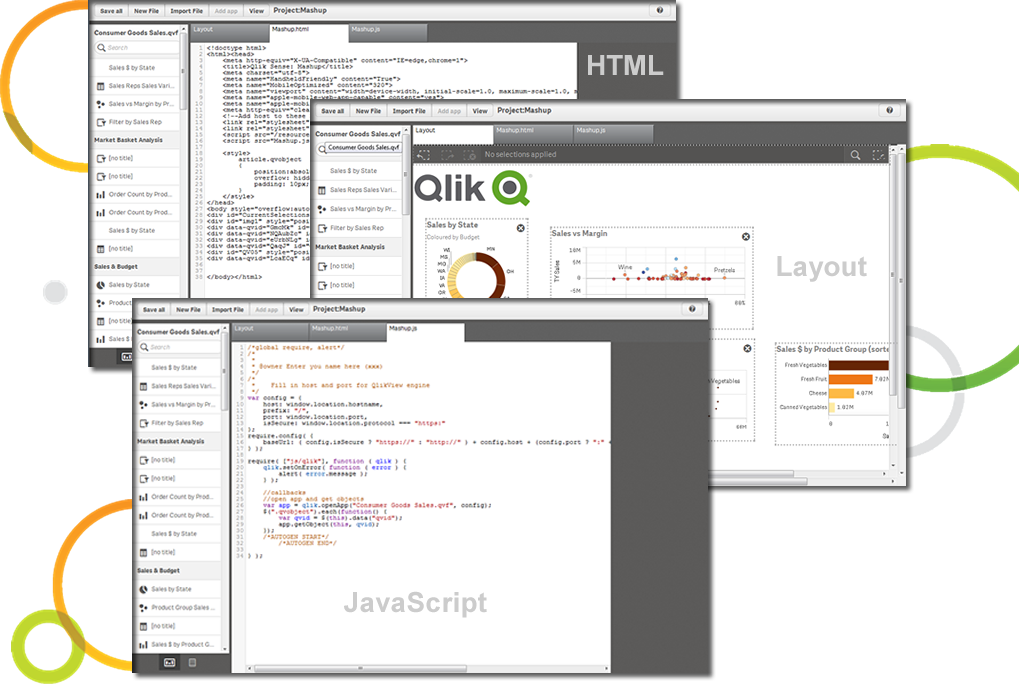
Screenshot of Qlik Sense Cash Flow DashboardScreenshot of Qlik Sense Global Smart SearchScreenshot of Qlik Sense Smart Data Compression - Get immediate insight on large dataScreenshot of Extend, mix and mash-up with our APIsScreenshot of Add "External data" with Qlik DataMarket - Data as a ServiceScreenshot of Visualization Bundle