TrustRadius: an HG Insights company

Beeline Extended Workforce Platform vs. Teamsly

Save this comparison

Save this comparison

Add Product

Recommended Comparisons

    Overview
    ProductRatingMost Used ByProduct SummaryStarting Price

    Beeline Extended Workforce Platform

    Score7.4 out of 10
    N/ABeeline VMS is a vendor management system from Beeline headquartered in Jacksonville, Florida, an independently operated division of global HR company Adecco, for managing a contingent workforce.N/A

    Teamsly

    N/AN/ATeamsly is a cloud-based workforce management platform for hourly, shift-based, deskless, frontline, and field teams. Available on the web, iOS, and Android, Teamsly brings employee scheduling, job and crew scheduling, time and attendance, GPS time tracking, timesheets, team communication, task management, digital forms, audits, employee training, paid time off, labor-cost management, and workforce reporting into one connected system. The platform is designed to…

    $29

    per month per Location

    Pricing
    Beeline Extended Workforce PlatformTeamsly
    Editions & Modules
    No answers on this topic
    Free
    $0
    per month Per Location
    Basic
    $29
    per month Per Location
    All-In-One
    $59
    per month Per Location
    Offerings
    Pricing Offerings
    Beeline Extended Workforce PlatformTeamsly
    Free Trial
    NoYes
    Free/Freemium Version
    NoYes
    Premium Consulting/Integration Services
    NoNo
    Entry-level Setup FeeNo setup feeNo setup fee
    Additional Details—Teamsly uses flat per-location pricing rather than per-employee pricing. The Free plan supports one location with up to 10 employees. Basic and All-In-One paid plans include unlimited employees, helping businesses maintain predictable costs as their teams grow. Basic costs $29 per location per month with monthly billing or $24 per location per month when billed annually. All-In-One costs $59 per location per month with monthly billing or $49 per location per month when billed annually. Both paid plans include a 30-day free trial with no credit card required. Teamsly does not charge setup fees or require a locked-in contract, and customers can upgrade, downgrade, or change plans as their operational needs evolve.
    More Pricing Information
    Best Alternatives
    Beeline Extended Workforce PlatformTeamsly
    Small Businesses
    No answers on this topic
    Deputy
    Score8.6 out of 10
    Medium-sized Companies
    SAP Fieldglass
    Score8.2 out of 10
    Harri
    Score6 out of 10
    Enterprises
    SAP Fieldglass
    Score8.2 out of 10
    Enterprise eTIME, by ADP (discontinued)
    Score10 out of 10
    All AlternativesView all alternativesView all alternatives
    User Ratings
    Beeline Extended Workforce PlatformTeamsly
    Likelihood to Recommend
    8.0
    (10 ratings)
    -
    (0 ratings)
    Likelihood to Renew
    6.0
    (1 ratings)
    -
    (0 ratings)
    Usability
    7.0
    (2 ratings)
    -
    (0 ratings)
    Support Rating
    10.0
    (1 ratings)
    -
    (0 ratings)
    User Testimonials
    Beeline Extended Workforce PlatformTeamsly
    Likelihood to Recommend
    Beeline, Inc.
    Works well for time reporting in the staffing world. Allows multiple resources to see time worked on specific projects. Lets managers also view time spent and approve those hours to ensure seamless invoicing to proper projects for time worked.
    Incentivized
    Read full review
    Teamsly
    No answers on this topic
    Pros
    Beeline, Inc.
    • The user interface is much better than other VMS's (ie IQnavigator).
    • Faster 'in effect' time.
    • It is easy to create reports.
    • Being able to jump into the other view points of different users is fantastic. Especially with manager timesheet approvals.
    Incentivized
    Read full review
    Teamsly
    No answers on this topic
    Cons
    Beeline, Inc.
    • Finding existing candidates who have profiles within Beeline
    • Adding/removing/editing specific job categories to candidates - I often had to create two separate profiles for the same person when submitting them to different jobs within Beeline
    • Beeline integration with third-party Applicant Tracking Systems (such as Bullhorn ATS)
    Incentivized
    Read full review
    Teamsly
    No answers on this topic
    Usability
    Beeline, Inc.
    I think Beeline is one of the best tools, I like Fieldglass the best but beeline comes in a close 2nd. Beeline is easy to navigate around for most things, it is a little difficult to find some information however most of the time it is pretty easy and nice to use
    Incentivized
    Read full review
    Teamsly
    No answers on this topic
    Support Rating
    Beeline, Inc.
    Happy with overall support from the representative. They do a great job!
    Incentivized
    Read full review
    Teamsly
    No answers on this topic
    Alternatives Considered
    Beeline, Inc.
    Again, I didn't select Beeline, our clients did. But in comparing these products from a user perspective, I would rank Beeline about on par with the rest. IQNavigator and Fieldglass are probably the best ones, and Covendis is by far the worst. The rest are fairly similar, and all have many of the same issues. Most companies don't take the time (or the VMS doesn't allow them) to simplify the software for use. There are always a ton of unnecessary and unused features that are required to fill out, or require clicking through, and it honestly wastes a ton of time. I will say, though, that I have used Fieldglass for more than one client, and it is the easiest, every time.
    Incentivized
    Read full review
    Teamsly
    No answers on this topic
    Return on Investment
    Beeline, Inc.
    • Accuracy is the biggest positive.
    • Vision of project budget used.
    • Status of project.
    • Manager approval of hours worked.
    • Seamless billing of invoices off time worked.
    Incentivized
    Read full review
    Teamsly
    No answers on this topic
    ScreenShots

    Teamsly Screenshots

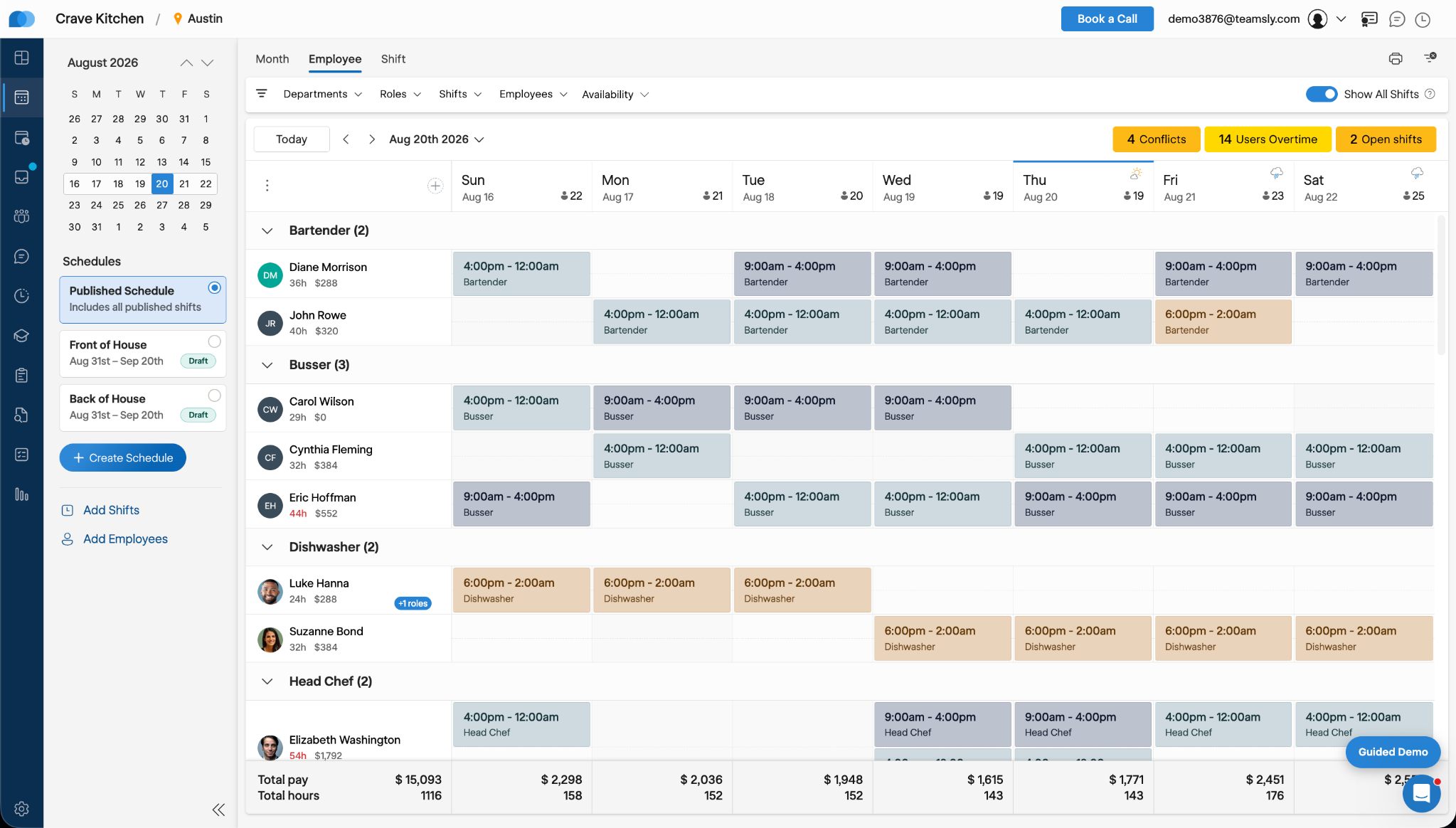
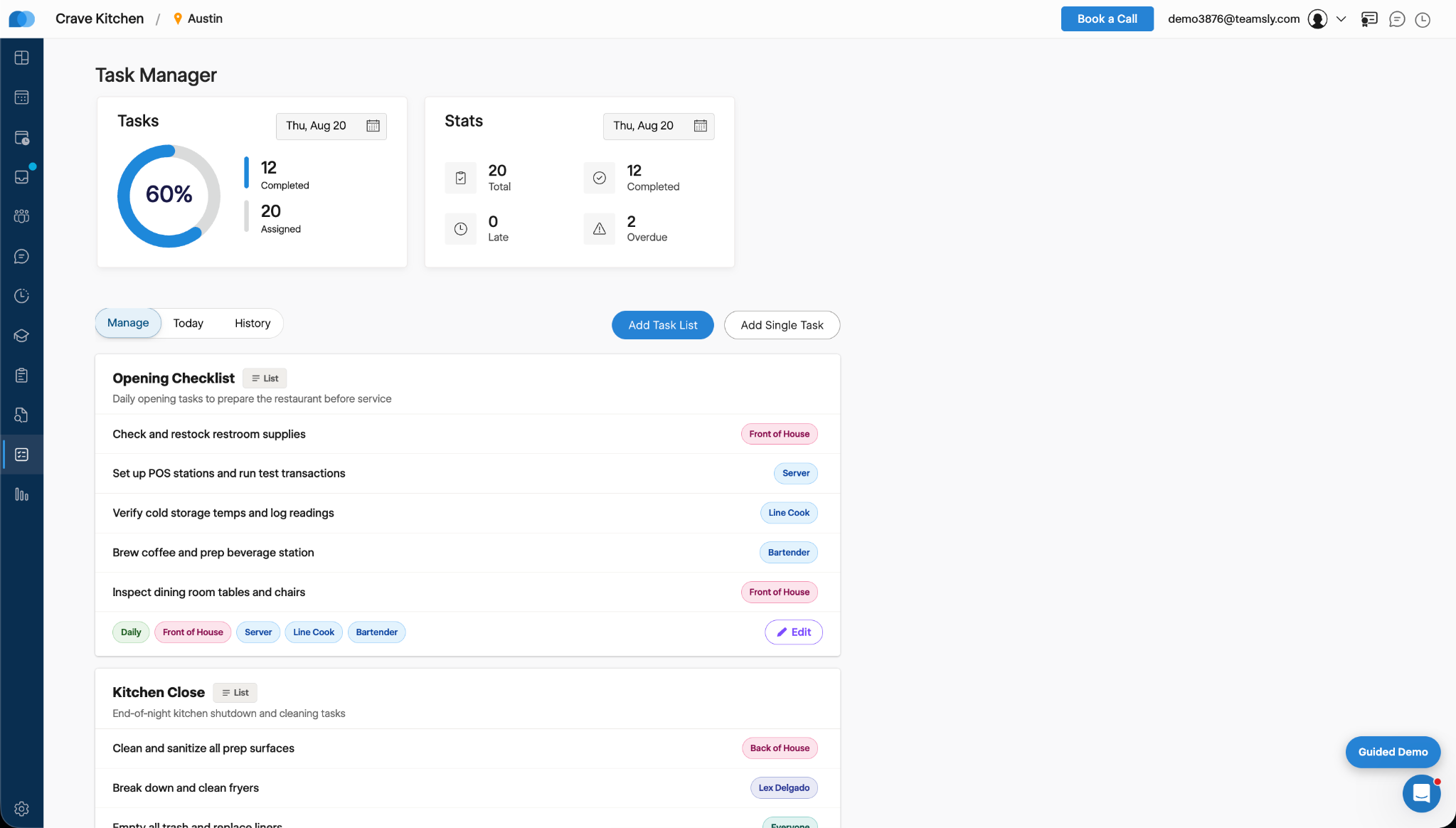
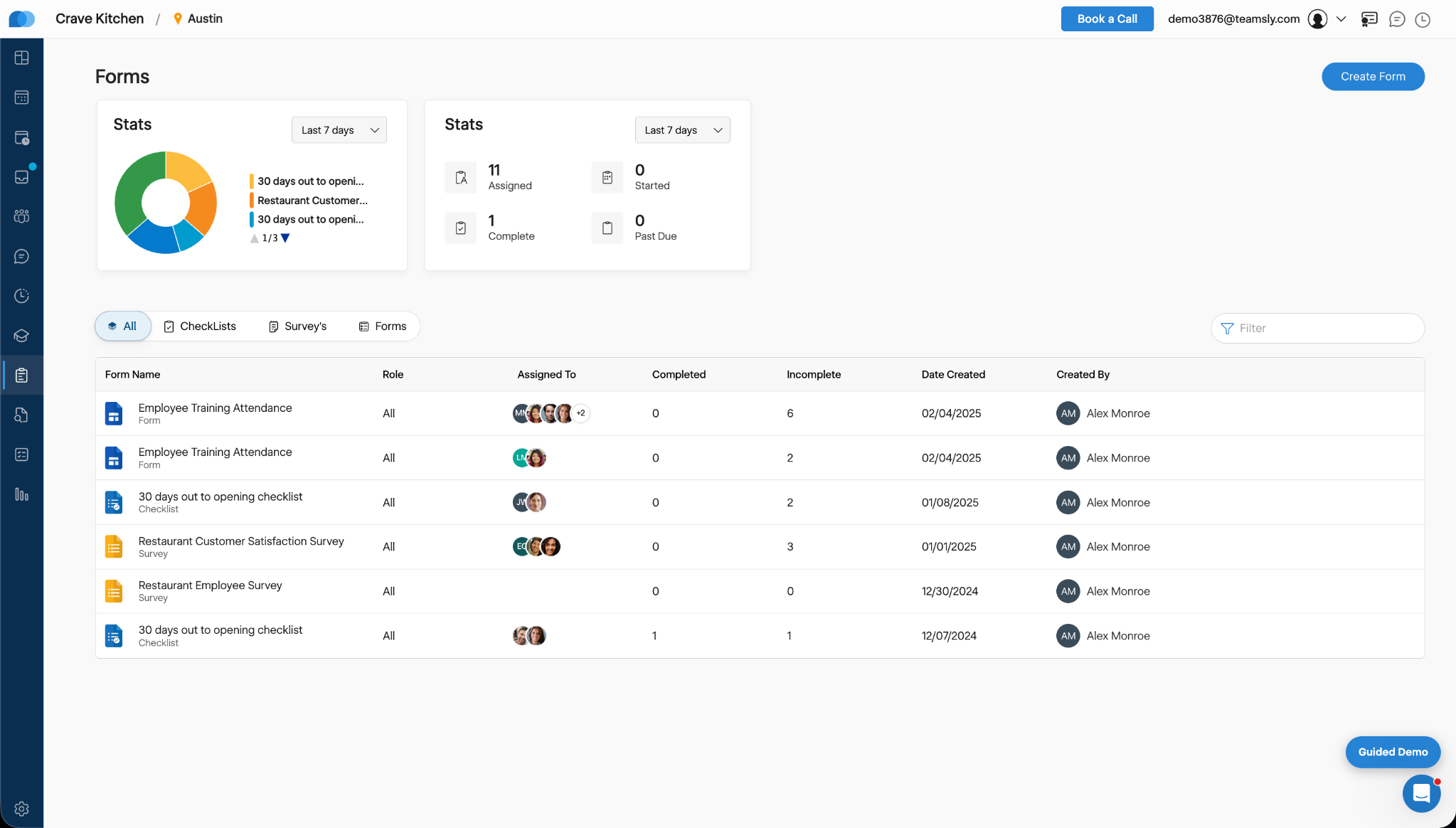
    Screenshot of Teamsly’s employee scheduling software, which gives managers a role-based weekly view of every employee and shift. Managers can create separate draft and published schedules, filter by department, role, shift, employee, or availability, identify scheduling conflicts, projected overtime, and open shifts, and review scheduled hours and estimated labor costs before publishing changes to the team.Screenshot of Teamsly’s workforce management dashboard. This brings daily staffing and operational data into one centralized view. Managers can monitor open shifts, shift swaps, employee requests, availability requests, scheduled coverage by role, paid hours, overtime, estimated pay, paid breaks, training quiz completion, and a visual shift timeline—making urgent staffing and workforce priorities easier to identify.Screenshot of Teamsly’s employee timesheet and time tracking software, which organizes timecards, paid hours, regular hours, overtime, paid and unpaid breaks, and estimated pay. Managers can compare scheduled hours with actual hours, spot timecard issues, review attendance data by employee and date range, add missing timecards, and download detailed reports for payroll preparation.Screenshot of Teamsly’s task management software, which helps managers create one-time tasks and recurring operational checklists, assign work by employee or role, and monitor completion from one dashboard. Status metrics show assigned, completed, late, and overdue work, while Today and History views strengthen accountability across opening, closing, cleaning, food preparation, and other repeatable team workflows.Screenshot of where Teamsly centralizes digital forms, checklists, and surveys for frontline and deskless teams. Managers can create and assign workflows such as employee training attendance forms, new-location opening checklists, customer satisfaction surveys, and employee surveys, then track assigned, started, completed, incomplete, and past-due submissions from a filterable reporting dashboard.Screenshot of Teamsly’s audit management software, which standardizes inspections and evaluations for employees, external participants, locations, equipment, and other operational subjects. Managers can assign audits, set scoring goals, monitor average scores, track completed and incomplete work, and identify past-due audits across food safety, employee hygiene, equipment maintenance, storage, workplace cleanliness, training, and knowledge.