
Bing Maps vs. GeoSurf vs. WhoisXML API IP Geolocation API
Bing Maps vs. GeoSurf vs. WhoisXML API IP Geolocation API
| Product | Rating | Most Used By | Product Summary | Starting Price |
|---|---|---|---|---|
 Bing Maps | N/A | Bing Maps is a geographic information and location intelligence solution, that when integrated as a data visualization dashboard for Microsoft Power BI, Excel, SharePoint and Dynamics software allows organizations to visualize multiple layers of business data on a map, such as sales, current customers and competitors. The ability to view data in this context reveals patterns and relationships, allowing businesses to better understand their opportunities and informs key business decisions at all… | N/A | |
 GeoSurf | N/A | GeoSurf is browser toolbar that enables users to get the local perspective from more than 110 global locations. It is often used by online media professionals (buyers, campaign managers, sales, affiliates, and compliance teams) to view geo-targeted ads and web content. This way, they can easily validate and monitor campaigns, see who is bidding on localized ad placements, generate new sources of business, and enhance current marketing activities. The interface is a straight-forward toolbar which… | $89 month | |
 WhoisXML API IP Geolocation API | N/A | About IP Geolocation API WhoisXML API’s IP Geolocation API is a resource to link an IP address, domain name, or email to its geographical coordinates. For a given input, the API returns various location data points among which the country, city, time zone, postal code, latitude and longitude, ASN type, geoname ID, ISP, as well as associated domains. Marketing Marketers and advertising professionals can use the API to enrich customer profiles with location… | N/A |
| Bing Maps | GeoSurf | WhoisXML API IP Geolocation API | ||||||||||||||||||||||
|---|---|---|---|---|---|---|---|---|---|---|---|---|---|---|---|---|---|---|---|---|---|---|---|---|
| Editions & Modules | No answers on this topic |
| No answers on this topic | |||||||||||||||||||||
| Offerings |
| |||||||||||||||||||||||
| Entry-level Setup Fee | No setup fee | No setup fee | No setup fee | |||||||||||||||||||||
| Additional Details | — | Interested in Enterprise plan? Contact the vendor for details. | — | |||||||||||||||||||||
| More Pricing Information | ||||||||||||||||||||||||
| Bing Maps | GeoSurf | WhoisXML API IP Geolocation API |
|---|
| Bing Maps | GeoSurf | WhoisXML API IP Geolocation API | |
|---|---|---|---|
| Small Businesses |  ArcGIS Score 8.0 out of 10 | No answers on this topic | No answers on this topic |
| Medium-sized Companies | ArcGIS Score 8.0 out of 10 | No answers on this topic | No answers on this topic |
| Enterprises | ArcGIS Score 8.0 out of 10 | No answers on this topic | No answers on this topic |
| All Alternatives | View all alternatives | View all alternatives | View all alternatives |
| Bing Maps | GeoSurf | WhoisXML API IP Geolocation API | |
|---|---|---|---|
| Likelihood to Recommend | 7.7 (3 ratings) | 8.4 (45 ratings) | 9.1 (1 ratings) |
| Likelihood to Renew | - (0 ratings) | 10.0 (2 ratings) | - (0 ratings) |
| Usability | - (0 ratings) | 9.0 (2 ratings) | - (0 ratings) |
| Availability | - (0 ratings) | 10.0 (1 ratings) | - (0 ratings) |
| Performance | - (0 ratings) | 10.0 (1 ratings) | - (0 ratings) |
| Support Rating | - (0 ratings) | 10.0 (2 ratings) | 9.1 (1 ratings) |
| Online Training | - (0 ratings) | 9.0 (1 ratings) | - (0 ratings) |
| Implementation Rating | - (0 ratings) | 10.0 (1 ratings) | - (0 ratings) |
| Bing Maps | GeoSurf | WhoisXML API IP Geolocation API | |
|---|---|---|---|
| Likelihood to Recommend | Microsoft
|  BIScience
| WhoisXML API
|
| Pros | Microsoft
| BIScience
 Alexander Delivlaev Quality Assurance with Test Automation | WhoisXML API
|
| Cons | Microsoft
| BIScience
 John Beaver Software Integration Architect | WhoisXML API
|
| Likelihood to Renew | Microsoft No answers on this topic | BIScience
 Lital Barkan Freelance Marketing and Business Development | WhoisXML API No answers on this topic |
| Usability | Microsoft No answers on this topic | BIScience
| WhoisXML API No answers on this topic |
| Reliability and Availability | Microsoft No answers on this topic | BIScience
Lital Barkan Freelance Marketing and Business Development | WhoisXML API No answers on this topic |
| Performance | Microsoft No answers on this topic | BIScience
Lital Barkan Freelance Marketing and Business Development | WhoisXML API No answers on this topic |
| Support Rating | Microsoft No answers on this topic | BIScience
| WhoisXML API
|
| Online Training | Microsoft No answers on this topic | BIScience
Lital Barkan Freelance Marketing and Business Development | WhoisXML API No answers on this topic |
| Alternatives Considered | Microsoft
| BIScience
| WhoisXML API No answers on this topic |
| Return on Investment | Microsoft
| BIScience
Lital Barkan Freelance Marketing and Business Development | WhoisXML API
|
| ScreenShots | GeoSurf Screenshots 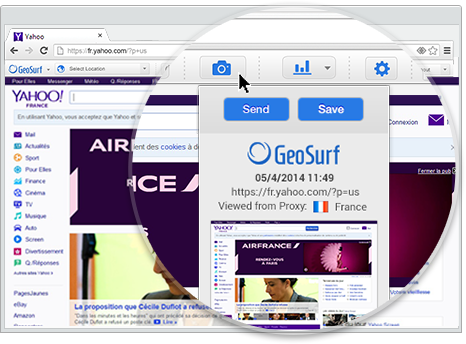 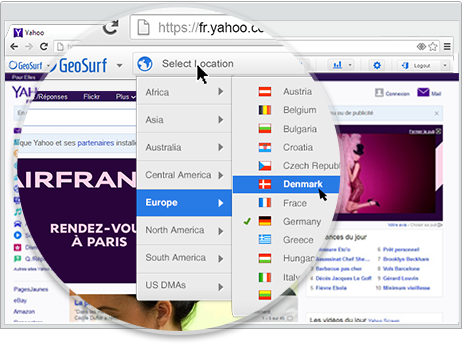 | WhoisXML API IP Geolocation API Screenshots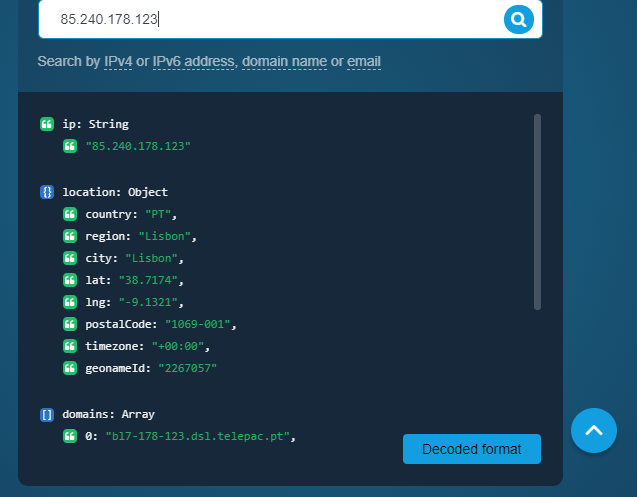  |