BuzzCast vs. ClickMeeting

Overview
ProductRatingMost Used ByProduct SummaryStarting Price
BuzzCast
Score 9.1 out of 10
N/A
BuzzCast supports flagship events for clients such as The Bill & Melinda Gates Foundation, Anthem Blue Cross Blue Shield, Uber, Fiserv, Carnival, The World Travel and Tourism Council, and AES. Crafted specifically to handle the needs of top tier production companies and their enterprise clients, BuzzCast is focused on three core pillars: Scalability Security Service Built from the ground up on the newest AWS Serverless…N/A
ClickMeeting
Score 9.4 out of 10
N/A
ClickMeeting is a webinar solution formerly owned by GetResponse, an email marketing software company. ClickMeeting's online meeting and collaboration tools are designed to support the sales, marketing, e-learning, and training needs of business of all sizes.
$25
per month
Pricing
BuzzCastClickMeeting
Editions & Modules
No answers on this topic
Live 25
$25
up to 25 attendees
Live 50
$35
up to 50 attendees
Automated 25
$40
up to 25 attendees
Automated 50
$45
up to 50 attendees
Live 100
$60
up to 100 attendees
Automated 100
$75
up to 100 attendees
Live 200
$119
up to 200 attendees
Live 500
$139
up to 500 attendees
Automated 200
$145
up to 200 attendees
Enterprise
$165
500 - 5000
Automated 500
$179
up to 500 attendees
Live 1000
$239
up to 1000 attendees
Automated 1000
$279
up to 1000 attendees
Offerings
Pricing Offerings
BuzzCastClickMeeting
Free Trial
NoYes
Free/Freemium Version
NoNo
Premium Consulting/Integration Services
NoYes
Entry-level Setup FeeOptionalNo setup fee
Additional DetailsBuzzCast offers an annual subscription based pricing model. Calculations are based on number of attendees, numbers of event and rehearsal days, streaming usage and level of production support you require. Our suite of leading edge features are yours to utilize for the duration of the annual license.Detailed enterprise pricing on demand.
More Pricing Information
Community Pulse
BuzzCastClickMeeting
Features
BuzzCastClickMeeting
Performance & Compatibility of Online Events Software
Comparison of Performance & Compatibility of Online Events Software features of Product A and Product B
BuzzCast
-
Ratings
ClickMeeting
9.0
65 Ratings
13% above category average
High quality audio00 Ratings9.765 Ratings
High quality video00 Ratings9.465 Ratings
Low bandwidth requirements00 Ratings8.559 Ratings
Mobile support00 Ratings8.355 Ratings
Screen Sharing
Comparison of Screen Sharing features of Product A and Product B
BuzzCast
-
Ratings
ClickMeeting
9.4
64 Ratings
17% above category average
Desktop sharing00 Ratings9.664 Ratings
Whiteboards00 Ratings9.256 Ratings
Online Meetings / Events
Comparison of Online Meetings / Events features of Product A and Product B
BuzzCast
-
Ratings
ClickMeeting
9.7
66 Ratings
17% above category average
Calendar integration00 Ratings9.753 Ratings
Meeting initiation00 Ratings9.663 Ratings
Integrates with social media00 Ratings9.647 Ratings
Record meetings / events00 Ratings9.964 Ratings
Slideshows00 Ratings9.760 Ratings
Online Events Collaboration
Comparison of Online Events Collaboration features of Product A and Product B
BuzzCast
-
Ratings
ClickMeeting
9.7
64 Ratings
18% above category average
Live chat00 Ratings9.663 Ratings
Audience polling00 Ratings9.759 Ratings
Q&A00 Ratings9.859 Ratings
Online Events Security
Comparison of Online Events Security features of Product A and Product B
BuzzCast
-
Ratings
ClickMeeting
9.4
61 Ratings
16% above category average
User authentication00 Ratings9.754 Ratings
Participant roles & permissions00 Ratings9.761 Ratings
Confidential attendee list00 Ratings8.856 Ratings
Best Alternatives
BuzzCastClickMeeting
Small Businesses
Whova
Whova
Score 9.4 out of 10
Intermedia AnyMeeting Pro
Score 7.1 out of 10
Medium-sized Companies
Whova
Whova
Score 9.4 out of 10
JioMeet
JioMeet
Score 9.8 out of 10
Enterprises
Whova
Whova
Score 9.4 out of 10
Webex Meetings
Webex Meetings
Score 8.6 out of 10
All AlternativesView all alternativesView all alternatives
User Ratings
BuzzCastClickMeeting
Likelihood to Recommend
9.1
(9 ratings)
8.8
(59 ratings)
Likelihood to Renew
-
(0 ratings)
9.1
(1 ratings)
Usability
-
(0 ratings)
8.7
(41 ratings)
Support Rating
-
(0 ratings)
9.9
(36 ratings)
Implementation Rating
-
(0 ratings)
9.1
(1 ratings)
User Testimonials
BuzzCastClickMeeting
Likelihood to Recommend
BuzzCast
BuzzCast is great for large, complex online events - especially during the pandemic when it's been hard or impossible to gather folks in person. If you only need a smaller group of 5 or 10 people, BuzzCast is probably overkill. Once you have lots of people / multiple sessions, or want to capture and save presentations for later, you'll want to start looking at BuzzCast.
Read full review
ClickMeeting
ClickMeeting serves a dual purpose within our organization. Firstly, it acts as a reliable platform for hosting staff meetings, enabling effective communication and collaboration among team members. Whether it's for updates, discussions, or brainstorming sessions, ClickMeeting provides the necessary tools for seamless engagement.Secondly, ClickMeeting is instrumental in delivering online courses to our students. It empowers us to create interactive learning experiences regardless of geographical constraints. We can easily share course materials, conduct live or pre-recorded lectures, and facilitate interactive discussions and Q&A sessions. ClickMeeting ensures our students have access to high-quality education and a supportive learning environment.In summary, ClickMeeting is an invaluable tool for both internal staff communications and student-centered online courses. It fosters collaboration, engagement, and knowledge sharing in a flexible and accessible manner, enhancing our overall productivity and educational offerings.
Read full review
Pros
BuzzCast
  • The BuzzCast platform was excellent in every way.
  • The platform is sleek and easy to use, both the backend and the UX.
  • The entire team at BuzzCast is supportive and works hard to make your event a complete success.
  • Building and deploying the conference was made easy by the expertise and hard-working BuzzCast staff.
Read full review
ClickMeeting
  • ClickMeeting is user-friendly, the admin and user panel is simple, intuitive!
  • When conducting training, you can use default settings such as edu mode and it saves time, I don't have to worry if I'm sure I've muted everyone and if I'm the only one visible.
  • ClickMeeting is also integrated with the Moodle e-learning platform, so it's a great support in organizing blended-learning processes.
Read full review
Cons
BuzzCast
  • Within the platform it would be great to have direct access to make edits changes (I believe this functionality is in process)
Read full review
ClickMeeting
  • Individual Audio Controls. I'd love to be able to adjust the audio for each of the presenters within the platform, as the host. Not all presenters are tech savvy and sometimes don't know how to adjust this themselves.
  • Additional Saved Color Schemes. I'd love to be able to create/save multiple custom color schemes that I can use for various events instead of a single one.
Read full review
Usability
BuzzCast
No answers on this topic
ClickMeeting
ClickMeeting's overall usability is commendably excellent. Its intuitive, user-friendly interface makes it remarkably easy for users of all skill levels to navigate. The platform delivers a seamless, streamlined experience from setting up meetings to engaging with participants. Despite some advanced features having a slight learning curve, the platform remains user-friendly, efficient, and reliable.
Read full review
Support Rating
BuzzCast
No answers on this topic
ClickMeeting
It takes a bit of time to get to grips with the platform at first, but it's short and there is an online help chat available. People on the chat are very helpful and available for a long time - also on weekends, which greatly improves work. Really very good support.
Read full review
Implementation Rating
BuzzCast
No answers on this topic
ClickMeeting
It was very simple.
Read full review
Alternatives Considered
BuzzCast
BuzzCast platform has the most amount of features that our events require (public chat/private chat, breakouts, auto-scrolling agenda). The entire platform is built and designed so that it's intuitive for our viewers and they are shown exactly how to operate the platform in under a minute. The quality of the stream is superior. The BuzzCast team is great to work with and are true partners who are all solution-oriented.
Read full review
ClickMeeting
- does not require installation - clear interface - fast chat technical support - available in Polish language - provides a stable connection - it allows us to share presentations - we can also record the meeting - the process of creating the meeting is quick and easy also for beginners
Read full review
Return on Investment
BuzzCast
  • BuzzCast enabled one of my clients to deliver an investors' meeting that resulted in a $10 billion increase in market cap
Read full review
ClickMeeting
  • ClickMeeting has had a very positive impact on our organization’s objectives. It allows us to run open training sessions and webinars for participants from multiple organizations, reaching more people without the need for travel or large venues. The platform’s reliability and ease of use help us deliver high-quality training efficiently.
Read full review
ScreenShots

BuzzCast Screenshots

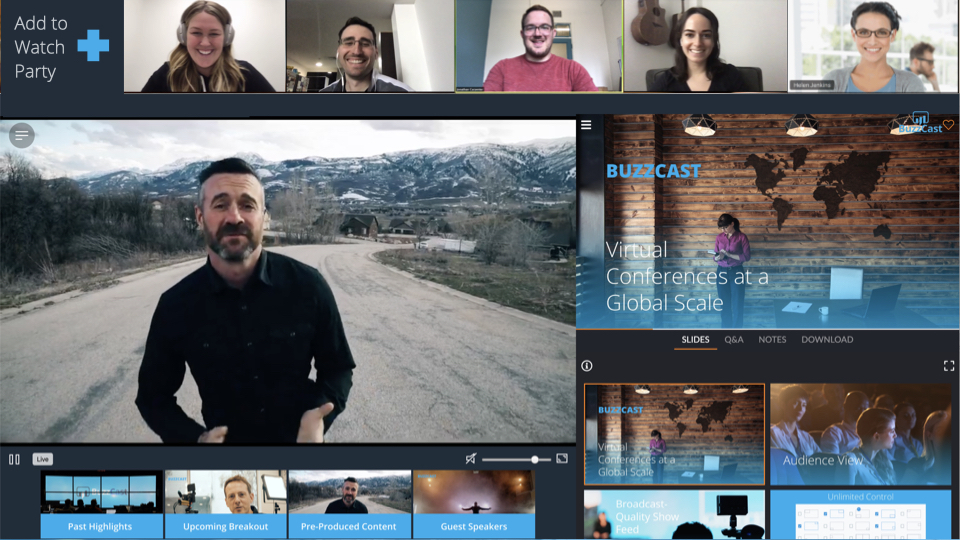
Screenshot of custom landing page for long time clients The Bill & Melinda Gates Foundation Grand Challenges eventScreenshot of Adding eCommerce capabilities to your BuzzCast exhibitor booths or being able to accept donations at your annual fundraising gala is just one of many many features we offer.Screenshot of BuzzCast offers a wide range of 3D rendered exhibitor booth options. Booth attendees can do things like join a video meeting or demo, schedule a meeting on the booth owners calendar, fill out check in forms for lead generation, visit websites, check out special offers & more.Screenshot of BuzzCast's Watch Party feature!!  enough said.Screenshot of custom 3D exhibitor hall entrance lobby's are a spectacular addition to any event. BuzzCast's talented in-house designers can create magic virtual environmentsScreenshot of Public chat. Private chat. Emojis. Likes. You'll like it!

ClickMeeting Screenshots

Screenshot of Whiteboard featureScreenshot of Presentation featureScreenshot of Responsive designScreenshot of Webinar roomScreenshot of Webinar room 2Screenshot of Webinar room 3