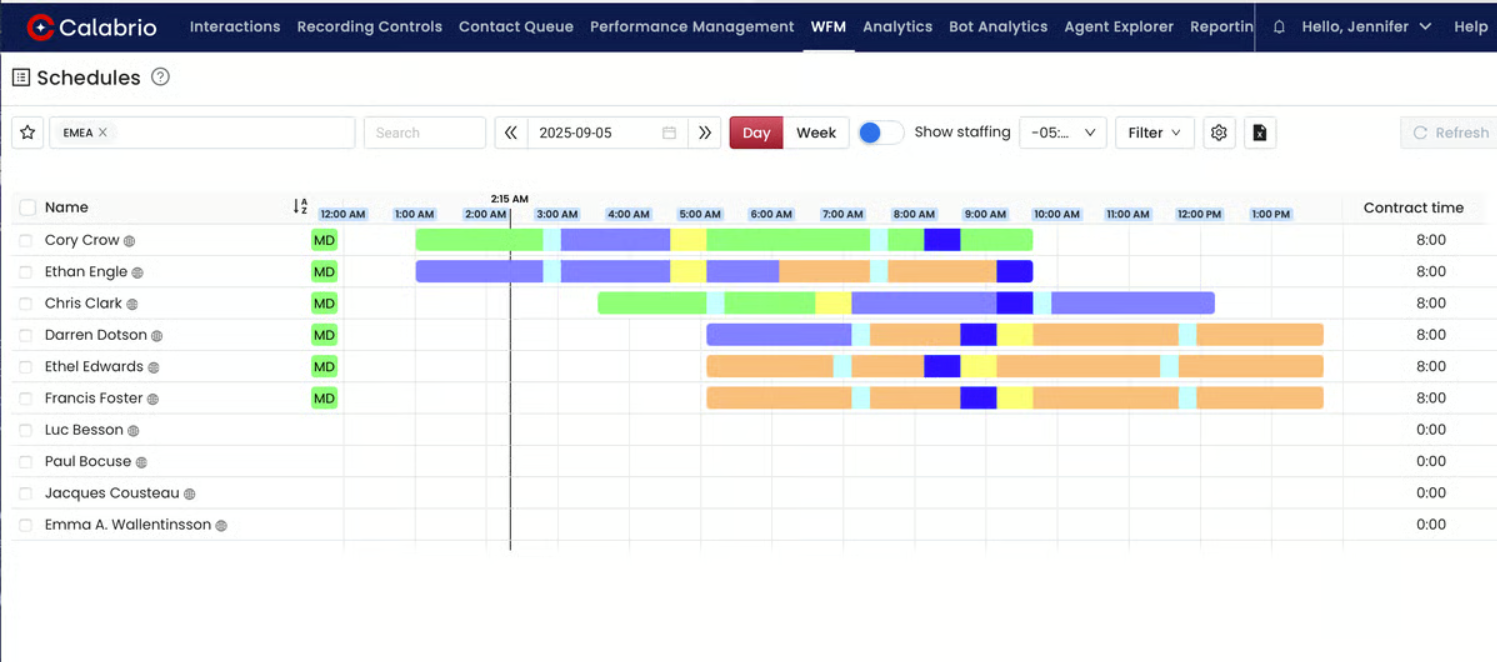
Calabrio WFM is a solution that helps accelerate workforce management tasks in contact centers, such as forecasting, scheduling, and managing intraday schedule changes.
N/A
Homebase
Score7.5 out of 10
N/A
Homebase in San Francisco offers restaurants, hotels, hospitals, and retailers their employee scheduling and time tracking tools with scheduling optimization and team messaging for coordinating shifts; service includes a free time tracking app.
Calabrio Teleopti WFM is widely used in our organization, and once we've gotten the hang of it, it's very simple to use. We can manage the entries to each employee's task lists, plan the turns that each teleworker will cover, and swap turns as needed. We can also automate the completion of scheduled management tasks and calculate how much time each employee spends at the company. This application, in general, ensures increased productivity on the call center platform.
A de minimis incentive was given to thank the reviewer for their time. The incentive was not used to bias or drive a particular response, nor was the incentive contingent on a positive endorsement. More Info
Homebase is a very cost-effective program that does a good job tracking employee hours as well as what employees are working on. It is extremely easy to use and has a lot of self-service features, which give employees information at their fingertips. Homebase integrates well with our payroll provider.
A de minimis incentive was given to thank the reviewer for their time. The incentive was not used to bias or drive a particular response, nor was the incentive contingent on a positive endorsement. More Info
A de minimis incentive was given to thank the reviewer for their time. The incentive was not used to bias or drive a particular response, nor was the incentive contingent on a positive endorsement. More Info
A de minimis incentive was given to thank the reviewer for their time. The incentive was not used to bias or drive a particular response, nor was the incentive contingent on a positive endorsement. More Info
The messaging features in Homebase are not consistent across the platform. In the app you can mass message everyone, however using the website you cannot, at least not at the price point that we are using.
The roles for employees and how to navigate them can be confusing especially when trying to schedule one employee in two different departments.
The separation of departments is a bit rigid and makes it difficult for universal employees to be scheduled easily.
A de minimis incentive was given to thank the reviewer for their time. The incentive was not used to bias or drive a particular response, nor was the incentive contingent on a positive endorsement. More Info
A de minimis incentive was given to thank the reviewer for their time. The incentive was not used to bias or drive a particular response, nor was the incentive contingent on a positive endorsement. More Info
Homebase is very easy to use. Not a lot of training or direction is needed to get it going. Easy feature to track employee hours. Able to use centrally located tablets for employees to clock in and out. A very cost-effective system that also saves time when processing payroll. Employees love its features.
A de minimis incentive was given to thank the reviewer for their time. The incentive was not used to bias or drive a particular response, nor was the incentive contingent on a positive endorsement. More Info
I have worked for other smaller companies that have just used excel sheets to manage scheduling and it was a complete mess. This is a complete and utter 180 in that scheduling is so simplified and creates/causes basically zero conflict among staff.
A de minimis incentive was given to thank the reviewer for their time. The incentive was not used to bias or drive a particular response, nor was the incentive contingent on a positive endorsement. More Info
Homebase is simpler to use. Easier to navigate and is much cheaper than other alternatives! We had trouble when I worked as they were harder to reach our ROI. Deputy was too expensive and it was the reason we decided on Homebase! Employees also find it easy to use on their end!
A de minimis incentive was given to thank the reviewer for their time. The incentive was not used to bias or drive a particular response, nor was the incentive contingent on a positive endorsement. More Info
A de minimis incentive was given to thank the reviewer for their time. The incentive was not used to bias or drive a particular response, nor was the incentive contingent on a positive endorsement. More Info
Homebase has made the day to day management of employees easier, freeing up time for management to work on other things that help secure customer satisfaction.
It has also made payroll easier since it's implementation and allowed for fewer mistakes than the previous manual method, leading to less monetary mistakes and happier employees.
Homebase has made monitoring hours and overtime, as well as completion of internship and volunteer hours, much easier to monitor, leading to less confusion and more satisfied volunteers, interns, and payroll managers
A de minimis incentive was given to thank the reviewer for their time. The incentive was not used to bias or drive a particular response, nor was the incentive contingent on a positive endorsement. More Info