DBAmp is a Salesforce integration solution for any SQL DBA. With DBAmp, users can access Salesforce data in real-time using standard SQL. For many organizations, SQL Server plays a critical role in BI and operational reporting. Using DBAmp, users can extend the same SQL Server integrations they've built for BI, analytics, and reporting to Salesforce data.
$2,495
per user
Devart Excel Add-ins
Score 9.3 out of 10
N/A
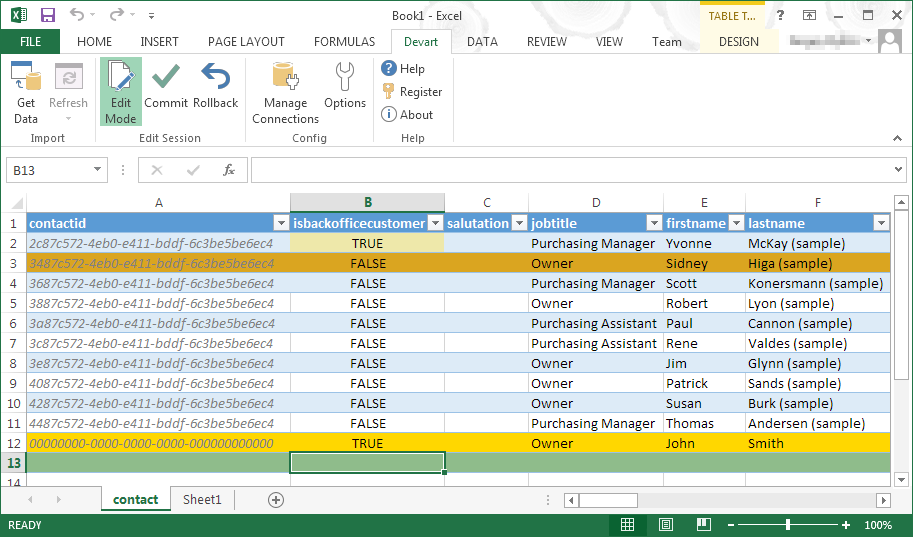
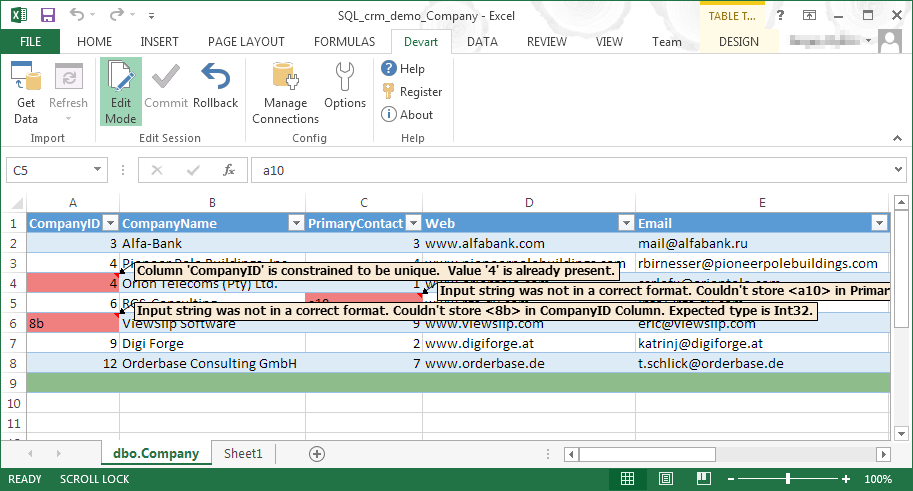
Devart Excel Add-ins allow you to use Excel capabilities to import, process, and analyze data from cloud applications and relational databases. The Excel Add-ins also allow users to make data changes and then save those changes back to the data source they were originally imported from.
$399.95
one-time fee
IBM InfoSphere Information Server
Score 8.0 out of 10
N/A
IBM InfoSphere Information Server is a data integration platform used to understand, cleanse, monitor and transform data. The offerings provide massively parallel processing (MPP) capabilities.
N/A
Pricing
CData DBAmp
Devart Excel Add-ins
IBM InfoSphere Information Server
Editions & Modules
Single Server License One-year Subscription
$2,495
per user
Excel Add-in Database Pack
$399.95
one-time fee
Excel Add-in Cloud Pack
$499.95
one-time fee
Excel Add-in Universal Pack
$599.95
one-time fee
No answers on this topic
Offerings
Pricing Offerings
CData DBAmp
Devart Excel Add-ins
IBM InfoSphere Information Server
Free Trial
Yes
Yes
No
Free/Freemium Version
No
No
No
Premium Consulting/Integration Services
No
No
No
Entry-level Setup Fee
No setup fee
No setup fee
No setup fee
Additional Details
—
Purchases include a perpetual license and 1 year of subscription which includes the product updates and premium support.
Director, eCommerce Analytics and Digital Marketing
Chose Devart Excel Add-ins
Microsoft Excel is the most used tool in the software universe. As such, asking Microsoft Excel to be the tool used post data acquisition makes a ton of sense. Almost everyone we hire has some idea on how to use this tool, which decreases the time spend training new employees.
Devart Excel stacks up very well against its alternatives. It has significant advantages as it keeps getting an update. Features are very much suitable for smaller organizations. For larger organizations the features cannot be used directly because of the size of the company …
I particularly believe that Information Server, especially DataStage, is superior in many aspects to the Oracle Data Integrator tool. Several market analysts such as Gartner and / or Forrester better position DataStage on the Oracle solution.
Information Server and Informatica PowerCenter are the two leading integration platforms worldwide. Information Server has a better integration with other IBM products such as MDM or Cognos but the decision to use one or another platform is more a price decision and quantity of …
Information can be used for large but simple implementation. InfoSphere provides more intergaration options with outside world. Abinitio is great product but stopped innvoating and is not kept up to date with market needs and changes. Talend is good new product. Good Big Data …
Well suited as an inexpensive tool as "middleware" between your on-prem or hosted SQL Server. Not sure how well it will translate to cloud-based SQL as a platform (Azure SQL) as it relies on linked servers. This tool only applies to Salesforce CRM - not Marketing Cloud. For writing back to Salesforce we did run into Salesforce resource limitations when extensive triggers existed on the objects.
One of the biggest benefits of Excel is its primary function: The ability to organize large amounts of data into orderly, logical spreadsheets and charts. With the data organized, it's a lot easier to analyze and digest, especially when used to create graphs and other visual data representations. Excel crunches numbers almost instantly, making batch calculations much easier than working things out yourself with a calculator. Depending on your understanding and skill with Excel, the formulas and equations are used to quickly compute both simple and complex equations using large amounts of data.
You can use infosphere: -If you have multiple targets and source systems and they are different than each other. -If your infostructure is so big and unplaned well so you can't find what you want to see. -If your databases not so strong to process your data
Because it uses Linked Servers, not sure how this will work in Azure SQL.
Replicated tables are based on user security - this means you have to pay for a license to set this up.
There is no built-in function to skip tables or fields on secured tables. This has to be done on the CRM side for fields and we built a function to skip tables in the replication logic.
Microsoft Excel is the most used tool in the software universe. As such, asking Microsoft Excel to be the tool used post data acquisition makes a ton of sense. Almost everyone we hire has some idea on how to use this tool, which decreases the time spend training new employees.
I particularly believe that Information Server, especially DataStage, is superior in many aspects to the Oracle Data Integrator tool. Several market analysts such as Gartner and / or Forrester better position DataStage on the Oracle solution.
Information Server can positively impact the costs of companies by increasing the productivity of development and therefore reduce their time and costs. It is estimated that DataStage can increase a developer's productivity by 40% on average.