TrustRadius: an HG Insights company

Save this comparison

Save this comparison

Add Product

Recommended Comparisons

    Overview
    ProductRatingMost Used ByProduct SummaryStarting Price

    Cincopa

    Score9.8 out of 10
    N/ACincopa is a video knowledge management platform that converts video and document assets into searchable, structured knowledge environments. The solution utilizes Artificial Intelligence (AI) to index multimedia content, allowing users to query libraries using natural language to locate specific information within media files. Key Capabilities Structured Knowledge Environments: The platform organizes Video Assets and Digital Documents into categorized…

    $99

    per month

    XWiki

    Score8.2 out of 10
    Mid-Size Companies (51-1,000 employees)
    XWiki is an open-source collaborative platform designed to enhance business collaboration and streamline knowledge management for companies of all sizes. As a an alternative to proprietary knowledge bases, XWiki offers a structured second-generation wiki with over 900 pre-made extensions, enabling businesses to add features and customize their XWiki instance to meet specific needs. Key features and benefits: Structured wiki concept: XWiki organizes knowledge…

    $300

    per year 10 users

    Pricing
    CincopaXWiki
    Editions & Modules
    Starter
    $99.00
    per month
    Growth
    $349.00
    per month
    Starter
    €300
    per year for up to 10 users
    On-Premise
    Custom Pricing
    (Pro Plans available for On-Premise deployment)
    Basic
    starting at €1443
    per year for up to 25 users
    Business
    starting at €10890
    per year for up to 250 users
    Enterprise
    starting at €33000
    per year for up to 500 users
    Offerings
    Pricing Offerings
    CincopaXWiki
    Free Trial
    NoYes
    Free/Freemium Version
    NoYes
    Premium Consulting/Integration Services
    NoYes
    Entry-level Setup FeeOptionalOptional
    Additional Details—Discount available for multi-year pricing and higher user volumes. Up to a 50% discount available for NGOs and institutions of higher learning.
    More Pricing Information
    Features
    CincopaXWiki
    Video Marketing
    Comparison of Video Marketing features of Cincopa and XWiki
    Feature
    Cincopa
    8.6
    17 Ratings
    13% above category average
    XWiki
    -
    Ratings
    Lead generation7.014 Ratings00 Ratings
    Video personalization9.914 Ratings00 Ratings
    eCommerce8.76 Ratings00 Ratings
    Support for advertisements8.59 Ratings00 Ratings
    Video SEO8.913 Ratings00 Ratings
    Integration to Marketing Automation8.69 Ratings00 Ratings
    Video Platform Integrations
    Comparison of Video Platform Integrations features of Cincopa and XWiki
    Feature
    Cincopa
    8.2
    5 Ratings
    28% above category average
    XWiki
    -
    Ratings
    Integration to Salesforce.com8.24 Ratings00 Ratings
    Integration to Marketo8.24 Ratings00 Ratings
    Integration to HubSpot8.35 Ratings00 Ratings
    Video Security
    Comparison of Video Security features of Cincopa and XWiki
    Feature
    Cincopa
    9.2
    16 Ratings
    7% above category average
    XWiki
    -
    Ratings
    Video access controls9.016 Ratings00 Ratings
    User management9.016 Ratings00 Ratings
    Video link sharing9.915 Ratings00 Ratings
    Internal video9.013 Ratings00 Ratings
    External video9.014 Ratings00 Ratings
    Video Player
    Comparison of Video Player features of Cincopa and XWiki
    Feature
    Cincopa
    9.0
    19 Ratings
    9% above category average
    XWiki
    -
    Ratings
    Player customization9.019 Ratings00 Ratings
    Embedded videos9.018 Ratings00 Ratings
    Video quality / Bandwidth controls9.016 Ratings00 Ratings
    Mobile compatibility9.017 Ratings00 Ratings
    Video Analytics
    Comparison of Video Analytics features of Cincopa and XWiki
    Feature
    Cincopa
    9.9
    14 Ratings
    23% above category average
    XWiki
    -
    Ratings
    Per viewer tracking10.013 Ratings00 Ratings
    Per video tracking9.914 Ratings00 Ratings
    Video analytics dashboard9.712 Ratings00 Ratings
    Video Hosting, Management & Storage
    Comparison of Video Hosting, Management & Storage features of Cincopa and XWiki
    Feature
    Cincopa
    8.7
    15 Ratings
    1% above category average
    XWiki
    -
    Ratings
    On-Demand video9.010 Ratings00 Ratings
    Live streaming9.06 Ratings00 Ratings
    Video upload & format support8.115 Ratings00 Ratings
    Video library / File management9.015 Ratings00 Ratings
    Video portal8.110 Ratings00 Ratings
    Video Engagement
    Comparison of Video Engagement features of Cincopa and XWiki
    Feature
    Cincopa
    7.7
    2 Ratings
    3% below category average
    XWiki
    -
    Ratings
    Audience Q&A / Live chat8.21 Ratings00 Ratings
    Video comments7.22 Ratings00 Ratings
    Best Alternatives
    CincopaXWiki
    Small Businesses
    Vidyard
    Score8.3 out of 10
    Slite
    Score5.7 out of 10
    Medium-sized Companies
    Vidyard
    Score8.3 out of 10
    Bloomfire
    Score8.4 out of 10
    Enterprises
    Panopto
    Score7.5 out of 10
    Bloomfire
    Score8.4 out of 10
    All AlternativesView all alternativesView all alternatives
    User Ratings
    CincopaXWiki
    Likelihood to Recommend
    9.8
    (28 ratings)
    10.0
    (1 ratings)
    Likelihood to Renew
    9.1
    (1 ratings)
    -
    (0 ratings)
    Usability
    8.2
    (1 ratings)
    -
    (0 ratings)
    User Testimonials
    CincopaXWiki
    Likelihood to Recommend
    Cincopa
    I would say that Cincopa is a first-stop for any dev project without an internal gallery option. This is especially true if the person in charge of content or building the galleries is not a coder. Cincopa makes designing a good looking gallery and inserting it into nearly any webpage a pretty simple process, so it is a great starting place. There may be other options that would fit a different development project better (internal gallery functions or a full-scale DAM with importable galleries), but for our purposes Cincopa was (and is) a perfect fit.
    Incentivized
    Read full review
    XWiki SAS
    XWiki is very well suited for a very wide range of web collaboration and web development.
    Read full review
    Pros
    Cincopa
    • Responsive - if your platform is not responsive it will display the gallery this way across all platforms.
    • Fast - if you have slow uploads it will increase your load speed.
    • Easy - you can upload all your photos at once or one at a time. Then use a preset gallery to display them.
    Read full review
    XWiki SAS
    • XWiki makes it easy to manage semi-structured information, which is at the heart of every knowledge nexus of organizations. It makes it easy to manage in a single system both structured data (such as memberships, projects), and unstructured data.
    • XWiki offers a very rich API for creating enterprise applications quickly that are easy to maintain and evolve collaboratively.
    • XWiki templating and skinning system is extremely flexible and powerful.
    Read full review
    Cons
    Cincopa
    • The number of pictures for the upload should be slightly higher.
    • The previous calculation of the traffic is difficult.
    • If many pictures have to be deleted from a gallery, that does not happen so fast, because only 50 pictures are loaded. Then you have to scroll all the way down and wait until the next 50 images are loaded, in order to be able to mark them for deletion. This takes a while with 800 pictures for example.
    Read full review
    XWiki SAS
    • While the basic pieces are available for turning XWiki into an advanced semantic system, some features could be made available more prominently to the user for easing the use of faceted and typed links, paving the way for a new era of collaborative knowledge sharing.
    Read full review
    Likelihood to Renew
    Cincopa
    It solved the problems we were facing at the time.
    Read full review
    XWiki SAS
    No answers on this topic
    Usability
    Cincopa
    Cincopa is very easy to use, especially to the uninitiated. You don't need a degree in CS or years of experience to set-up a fantastic looking gallery. The interface is self-explanatory for the most part and very easy to use. The drag-and-drop functionality makes it simple and inviting for all users.
    Incentivized
    Read full review
    XWiki SAS
    No answers on this topic
    Alternatives Considered
    Cincopa
    Cincopa has nice templates that are easy to use. The images can be moved about, more images added, and the size changed.
    I particularly like the Pinterest style template, as it fits in well with the number of images that I need to display on my website. The more choices displayed, the more likely customers are to order.
    Incentivized
    Read full review
    XWiki SAS
    XWiki key differentiators in my opinion:
    • Fast app development framework with very rich API
    • Open-source strategy, opening the way to collaborative innovation
    Read full review
    Return on Investment
    Cincopa
    • The video that we uploaded to our website will show prospects in the area around our apartment community and hopefully give them a good idea of how close they can be to work/school.
    • Our video will result in more apartments being rented which will have a positive impact on our ROI.
    • Our video will give residents and prospects a positive image of our community.
    Incentivized
    Read full review
    XWiki SAS
    • XWiki has a positive impact on the OW2 communication and collaborations strategies. It saves time when developing applications.
    Read full review
    ScreenShots

    Cincopa Screenshots

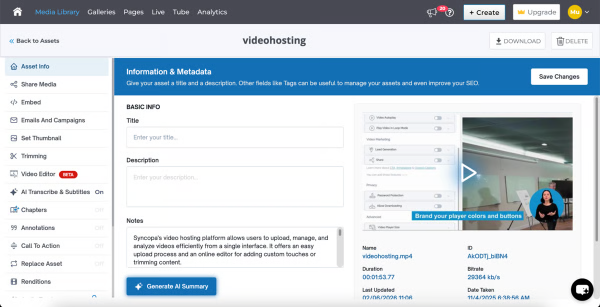
    Screenshot of where Cincopa's AI interacts with viewers, answering questions and surfacing key information without watching the entire video, making content more accessible, searchable, and engaging.Screenshot of the dashboard to see what users are asking, track unanswered questions, and identify content gaps.Screenshot of an analytics dashboard, offering insights to improve content quality, enhance viewer experience, and address missing information.Screenshot of key performance metrics like views, watch time, plays, and engagement in real time. Analyze trends across devices, pages, and geographies to understand viewer behavior and optimize video strategy.Screenshot of the interface to upload and edit videos. Users can update metadata, trim content, add subtitles, configure player settings, and control distribution.Screenshot of a branded video hub with categorized playlists and intuitive navigation. This enables users to browse, search, and access content across channels like onboarding, training, and updates, all in one centralized CincoTube experience.

    XWiki Screenshots

    Screenshot of an XWiki homepageScreenshot of knowledge management, in XWiki.Screenshot of the granular rights access feature, that helps users to manage big teams.Screenshot of some of the customizations available in every aspect of an instance, from theme to templates and page structure.Screenshot of an example of migration from Confluence using the dedicated migrator.