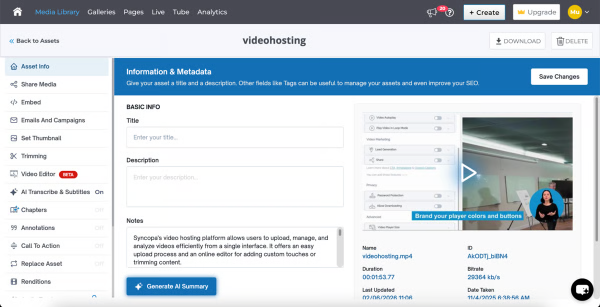
Cincopa is a video knowledge management platform that converts video and document assets into searchable, structured knowledge environments. The solution utilizes Artificial Intelligence (AI) to index multimedia content, allowing users to query libraries using natural language to locate specific information within media files. Key Capabilities Structured Knowledge Environments: The platform organizes Video Assets and Digital Documents into categorized…
$99
per month
Zendesk Guide
Score9.2 out of 10
N/A
Zendesk Guide is a smart knowledge base built to help support teams continuously improve content, keep it up to date, and serve it to customers.
I would say that Cincopa is a first-stop for any dev project without an internal gallery option. This is especially true if the person in charge of content or building the galleries is not a coder. Cincopa makes designing a good looking gallery and inserting it into nearly any webpage a pretty simple process, so it is a great starting place. There may be other options that would fit a different development project better (internal gallery functions or a full-scale DAM with importable galleries), but for our purposes Cincopa was (and is) a perfect fit.
A de minimis incentive was given to thank the reviewer for their time. The incentive was not used to bias or drive a particular response, nor was the incentive contingent on a positive endorsement. More Info
In our company, we host our benefit articles based on country on our Zendesk Guide. However, these articles should not be seen by employees that are outside their respective article country. For example, an employee that is based in Thailand shouldn't be seeing Malaysia benefits article as employees might compared benefits. With Zendesk Guide, the system allow us to set the configuration of the article so it is only visible Thailand-based employees, and for Malaysia article, only Malaysia-based employees
A de minimis incentive was given to thank the reviewer for their time. The incentive was not used to bias or drive a particular response, nor was the incentive contingent on a positive endorsement. More Info
They give us ability to control the whole frontend of the Communities by giving us access to manipulate HTML (in HBS file), CSS and JS
They give handlebars templating engine in backend which helps us to show various listing rendered through server side without having need to implement client side rendering of the listing and features.
They provide us dynamic content fields, which can be useful for mapping categories or storing category and topic IDs so we don't need to hard code IDs in Sandbox and Production separately.
A de minimis incentive was given to thank the reviewer for their time. The incentive was not used to bias or drive a particular response, nor was the incentive contingent on a positive endorsement. More Info
The number of pictures for the upload should be slightly higher.
The previous calculation of the traffic is difficult.
If many pictures have to be deleted from a gallery, that does not happen so fast, because only 50 pictures are loaded. Then you have to scroll all the way down and wait until the next 50 images are loaded, in order to be able to mark them for deletion. This takes a while with 800 pictures for example.
A de minimis incentive was given to thank the reviewer for their time. The incentive was not used to bias or drive a particular response, nor was the incentive contingent on a positive endorsement. More Info
Cincopa is very easy to use, especially to the uninitiated. You don't need a degree in CS or years of experience to set-up a fantastic looking gallery. The interface is self-explanatory for the most part and very easy to use. The drag-and-drop functionality makes it simple and inviting for all users.
A de minimis incentive was given to thank the reviewer for their time. The incentive was not used to bias or drive a particular response, nor was the incentive contingent on a positive endorsement. More Info
The support is good but can sometime be frustrating to get a quick answer. We end up being sent articles that don't answer the question and then we have to go back and try again
A de minimis incentive was given to thank the reviewer for their time. The incentive was not used to bias or drive a particular response, nor was the incentive contingent on a positive endorsement. More Info
Cincopa has nice templates that are easy to use. The images can be moved about, more images added, and the size changed.
I particularly like the Pinterest style template, as it fits in well with the number of images that I need to display on my website. The more choices displayed, the more likely customers are to order.
A de minimis incentive was given to thank the reviewer for their time. The incentive was not used to bias or drive a particular response, nor was the incentive contingent on a positive endorsement. More Info
It is an attribute of Zendesk that allows for easy over the phone communication between agents and customers. It is more personal and allows for better productivity. Phone support from anywhere with reliable internet connection which is essential to call center communication whether in the office or in the home of the agent.
A de minimis incentive was given to thank the reviewer for their time. The incentive was not used to bias or drive a particular response, nor was the incentive contingent on a positive endorsement. More Info
The video that we uploaded to our website will show prospects in the area around our apartment community and hopefully give them a good idea of how close they can be to work/school.
Our video will result in more apartments being rented which will have a positive impact on our ROI.
Our video will give residents and prospects a positive image of our community.
A de minimis incentive was given to thank the reviewer for their time. The incentive was not used to bias or drive a particular response, nor was the incentive contingent on a positive endorsement. More Info
A de minimis incentive was given to thank the reviewer for their time. The incentive was not used to bias or drive a particular response, nor was the incentive contingent on a positive endorsement. More Info