TrustRadius: an HG Insights company

Save this comparison

Save this comparison

Add Product

Recommended Comparisons

    Overview
    ProductRatingMost Used ByProduct SummaryStarting Price

    Clear Analytics

    Score8.8 out of 10
    Small Businesses (1-50 employees)
    Clear Analytics is a business intelligence solution that enables non technical end users to perform analytics by leveraging existing knowledge of Excel coupled with a built in query builder. Some key features include: Dynamic Data Refresh, Data Share and In-Excel Collaboration.

    $29

    Per Seat per Month

    IBM InfoSphere Information Server

    Score10 out of 10
    N/AIBM InfoSphere Information Server is a data integration platform used to understand, cleanse, monitor and transform data. The offerings provide massively parallel processing (MPP) capabilities.N/A
    Pricing
    Clear AnalyticsIBM InfoSphere Information Server
    Editions & Modules
    Personal
    $29
    Per Seat per Month
    Team
    $165
    upto 10 Seat per Month
    Department
    $265
    upto 25 Seat per month
    Organization
    $565
    Upto 100 per seat per month
    No answers on this topic
    Offerings
    Pricing Offerings
    Clear AnalyticsIBM InfoSphere Information Server
    Free Trial
    YesNo
    Free/Freemium Version
    NoNo
    Premium Consulting/Integration Services
    YesNo
    Entry-level Setup Fee$800 Initial OnBoardingNo setup fee
    Additional DetailsCertain Enterprise level features can be made available to Small Business edition at additional cost. Such services include Scheduler and OLAP connectivity. Custom adapters can also be created to connect to SaaS services.
    More Pricing Information
    Community Pulse
    Clear AnalyticsIBM InfoSphere Information Server
    Considered Both Products
    Clear Analytics
    No answer on this topic
    IBM
    No answer on this topic
    Key User Insights
    Would buy again
    100%
    Would buy again
    8 Answers
    No answers on this topic
    Delivers good value for the price
    100%
    Delivers good value for the price
    8 Answers
    No answers on this topic
    Happy with the feature set
    100%
    Happy with the feature set
    8 Answers
    No answers on this topic
    Lived up to sales and marketing promises
    100%
    Lived up to sales and marketing promises
    7 Answers
    No answers on this topic
    Implementation went as expected
    100%
    Implementation went as expected
    8 Answers
    No answers on this topic
    Features
    Clear AnalyticsIBM InfoSphere Information Server
    BI Standard Reporting
    Comparison of BI Standard Reporting features of Clear Analytics and IBM InfoSphere Information Server
    Feature
    Clear Analytics
    9.0
    8 Ratings
    10% above category average
    IBM InfoSphere Information Server
    -
    Ratings
    Pixel Perfect reports9.08 Ratings00 Ratings
    Customizable dashboards9.18 Ratings00 Ratings
    Report Formatting Templates8.78 Ratings00 Ratings
    Ad-hoc Reporting
    Comparison of Ad-hoc Reporting features of Clear Analytics and IBM InfoSphere Information Server
    Feature
    Clear Analytics
    8.9
    8 Ratings
    10% above category average
    IBM InfoSphere Information Server
    -
    Ratings
    Drill-down analysis9.28 Ratings00 Ratings
    Formatting capabilities8.78 Ratings00 Ratings
    Report sharing and collaboration8.98 Ratings00 Ratings
    Report Output and Scheduling
    Comparison of Report Output and Scheduling features of Clear Analytics and IBM InfoSphere Information Server
    Feature
    Clear Analytics
    9.0
    8 Ratings
    9% above category average
    IBM InfoSphere Information Server
    -
    Ratings
    Publish to Web9.08 Ratings00 Ratings
    Publish to PDF9.17 Ratings00 Ratings
    Report Versioning8.98 Ratings00 Ratings
    Report Delivery Scheduling8.87 Ratings00 Ratings
    Data Discovery and Visualization
    Comparison of Data Discovery and Visualization features of Clear Analytics and IBM InfoSphere Information Server
    Feature
    Clear Analytics
    9.0
    8 Ratings
    12% above category average
    IBM InfoSphere Information Server
    -
    Ratings
    Pre-built visualization formats (heatmaps, scatter plots etc.)8.98 Ratings00 Ratings
    Location Analytics / Geographic Visualization9.18 Ratings00 Ratings
    Access Control and Security
    Comparison of Access Control and Security features of Clear Analytics and IBM InfoSphere Information Server
    Feature
    Clear Analytics
    9.3
    8 Ratings
    9% above category average
    IBM InfoSphere Information Server
    -
    Ratings
    Multi-User Support (named login)9.48 Ratings00 Ratings
    Role-Based Security Model9.08 Ratings00 Ratings
    Multiple Access Permission Levels (Create, Read, Delete)9.48 Ratings00 Ratings
    Mobile Capabilities
    Comparison of Mobile Capabilities features of Clear Analytics and IBM InfoSphere Information Server
    Feature
    Clear Analytics
    8.6
    6 Ratings
    10% above category average
    IBM InfoSphere Information Server
    -
    Ratings
    Mobile Application8.54 Ratings00 Ratings
    Dashboard / Report / Visualization Interactivity on Mobile8.76 Ratings00 Ratings
    Data Source Connection
    Comparison of Data Source Connection features of Clear Analytics and IBM InfoSphere Information Server
    Feature
    Clear Analytics
    -
    Ratings
    IBM InfoSphere Information Server
    8.7
    4 Ratings
    5% above category average
    Connect to traditional data sources00 Ratings9.94 Ratings
    Connecto to Big Data and NoSQL00 Ratings7.54 Ratings
    Data Transformations
    Comparison of Data Transformations features of Clear Analytics and IBM InfoSphere Information Server
    Feature
    Clear Analytics
    -
    Ratings
    IBM InfoSphere Information Server
    9.6
    4 Ratings
    17% above category average
    Simple transformations00 Ratings10.04 Ratings
    Complex transformations00 Ratings9.24 Ratings
    Data Modeling
    Comparison of Data Modeling features of Clear Analytics and IBM InfoSphere Information Server
    Feature
    Clear Analytics
    -
    Ratings
    IBM InfoSphere Information Server
    8.0
    4 Ratings
    2% above category average
    Data model creation00 Ratings8.72 Ratings
    Metadata management00 Ratings7.74 Ratings
    Business rules and workflow00 Ratings8.44 Ratings
    Collaboration00 Ratings8.04 Ratings
    Testing and debugging00 Ratings7.14 Ratings
    Data Governance
    Comparison of Data Governance features of Clear Analytics and IBM InfoSphere Information Server
    Feature
    Clear Analytics
    -
    Ratings
    IBM InfoSphere Information Server
    9.7
    4 Ratings
    19% above category average
    Integration with data quality tools00 Ratings10.04 Ratings
    Integration with MDM tools00 Ratings9.53 Ratings
    Best Alternatives
    Clear AnalyticsIBM InfoSphere Information Server
    Small Businesses
    Cyfe
    Score4 out of 10
    Skyvia
    Score10 out of 10
    Medium-sized Companies
    Qlik Cloud Analytics (Qlik Sense)
    Score8.2 out of 10
    Informatica PowerCenter (legacy)
    Score9.3 out of 10
    Enterprises
    Jaspersoft Community Edition
    Score7 out of 10
    SolarWinds Task Factory
    Score8.3 out of 10
    All AlternativesView all alternativesView all alternatives
    User Ratings
    Clear AnalyticsIBM InfoSphere Information Server
    Likelihood to Recommend
    9.0
    (8 ratings)
    8.9
    (5 ratings)
    Likelihood to Renew
    -
    (0 ratings)
    8.0
    (1 ratings)
    Usability
    9.1
    (8 ratings)
    -
    (0 ratings)
    Support Rating
    9.5
    (8 ratings)
    -
    (0 ratings)
    User Testimonials
    Clear AnalyticsIBM InfoSphere Information Server
    Likelihood to Recommend
    Clear Analytics
    Clear Analytics has almost all the features which are mostly required by the organizations for their data analytics and transformation activities. Clear Analytics is built on the support of a parallel query engine which makes it handle large volume requests and also provides optimized results. However, every solution has some limitations, Clear Analytics lacks advanced features such as Predictive Analytics which is a very demanding feature in the market as most organizations are adopting AI/ML automation for their businesses. Also, it needs to add a lot of advanced visualizations so that the user has the choice of selection. Overall a good solution to be recommended.
    Incentivized
    Read full review
    IBM
    Information Server is extremely useful to replace manual developments that require a lot of coding effort. It significantly increases the productivity of the initial development and the future maintenance of the processes since it has a visual development environment with self-documentation.
    Read full review
    Pros
    Clear Analytics
    • Quick management of the data through Excel thanks to the tools Clear Analytics provides such as filtering different information for an easier view.
    • Ability to add new KPIs to measure different areas of our business.
    • Drag and drop tool which makes an easier usage of Excel.
    • Cost-effective. I find Clear Analytics to be affordable considering the number of features added and the unlimited sharing and editing it provides.
    Incentivized
    Read full review
    IBM
    • IIS best for ETL ,not ELT , and many and diffrent source systems.
    • It also can process big data , unstuctured data
    • It is not only DWH , you can use infosphere for analys and see the bigger architecture of your OLTP systems
    Incentivized
    Read full review
    Cons
    Clear Analytics
    • For Charts and Graphs , getting the Power Point Deck would be helpful. As of now we use the data from Excel Reports
    Incentivized
    Read full review
    IBM
    • I would be nice to have a new web development environment for DataStage.
    • Connectivity Packs such as Pack for SAP Application are a little pricey.
    • It is confusing for new developers the possibility of developing jobs using different execution engines such as Parallel or Server.
    Incentivized
    Read full review
    Likelihood to Renew
    Clear Analytics
    No answers on this topic
    IBM
    • Scale of implementation
    • IBM techsupport
    Incentivized
    Read full review
    Usability
    Clear Analytics
    I have really enjoyed working with Clear Analytics. This platform has contributed to increased production and reliable data control processes. It has flexible user interface that can be operated by any organization member. Reports are shared on simple and transparent way in the dashboard for easy access. Data analytics from all departments have created manageable working environment that have increased production.
    Incentivized
    Read full review
    IBM
    No answers on this topic
    Support Rating
    Clear Analytics
    I have had multiple scenarios where I had to reach out to the support team of Clear Analytics, be it access-related, general queries, during initial implementation, etc. My overall experience has always been good. I got the needed support every time without any delay. I can definitely recommend Clear Analytics simply on the basis of its excellent support team.
    Incentivized
    Read full review
    IBM
    No answers on this topic
    Alternatives Considered
    Clear Analytics
    There are other great tools that are out there but Clear Analytics is reasonable for our business and provides a lot of features that we specifically needed
    Incentivized
    Read full review
    IBM
    DataStage is more robust and stable than ODI The ability to perform complex transformations or implement business rules is much more developed in DS
    Read full review
    Return on Investment
    Clear Analytics
    • Super useful to get started immediately
    • Didn't have to rely on migrating data
    • Easy to add members
    • Easy to learn and build charts
    Incentivized
    Read full review
    IBM
    • Productivity of the development of integration processes.
    • Better documentation and governance.
    • Reduce training costs of various technologies.
    Read full review
    ScreenShots

    Clear Analytics Screenshots

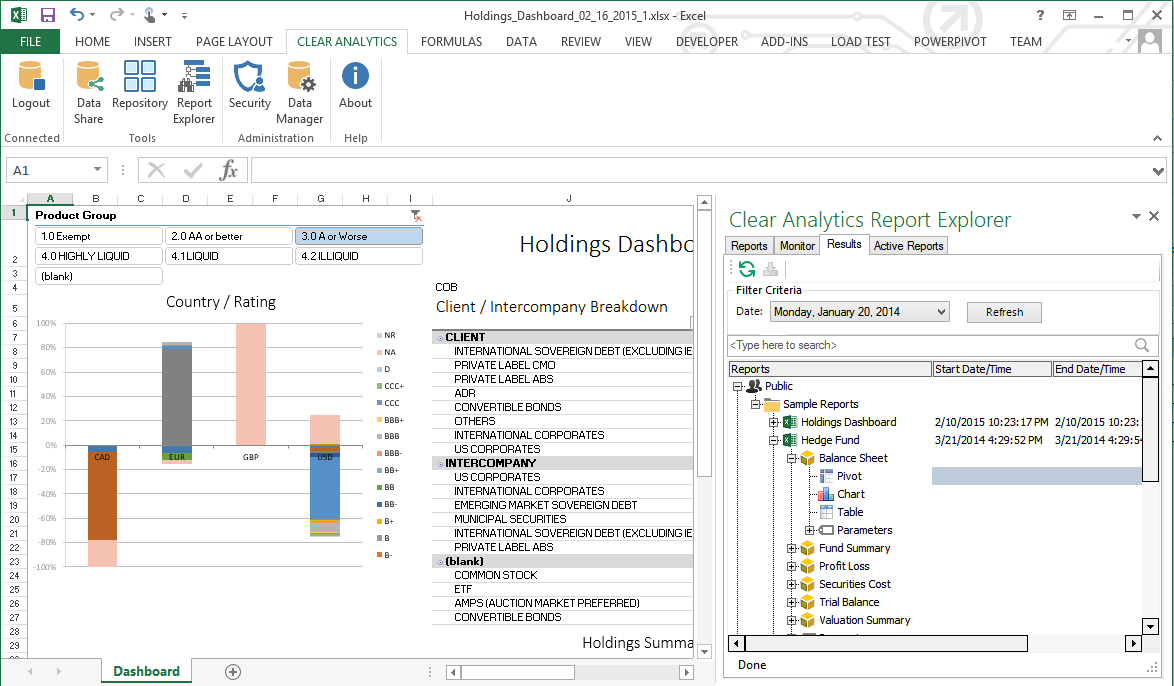
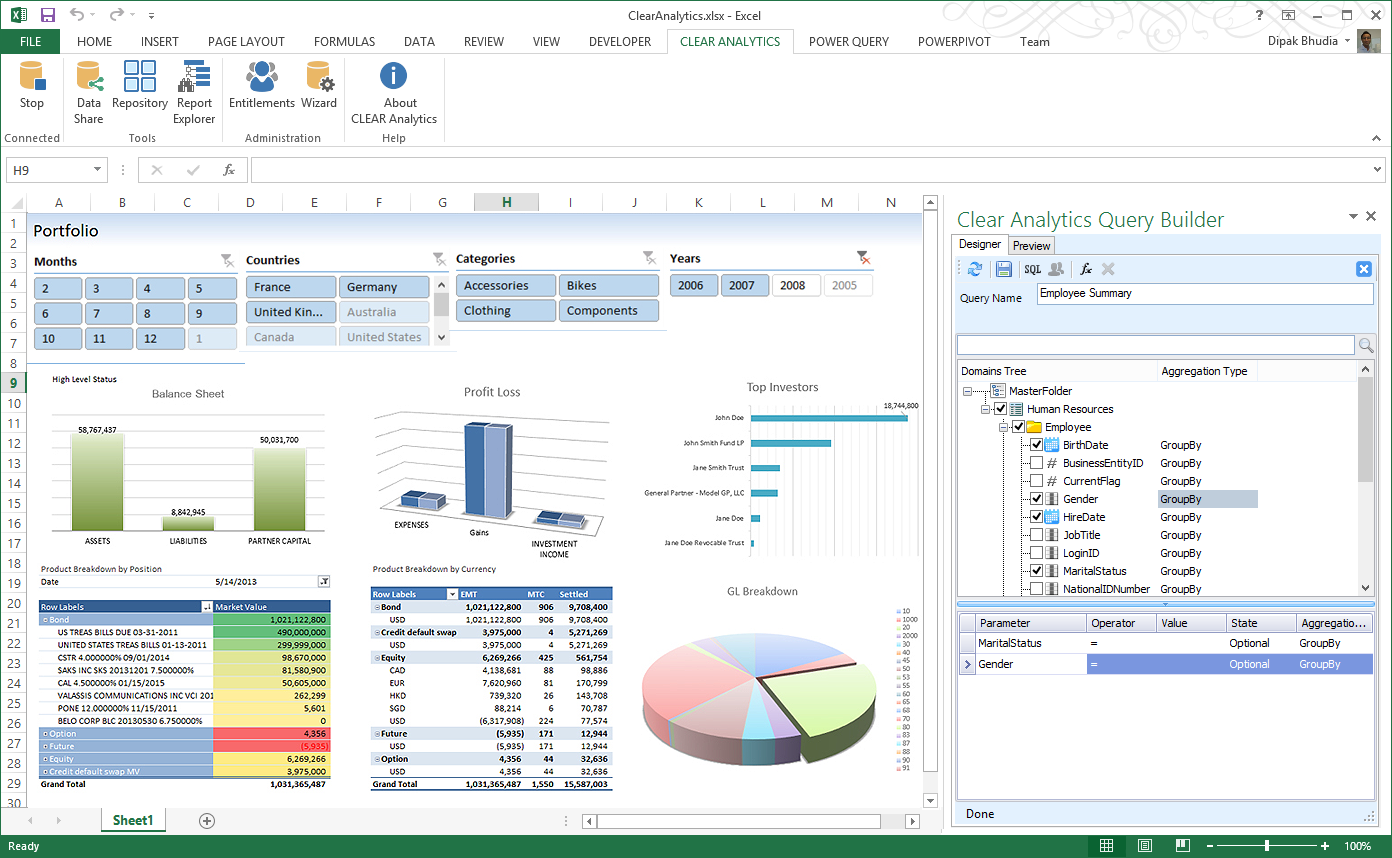
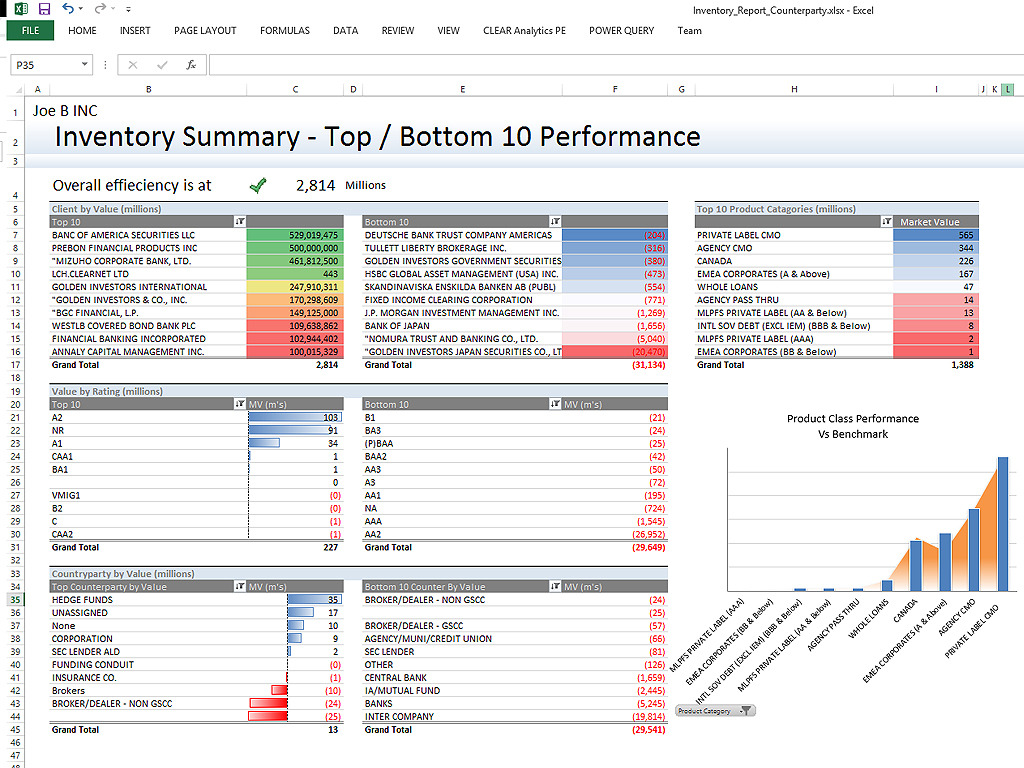
    Screenshot of Clear Analytics integrated Excel panel essentially transforms standalone Excel into an enterprise strength, fully auditable, collaborative and centralized business intelligence platform.Screenshot of Users have the ability to dynamically query systems and render that data in any way they like.  No more waiting on IT to create reports.Screenshot of Your firms existing knowledge of Excel enables the firm to be product from day 1. Use the skills already present in your organization and don't pay for outside reporting consultants to create reports for you.Screenshot of Leverage the integration capability of Microsoft's Power BI to extend the reach of your data to web and mobile devices.Screenshot of Leverage all of Excels capabilities, from it's slicers to miniature spark-line charts to create incredibly informative and responsive dashboards.