CoSchedule Marketing Suite vs. Viraltag

Overview
ProductRatingMost Used ByProduct SummaryStarting Price
CoSchedule Marketing Suite
Score 10.0 out of 10
N/A
CoSchedule provides a content calendar, content optimization, and contentmarketing products, with users among 50,000 marketers worldwide, helping them organize their work, deliver projects on time, and prove marketing team value.N/A
Viraltag
Score 8.7 out of 10
N/A
Viraltag is a social media marketing and management solution built to provide users with multi-channel content management based on engaging visual content. It includes third-party integrations with Dropbox, Picasa, Instagram, RSS feeds, and Canva, among others.N/A
Pricing
CoSchedule Marketing SuiteViraltag
Editions & Modules
No answers on this topic
Offerings
Pricing Offerings
CoSchedule Marketing SuiteViraltag
Free Trial
NoNo
Free/Freemium Version
YesNo
Premium Consulting/Integration Services
NoNo
Entry-level Setup FeeNo setup feeNo setup fee
Additional Details
More Pricing Information
Community Pulse
CoSchedule Marketing SuiteViraltag
Features
CoSchedule Marketing SuiteViraltag
Content Creation
Comparison of Content Creation features of Product A and Product B
CoSchedule Marketing Suite
7.3
1 Ratings
8% below category average
Viraltag
-
Ratings
Ideation5.01 Ratings00 Ratings
Content collaboration7.01 Ratings00 Ratings
Content calendar10.01 Ratings00 Ratings
Content Publishing
Comparison of Content Publishing features of Product A and Product B
CoSchedule Marketing Suite
10.0
1 Ratings
23% above category average
Viraltag
-
Ratings
Content distribution10.01 Ratings00 Ratings
Content promotion10.01 Ratings00 Ratings
Content automation10.01 Ratings00 Ratings
Content Reporting & Analytics
Comparison of Content Reporting & Analytics features of Product A and Product B
CoSchedule Marketing Suite
10.0
1 Ratings
29% above category average
Viraltag
-
Ratings
Closed-loop tracking and reporting10.01 Ratings00 Ratings
Content performance analytics10.01 Ratings00 Ratings
Listening/monitoring
Comparison of Listening/monitoring features of Product A and Product B
CoSchedule Marketing Suite
-
Ratings
Viraltag
9.0
1 Ratings
17% above category average
Boolean keyword searches00 Ratings10.01 Ratings
Filtering out noise/spam00 Ratings8.01 Ratings
Sentiment analysis00 Ratings9.01 Ratings
Broad channel coverage00 Ratings9.01 Ratings
Publishing
Comparison of Publishing features of Product A and Product B
CoSchedule Marketing Suite
-
Ratings
Viraltag
9.3
2 Ratings
14% above category average
Content planning and scheduling00 Ratings10.02 Ratings
Audience targeting00 Ratings9.01 Ratings
Content optimization00 Ratings8.02 Ratings
Workflow management00 Ratings10.02 Ratings
Engagement
Comparison of Engagement features of Product A and Product B
CoSchedule Marketing Suite
-
Ratings
Viraltag
8.3
2 Ratings
3% above category average
Automated routing and prioritization00 Ratings8.02 Ratings
Customer interaction histories00 Ratings9.01 Ratings
Bulk actions00 Ratings8.01 Ratings
Marketing
Comparison of Marketing features of Product A and Product B
CoSchedule Marketing Suite
-
Ratings
Viraltag
9.5
1 Ratings
21% above category average
Lead generation00 Ratings10.01 Ratings
Content marketing00 Ratings9.01 Ratings
Paid media management00 Ratings10.01 Ratings
Campaigns and promotions00 Ratings9.01 Ratings
Channel coverage/integration
Comparison of Channel coverage/integration features of Product A and Product B
CoSchedule Marketing Suite
-
Ratings
Viraltag
9.2
2 Ratings
10% above category average
Twitter00 Ratings9.02 Ratings
Facebook00 Ratings9.02 Ratings
LinkedIn00 Ratings9.01 Ratings
Google+00 Ratings10.01 Ratings
Instagram00 Ratings9.01 Ratings
Pinterest00 Ratings9.02 Ratings
Reporting/analytics
Comparison of Reporting/analytics features of Product A and Product B
CoSchedule Marketing Suite
-
Ratings
Viraltag
9.7
1 Ratings
23% above category average
Campaign success analytics00 Ratings10.01 Ratings
Real-time tracking00 Ratings10.01 Ratings
Competitor analysis00 Ratings9.01 Ratings
Account management
Comparison of Account management features of Product A and Product B
CoSchedule Marketing Suite
-
Ratings
Viraltag
8.5
1 Ratings
7% above category average
Role-based user permissions & privileges00 Ratings8.01 Ratings
Mobile access00 Ratings9.01 Ratings
Best Alternatives
CoSchedule Marketing SuiteViraltag
Small Businesses
Vyond
Vyond
Score 8.6 out of 10
CoSchedule Marketing Suite
Score 10.0 out of 10
Medium-sized Companies
Vyond
Vyond
Score 8.6 out of 10
CoSchedule Marketing Suite
Score 10.0 out of 10
Enterprises
Vyond
Vyond
Score 8.6 out of 10
Social Suite by Reputation.com
Score 9.4 out of 10
All AlternativesView all alternativesView all alternatives
User Ratings
CoSchedule Marketing SuiteViraltag
Likelihood to Recommend
10.0
(11 ratings)
9.0
(2 ratings)
Usability
10.0
(1 ratings)
9.0
(1 ratings)
Support Rating
9.0
(2 ratings)
9.0
(1 ratings)
User Testimonials
CoSchedule Marketing SuiteViraltag
Likelihood to Recommend
CoSchedule
CoSchedule is great for businesses or agencies who need an overview of all their marketing efforts, and who want to establish collaboration between multiple departments. The calendar view is one of the best we've worked with and makes it easy to see exactly what's happening. There is some slight clunkiness when it comes to admin-related tasks, and a few things aren't easy to find, but there's great support.
Read full review
Viraltag Inc.
I found [Viraltag] offers great value for money. Especially, it allows you to
just manage one account for all media social media platforms namely Pinterest,
Instagram, Facebook, Facebook Pages, Twitter, and LinkedIn. Tailwind (another
great social media posting tool), on the other hand, only allows 1 account for
1 social media platform. This implies that we have to pay more! However, [Viraltag] has
been responsive to users' requests, and it is constantly improving its features
over time.
Read full review
Pros
CoSchedule
  • Best time to post is great at updating to when we get the most engagement by platform
  • Requeue tool to slate out additional posts for a given piece of content is a huge time saver
  • Aggregate analytics tool shows us a peek across our posts on a given platform that's actually easier to read than the platform itself
Read full review
Viraltag Inc.
  • Affordable platform for Pinterest especially
  • Streamlining of pins at peak times on Pinterest
  • Easy to navigate platform
Read full review
Cons
CoSchedule
  • The platform seems sluggish as of late, likely as a result of the robust amount of data we are entering and the number of filters we're creating.
  • Social media scheduling exists, but we do run into publishing errors more often then we'd like.
  • Task templates when updated are not retroactive, so when you create projects for an entire year and then change a template, you need to go back and change them manually.
Read full review
Viraltag Inc.
  • While the more costly arrangement offers Google examination, this is just insufficient for a business to see genuine commitment with our posts.
  • Visual investigations with charts, which are standard on numerous different arrangements, are just accessible in the top estimated plan at VT.
Read full review
Usability
CoSchedule
The interface is very intuitive, from setting up social profiles, to posting, to tags, to optimizing for best day/time to post. It's super easy to scan the aggregate analytics. The calendar is very easy to grok at a glance, and the more advanced functionality is intuitive to set up.
Read full review
Viraltag Inc.
It is absolutely amazing software. I love to use this mind-blowing software.
Read full review
Support Rating
CoSchedule
I didn't have to use their official support, but I can say that they put out a lot of content online to help users. Their YouTube page has quite an array of tutorial videos explaining how things work and how to get the most out of their tools. If you're struggling, before picking up a phone or blasting off an email, try searching for your problem on YouTube or their forums.
Read full review
Viraltag Inc.
It is very supportive by all means.
Read full review
Alternatives Considered
CoSchedule
CoSchedule provides collaborative planning of projects. The calendar view is very well designed. Meetings and tasks can be scheduled and tracked easily. Whatever is being done, no matter how big the task/project is, it gives a bird-eye view of everything. Additionally, it also integrated very well with WordPress. Their customer service team is also very helpful.
Read full review
Viraltag Inc.
We don't use Hootsuite for Pinterest and we don't use Viraltag (much) for Twitter, Instagram or Facebook feeds.
Read full review
Return on Investment
CoSchedule
  • It has saved me about 1 hour per day to keep things organized from Asana to WordPress.
  • By not having a functioning Google Doc import feature, it costs me about 30 minutes for each blog post to copy paste all the content, images, etc.
  • By bundling too many features into their plans, many of which we don't use (e.g. social media scheduling), we lose a little ROI because we are not using the full feature set. We use and prefer Buffer for social media, so when CoSchedule raised their price $40+ per month on features we would not be using, that hurt.
Read full review
Viraltag Inc.
  • Viraltag, when used to optimize Pinterest stream, saved advertising dollars and reached organic audience really well
Read full review
ScreenShots

CoSchedule Marketing Suite Screenshots

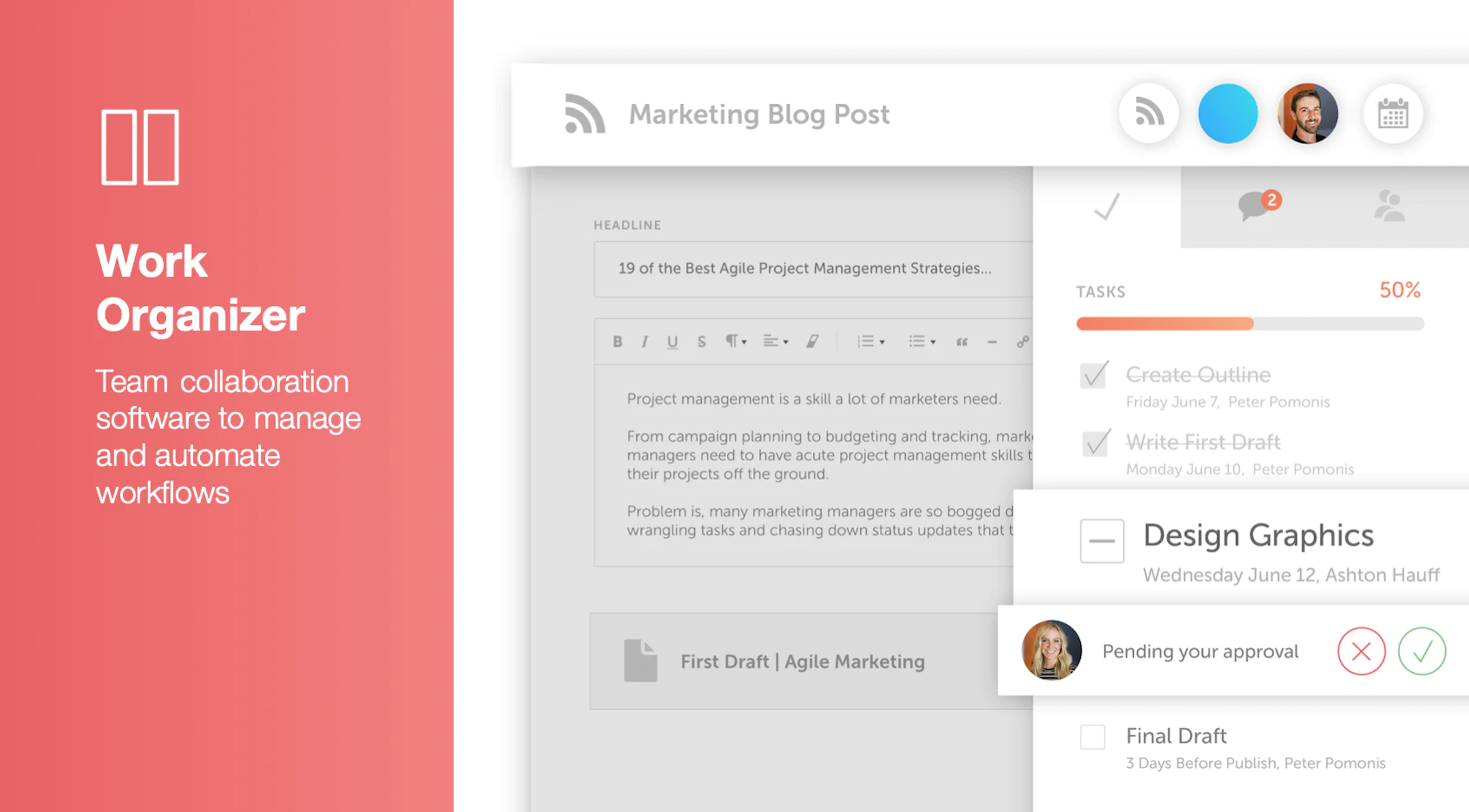
Screenshot of Calendar Organizer: Visualizes everything in real time, and shows every project on a unified calendar of record. Helps to keep stakeholders in the know and pivot quickly when priorities change.Screenshot of Content Organizer: Eliminates content bottlenecks from idea to promotion. Optimizes the editorial process, and centralizes publishing and promotion by connecting marketing tools.Screenshot of Work Organizer: Maximizes resources by implementing consistent, defined workflows to speed up production and identify how urgent changes impact proactively planned work.Screenshot of Asset Organizer: Catalogs and maintains control of brand assets with customized taxonomies to find, update, and share files. Folders and files can be shared with stakeholders to make sure work is up-to-date.Screenshot of Idea Board: Used to write down ideas, take in requests, and prioritize the projects that are up-next, before giving them a publish date and putting them on the calendar organizer.Screenshot of An AI-powered Marketing Intelligence Assistant that can be used to write first-draft copy, complete work faster, and generate new ideas.