TrustRadius: an HG Insights company

Save this comparison

Save this comparison

Add Product

Recommended Comparisons

    Overview
    ProductRatingMost Used ByProduct SummaryStarting Price

    Dash

    N/AN/ADash is a Digital Asset Management (DAM) solution for small and growing brands for smaller teams. Dash helps users claw back the hours spent hunting around for images and videos on network servers and shared cloud storage. It provides a centralised home for digital assets — enabling the user to find images and video quickly, before deploying them to campaigns.

    $109

    per month

    SharePoint

    Score7.8 out of 10
    N/AMicrosoft's SharePoint is an Intranet solution that enables users to share and manage content, knowledge, and applications to empower teamwork, quickly find information, and collaborate across the organization.

    $5

    Per User Per Month

    Pricing
    DashSharePoint
    Editions & Modules
    Start-up
    $109
    per month
    Small team
    $239
    per month
    Growing brand
    $389
    per month
    Established brand
    $589
    per month
    Plan 1
    $5.00
    Per User Per Month
    Plan 2
    $10.00
    Per User Per Month
    Office 365 E3
    $20.00
    Per User Per Month
    Offerings
    Pricing Offerings
    DashSharePoint
    Free Trial
    YesYes
    Free/Freemium Version
    NoNo
    Premium Consulting/Integration Services
    NoNo
    Entry-level Setup FeeNo setup feeNo setup fee
    Additional DetailsDash prices by storage and download volume rather than by user. Every plan includes unlimited users, so brands can give access to their whole marketing, ecommerce and creative team, along with external collaborators such as agencies, photographers and retail partners, without per-seat costs increasing as they grow. All features are included on every plan, including AI search, auto-tagging, guest upload links, branded partner portals, image editing tools, CDN embedding and integrations with Shopify, WooCommerce, WordPress, Canva and Hootsuite. Brands choose a plan based on how much they store and how often assets are downloaded, not on which capabilities they need. Free migration and onboarding support are included on all plans, covering the move from tools such as Google Drive, Dropbox, SharePoint or another DAM. Prices are listed in US, GBP, EUR, CAD and AUD and billed monthly by standard, with a 10% discount for annual billing. You can also get a further 10% off if you're a non-profit. The Established brand plan scales from 200GB to 50TB of storage with unlimited downloads, suited to brands with large product photography and video libraries.—
    More Pricing Information
    Community Pulse
    DashSharePoint
    Considered Both Products
    Bright Interactive
    No answer on this topic
    Microsoft
    No answer on this topic
    Key User Insights
    Would buy again
    No answers on this topic
    89%
    Would buy again
    51 Answers
    Delivers good value for the price
    No answers on this topic
    96%
    Delivers good value for the price
    45 Answers
    Happy with the feature set
    No answers on this topic
    95%
    Happy with the feature set
    54 Answers
    Lived up to sales and marketing promises
    No answers on this topic
    96%
    Lived up to sales and marketing promises
    27 Answers
    Implementation went as expected
    No answers on this topic
    97%
    Implementation went as expected
    37 Answers
    Best Alternatives
    DashSharePoint
    Small Businesses
    Adobe Bridge
    Score8.7 out of 10
    HCL Connections
    Score9 out of 10
    Medium-sized Companies
    Cloudinary
    Score9 out of 10
    HCL Connections
    Score9 out of 10
    Enterprises
    Acquia DAM (Widen)
    Score8.1 out of 10
    HCL Connections
    Score9 out of 10
    All AlternativesView all alternativesView all alternatives
    User Ratings
    DashSharePoint
    Likelihood to Recommend
    -
    (0 ratings)
    8.1
    (271 ratings)
    Likelihood to Renew
    -
    (0 ratings)
    9.8
    (26 ratings)
    Usability
    -
    (0 ratings)
    8.2
    (31 ratings)
    Support Rating
    -
    (0 ratings)
    8.8
    (13 ratings)
    In-Person Training
    -
    (0 ratings)
    4.5
    (1 ratings)
    Online Training
    -
    (0 ratings)
    6.4
    (1 ratings)
    Implementation Rating
    -
    (0 ratings)
    6.0
    (5 ratings)
    Data Sharing and Collaboration
    -
    (0 ratings)
    9.2
    (51 ratings)
    Data Sources
    -
    (0 ratings)
    7.6
    (50 ratings)
    User Testimonials
    DashSharePoint
    Likelihood to Recommend
    Bright Interactive
    No answers on this topic
    Microsoft
    It's Microsoft, so it rarely goes down or unnecessarily limits access. It works, though page load times can be long if you have lots of data. I feel like the Mac vs. PC divide has started to show up for MS products, but SharePoint works well with both.
    Read full review
    Pros
    Bright Interactive
    No answers on this topic
    Microsoft
    • We track employees' performance sheets, which are accessible to the employee, his manager, and HR, and this helps with transparency.
    • We maintain technical process documents and SOPs, which help us quickly provide relevant documents during audits.
    • We maintain incident documents change request forms in SharePoint, which helps us in tracking the changes.
    Incentivized
    Read full review
    Cons
    Bright Interactive
    No answers on this topic
    Microsoft
    • Windows Explorer users have some difficulty having to constantly UPLOAD / DOWNLOAD files. Specifically on the DOWNLOAD when they are used to Drag & Drop in & out of LOCAL folders via Window's explorer.
    • Microsoft SharePoint supports multiple "library" types. When implementing our "image" library the search function is done via "tags" and boolean logic. This is challenging to most end users. I'd like our users to be able to search our Microsoft SharePoint image library without having to enter KEYWORD or other BOOLEAN logic.
    • Microsoft SharePoint can also be an internal website for each department or company wide communication tool but I believe these features are geared for much larger organizations. Since we are a SMB we really aren't using these features. So maybe something more useful to SMBs would be nice.
    Incentivized
    Read full review
    Likelihood to Renew
    Bright Interactive
    No answers on this topic
    Microsoft
    It's integral to our business. It's already included with most of the Office 365 licensing we buy, so the cost is effectively zero. It stores our files, it is the foundation for custom applications, and Microsoft only continues to enhance its functionality and its connections to other Microsoft tools. SharePoint just keeps getting better and better.
    Incentivized
    Read full review
    Usability
    Bright Interactive
    No answers on this topic
    Microsoft
    No usability issues reported. Individual teams also have allocated areas which replace legacy shared drives on local LANs. Access to Sharepoint resources is fully integrated with corporate Active Directory with additional two-factor authentication required for administrative users. Users have access to Microsoft Services Hub which allows you to create, manage, and track support requests while staying current on Microsoft technologies with access to select self-paced learning paths
    Incentivized
    Read full review
    Support Rating
    Bright Interactive
    No answers on this topic
    Microsoft
    Support for SharePoint is quite good. Microsoft provides good support. Microsoft offers
    • Quick turnaround time for issues
    • A range of support services
    • Access to a network of resources
    • Escalation of issues
    • Ongoing development and commitment to produce enhancement
    The majority of support is required for initial installation. Once complete and the system is operating we have had very few support issues.
    Incentivized
    Read full review
    In-Person Training
    Bright Interactive
    No answers on this topic
    Microsoft
    The face to face training I received was on SharePoint Administration. It was rushed as there was a lot of information to cover and the application of the labs weren't that great either. I like to be able to relate what I am learning to what I am currently doing.
    Read full review
    Online Training
    Bright Interactive
    No answers on this topic
    Microsoft
    I like to learn at my own pace and online training allows for that. Additionally, you can skip through pieces of content that you already know or are already comfortable with. Microsoft actually offers great videos on their website for basic fundamental SharePoint Training. I have used these training videos in some of my own training sessions with end users.
    Read full review
    Implementation Rating
    Bright Interactive
    No answers on this topic
    Microsoft
    Planning to the last detail would be advised. SharePoint is a very large application that takes a lot of finesse to get operational
    Read full review
    Alternatives Considered
    Bright Interactive
    No answers on this topic
    Microsoft
    The reasons for selecting MS SharePoint are: SharePoint provides ease of use and web design assistance and support SharePoint helps you schedule your content for publishing. enables users to share documents with external parties and offers a better internal structure of the content and better indexing and searching capabilities.
    Incentivized
    Read full review
    Return on Investment
    Bright Interactive
    No answers on this topic
    Microsoft
    • It comes with Office 365. It won't cost you any additional charges.
    • It will help you to streamline your communication and work as a central hub for all tasks, files[,] and events[.]
    • Setting it up will need a bit [of] planning. If you jump blindly it will become a confusing place for your team members and make them frustrated[.]
    Incentivized
    Read full review
    ScreenShots

    Dash Screenshots

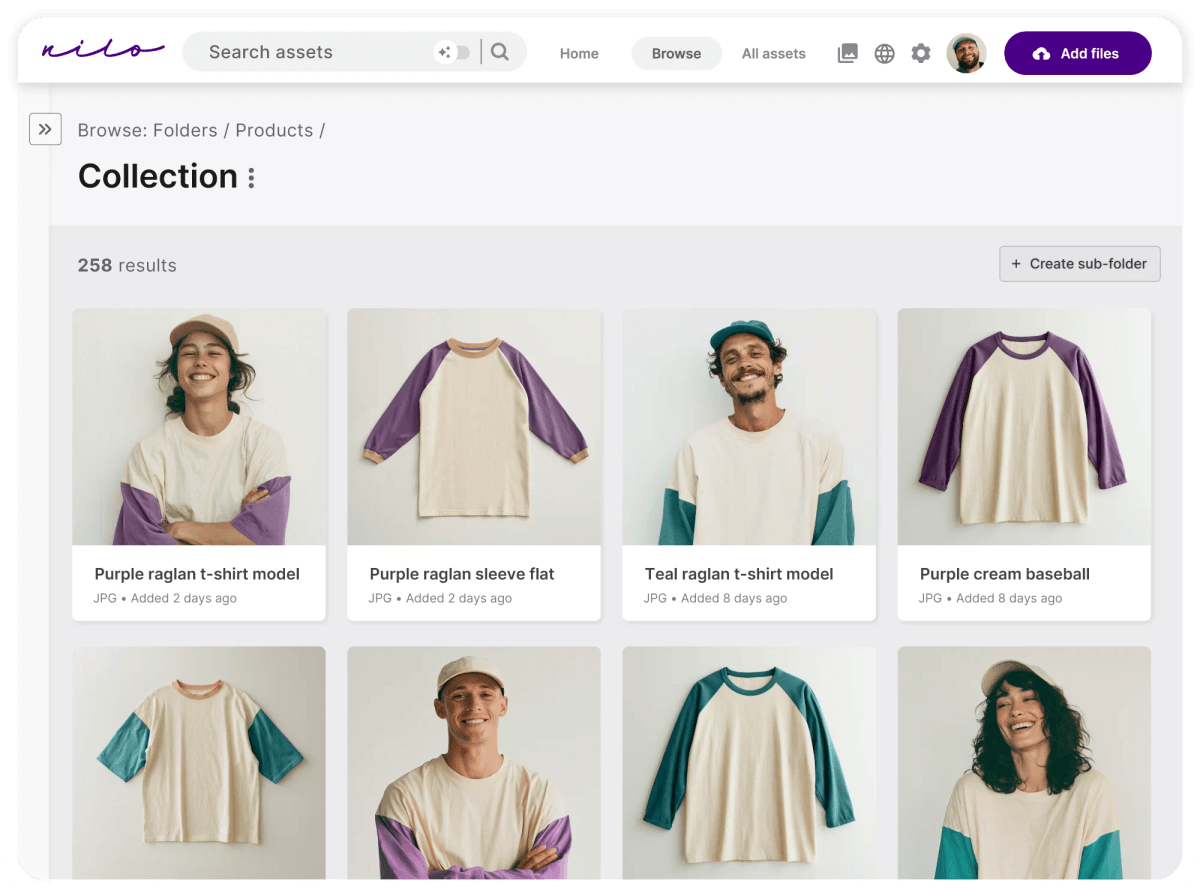
    Screenshot of The Dash homepage - find assets using AI search and deploy it across channelsScreenshot of Filter and browse by custom and AI-generated tags, along with product SKU and name imported from a Shopify catalogue.Screenshot of Integrations with ecommerce tools like Shopify and Klaviyo.