Daylite is a project management solution built around features such as contact management, scheduling, and sales pipeline tracking.
$20.83
per month billed yearly
GanttPRO
Score8 out of 10
N/A
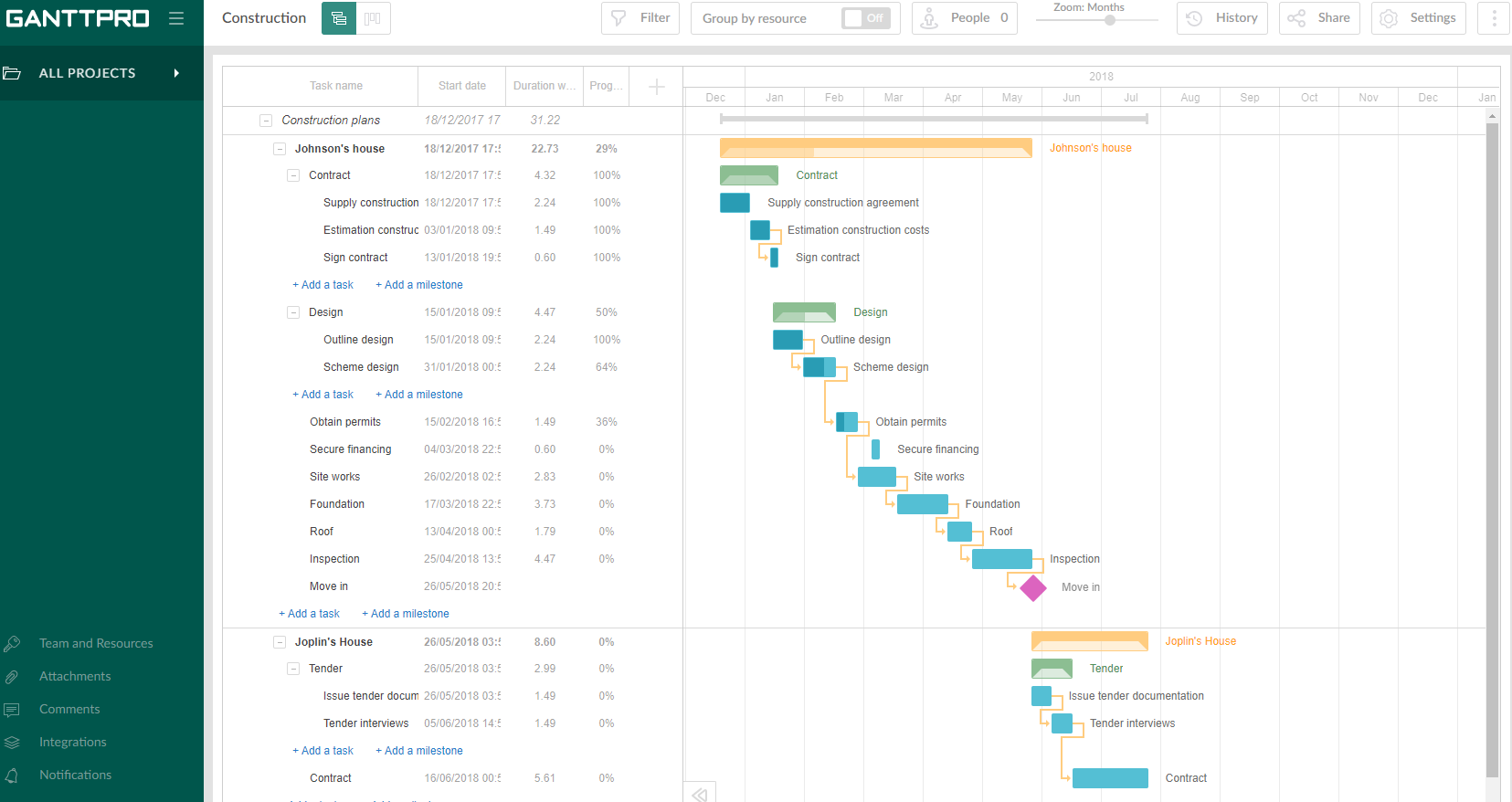
GanttPRO is a project planning tool based on a Gantt chart approach. It visualizes all tasks along a timeline, and it supports resource management, collaboration within teams, and importing and exporting projects onto 3rd party programs.
Well suited for any size company which needs CRM management. Easy to use. Great for individuals or teams that use Apple products. Daylite and ios expert integration has been key in capturing leads from our website into the Daylite database, plus then if they opt into email marketing, they are entered into the MailChimp database. The web forms also automate the creation of opportunities and are linked with the contacts/companies. Sales Managers with geographical responsibilities can easily filter contacts or projects based on these regions so they only see what they need. Daylite is not appropriate for Windows users.
A de minimis incentive was given to thank the reviewer for their time. The incentive was not used to bias or drive a particular response, nor was the incentive contingent on a positive endorsement. More Info
Projects are a lot easier to set up with GanttPRO than most tools that support a WBS, so although I've used GanttPRO for very simple projects, it's great for projects with complex WBS' and/or dynamic backlogs (using Agile methodologies). I've used it for long-running projects with multiple phases, where I needed to set up high-level plans for downstream phases (for budgeting) that got updated and modified based on outcomes from upstream phases.
Daylite allows you to link your email so when you email a client it will link to their contact in Daylite and save the communication so anyone on the team can see all the emails that have been sent between the client and our company.
Daylite allows you to create "opportunities" for the different packages and services we offer. This lets us track where someone is in the process, if they are still thinking about a service, have been sold on it, or are not interested.
Daylite lets you leave notes on the account that everyone on the team can see. This has been so helpful for our company because it lets us drop helpful notes on personal things about the client that would be good for everyone to know.
A de minimis incentive was given to thank the reviewer for their time. The incentive was not used to bias or drive a particular response, nor was the incentive contingent on a positive endorsement. More Info
A de minimis incentive was given to thank the reviewer for their time. The incentive was not used to bias or drive a particular response, nor was the incentive contingent on a positive endorsement. More Info
The main drawback of Daylite is that it becomes slow on its iOS mobile devices.
Sometimes I face a lot of retries to log into the account. The mobile app needs a change and needs an upgrade. Apps are lacking in giving appointment reminders on time. Sometimes it does not notify on the right time about the appointment with the client.
A de minimis incentive was given to thank the reviewer for their time. The incentive was not used to bias or drive a particular response, nor was the incentive contingent on a positive endorsement. More Info
A de minimis incentive was given to thank the reviewer for their time. The incentive was not used to bias or drive a particular response, nor was the incentive contingent on a positive endorsement. More Info
A de minimis incentive was given to thank the reviewer for their time. The incentive was not used to bias or drive a particular response, nor was the incentive contingent on a positive endorsement. More Info
A de minimis incentive was given to thank the reviewer for their time. The incentive was not used to bias or drive a particular response, nor was the incentive contingent on a positive endorsement. More Info
Intuitive interface, clean, and nice design. As an online app, the data can be viewed on Windows PCs, Macs, and tablets. It saves the data very quickly (depending on the Internet speed) as if it is a locally installed application. Training is minimal, plus there is an extensive range of learning videos and topics in the GanttPRO learning center.
A de minimis incentive was given to thank the reviewer for their time. The incentive was not used to bias or drive a particular response, nor was the incentive contingent on a positive endorsement. More Info
A de minimis incentive was given to thank the reviewer for their time. The incentive was not used to bias or drive a particular response, nor was the incentive contingent on a positive endorsement. More Info
A de minimis incentive was given to thank the reviewer for their time. The incentive was not used to bias or drive a particular response, nor was the incentive contingent on a positive endorsement. More Info
A de minimis incentive was given to thank the reviewer for their time. The incentive was not used to bias or drive a particular response, nor was the incentive contingent on a positive endorsement. More Info
The support for GanttPro is very good. I have no troubles reaching out for their customer support whenever I have questions, they respond almost instantly. I just hope that they will have live chat support for a real-time support experience on the user-end and can answer the questions in real-time.
A de minimis incentive was given to thank the reviewer for their time. The incentive was not used to bias or drive a particular response, nor was the incentive contingent on a positive endorsement. More Info
Daylite provides authentic services and features with excellent programming. I have also collaborated on the Daylite calendar with Apple Calendar so that I can never leave behind any updates of the future. Moreover, it keeps on updating its feature for giving better services.
A de minimis incentive was given to thank the reviewer for their time. The incentive was not used to bias or drive a particular response, nor was the incentive contingent on a positive endorsement. More Info
GanttPRO is easy to use and just works. If you need to do something quickly or do a small project then GanttPro is a great tool to use. If you are managing a large project then I would consider using Microsoft Project even though it is a more substantial investment overtime.
A de minimis incentive was given to thank the reviewer for their time. The incentive was not used to bias or drive a particular response, nor was the incentive contingent on a positive endorsement. More Info
A de minimis incentive was given to thank the reviewer for their time. The incentive was not used to bias or drive a particular response, nor was the incentive contingent on a positive endorsement. More Info
A de minimis incentive was given to thank the reviewer for their time. The incentive was not used to bias or drive a particular response, nor was the incentive contingent on a positive endorsement. More Info
A de minimis incentive was given to thank the reviewer for their time. The incentive was not used to bias or drive a particular response, nor was the incentive contingent on a positive endorsement. More Info
Daylite has been very helpful for new employees to answer their own questions about contacts/passwords, etc.
We found the tiny notification bell to be weak, sometimes a project comes in with a tight deadline and we have to double-check and ask an employee if they saw the notification. More time would be saved by just chatting about the project and its expectations.
A huge benefit is the institutional knowledge that can be had by reading past projects. We've tracked everything, so the history is there.
A de minimis incentive was given to thank the reviewer for their time. The incentive was not used to bias or drive a particular response, nor was the incentive contingent on a positive endorsement. More Info
A de minimis incentive was given to thank the reviewer for their time. The incentive was not used to bias or drive a particular response, nor was the incentive contingent on a positive endorsement. More Info