
Devart Excel Add-ins vs. Informatica Intelligent Data Management Cloud
| Product | Rating | Most Used By | Product Summary | Starting Price |
|---|---|---|---|---|
 Devart Excel Add-ins | Score9.4 out of 10 | N/A | Devart Excel Add-ins allow you to use Excel capabilities to import, process, and analyze data from cloud applications and relational databases. The Excel Add-ins also allow users to make data changes and then save those changes back to the data source they were originally imported from. | $399.95 one-time fee |
 Informatica Intelligent Data Management Cloud | Score7 out of 10 | N/A | The Informatica® Intelligent Data Management Cloud™ (IDMC) is designed to help businesses efficiently handle the complex challenges of dispersed and fragmented data to innovate with their data on virtually any platform, any cloud, multi-cloud and multi-hybrid. | N/A |
| Devart Excel Add-ins | Informatica Intelligent Data Management Cloud | |||||||||||||||
|---|---|---|---|---|---|---|---|---|---|---|---|---|---|---|---|---|
| Editions & Modules |
| No answers on this topic | ||||||||||||||
| Offerings |
| |||||||||||||||
| Entry-level Setup Fee | No setup fee | No setup fee | ||||||||||||||
| Additional Details | Purchases include a perpetual license and 1 year of subscription which includes the product updates and premium support. | — | ||||||||||||||
| More Pricing Information | ||||||||||||||||
| Devart Excel Add-ins | Informatica Intelligent Data Management Cloud | |
|---|---|---|
| Considered Both Products | No answer on this topic | No answer on this topic |
| Key User Insights | ||
| Would buy again | ||
No answers on this topic | 100% Would buy again 6 Answers | |
| Delivers good value for the price | ||
No answers on this topic | 100% Delivers good value for the price 6 Answers | |
| Happy with the feature set | ||
No answers on this topic | 100% Happy with the feature set 6 Answers | |
| Lived up to sales and marketing promises | ||
No answers on this topic | No answers on this topic | |
| Implementation went as expected | ||
No answers on this topic | 100% Implementation went as expected 5 Answers | |
| Devart Excel Add-ins | Informatica Intelligent Data Management Cloud | |||||||||||||||||||
|---|---|---|---|---|---|---|---|---|---|---|---|---|---|---|---|---|---|---|---|---|
| Data Source Connection |
| |||||||||||||||||||
| Data Transformations |
| |||||||||||||||||||
| Data Modeling |
| |||||||||||||||||||
| Data Governance |
| |||||||||||||||||||
| Devart Excel Add-ins | Informatica Intelligent Data Management Cloud | |
|---|---|---|
| Small Businesses |  Skyvia Score10 out of 10 | Skyvia Score10 out of 10 |
| Medium-sized Companies |  IBM InfoSphere Information Server Score10 out of 10 | IBM InfoSphere Information Server Score10 out of 10 |
| Enterprises |  SolarWinds Task Factory Score8.3 out of 10 | SolarWinds Task Factory Score8.3 out of 10 |
| All Alternatives | View all alternatives | View all alternatives |
| Devart Excel Add-ins | Informatica Intelligent Data Management Cloud | |
|---|---|---|
| Likelihood to Recommend | 9.0 | 8.3 |
| Likelihood to Renew | - | 9.0 |
| Usability | 9.0 | - |
| Support Rating | - | 8.0 |
| Devart Excel Add-ins | Informatica Intelligent Data Management Cloud | |
|---|---|---|
| Likelihood to Recommend |
|
|
| Pros |
|
|
| Cons |
|
|
| Usability |
| No answers on this topic |
| Support Rating | No answers on this topic |
|
| Alternatives Considered |
|
|
| Return on Investment |
|
|
| ScreenShots | Devart Excel Add-ins Screenshots  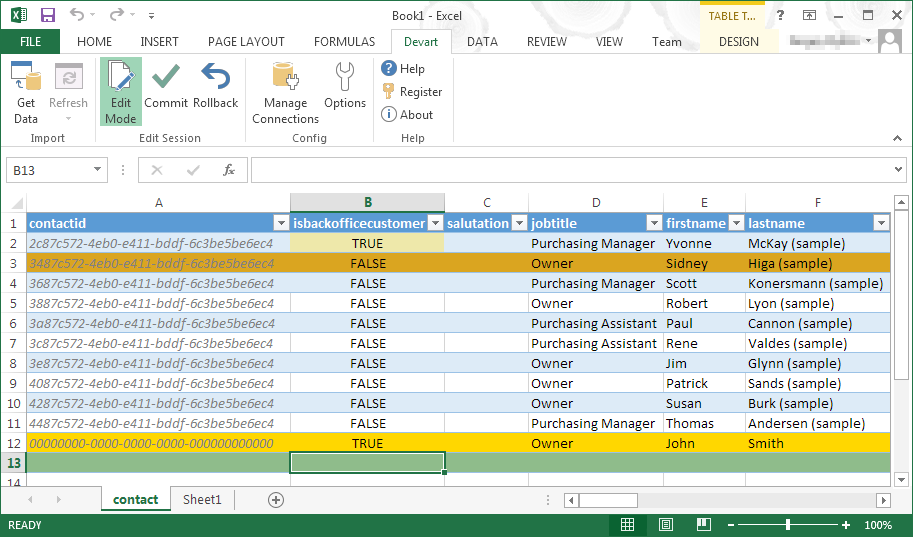 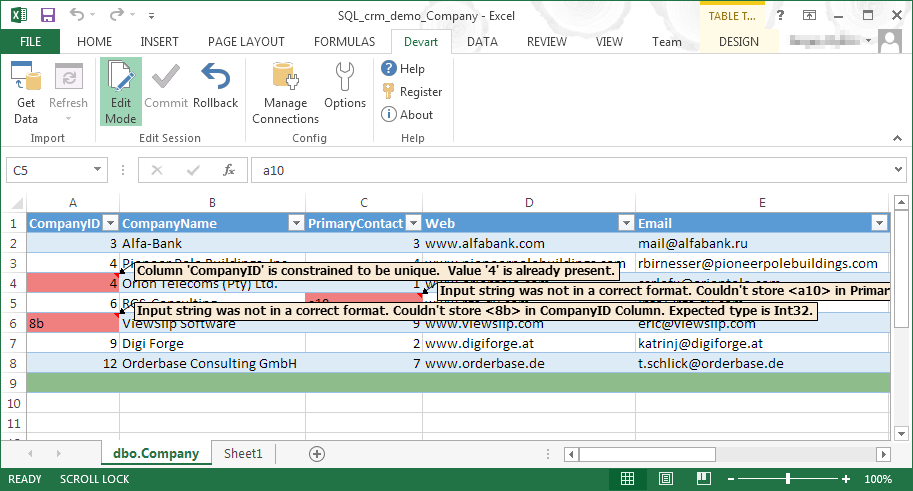 |


