DocuXplorer vs. Epicor ECM

Overview
ProductRatingMost Used ByProduct SummaryStarting Price
DocuXplorer
Score 0.0 out of 10
N/A
DocuXplorer is a document management solution for any file belonging to any business, from the company of the same name in Charleston, South Carolina. WIth it, users can control their data with its methods of locating, accessing, and sharing any type of document, whether scanned or electronic. DocuXplorer’s Microsoft's File Explorer-style interface is designed to require little training and virtually no technology expertise to operate, and it is available in 8 languages and suits businesses of…N/A
Epicor ECM
Score 7.6 out of 10
N/A
Epicor ECM is based on docStar, a document management software offering that was acquired by Epicor in 2017.N/A
Pricing
DocuXplorerEpicor ECM
Editions & Modules
No answers on this topic
Offerings
Pricing Offerings
DocuXplorerEpicor ECM
Free Trial
NoNo
Free/Freemium Version
NoNo
Premium Consulting/Integration Services
YesNo
Entry-level Setup FeeNo setup feeNo setup fee
Additional Details
More Pricing Information
Community Pulse
DocuXplorerEpicor ECM
Features
DocuXplorerEpicor ECM
Enterprise Content Management
Comparison of Enterprise Content Management features of Product A and Product B
DocuXplorer
-
Ratings
Epicor ECM
9.4
4 Ratings
15% above category average
Content capture & imaging00 Ratings9.04 Ratings
File sync, storage & archiving00 Ratings9.04 Ratings
Document management00 Ratings9.04 Ratings
Records management00 Ratings10.04 Ratings
Content search & retrieval00 Ratings10.04 Ratings
Enterprise content collaboration00 Ratings9.03 Ratings
Content publishing & creation00 Ratings9.02 Ratings
Security, risk management & information governance00 Ratings9.94 Ratings
Contract lifecycle management00 Ratings9.03 Ratings
Automated workflows00 Ratings9.94 Ratings
Artificial intelligence00 Ratings9.01 Ratings
Mobile support00 Ratings10.02 Ratings
Integration00 Ratings9.93 Ratings
Best Alternatives
DocuXplorerEpicor ECM
Small Businesses
Square 9 Softworks
Square 9 Softworks
Score 9.5 out of 10
Square 9 Softworks
Square 9 Softworks
Score 9.5 out of 10
Medium-sized Companies
MSB Docs
MSB Docs
Score 9.4 out of 10
MediaValet
MediaValet
Score 9.0 out of 10
Enterprises
Tungsten Capture
Tungsten Capture
Score 8.0 out of 10
MediaValet
MediaValet
Score 9.0 out of 10
All AlternativesView all alternativesView all alternatives
User Ratings
DocuXplorerEpicor ECM
Likelihood to Recommend
-
(0 ratings)
10.0
(7 ratings)
Support Rating
-
(0 ratings)
9.9
(3 ratings)
User Testimonials
DocuXplorerEpicor ECM
Likelihood to Recommend
DocuXplorer
No answers on this topic
Epicor Software
It is well suited for billing service storage and retrieval. It ends the need to pay extra for a storage space. It also makes for easy cleanup of files on a yearly basis.
Read full review
Pros
DocuXplorer
No answers on this topic
Epicor Software
  • Templates - By being able to create templates for each document type, it made organizing files much easier. It also made the titles similar in format, which also allows for better organization.
  • We were able to scan documents directly into docStar, which helped us eliminate extra steps. For example, if we were missing a page from a document, and we received it at a later time, we could scan just that page into docStar as opposed to scanning the entire document again.
  • The functionalities are straight forward, so it is not hard to use the docStar system.
Read full review
Cons
DocuXplorer
No answers on this topic
Epicor Software
  • Cost is an issue, pricey for what it's essentially glorified cloud storage.
  • No ability to lookup vehicles by stock number or phone number.
Read full review
Support Rating
DocuXplorer
No answers on this topic
Epicor Software
Our support for DocStar has been phenomenal! They are always prompt, courteous, and effective. We have never had a bad experience with the support staff and they are always available when we need their help.
Read full review
Alternatives Considered
DocuXplorer
No answers on this topic
Epicor Software
A former employee of our company chose DocStar after much research and Q&A with the DocStar seller. I believe she truly put a lot of time/effort into choosing this system, but the end result is that it is not a good match for our company. After reviewing her notes, I believe she chose the system due to its ability to be customized through the template system
Read full review
Return on Investment
DocuXplorer
No answers on this topic
Epicor Software
  • We have saved almost 10,000 dollars a year just in toner cost. We had to implement some up front cost for tablets and other computer aspects but the initial cost of this was about 3,000 to 4,000 dollars. docStar has saved us an instrumental amount of money and will so in the future as well.
Read full review
ScreenShots

DocuXplorer Screenshots

Screenshot of the AI Insights that automate analysis securely as a localized large language model (LLM). It operates entirely within the DocuXplorer interface, protecting proprietary company data.

Key benefits of AI Insights include:
- Full text search. Whether or not the information within a document is indexed, Insights can search and retrieve the information, including links or references to documents, when prompted.
- Conversational queries. Quickly locate and summarize company reports, policies, contracts, or financial statements without the research.
- Data privacy. Data remains in a secure storage container within a dedicated LLM model, ensuring security.
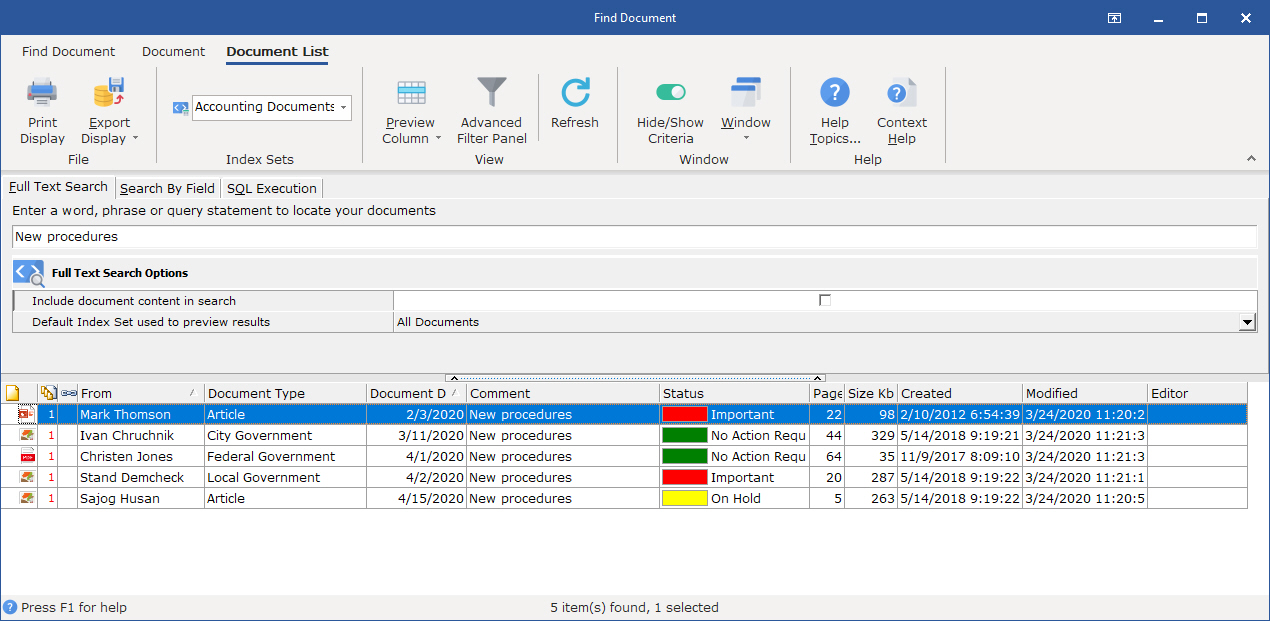
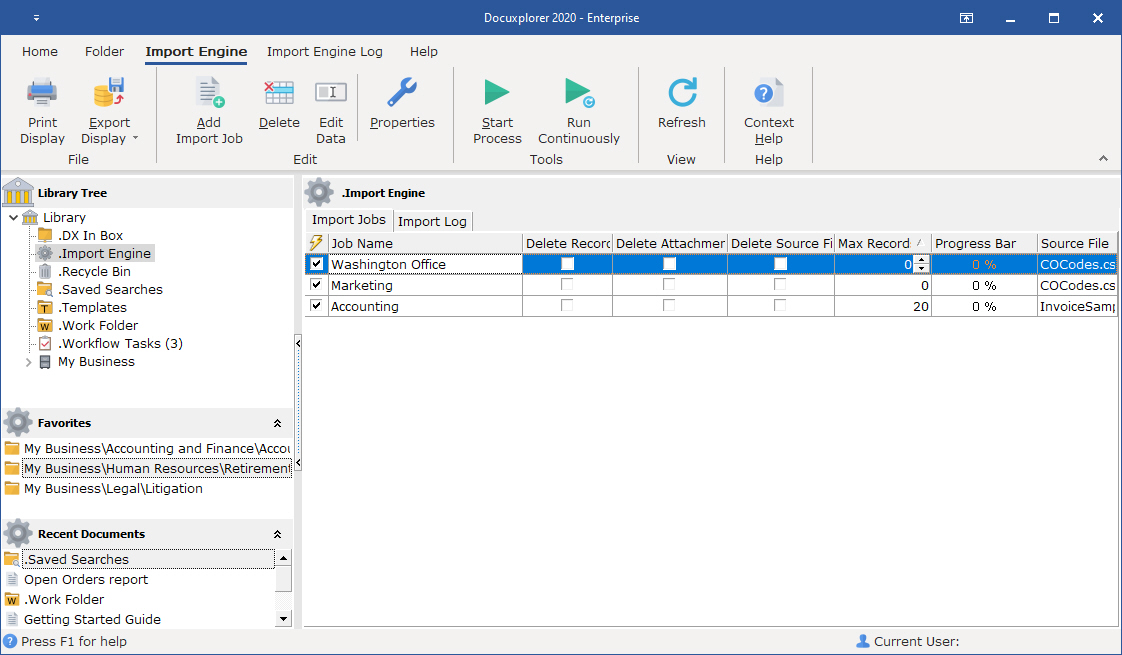
- Permission adherence. Teams only gets answers based on the files they have access to.Screenshot of DocuXplorer's full-text search, which lets users search by key fields (metadata) like date, document type, invoice number, customer/vendor name, or even unstructured data within the document.Screenshot of the Import Engine, used to automate document import from email, local drives, third-party software, and industry systems. It can:
- Handle one-time imports for bulk data migrations—useful when digitizing cabinets of paper records or moving from another system.
- Run ongoing imports by monitoring external folders, email inboxes, or third-party platforms for new files and pulling them into DocuXplorer automatically.
- Create new cabinets, drawers, and folders as needed, so there is no need to build the infrastructure manually.
- Populate index fields with key data during import, so every file is organized and searchable from day one.
- Run in the background—no need to tie up a specific workstation. Imports and organization happen everywhere, all the time, without any user effort.

Everything from PDFs and Word documents to PowerPoint presentations, Excel sheets, and QuickBooks transactions can be automatically pulled into DocuXplorer and organized.