elapseit vs. Miro

Overview
ProductRatingMost Used ByProduct SummaryStarting Price
elapseit
Score 0.0 out of 10
N/A
elapseit is a web-based resource management software solution. It helps businesses match their resources with the upcoming needs and deadlines, as an integrated solution with modules for resource planning, financial management, and project management. The product comes with smart automation, especially for invoicing. It is presented as an ideal choice for medium and large companies, designed to cover most part of their need in resources and project management, but it can also be used by…
$14
per month per user
Miro
Score 9.2 out of 10
N/A
Miro empowers cross-functional teams to flow from early discovery through final delivery on a shared, AI-first canvas. With the canvas as the prompt, Miro’s AI capabilities keep teams in the flow of work, and scale shifts in ways of working.
$10
per month per user
Pricing
elapseitMiro
Editions & Modules
Resourcing
$14
per month per user
Complete
$21
per month per user
1. Free - To discover what Miro can do. Always free
$0
2. Starter - Unlimited and private boards with essential features
$8
per month (billed annually) per user
3. Business - Scales collaboration with advanced features and security
$16
per month (billed annually) per user
4. Enterprise - For work across the entire organization, with support, security and control, to scale
contact sales
annual billing per user
Offerings
Pricing Offerings
elapseitMiro
Free Trial
YesYes
Free/Freemium Version
YesYes
Premium Consulting/Integration Services
YesNo
Entry-level Setup FeeNo setup feeOptional
Additional DetailsThere is also the 3rd pricing plan - Enterprise, which offers integrated and customised solution as specific features, customised integrations, dedicated support, isolated environment and custom URL. There is no fixed price for this plan, the client receiving an offered price after discussions, when we have a clear image of what the client needs.Monthly billing also available at $10 per month for the Starter plan, or $20 for the Business plan.
More Pricing Information
Community Pulse
elapseitMiro
Best Alternatives
elapseitMiro
Small Businesses
Stackby
Stackby
Score 9.0 out of 10
Lucid Visual Collaboration Suite
Score 8.8 out of 10
Medium-sized Companies
InEight
InEight
Score 9.5 out of 10
Lucid Visual Collaboration Suite
Score 8.8 out of 10
Enterprises
InEight
InEight
Score 9.5 out of 10
Lucid Visual Collaboration Suite
Score 8.8 out of 10
All AlternativesView all alternativesView all alternatives
User Ratings
elapseitMiro
Likelihood to Recommend
-
(0 ratings)
9.1
(6075 ratings)
Likelihood to Renew
-
(0 ratings)
9.4
(184 ratings)
Usability
-
(0 ratings)
8.6
(447 ratings)
Availability
-
(0 ratings)
9.4
(20 ratings)
Performance
-
(0 ratings)
9.0
(19 ratings)
Support Rating
-
(0 ratings)
7.7
(63 ratings)
In-Person Training
-
(0 ratings)
1.0
(1 ratings)
Online Training
-
(0 ratings)
9.1
(7 ratings)
Implementation Rating
-
(0 ratings)
8.9
(3659 ratings)
Configurability
-
(0 ratings)
8.5
(14 ratings)
Ease of integration
-
(0 ratings)
8.1
(4002 ratings)
Product Scalability
-
(0 ratings)
8.5
(19 ratings)
Vendor post-sale
-
(0 ratings)
6.9
(7 ratings)
Vendor pre-sale
-
(0 ratings)
6.1
(8 ratings)
User Testimonials
elapseitMiro
Likelihood to Recommend
Elapse IT SRL
No answers on this topic
Miro
Miro works best for me when I am running visual QA on labelled math problems before it is sent out to production. The infinite canvas helps all the members of the team to give valuable feedback, suggestions, etc. I can instantly spot inconsistent logic or misapplied labels. However, once the board exceeds a large number of nodes, lag creeps in, system freezes. Small formula edits without LaTeX becomes really frustrating. Even with all these cons, it is kind of one of the best products yet.
Read full review
Pros
Elapse IT SRL
No answers on this topic
Miro
  • Especially useful project planning with functions like whiteboard and great collaboration features.
  • Miros presentation mode is great for walking people through and explaining a concept.
  • If someone can’t join a meeting, we record a Talktrack. Its like a mini-presentation that people can watch later. Can be extremely useful at times.
Read full review
Cons
Elapse IT SRL
No answers on this topic
Miro
  • Sticky notes cannot be easily resized. It would often be useful for them to transform into workspaces, because they become actual text content rather than just notes.
  • Perhaps there is no option to sort the work boards according to specific criteria (such as alphabetical order or date).
  • The various functions available should perhaps be explained clearly with a tooltip or something similar while you are working with the various tools. I often don't realise that certain things can be done.
Read full review
Likelihood to Renew
Elapse IT SRL
No answers on this topic
Miro
I have advocate for the renew of Miro quite few times, however, it is not under my control as the decision is made in another team with their own budget. I would buy for my own entrepreneur projects (1-2 members) as I do know the value and work there 100%. So, I would pay out of my own pocket to get the value. However, If I wouldn't know the value it provides, it would be hard to decide with the current freemium features
Read full review
Usability
Elapse IT SRL
No answers on this topic
Miro
Solid usability, we transitioned from Mural, so some of it is a learning curve from what we were used to in the prior tool. As previously mentioned, the scrolling feature and moving around the board is not as intuitive as I would like. Outside of that, the functionality seems to mee the expectations we have for a collaboration tool
Read full review
Reliability and Availability
Elapse IT SRL
No answers on this topic
Miro
I only give a 9/10 because of the speed at which it loads. I have never experienced issues with Miro logging me out early, or some other technical issue causing the program to crash, or even it just loading in perpetuity without ever actually coming up (unlike other programs such as SFDC). It take a minute for all of my boards to come up after I click on it in my favorites, but besides that, it's all good.
Read full review
Performance
Elapse IT SRL
No answers on this topic
Miro
Sometimes it gets quite slow and there is a correlation between this and the size of the board. Hence we are trying to segment the boards based on product stages or projects so that the size doesn't go big. When you go from discovery to delivery on a simple board, it will get large and difficult to load, even crash or go white screen
Read full review
Support Rating
Elapse IT SRL
No answers on this topic
Miro
We have never reached out to or contacted support because Miro's platform has been incredibly intuitive and user-friendly. The comprehensive resources available, such as tutorials, documentation, and community forums, have provided all the guidance we needed. The seamless integration with our existing tools and the reliability of the platform have ensured that we rarely encounter issues that require external assistance. This self-sufficiency has allowed us to focus more on our projects and collaboration without interruptions. Overall, our experience with Miro has been smooth and efficient, eliminating the need for additional support
Read full review
Online Training
Elapse IT SRL
No answers on this topic
Miro
There was a series of webinars which Miro hosted with our organization that went over the basics, then progressively became more advanced with additional sections. The instructors were knowledgeable, and provided examples throughout the sessions, as well as answered peoples' questions. There was ample time and experience on the calls to cover a range of topics. The instructors were also very friendly and sociable, as well as honest. Of course Miro isn't a "God-tool" that does absolutely everything, but the instructors were aware and emphasized the strengths where Miro had them and sincerely accepted feedback.
Read full review
Implementation Rating
Elapse IT SRL
No answers on this topic
Miro
Easy to learn, Miro has a series of videos on YouTube that effectively taught this program to my team members and me. The program is drag-and-drop and works excellently. People pick up on how to use it efficiently, and it's great for organizing ideas more freely. This product is more challenging for some older audiences who are not accustomed to using a touchpad, but for most, it was very easy to use.
Read full review
Alternatives Considered
Elapse IT SRL
No answers on this topic
Miro
While not as feature rich to be honest as some of these focused tools, it still replaces a vast majority of them. It is enough to make it easily replace the listed tools if you wish to do so. This not only saves time pivoting between tools, but also money with licensing which is an easy sell to my management.
Read full review
Scalability
Elapse IT SRL
No answers on this topic
Miro
Maybe is possible now so... Could be useful to manage in some way source code for the projects? not to edit so when we make solutions with different components in MIro, maybe each component could redirect to the source code of this component
Read full review
Return on Investment
Elapse IT SRL
No answers on this topic
Miro
  • We did a dynamic activity based on actionable insights from a research study that I conducted. It was great to see people interacting, and one of the proposals was successful, resulting in a 6 million (in local currency) contribution to the company!
Read full review
ScreenShots

elapseit Screenshots

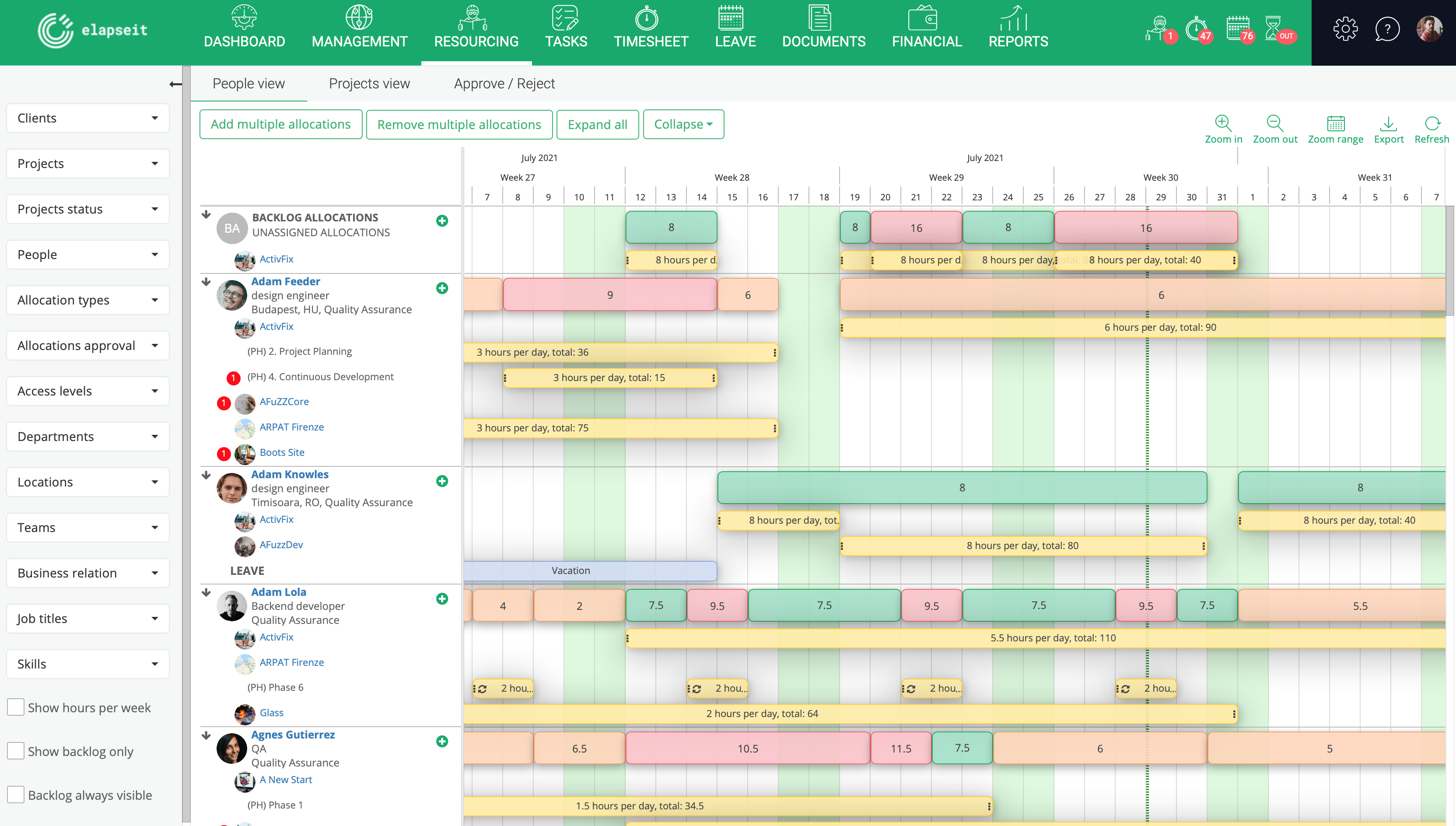
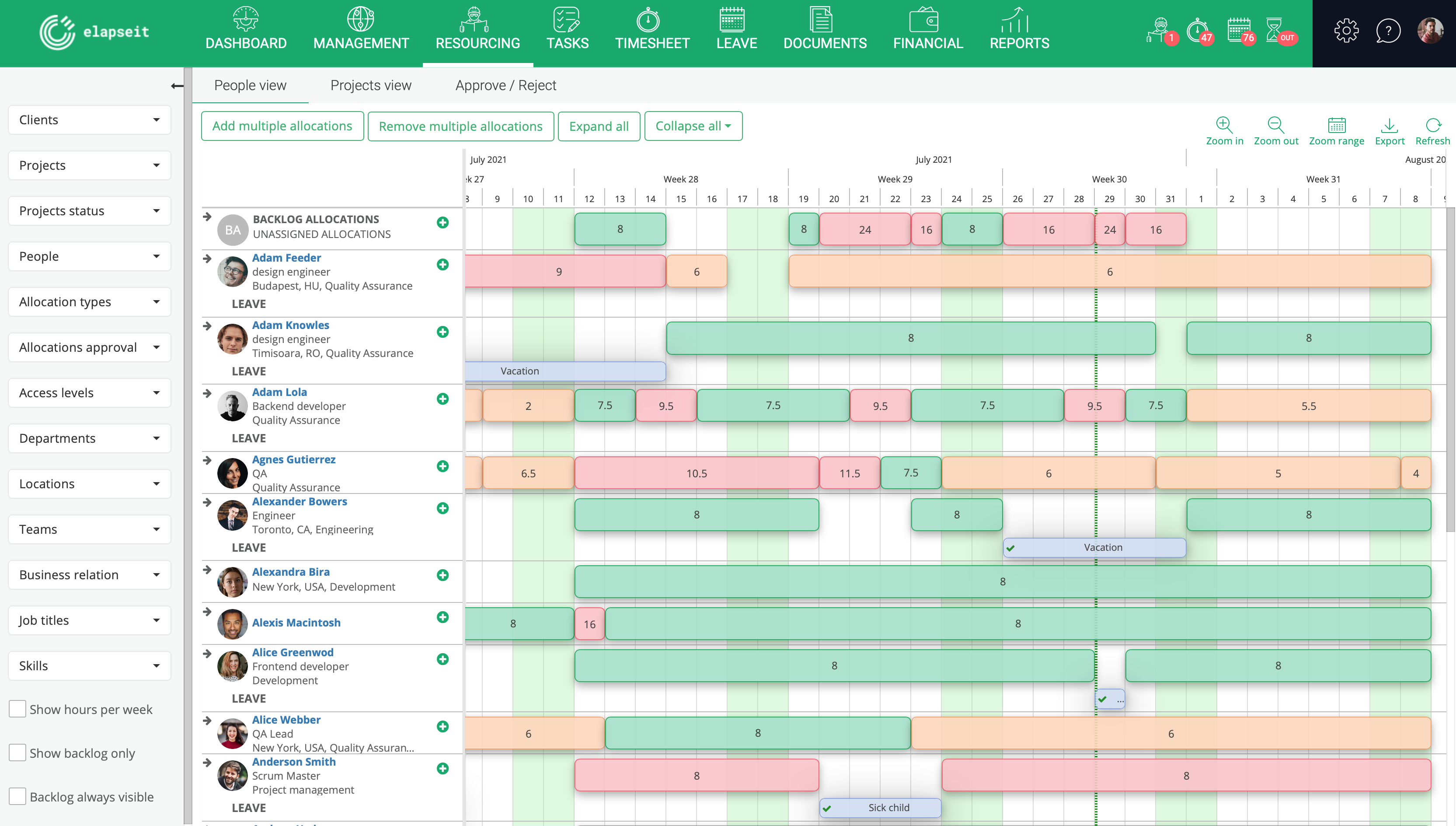
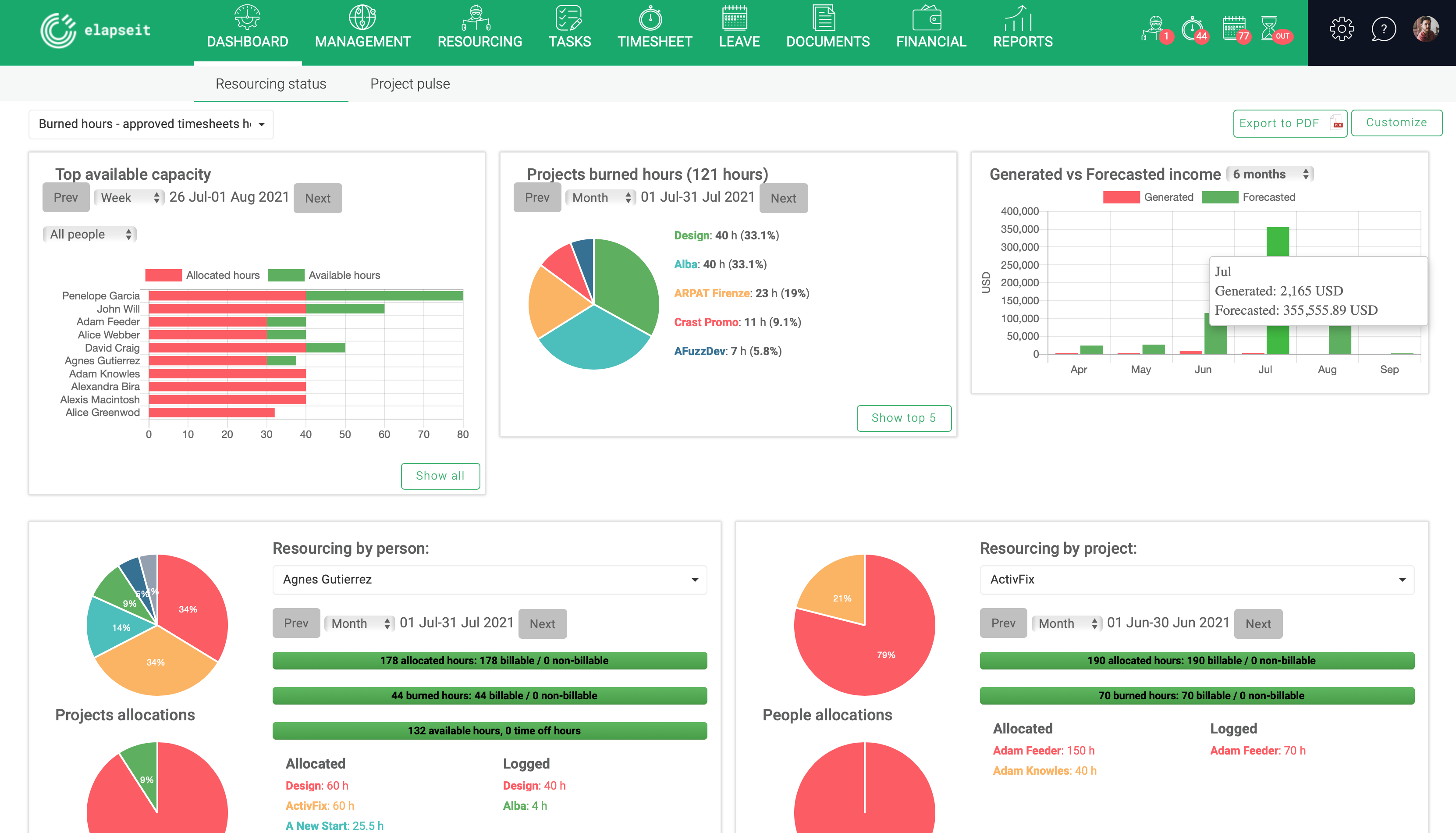
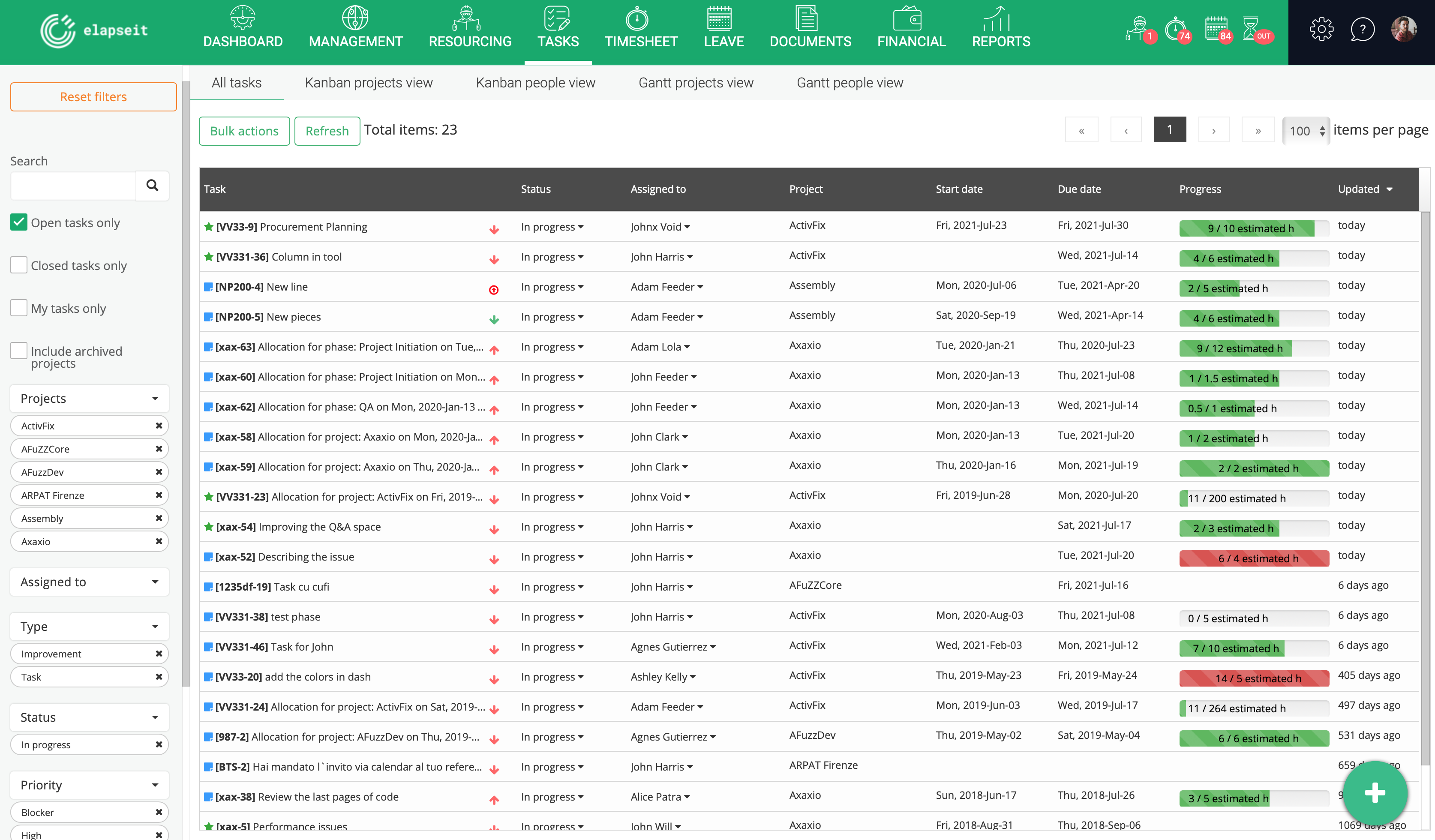
Screenshot of Resource planner expanded, where you can see the availability of all your resources, and who is working on what project, how many hours, etcScreenshot of Resource planner collapsed, which gives you a very clear image of who is under allocated (orange), fully allocated (green) and over allocated (red). Having this view, a project manager can rearrange the allocations, so that all the resources can work a normal schedule.Screenshot of Resourcing dashboard is showing you the state of your business in one page, from resourcing information (availability, leave, tasks allocations) to financial information (revenue forecasted vs generate, invoices, expenses)Screenshot of Tasks list, where are listed all the tasks with statistics about the logged hours, and basic information about the status, project and resource assigned to the task.Screenshot of KanBan board for a project, with the statuses (columns) for each taskScreenshot of Gantt view, with tasks assigned and dependencies for each one

Miro Screenshots

Screenshot of Miro's design sprint templates, used to solve big challenges, create new products or improve existing ones.Screenshot of the Sprint Planning features in Miro, that assists Development Teams in creating a transparent understanding of what can be built and how. Users can run sprints and turn a team into creative and active participants. Today, many organizations use Agile tools to manage software development and other non-IT projects.Screenshot of the PI Planning Template that brings teams toward one vision of what stories to develop. Used to manage a backlog, increase productivity, and build the foundation for a successful PI Planning event. Miro’s PI Planning Template helps to get an overview of any PI Planning event, with step-by-step frames to guide the process.Screenshot of diagrams, concept maps, and system mapping templates used to communicate complex flows and create a shared understanding. Users can check off all the essential steps of the diagramming process and gain a complete overview of operations with Miro's diagramming templates collection.