Entendo vs. Logi Symphony

Overview
ProductRatingMost Used ByProduct SummaryStarting Price
Entendo
Score 0.0 out of 10
Mid-Size Companies (51-1,000 employees)
Entendo is a conversational business intelligence platform that turns plain-language questions into charts and numbers — without SQL, BI specialists, or weeks of setup. Built for Brazilian mid-market companies (50–300 employees), Entendo connects directly with XSLX/CSV to PostgreSQL, MySQL , SQL Server and Oracle databases — typically behind ERPs such as Totvs Protheus, SAP Business One, Bling, or Omie — and lets any decision-maker ask a question in natural language and get an answer in…
$29
per month per organization
Logi Symphony
Score 8.9 out of 10
N/A
Logi Symphony is a business intelligence and data visualization software that includes customizable dashboards, reporting, and visual data analytics. It can be integrated into users’ existing business applications and its visualization and reporting tools can be customized.N/A
Pricing
EntendoLogi Symphony
Editions & Modules
Free
$0
one-time fee Up to 5 users 30 free queries CSV / Excel upload Agents: Chart, Table Exports (CSV, PDF, PNG)
Starter
$29
per month Up to 15 users 80 queries / month SQL, Postgres, Sheets connection Basic Analytics Agent Dashboard Sharing
Pro
$69
per month Up to 40 users 200 queries / month Prediction Agent (Forecast) Full Analytics Agent Prompt audit logs
Business
$149
per month Up to 100 users 500 queries / month Execution priority Embedded Analytics Optional contract
Enterprise
tbd
per month Custom Full control: your cloud, your rules, your data. Unlimited users SSO / SAML Custom SLA BYOK (bring your own AI key)
No answers on this topic
Offerings
Pricing Offerings
EntendoLogi Symphony
Free Trial
NoYes
Free/Freemium Version
YesNo
Premium Consulting/Integration Services
YesYes
Entry-level Setup FeeNo setup feeNo setup fee
Additional DetailsEntendo is priced per workspace, not per seat. A 40-person data team on the Pro plan pays the equivalent of ~$1.75 per user per month. Query quotas refer to natural-language questions asked to the AI agents. Traditional dashboard views, chart interactions, drill-downs, cross-filters, report sharing, and data exports (CSV, PDF, PNG) are unlimited on all plans, including Free. Plan capabilities scale as follows: - Free (R$0 / ~$0): 5 users, 30 queries/month. CSV and Excel file upload only. Includes Chart Agent and Table Agent. Exports in CSV, PDF, PNG. - Starter (R$149 / ~$29): 15 users, 80 queries/month. Adds database connectors (PostgreSQL, MySQL, SQL Server, Oracle, Google Sheets). Adds Basic Analytics Agent. Adds Dashboard Sharing. - Pro (R$349 / ~$69, most popular): 40 users, 200 queries/month. Adds Prediction Agent (time-series forecasting with ARIMA and Holt-Winters). Upgrades to Full Analytics Agent. Adds prompt audit logs for governance and compliance. - Business (R$749 / ~$149): 100 users, 500 queries/month. Adds query execution priority, Embedded Analytics (iframe/embed in third-party applications), and optional annual contract terms. - Enterprise (custom): Unlimited users, custom query quotas, on-premise or hybrid deployment, BYOK (Bring Your Own Key) for LLM providers including OpenAI, Anthropic, and Google Gemini, SSO, audit trails, LGPD compliance, and SLA. Note on currency: Entendo is a Brazilian product and billing is currently available in Brazilian Reais (BRL) only. USD prices shown in this listing are approximate conversions at R$5.00 per USD and are provided for reference. Actual billed amounts are R$149 (Starter), R$349 (Pro), and R$749 (Business) per month.
More Pricing Information
Community Pulse
EntendoLogi Symphony
Features
EntendoLogi Symphony
BI Standard Reporting
Comparison of BI Standard Reporting features of Product A and Product B
Entendo
-
Ratings
Logi Symphony
8.4
51 Ratings
3% above category average
Pixel Perfect reports00 Ratings8.443 Ratings
Customizable dashboards00 Ratings8.651 Ratings
Report Formatting Templates00 Ratings8.139 Ratings
Ad-hoc Reporting
Comparison of Ad-hoc Reporting features of Product A and Product B
Entendo
-
Ratings
Logi Symphony
8.1
51 Ratings
1% above category average
Drill-down analysis00 Ratings7.951 Ratings
Formatting capabilities00 Ratings8.250 Ratings
Integration with R or other statistical packages00 Ratings7.633 Ratings
Report sharing and collaboration00 Ratings8.645 Ratings
Report Output and Scheduling
Comparison of Report Output and Scheduling features of Product A and Product B
Entendo
-
Ratings
Logi Symphony
7.9
49 Ratings
4% below category average
Publish to Web00 Ratings8.442 Ratings
Publish to PDF00 Ratings7.845 Ratings
Report Versioning00 Ratings7.838 Ratings
Report Delivery Scheduling00 Ratings8.337 Ratings
Delivery to Remote Servers00 Ratings7.23 Ratings
Data Discovery and Visualization
Comparison of Data Discovery and Visualization features of Product A and Product B
Entendo
-
Ratings
Logi Symphony
7.8
49 Ratings
2% below category average
Pre-built visualization formats (heatmaps, scatter plots etc.)00 Ratings8.148 Ratings
Location Analytics / Geographic Visualization00 Ratings7.941 Ratings
Predictive Analytics00 Ratings7.432 Ratings
Access Control and Security
Comparison of Access Control and Security features of Product A and Product B
Entendo
-
Ratings
Logi Symphony
8.2
49 Ratings
3% below category average
Multi-User Support (named login)00 Ratings8.648 Ratings
Role-Based Security Model00 Ratings8.045 Ratings
Multiple Access Permission Levels (Create, Read, Delete)00 Ratings8.246 Ratings
Single Sign-On (SSO)00 Ratings8.25 Ratings
Mobile Capabilities
Comparison of Mobile Capabilities features of Product A and Product B
Entendo
-
Ratings
Logi Symphony
8.2
45 Ratings
5% above category average
Responsive Design for Web Access00 Ratings8.344 Ratings
Dashboard / Report / Visualization Interactivity on Mobile00 Ratings8.140 Ratings
Application Program Interfaces (APIs) / Embedding
Comparison of Application Program Interfaces (APIs) / Embedding features of Product A and Product B
Entendo
-
Ratings
Logi Symphony
7.8
7 Ratings
1% above category average
REST API00 Ratings8.25 Ratings
Javascript API00 Ratings8.66 Ratings
iFrames00 Ratings7.05 Ratings
Themeable User Interface (UI)00 Ratings7.76 Ratings
Customizable Platform (Open Source)00 Ratings7.52 Ratings
Best Alternatives
EntendoLogi Symphony
Small Businesses
Yellowfin
Yellowfin
Score 8.6 out of 10
Yellowfin
Yellowfin
Score 8.6 out of 10
Medium-sized Companies
Reveal
Reveal
Score 10.0 out of 10
Reveal
Reveal
Score 10.0 out of 10
Enterprises
Kyvos Semantic Layer
Score 9.5 out of 10
Kyvos Semantic Layer
Score 9.5 out of 10
All AlternativesView all alternativesView all alternatives
User Ratings
EntendoLogi Symphony
Likelihood to Recommend
-
(0 ratings)
8.3
(52 ratings)
Likelihood to Renew
-
(0 ratings)
7.0
(1 ratings)
Usability
-
(0 ratings)
8.0
(6 ratings)
Support Rating
-
(0 ratings)
8.8
(11 ratings)
Implementation Rating
-
(0 ratings)
7.3
(1 ratings)
User Testimonials
EntendoLogi Symphony
Likelihood to Recommend
Sozo Data Ltda
No answers on this topic
Insightsoftware, Inc
For all the scenarios I have so far worked on or I am currently working on, Dundas BI has proved to be more than adequate and apt to handle all of those. It is a very easy-to-use tool with quick shortcuts enabling you to prepare ad-hoc reports or dashboards in a matter of minutes.
Read full review
Pros
Sozo Data Ltda
No answers on this topic
Insightsoftware, Inc
  • Project organization from Development to Production, you get a production and development license but I think the best way to do it is with DEV and Prod project in the Production box. Use the development box for testing updates and really crazy things. With the Dev and Prod projects on the same box, you just publish from Dev to Prod and you are done. Users only have access to the Prod projects so no one can mess up what you are working on.
  • Security - If you have a hierarchy (subsidiaries, divisions, department, teams) and you want each group to see only their data, then Security hierarchies are for you!
  • Dependent filters! What's this you ask? Here is an example of how it can be used, in your company you have departments and who works for what department is in your database. You make a dashboard that has a department filter (only show these departments), a managers filter, and employee filter. Not every manager or employee is in multiple departments usually only one. With dependent filters you can say that the manager and employee filter are dependent on what is selected in the departments filter so when you go to filter them they only show the managers or employees that are part of that department, and you can even it do so employees are not only dependent on department but on manager as well. Then it gets even better as it can be done in reverse as well so when you select a manager then go to the department it only shows the departments he works for (there are better situations where this is more useful).
  • It is scriptable! From calculate columns, null replacements, button actions, load actions, hover over events there a way to do what you want.
  • They are constantly improving and listens to your suggestions.
Read full review
Cons
Sozo Data Ltda
No answers on this topic
Insightsoftware, Inc
  • Not too many cons for how we use the application. It really is easy and powerful. Very powerful.
  • Licensing is one thing that could be looked into. It is simple, but a little confusing. For example, if I get a license today, but a new release comes out tomorrow, it seems that the license doesn't work with the new release. Maybe that is by design, but it would be nice to clearly understand.
Read full review
Usability
Sozo Data Ltda
No answers on this topic
Insightsoftware, Inc
We are still in the implementation phase, but so far we are finding it to be easy to use and learn. The eLearning courses that they have made available for free, as well as User Forums and other training videos have made even difficult concepts easier to understand.
Read full review
Support Rating
Sozo Data Ltda
No answers on this topic
Insightsoftware, Inc
We have bi-weekly calls with our Success Manager, as well as access to support as needed. Any question that I have had, multiple people have been willing and able to jump on a call to talk me through it, or send an email with the solution
Read full review
Implementation Rating
Sozo Data Ltda
No answers on this topic
Insightsoftware, Inc
Providing that you have the client's needs well known, creating BI content using Dundas BI is a walk in the park!
Read full review
Alternatives Considered
Sozo Data Ltda
No answers on this topic
Insightsoftware, Inc
Per dollar spent, it offers the widest range of features of the tools that we evaluated. It offers lots of options for how to configure your environment, though they are not always intuitive to figure out. Having an ETL layer was a must have for us, as well as the ability to host to secure HIPAA compliance. It is not a replacement for ad hoc reporting, but does a great job of creating parameterized reports and dashboards that look great.
Read full review
Return on Investment
Sozo Data Ltda
No answers on this topic
Insightsoftware, Inc
  • Coming from an SQL based standard delivery model, Dundas BI has provided a fantastic rate of ROI.
  • The preparation and delivery time has reduced from weeks to just a few hours.
Read full review
ScreenShots

Entendo Screenshots

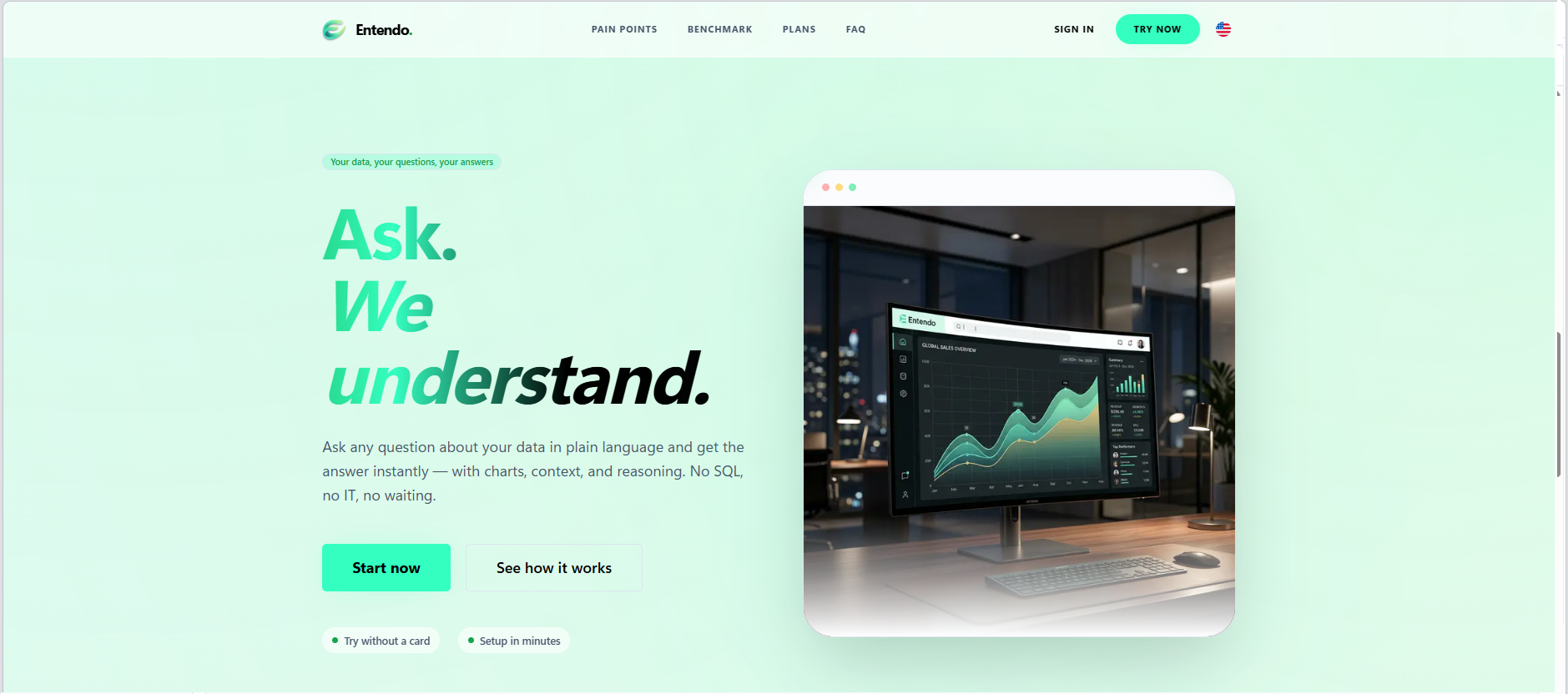
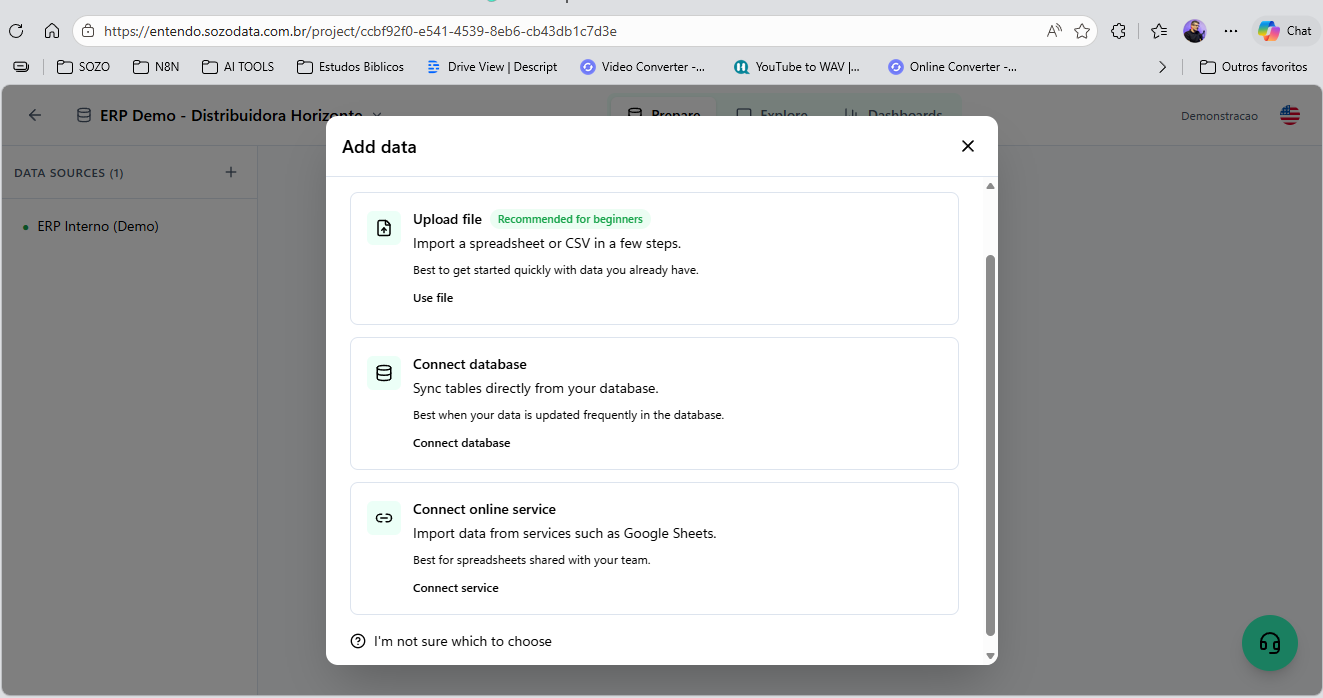
Screenshot of Entendo's landing page, which introduces the product's core promise: Ask. We  understand. Users type any business question in plain language and get the answer instantly — with charts, context, and reasoning — no SQL, no IT tickets, no waiting for the BI team.Screenshot of where users can upload a spreadsheet or CSV, connect their own SQL database (PostgreSQL, MySQL, SQL Server, Oracle), or sync tables from a cloud service like Google Sheets. File  upload is the recommended path for first-time users who want to evaluate the product on their own data before connecting production systems.Screenshot of where Entendo connects directly to existing production databases —   PostgreSQL, MySQL, SQL Server, and Oracle — using read-only credentials you control. The architecture is read-only by design with  four layers of SQL sanitization, so the AI agents can never write, update, or delete data.Screenshot of the conversational interface, which delivers analysis as a complete answer. In this view, the AI is responding about a pessimistic scenario: a revenue line chart on top, headline KPIs in the middle (current revenue, scenario impact, variation percentage), and a comparative bar chart at the bottom. Everything is generated live from the connected database.Screenshot of the Business Analytics Agent responding to a real question:   "show me an analysis of the actions being continuously taken to grow revenue by 30%." Instead of dumping a chart, the agent delivers a   structured diagnosis — overall picture, central problem, root-cause hypothesis, and concrete actions — grounded in the user's own data.Screenshot of an AI generated chart that can be pinned to a dashboard with a click. This example shows a wholesale operations dashboard with four views: weekly sales by day, top products by unit, critical stock   products, and inventory turnover ratio. Dashboards are shareable across the workspace, so the whole team sees the same numbers.

Logi Symphony Screenshots

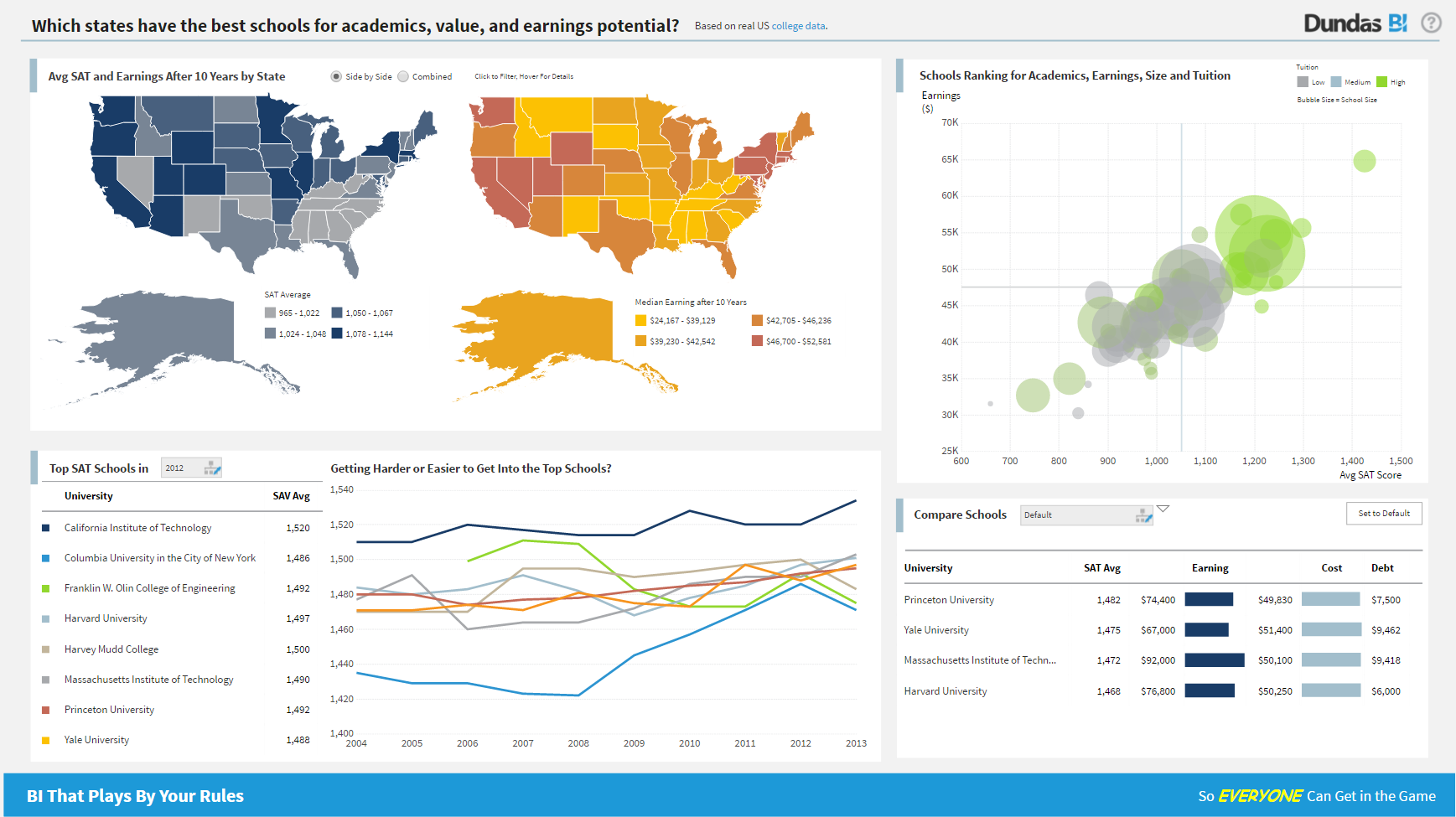
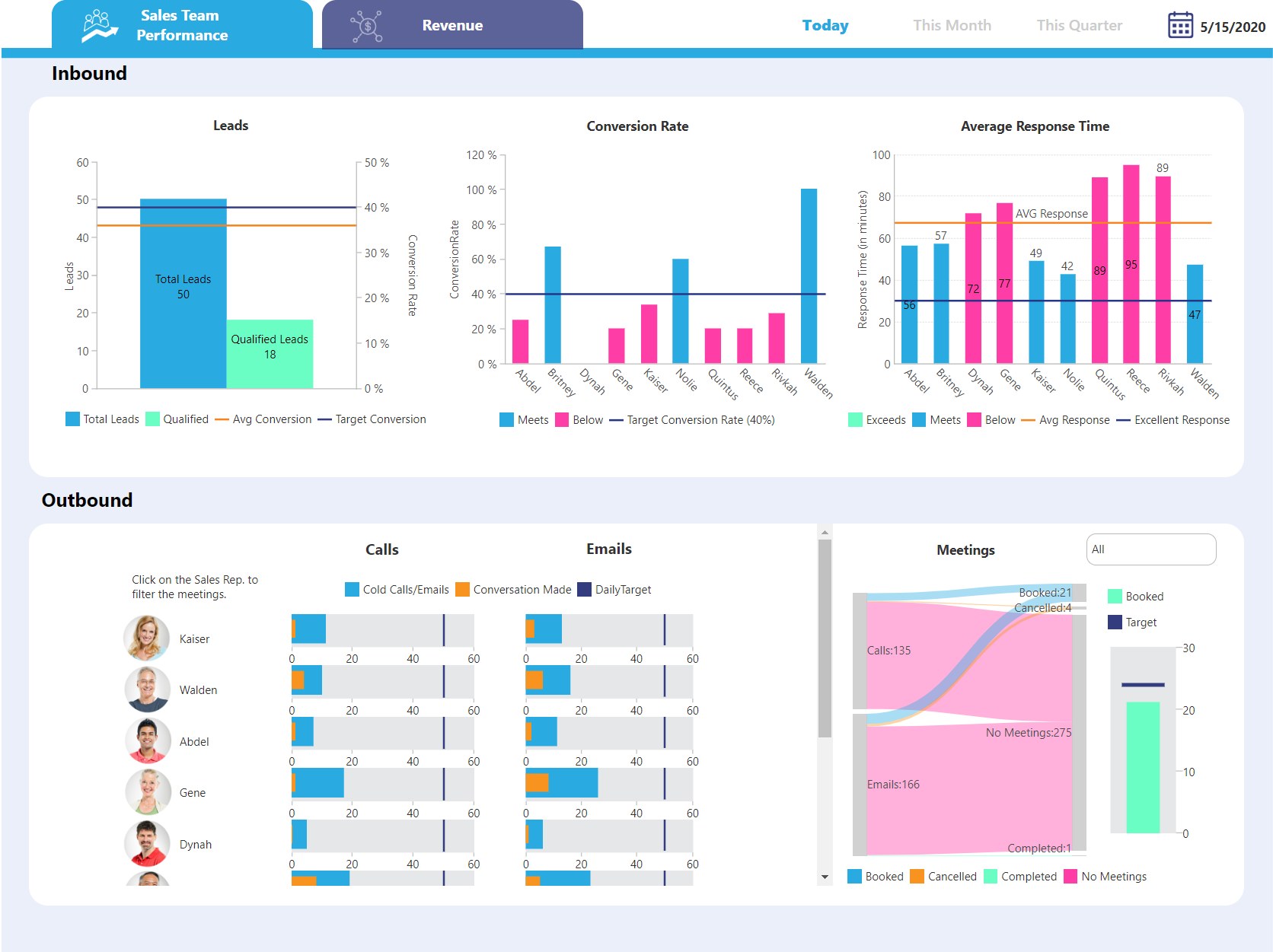
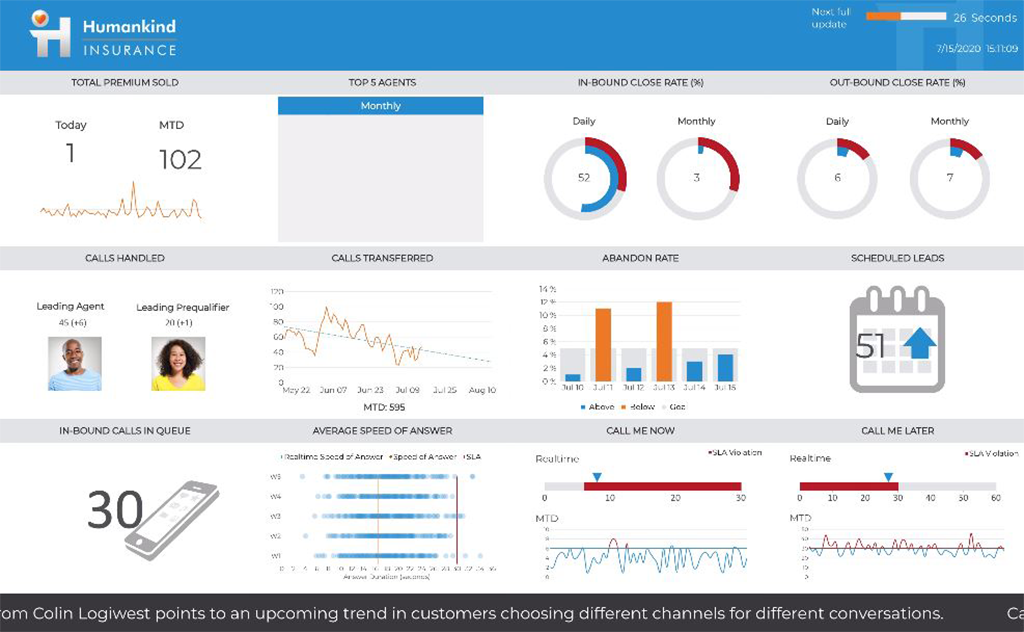
Screenshot of Dundas BI Dashboard Sample - EducationScreenshot of Dundas BI Dashboard Sample - Sales Team PerformanceScreenshot of Dundas BI Dahsboard Sample - Sales PerformanceScreenshot of Dundas BI Dashboard Sample - InsuranceScreenshot of Dundas BI Dashboard Sample - EmbeddedScreenshot of Dundas BI Dashboard Sample - Sales and Marketing