esProc SPL Community vs. Jupyter Notebook

Overview
ProductRatingMost Used ByProduct SummaryStarting Price
esProc SPL Community
Score 0.0 out of 10
Small Businesses (1-50 employees)
esProc SPL is an open-source and JVM-based analyzing and computing engine for structured data and semi-structured data, and capable at solving data problems, including hard to write, slow to run and difficult to operate and maintain. esProc SPL adopts self-created SPL (Structured Process Language) syntax, boasting the characteristics of low code, high performance, lightweight and versatility. Compared with SQL, SPL has more abundant data types and calculation features, which enhances…
$0
Jupyter Notebook
Score 8.6 out of 10
N/A
Jupyter Notebook is an open-source web application that allows users to create and share documents containing live code, equations, visualizations and narrative text. Uses include: data cleaning and transformation, numerical simulation, statistical modeling, data visualization, and machine learning. It supports over 40 programming languages, and notebooks can be shared with others using email, Dropbox, GitHub and the Jupyter Notebook Viewer. It is used with JupyterLab, a web-based IDE for…N/A
Pricing
esProc SPL CommunityJupyter Notebook
Editions & Modules
No answers on this topic
Offerings
Pricing Offerings
esProc SPL CommunityJupyter Notebook
Free Trial
NoNo
Free/Freemium Version
YesNo
Premium Consulting/Integration Services
NoNo
Entry-level Setup FeeNo setup feeNo setup fee
Additional Details
More Pricing Information
Community Pulse
esProc SPL CommunityJupyter Notebook
Features
esProc SPL CommunityJupyter Notebook
Platform Connectivity
Comparison of Platform Connectivity features of Product A and Product B
esProc SPL Community
-
Ratings
Jupyter Notebook
9.0
22 Ratings
8% above category average
Connect to Multiple Data Sources00 Ratings10.022 Ratings
Extend Existing Data Sources00 Ratings10.021 Ratings
Automatic Data Format Detection00 Ratings8.514 Ratings
MDM Integration00 Ratings7.415 Ratings
Data Exploration
Comparison of Data Exploration features of Product A and Product B
esProc SPL Community
-
Ratings
Jupyter Notebook
7.0
22 Ratings
19% below category average
Visualization00 Ratings6.022 Ratings
Interactive Data Analysis00 Ratings8.022 Ratings
Data Preparation
Comparison of Data Preparation features of Product A and Product B
esProc SPL Community
-
Ratings
Jupyter Notebook
9.5
22 Ratings
15% above category average
Interactive Data Cleaning and Enrichment00 Ratings10.021 Ratings
Data Transformations00 Ratings10.022 Ratings
Data Encryption00 Ratings8.514 Ratings
Built-in Processors00 Ratings9.314 Ratings
Platform Data Modeling
Comparison of Platform Data Modeling features of Product A and Product B
esProc SPL Community
-
Ratings
Jupyter Notebook
9.3
22 Ratings
10% above category average
Multiple Model Development Languages and Tools00 Ratings10.021 Ratings
Automated Machine Learning00 Ratings9.218 Ratings
Single platform for multiple model development00 Ratings10.022 Ratings
Self-Service Model Delivery00 Ratings8.020 Ratings
Model Deployment
Comparison of Model Deployment features of Product A and Product B
esProc SPL Community
-
Ratings
Jupyter Notebook
10.0
20 Ratings
16% above category average
Flexible Model Publishing Options00 Ratings10.020 Ratings
Security, Governance, and Cost Controls00 Ratings10.019 Ratings
Best Alternatives
esProc SPL CommunityJupyter Notebook
Small Businesses
Jupyter Notebook
Jupyter Notebook
Score 8.6 out of 10
IBM Watson Studio
IBM Watson Studio
Score 10.0 out of 10
Medium-sized Companies
Posit
Posit
Score 10.0 out of 10
Posit
Posit
Score 10.0 out of 10
Enterprises
Posit
Posit
Score 10.0 out of 10
Posit
Posit
Score 10.0 out of 10
All AlternativesView all alternativesView all alternatives
User Ratings
esProc SPL CommunityJupyter Notebook
Likelihood to Recommend
-
(0 ratings)
10.0
(23 ratings)
Usability
-
(0 ratings)
10.0
(2 ratings)
Support Rating
-
(0 ratings)
9.0
(1 ratings)
User Testimonials
esProc SPL CommunityJupyter Notebook
Likelihood to Recommend
scudata
No answers on this topic
Open Source
I've created a number of daisy chain notebooks for different workflows, and every time, I create my workflows with other users in mind. Jupiter Notebook makes it very easy for me to outline my thought process in as granular a way as I want without using innumerable small. inline comments.
Read full review
Pros
scudata
No answers on this topic
Open Source
  • Simple and elegant code writing ability. Easier to understand the code that way.
  • The ability to see the output after each step.
  • The ability to use ton of library functions in Python.
  • Easy-user friendly interface.
Read full review
Cons
scudata
No answers on this topic
Open Source
  • Need more Hotkeys for creating a beautiful notebook. Sometimes we need to download other plugins which messes [with] its default settings.
  • Not as powerful as IDE, which sometimes makes [the] job difficult and allows duplicate code as it get confusing when the number of lines increases. Need a feature where [an] error comes if duplicate code is found or [if a] developer tries the same function name.
Read full review
Usability
scudata
No answers on this topic
Open Source
Jupyter is highly simplistic. It took me about 5 mins to install and create my first "hello world" without having to look for help. The UI has minimalist options and is quite intuitive for anyone to become a pro in no time. The lightweight nature makes it even more likeable.
Read full review
Support Rating
scudata
No answers on this topic
Open Source
I haven't had a need to contact support. However, all required help is out there in public forums.
Read full review
Alternatives Considered
scudata
No answers on this topic
Open Source
With Jupyter Notebook besides doing data analysis and performing complex visualizations you can also write machine learning algorithms with a long list of libraries that it supports. You can make better predictions, observations etc. with it which can help you achieve better business decisions and save cost to the company. It stacks up better as we know Python is more widely used than R in the industry and can be learnt easily. Unlike PyCharm jupyter notebooks can be used to make documentations and exported in a variety of formats.
Read full review
Return on Investment
scudata
No answers on this topic
Open Source
  • Positive impact: flexible implementation on any OS, for many common software languages
  • Positive impact: straightforward duplication for adaptation of workflows for other projects
  • Negative impact: sometimes encourages pigeonholing of data science work into notebooks versus extending code capability into software integration
Read full review
ScreenShots

esProc SPL Community Screenshots

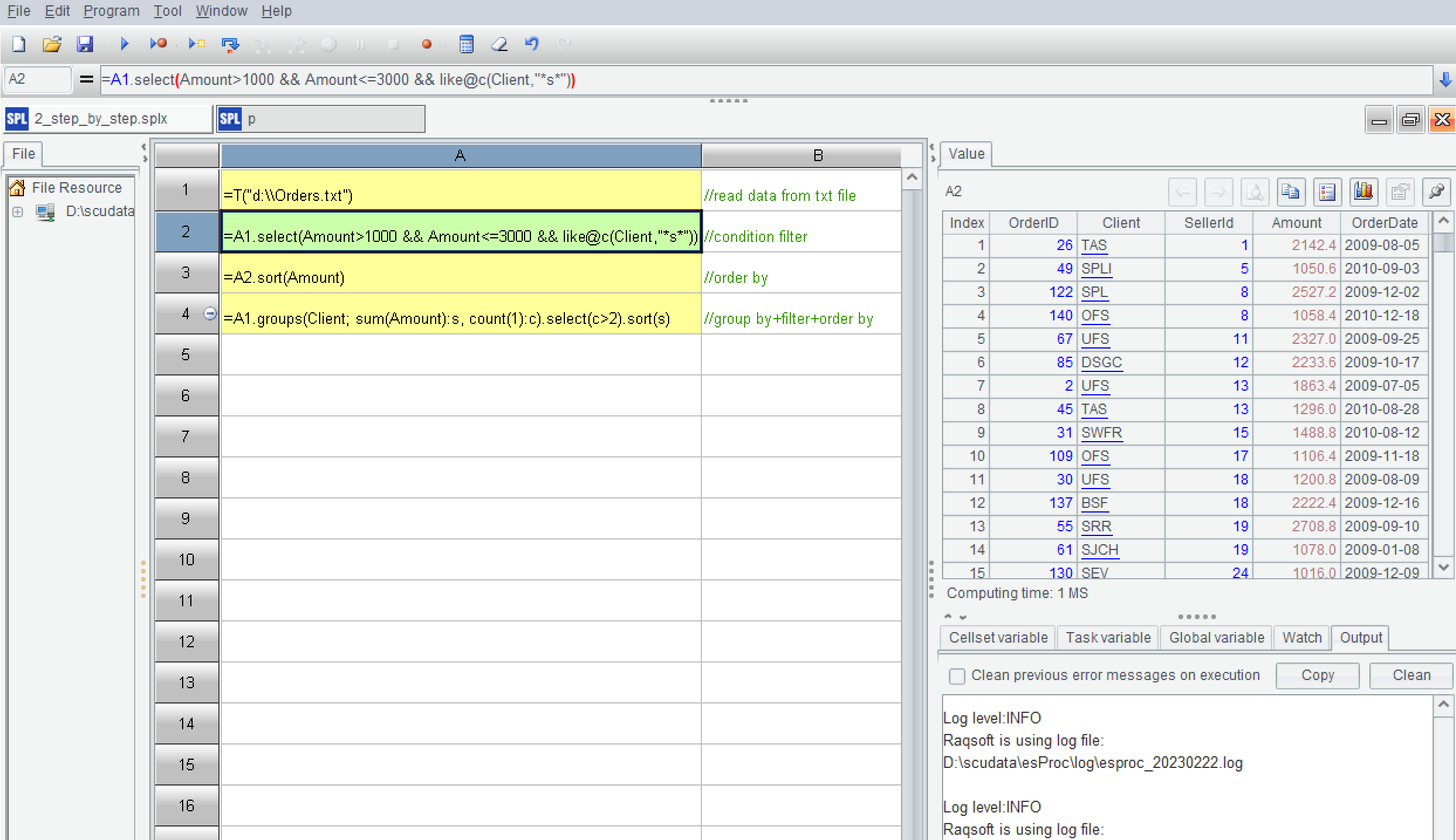
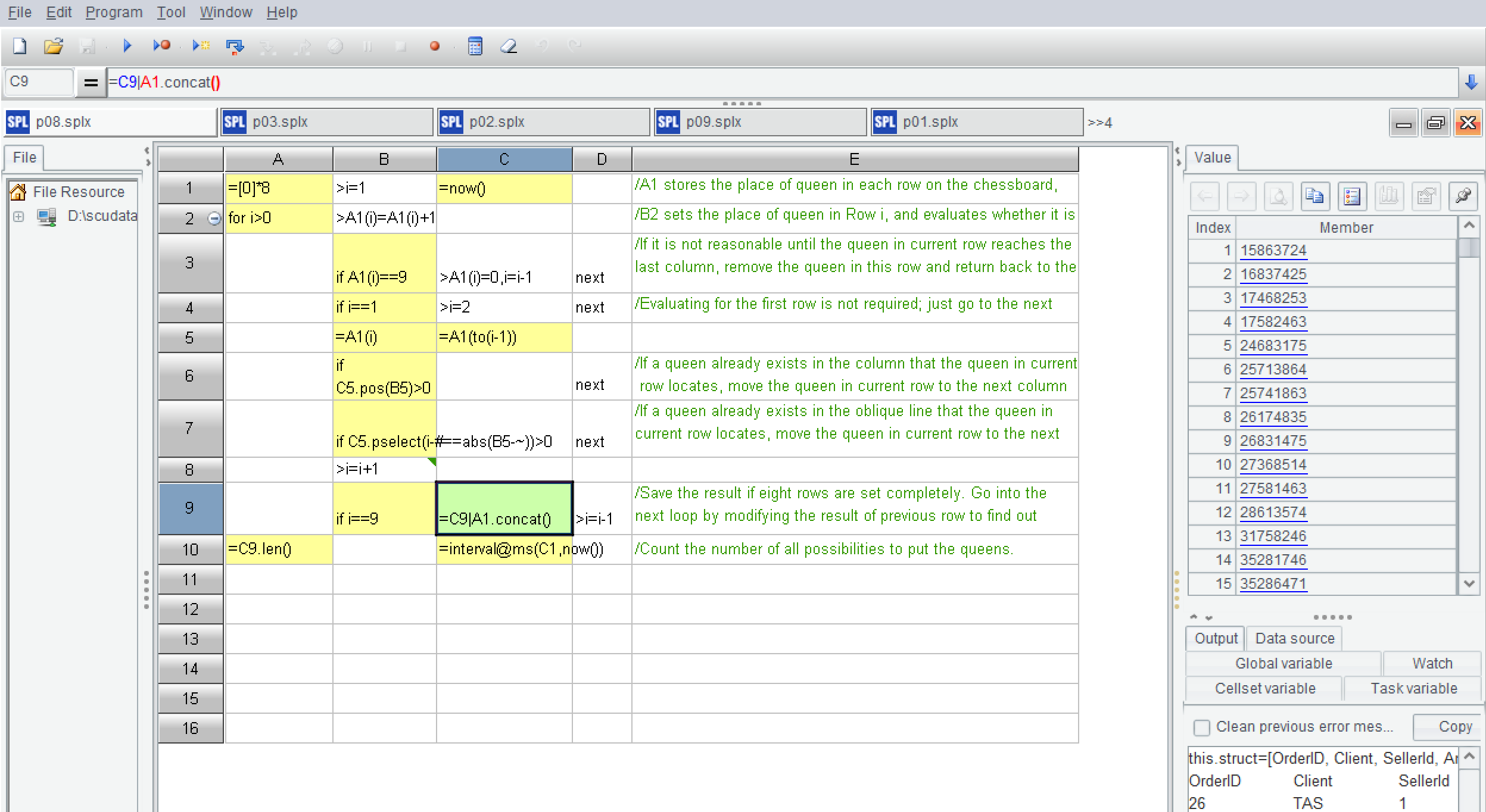
Screenshot of Debugging functions: set breakpoints, execute to cursor, single step, enter, skip, jump back. What you see is what you get, it is convenient to refer to intermediate results. Complete programming ability, the amount of code is smaller than that of Java, C#, and Python.Screenshot of supports executing SQL directly on txt/csv/xls/xlsx files, including operations such as condition filtering, fuzzy querying, group summarization, Join, from clause, with clause, Case when, COALESCE, Top-N, and limit n offset m.Screenshot of supports multi-step computation, which can break down a complex computing task into several simpler calculation steps to reduce computational complexity. The results of each step can be observed, making it easier to debug and maintain.Screenshot of provides an IDE that not only offers debugging and unit format programming, but also provides quick function help. Simply move the cursor to a function and press the Alt key to display a detailed explanation of the function.Screenshot of supports a complete flow processing structure, which has been simplified, including loops, conditionals, and sequential execution. This is an example of SPL code for solving the "Eight Queens Problem" to illustrate this.