TrustRadius: an HG Insights company

Save this comparison

Save this comparison

Add Product

Recommended Comparisons

    Overview
    ProductRatingMost Used ByProduct SummaryStarting Price

    Front

    Score9.2 out of 10
    N/AFront is a communication hub that helps businesses keep the human touch in every interaction.

    $29

    per month per user

    Quiq

    N/A
    Mid-Size Companies (51-1,000 employees)
    Quiq is an agentic customer journey platform used to support customer support agents' resolution efforts. Quiq works across channels—voice, chat, SMS, WhatsApp, Apple Messages for Business, email, and social—keeping every interaction connected and true to the brand's voice.N/A
    Pricing
    FrontQuiq
    Editions & Modules
    Starter
    $29
    per month per user
    Growth
    $79
    per month per user
    Scale
    $99
    per month (billed annually) per user
    Premier
    $229
    per month (billed annually) per seat (50 seat minimum)
    No answers on this topic
    Offerings
    Pricing Offerings
    FrontQuiq
    Free Trial
    YesYes
    Free/Freemium Version
    NoNo
    Premium Consulting/Integration Services
    YesYes
    Entry-level Setup FeeNo setup feeNo setup fee
    Additional DetailsDiscount for annual pricing on Starter and Growth plans. Scale and Premier plans are annual price only.Pricing is based on conversations, not by seat. Number of users is unlimited.
    More Pricing Information
    Community Pulse
    FrontQuiq
    Considered Both Products
    Front
    No answer on this topic
    Quiq
    No answer on this topic
    Key User Insights
    Would buy again
    93%
    Would buy again
    27 Answers
    No answers on this topic
    Delivers good value for the price
    96%
    Delivers good value for the price
    23 Answers
    No answers on this topic
    Happy with the feature set
    93%
    Happy with the feature set
    27 Answers
    No answers on this topic
    Lived up to sales and marketing promises
    82%
    Lived up to sales and marketing promises
    14 Answers
    No answers on this topic
    Implementation went as expected
    94%
    Implementation went as expected
    15 Answers
    No answers on this topic
    Features
    FrontQuiq
    Incident and problem management
    Comparison of Incident and problem management features of Front and Quiq
    Feature
    Front
    7.5
    6 Ratings
    8% below category average
    Quiq
    -
    Ratings
    Organize and prioritize service tickets8.26 Ratings00 Ratings
    Subscription-based notifications6.64 Ratings00 Ratings
    Ticket creation and submission7.64 Ratings00 Ratings
    Ticket response7.64 Ratings00 Ratings
    Self Help Community
    Comparison of Self Help Community features of Front and Quiq
    Feature
    Front
    6.9
    6 Ratings
    13% below category average
    Quiq
    -
    Ratings
    External knowledge base6.96 Ratings00 Ratings
    Multi-Channel Help
    Comparison of Multi-Channel Help features of Front and Quiq
    Feature
    Front
    8.8
    4 Ratings
    10% above category average
    Quiq
    -
    Ratings
    Customer portal8.33 Ratings00 Ratings
    Social integration9.43 Ratings00 Ratings
    Email support9.24 Ratings00 Ratings
    Help Desk CRM integration8.42 Ratings00 Ratings
    Best Alternatives
    FrontQuiq
    Small Businesses
    Intercom
    Score7.5 out of 10
    Fin
    Score8.8 out of 10
    Medium-sized Companies
    Help Scout
    Score9.3 out of 10
    Fin
    Score8.8 out of 10
    Enterprises
    Kustomer
    Score8.5 out of 10
    Sprinklr Service
    Score7.3 out of 10
    All AlternativesView all alternativesView all alternatives
    User Ratings
    FrontQuiq
    Likelihood to Recommend
    9.2
    (35 ratings)
    -
    (0 ratings)
    Likelihood to Renew
    9.0
    (1 ratings)
    -
    (0 ratings)
    Usability
    9.4
    (9 ratings)
    -
    (0 ratings)
    Support Rating
    9.8
    (5 ratings)
    -
    (0 ratings)
    User Testimonials
    FrontQuiq
    Likelihood to Recommend
    Front
    I think Front is very useful for every company with multiple teams working together on different emails from clients. Not so useful if a lot of different teams need to work on a request at the same time, because when an email is sitting in multiple shared inboxes things can get messy. Also would not recommend for teams that work is individualized, as team work is the main point of Front.
    Incentivized
    Read full review
    Quiq
    No answers on this topic
    Pros
    Front
    • Even if you are just trying to compose a single email, Front gives a smart system that has options such [as] organized templates, tags, alerts, [and] changing your outbound dpt email.
    • Tasks- with Front you will not miss any interaction. When you are required to get assistance from a coworker, you only need to mention him/her and that notification will appear automatically in their inboxes.
    • Smart Notifications- sometimes we are just overwhelmed about the several notifications on our devices that we tend to miss some of them, but Front offers a new way to notify every email, discussion, mentioning, or tag that you really would not want to miss.
    Incentivized
    Read full review
    Quiq
    No answers on this topic
    Cons
    Front
    • Their integration to Salesforce is lacking. As the owner of our productivity tools and how they are used, I have very little control over what things to enforce, or even change what objects are available. For example, we don't use Cases in Salesforce but with the Salesforce integration the Cases object shows up. There's no need to have that there. I've heard there is a roadmap improvement forthcoming.
    • One of our uses is for our sales development reps to prospect with visitors. Because of the high volume of inquiries it's difficult for our reps to efficiently manage all their follow ups. It would be nice if we could run a "scheduled campaign" where a predesigned cadence of email follow ups can be sent automatically. To be clear, they do have a scheduling capability, but it just can't be used as a prebuilt option.
    • Integrations to other systems require you have a user account to those systems. We have SSO and therefore we don't always have a user account. For example, out integration to Jira uses SSO so we don't each have individual Jira logins. This is an outage for us.
    Incentivized
    Read full review
    Quiq
    No answers on this topic
    Likelihood to Renew
    Front
    We are very happy with Front and don't anticipate changing
    Incentivized
    Read full review
    Quiq
    No answers on this topic
    Usability
    Front
    It's very easy to understand and use by new customer support agents as well. Be it a technology, product, or marketing person, we have trained most of the company folks to read and respond to customer conversations in their free time with the help of the Front app. It is also easy to set up for an admin and manage his/her team with communication rules.
    Incentivized
    Read full review
    Quiq
    No answers on this topic
    Support Rating
    Front
    The support is good, and it's definitely prompt, but still lags when it comes to technical requirements, as I guess they are slow in developing newer features fast. So no complaints in terms of responsiveness, but yeah, at times it's not very helpful when you need certain features or are blocked on things which can't be unblocked.
    Incentivized
    Read full review
    Quiq
    No answers on this topic
    Alternatives Considered
    Front
    This is something I am not familiar but it seems like it is [available] in Gmail. Thus I cannot give any feedback about it. What I am sure about is Front works for our team and I see Zoom using the service in the Customer Success Organization in a long run.
    Incentivized
    Read full review
    Quiq
    No answers on this topic
    Return on Investment
    Front
    • Saved our executive team considerable amount of time chasing support questions through different channels.
    • Gave our team clear accountability for who was lead on a support issue and how to escalate.
    • Customer regularly say our support is the best in the industry.
    Incentivized
    Read full review
    Quiq
    No answers on this topic
    ScreenShots

    Front Screenshots

    Product screenshotProduct screenshotProduct screenshotProduct screenshotProduct screenshot

    Quiq Screenshots

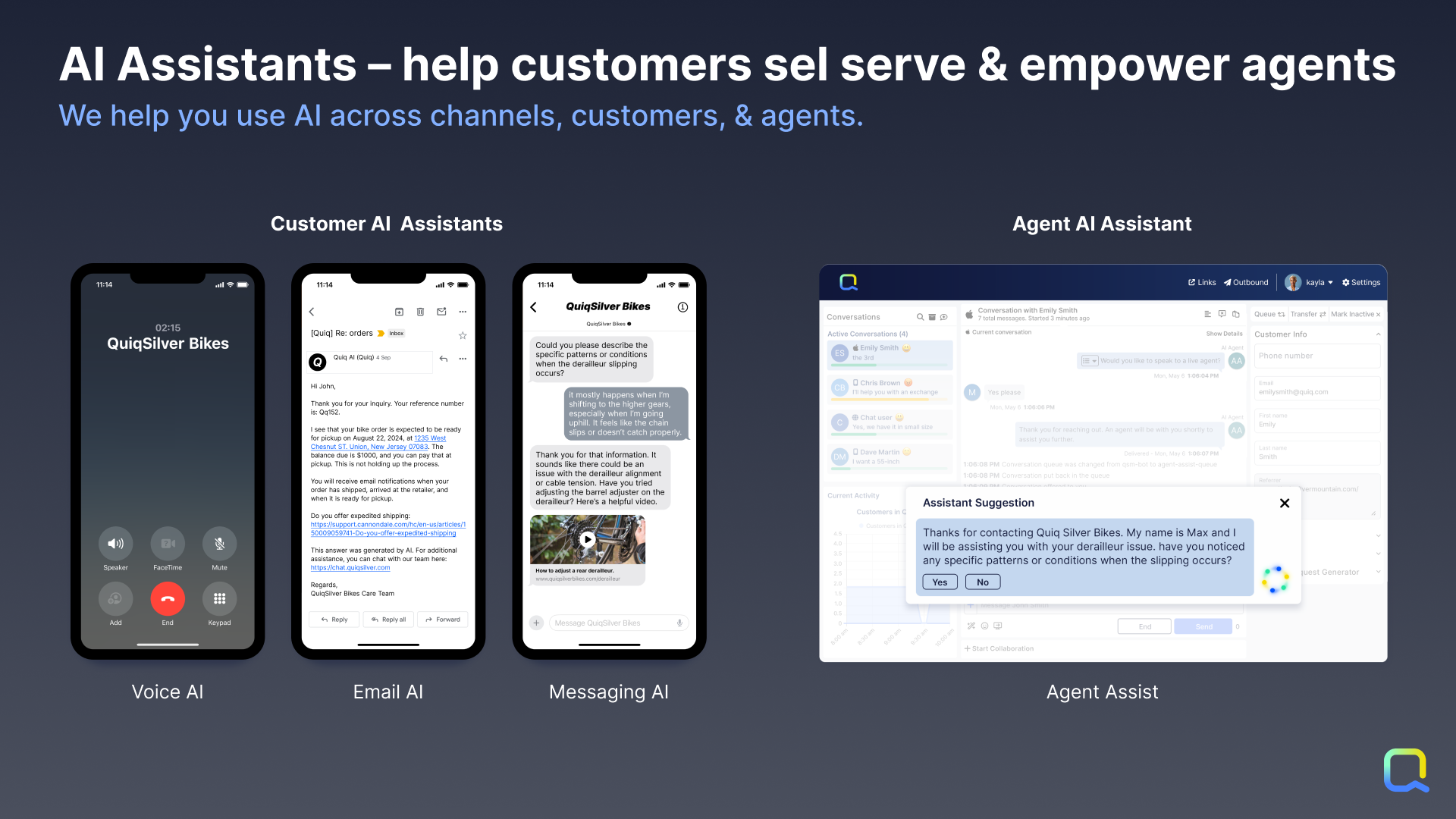
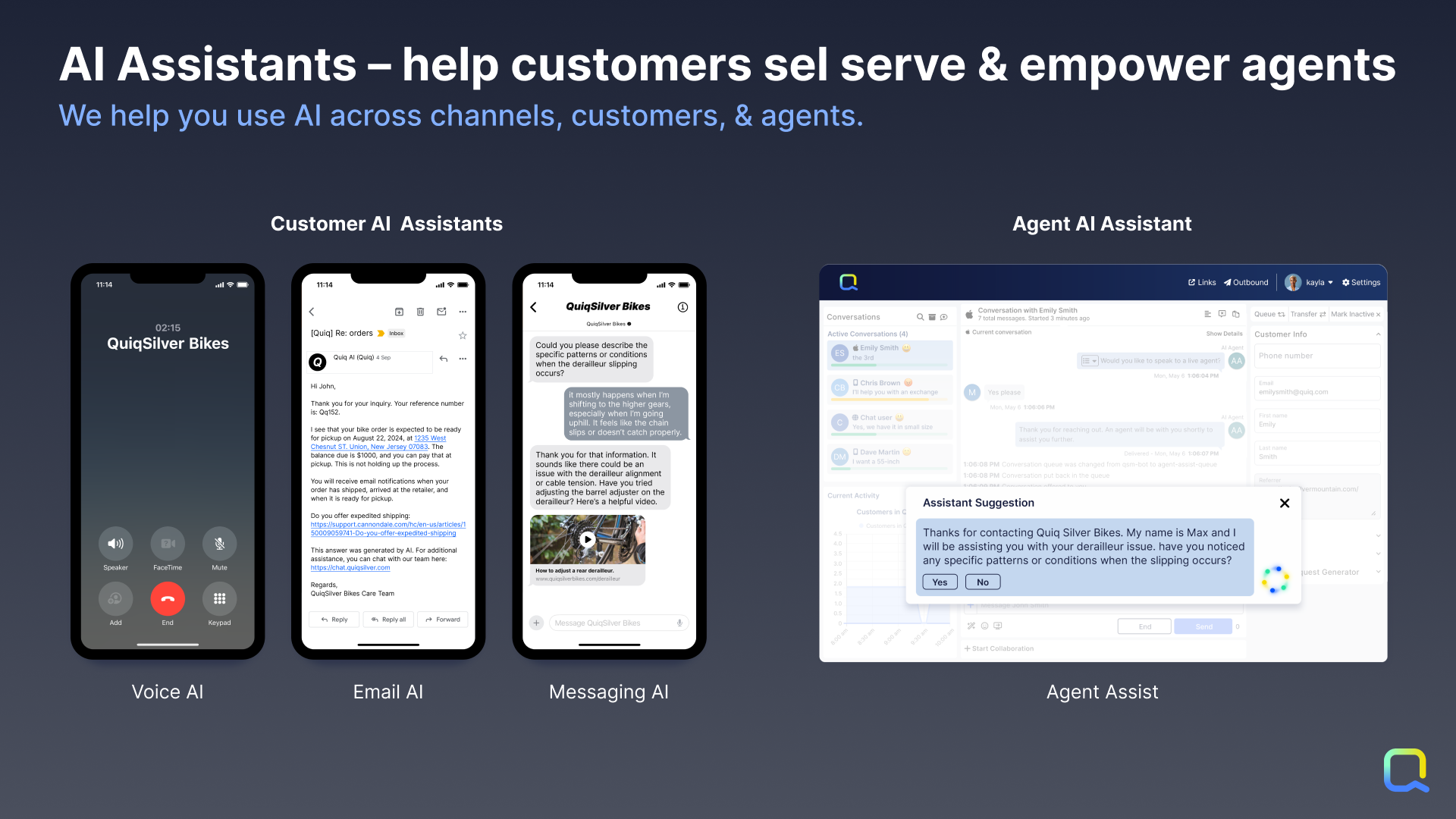
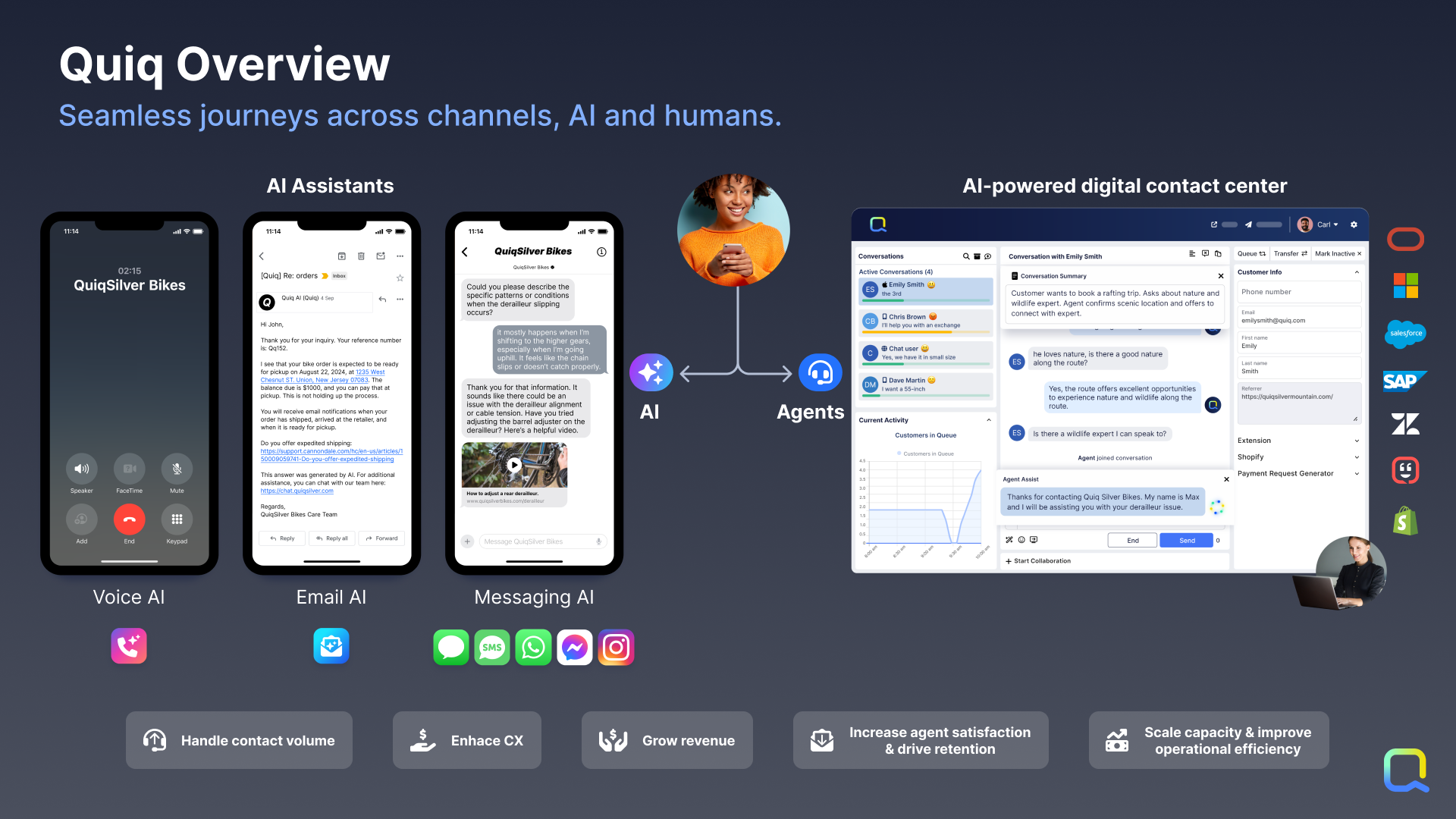
    Screenshot of Customer AI Assistants: By leveraging Generative AI combined with company knowledge and data, customers get answers created directly from data as if they had a human agent helping them.

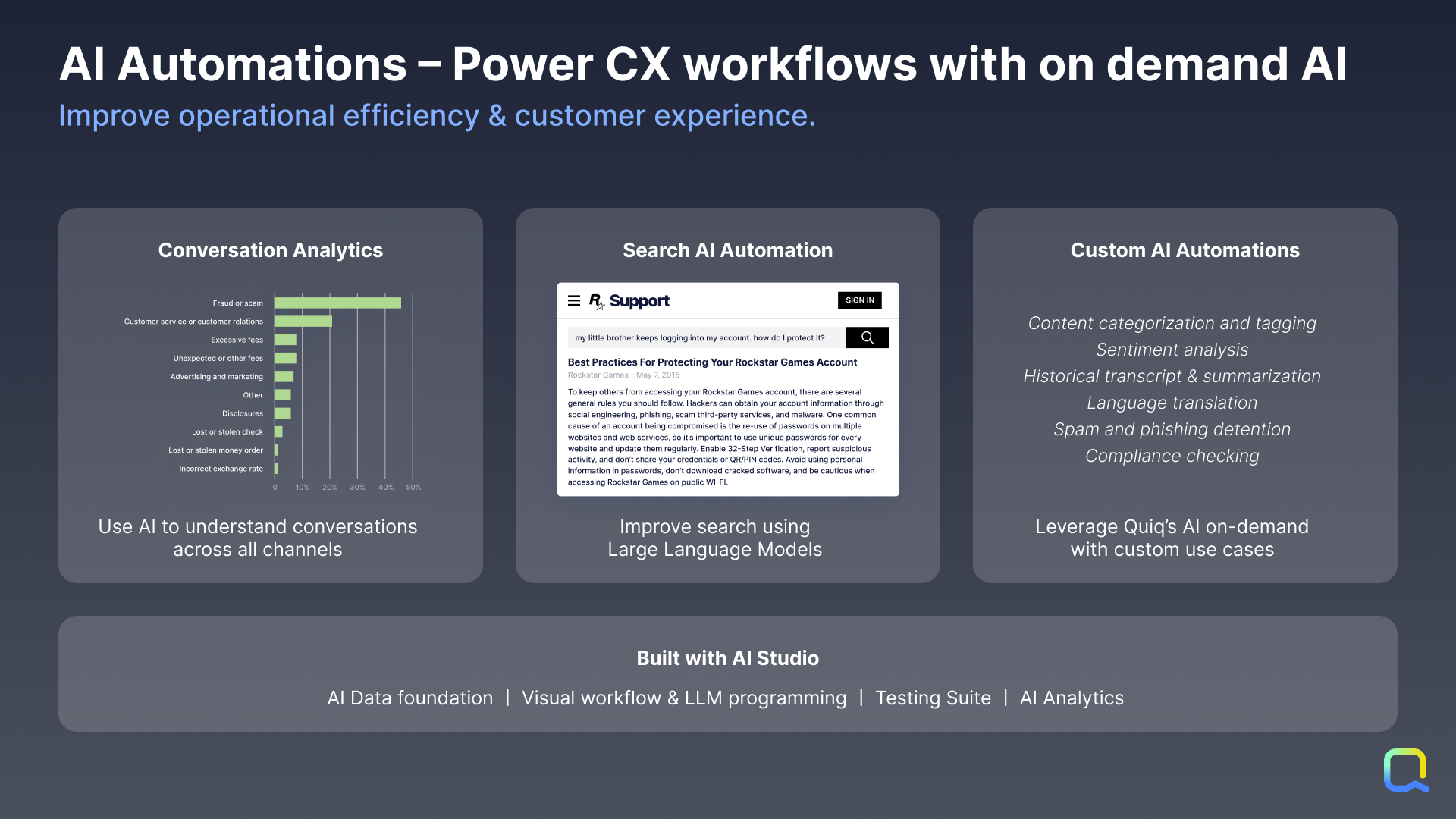
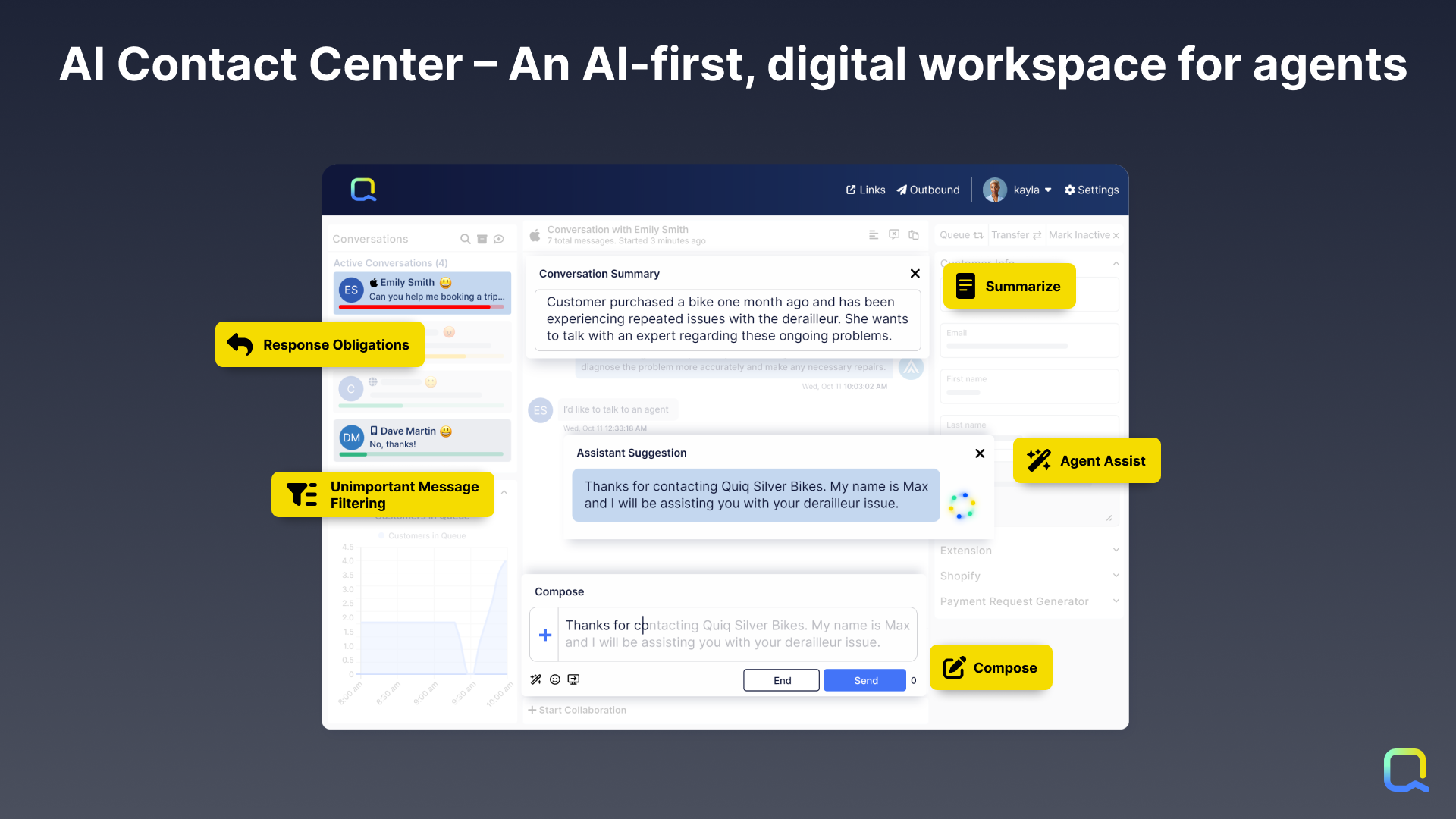
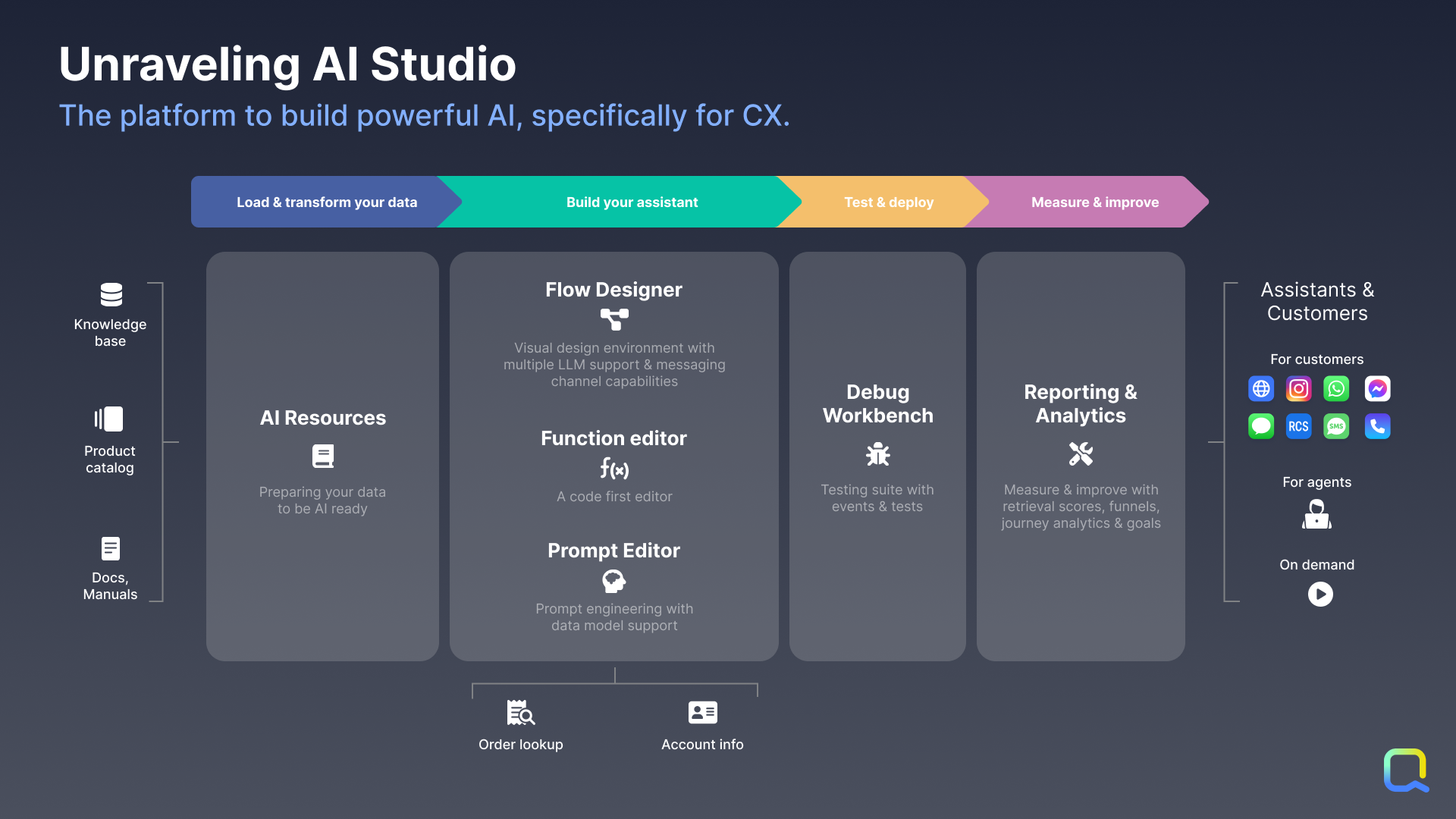
Agent AI Assistants: Not every question can be answered by AI, so Quiq’s AI-assisted contact center empowers human agents to handle many simultaneous asynchronous conversations across all popular messaging channels.Screenshot of AI Automations: Quiq’s platform can be used to apply AI on demand to any business workflow, such as analyzing incoming emails and routing it more accurately to human agents.Screenshot of Quiq’s AI-powered, multi-channel agent workspace, which is designed for CX leaders and Contact Center Managers. Those who manage agents and the agent experience at enterprise businesses need a robust console for modern channels that will drive speed, efficiency, and agent retention.Screenshot of Quiq’s AI Studio, which is a suite of infrastructure and tools that empowers developers, conversational designers, and CX leaders to create conversational experiences together across the development lifecycle.Screenshot of Integrations: AI Assistants based upon internal knowledge and data integrated can be built through Quiq’s AI Studio. Quiq conversations can be automated with native Quiq Assistants or third-party bots integrated with the Bot API. Through workspace extensions, users can augment agents' workflow with internal data to enable them to execute faster and do their jobs better. Internal systems and business intelligence can be kept up to date with Quiq’s real-time conversation and agent performance data webhooks. Quiq integrates into the largest CRMs.Screenshot of the Quiq AI for CX platform that offers a number of capabilities to drive transformational change in the customer experience.