TrustRadius: an HG Insights company

Save this comparison

Save this comparison

Add Product

Recommended Comparisons

    Overview
    ProductRatingMost Used ByProduct SummaryStarting Price

    GaggleAMP

    Score8.3 out of 10
    N/AGaggleAMP's employee advocacy and communications platform enables companies to boost the distribution of workforce communications and social media messaging. The solutions aims to foster a network of people, or a Gaggle, who share company-created messages to their social media networks and contribute content to their internal workforce community. This aids in employee development, leveraging them as a thought leader in their space while increasing social selling and recruitment…

    $25

    per month

    Loomly

    Score8.7 out of 10
    N/ALoomly is a brand success platform with solutions for brands of all sizes. Users can plan, create, publish, optimize, promote, and track social content across a variety of channels. Currently, Loomly supports Facebook, Twitter, Instagram, Pinterest, LinkedIn, Google My Business, YouTube, Snapchat, TikTok, and additional custom channels. Loomly was built for collaboration and organization, and is presented as an ideal tool for brands and agencies with multiple social accounts, locations,…

    $0

    up to 1 user

    Pricing
    GaggleAMPLoomly
    Editions & Modules
    Enterprise
    $1
    Call for Quote
    Agency
    $1
    Call for Quote
    Small and Medium Businesses
    $300
    25 seats per month
    Free
    $0
    up to 1 user
    Enterprise
    Contact Vendor
    Enterprise
    Custom
    Offerings
    Pricing Offerings
    GaggleAMPLoomly
    Free Trial
    YesYes
    Free/Freemium Version
    NoYes
    Premium Consulting/Integration Services
    NoNo
    Entry-level Setup FeeNo setup feeNo setup fee
    Additional DetailsGaggleAMP serves small businesses, medium-size businesses, enterprise-class organizations, and agencies that represent these businesses. Their small business offering starts at 25 seats for $300 per month, with additional packages available based on the number of seats needed. For Enterprise-class pricing and agency offerings, it is best to speak with a GaggleAMP representative to secure a rate.—
    More Pricing Information
    Features
    GaggleAMPLoomly
    Publishing
    Comparison of Publishing features of GaggleAMP and Loomly
    Feature
    GaggleAMP
    -
    Ratings
    Loomly
    9.1
    7 Ratings
    11% above category average
    Content planning and scheduling00 Ratings9.86 Ratings
    Audience targeting00 Ratings8.07 Ratings
    Content optimization00 Ratings9.06 Ratings
    Workflow management00 Ratings9.87 Ratings
    Engagement
    Comparison of Engagement features of GaggleAMP and Loomly
    Feature
    GaggleAMP
    -
    Ratings
    Loomly
    8.8
    6 Ratings
    8% above category average
    Customer interaction histories00 Ratings8.84 Ratings
    Bulk actions00 Ratings8.76 Ratings
    Marketing
    Comparison of Marketing features of GaggleAMP and Loomly
    Feature
    GaggleAMP
    -
    Ratings
    Loomly
    8.1
    7 Ratings
    5% above category average
    Content marketing00 Ratings9.96 Ratings
    Paid media management00 Ratings6.53 Ratings
    Campaigns and promotions00 Ratings8.02 Ratings
    Channel coverage/integration
    Comparison of Channel coverage/integration features of GaggleAMP and Loomly
    Feature
    GaggleAMP
    -
    Ratings
    Loomly
    9.5
    6 Ratings
    13% above category average
    Twitter00 Ratings9.75 Ratings
    Facebook00 Ratings9.75 Ratings
    LinkedIn00 Ratings9.96 Ratings
    Google+00 Ratings8.02 Ratings
    Instagram00 Ratings9.75 Ratings
    Pinterest00 Ratings9.64 Ratings
    YouTube00 Ratings9.53 Ratings
    Reporting/analytics
    Comparison of Reporting/analytics features of GaggleAMP and Loomly
    Feature
    GaggleAMP
    -
    Ratings
    Loomly
    8.3
    5 Ratings
    7% above category average
    Campaign success analytics00 Ratings8.54 Ratings
    Real-time tracking00 Ratings8.15 Ratings
    Account management
    Comparison of Account management features of GaggleAMP and Loomly
    Feature
    GaggleAMP
    -
    Ratings
    Loomly
    9.6
    6 Ratings
    19% above category average
    Role-based user permissions & privileges00 Ratings9.65 Ratings
    Mobile access00 Ratings9.56 Ratings
    Best Alternatives
    GaggleAMPLoomly
    Small Businesses
    No answers on this topic
    Sendible
    Score7.2 out of 10
    Medium-sized Companies
    No answers on this topic
    Emplifi
    Score8.9 out of 10
    Enterprises
    No answers on this topic
    Salesforce Marketing Cloud Social Studio (discontinued)
    Score8.1 out of 10
    All AlternativesView all alternativesView all alternatives
    User Ratings
    GaggleAMPLoomly
    Likelihood to Recommend
    8.7
    (12 ratings)
    9.5
    (7 ratings)
    Likelihood to Renew
    10.0
    (1 ratings)
    10.0
    (1 ratings)
    Usability
    -
    (0 ratings)
    9.8
    (6 ratings)
    Support Rating
    10.0
    (2 ratings)
    10.0
    (1 ratings)
    Implementation Rating
    -
    (0 ratings)
    10.0
    (1 ratings)
    User Testimonials
    GaggleAMPLoomly
    Likelihood to Recommend
    GaggleAMP
    GaggleAMP is well suited when you want to get timely local language content out to folks in other countries/regions, or content for a specific group/department. It is also well suited when you have multiple Gaggle content managers with multiple content calendars. It might be less appropriate if you want to hold multiple Social contests (gamification) with different rules, scopes, leaderboards, etc. for different groups/tags as there is only one leaderboard.
    Incentivized
    Read full review
    Loomly
    I think for someone looking for a lower-cost social media management took, Loomly is the best I've found. It's pretty easy to use, and has a lot of tools that outshine the downsides of the platform. If you're looking for a pretty standard, easy to use, and aesthetically clean platform, I'd recommend Loomly. For more analytic tools, it's perhaps not for you.
    Incentivized
    Read full review
    Pros
    GaggleAMP
    • Easy to tell associates what posts to like and share. Especially like that we can point them to like or share industry posts.
    • Easy to get others in organization to sign up. Also offers app and browser app.
    • Gamefication aspect allows associates to have friendly competition and allows awarding of prizes for reaching set point values
    Incentivized
    Read full review
    Loomly
    • AI transcription of videos
    • Naming title of topic / outlining what the video is about
    • Saving and exporting video to send to co workers
    • Integrates well with other apps (teams, slack, etc)
    Incentivized
    Read full review
    Cons
    GaggleAMP
    • There are no out of the box implementations to get started quick.
    • The campaign manager could be more involved and vocal about recommendations and how to implement them.
    • I'd like deeper insight into what my employees do and do not like to share.
    Incentivized
    Read full review
    Loomly
    • It should make it easier to select more accounts at once while duplicating post
    • It should make it easier to edit on multiple accounts at the same time while duplicating
    Incentivized
    Read full review
    Likelihood to Renew
    GaggleAMP
    Customer service has been good. It's easy to use. It's cost effective. It's a good way to expand your social presence and get your employees more vested in branding the company without spending a ton of money. There are bells and whistles that may be good for other users. I just haven't had the time to use them
    Incentivized
    Read full review
    Loomly
    These services that Loomly offers when integrating multiple social media platforms is invaluable. It makes this side of the business a breeze.
    Read full review
    Usability
    GaggleAMP
    No answers on this topic
    Loomly
    I think it's a great for people at any level. It's straightforward and easy-to-use and once you set it up once, you're good to go
    Incentivized
    Read full review
    Support Rating
    GaggleAMP
    Support for GaggleAMP is easily the best customer support I've experienced with any software tool. Our rep, Sam, is dedicated to our account (no bouncing around a call-center bullpen), and is highly proactive and eager to help us succeed. Most of our interactions have nothing to do with problems, but rather opportunities to optimize our use of the tool and set us up for greatest success. GaggleAMP sets a gold standard for customer support!
    Incentivized
    Read full review
    Loomly
    The chat feature is 10/10
    Read full review
    Alternatives Considered
    GaggleAMP
    A former colleague suggested EveryoneSocial, but I think that GaggleAMP has more industry experience in terms of employee advocacy and social engagement. While it did appear somewhat easier to use, it didn't have all the features and attention to detail that GaggleAMP provided such as the detailed reporting and the specific activity suggestions I was looking for.
    Incentivized
    Read full review
    Loomly
    I found Loomly, while more simple, to be the most worth the price. Especially because I specifically can view analytics on client accounts directly, there's no need for me to have it within my platform. However, I know this is crucial for a lot of people. If they're looking for that, I'd probably say another platform might be better. But for me, Loomly is perfect!
    Incentivized
    Read full review
    Return on Investment
    GaggleAMP
    • Take this with a grain of salt, but our company's all-time CPC (cost per click) savings is $1.85 M ($184,116.95 last quarter).
    • GaggleAMP has become an important part in getting our employees and partners to engage with us on Social Media more regularly - a great tool for getting information out there.
    • Brand awareness.
    Incentivized
    Read full review
    Loomly
    • Quicker scheduling times for clients.
    • Easy to pull social media analytics from one place instead of different platforms.
    • Can communicate with clients and colleagues in real time for editing purposes.
    Incentivized
    Read full review
    ScreenShots

    GaggleAMP Screenshots

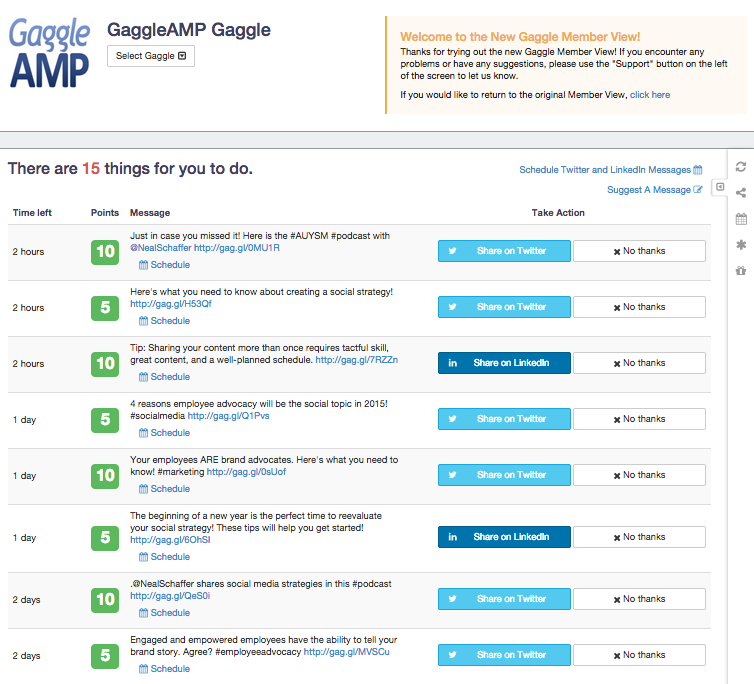
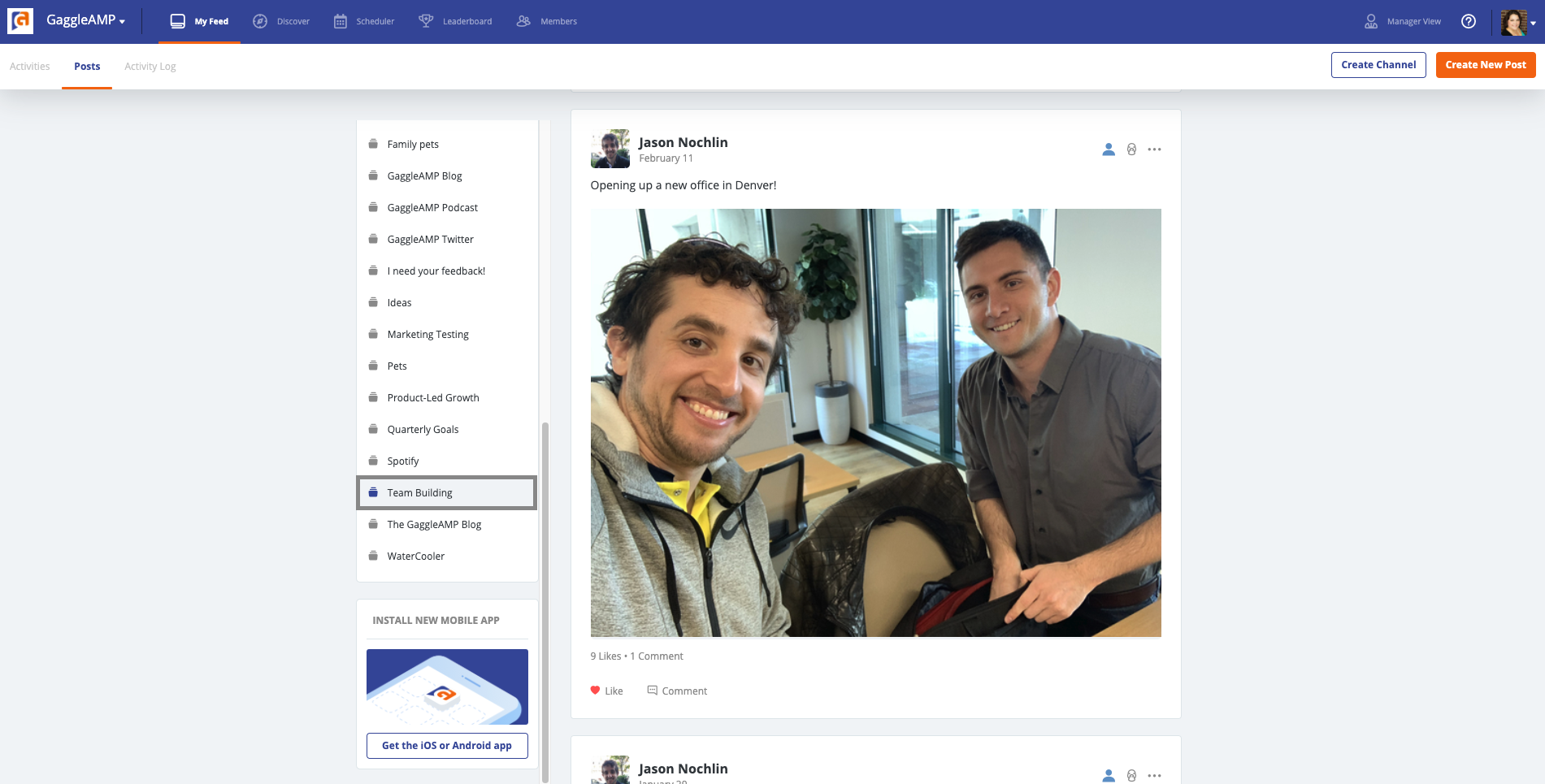
    Screenshot of The member view provides a simple view of actions and messages available. Acting take a simple click of a button. "Share" to share the message or "No Thanks". If a user declines a message/action there is an opportunity for them to provide feedback on why they chose not to share the message or perform the action. This helps the Gaggle manager learn the preferences of their member base and helps future content curation.Screenshot of Channels provide an outlet for employees to create user-generated content, communicate with their fellow employees, discover new content, and more. Channels also allow for automated RSS feeds, pulling in Twitter Lists, and monitoring hashtags, making the content curation process easier for marketing team.Screenshot of My feed shows employees and stakeholders what activities they have available to them. This area enables employees to engage and interact with content. Here they can share content to their social channels, see when content is expiring, and also engage with external and internal Channels.Screenshot of The GaggleAMP scheduling feature helps employees and stakeholders schedule their social media advocacy efforts on their time. Here they can pick and choose which messages they want to schedule, when they want to schedule them to go out, and their default preferences.Screenshot of Gaggle Managers, the term for the administrator of an employee advocacy program, can choose what types of activities to send to their employees and stakeholders. GaggleAMP offers over 50 different activities on any favorite social media networks. Some favorites are displayed here.Screenshot of Leaderboards allow sorting by reach and by points assigned to activities during certain timeframes. With leaderboards, employees and stakeholders can see how they are performing compared to their peers and also have the option to opt-out of the leaderboard.

    Loomly Screenshots

    Screenshot of Loomly DashboardScreenshot of Loomly List ViewScreenshot of Loomly Calendar ViewScreenshot of Loomly Post BuilderScreenshot of Loomly Post FinetuningScreenshot of Loomly Post View