Google Cloud Operations Suite vs. SolarWinds Server & Application Monitor

Overview
ProductRatingMost Used ByProduct SummaryStarting Price
Google Cloud Operations Suite
Score 7.2 out of 10
N/A
The Google Cloud Operations Suite (formerly Stackdriver) is an APM platform based on three tools for error detection, tracing, and resolution. It manages cloud-based or on-premise applications in live or mid-production environments.
$0.01
per 1,000 read API calls
SolarWinds Server & Application Monitor
Score 7.8 out of 10
N/A
SolarWinds Server & Application Monitor (SAM) delivers application and server monitoring capabilities. SAM allows for self-service for easy setup, 1200+ monitoring templates, and customization options, as well as integrate with other SolarWinds products.N/A
Pricing
Google Cloud Operations SuiteSolarWinds Server & Application Monitor
Editions & Modules
Monitoring API Calls
$0.01
per 1,000 read API calls
Trace Ingestion
$0.20
per million spans
Monitoring Data
$0.26
per MB
Logging Data
$0.50
per GB
No answers on this topic
Offerings
Pricing Offerings
Google Cloud Operations SuiteSolarWinds Server & Application Monitor
Free Trial
NoYes
Free/Freemium Version
NoNo
Premium Consulting/Integration Services
NoNo
Entry-level Setup FeeNo setup feeNo setup fee
Additional DetailsSAM pricing starts at $2,995.
More Pricing Information
Community Pulse
Google Cloud Operations SuiteSolarWinds Server & Application Monitor
Features
Google Cloud Operations SuiteSolarWinds Server & Application Monitor
Application Performance Management
Comparison of Application Performance Management features of Product A and Product B
Google Cloud Operations Suite
8.6
2 Ratings
11% above category average
SolarWinds Server & Application Monitor
6.5
280 Ratings
17% below category average
Application monitoring9.12 Ratings7.0270 Ratings
Database monitoring9.12 Ratings7.0234 Ratings
Threshold alerts7.32 Ratings6.8275 Ratings
Predictive capabilities9.01 Ratings6.0219 Ratings
Application performance management console6.42 Ratings7.3243 Ratings
Collaboration tools9.01 Ratings5.7151 Ratings
Out-of-the box templates to monitor applications9.01 Ratings6.5260 Ratings
Application dependency mapping and thresholding8.01 Ratings5.5220 Ratings
Virtualization monitoring10.01 Ratings7.3238 Ratings
Server availability and performance monitoring8.22 Ratings7.0273 Ratings
Server usage monitoring and capacity forecasting8.22 Ratings6.8254 Ratings
IT Asset Discovery10.01 Ratings5.7202 Ratings
Best Alternatives
Google Cloud Operations SuiteSolarWinds Server & Application Monitor
Small Businesses
GitLab
GitLab
Score 8.7 out of 10
GitLab
GitLab
Score 8.7 out of 10
Medium-sized Companies
ManageEngine Site24x7
Score 9.5 out of 10
ManageEngine Site24x7
Score 9.5 out of 10
Enterprises
ManageEngine Site24x7
Score 9.5 out of 10
ManageEngine Site24x7
Score 9.5 out of 10
All AlternativesView all alternativesView all alternatives
User Ratings
Google Cloud Operations SuiteSolarWinds Server & Application Monitor
Likelihood to Recommend
8.2
(2 ratings)
8.8
(278 ratings)
Likelihood to Renew
-
(0 ratings)
8.9
(10 ratings)
Usability
-
(0 ratings)
8.6
(29 ratings)
Availability
-
(0 ratings)
9.9
(3 ratings)
Performance
-
(0 ratings)
6.0
(3 ratings)
Support Rating
10.0
(1 ratings)
9.0
(21 ratings)
Online Training
-
(0 ratings)
4.5
(1 ratings)
Implementation Rating
-
(0 ratings)
4.5
(3 ratings)
Configurability
-
(0 ratings)
1.0
(2 ratings)
Ease of integration
-
(0 ratings)
4.5
(2 ratings)
Product Scalability
-
(0 ratings)
9.9
(3 ratings)
Vendor post-sale
-
(0 ratings)
4.5
(2 ratings)
Vendor pre-sale
-
(0 ratings)
4.5
(2 ratings)
User Testimonials
Google Cloud Operations SuiteSolarWinds Server & Application Monitor
Likelihood to Recommend
Google
Easy to set up in all environments. With this tool, the company is now able to measure both well-functioning data and data that needs immediate intervention. This early detection facilitates decisions about actions to correct the disorder and improve indexes. Stackdriver is now essential for the company's security and monitoring team and we plan to expand to other branches.
Read full review
SolarWinds
It is a well-suited software for monitoring and surveillance of your deployed nodes. The error-readability and filter options for filtering out logs and errors could be improved. But overall, it has a good UI design, is user-friendly, and is very easy to learn and access for new users.
Read full review
Pros
Google
  • All the application error reporting available at a single place.
  • You will get the real-time application error and alerts.
  • It's really easy to use and no need to worry for the setup.
Read full review
SolarWinds
  • Monitor Azure Cloud Severs- We use SolarWinds SAM to monitor Active Directory and DNS on Several DCs published on Azure Cloud.
  • Monitor Hyper V and VMware - SolarWinds SAM monitors applications on both Hyper V and VMware, while also monitoring the physical host machines.
  • It also helps us monitor Warranty expiration for physical servers.
Read full review
Cons
Google
  • For searching and filtering the logs the system is slow sometimes.
  • An agent needs to be installed in each VM to monitor specific metrics.
  • The pricing model is confusing.
Read full review
SolarWinds
  • Custom application monitors can be a little tricky to configure.
  • Logic in custom alerts can be a little hard to follow and figure out.
  • Inability to monitor certificates on custom applications or SQL Server.
  • Can be a little slow at times with on-prem SQL server.
Read full review
Likelihood to Renew
Google
No answers on this topic
SolarWinds
We are heavily invested in Solarwinds products for a reason. They are generally easy to setup and run with, requiring only some interfacing with support or help articles on rare occasions. They do what we bought them to do and we can't ask for more.
Read full review
Usability
Google
No answers on this topic
SolarWinds
SolarWinds Server & Application Monitor is quite easy to use and super versatile. It allows you to do just about anything you can through premade templates or through scripting. You can use an agent on the servers if you want to, or you can monitor through WMI or SNMP credentials. You can customize thresholds for alerting quickly, and you can configure alerts to be as complex or as simple as you want.
Read full review
Reliability and Availability
Google
No answers on this topic
SolarWinds
The tool works and monitors items 24x7, it only requires maintenance a little more frequently due to security fixes in the Windows operating system.
Read full review
Performance
Google
No answers on this topic
SolarWinds
The graphical interface and the performance of the database leave a little to be desired, they could be better explored.Some functionality and screens do not work well depending on the browser used. The integrations never had any problems or caused crashes in other systems.
Read full review
Support Rating
Google
It is also a great problem detection tool, and this is extremely important for General Motors.
The user can count on the ease of flexible panels and advanced visualization tools that help to identify problems. Among the most common, we can mention:
- containment of hosts;
- cloud provider limitation;
- hardware wear.
And also Stackdriver Integration with other Google Cloud data tools such as BigQuery, Cloud Pub/Sub, Cloud Storage and Cloud Database.
Read full review
SolarWinds
I think there was only a couple times I had to open a support case for SAM and one time they got multiple engineers on the phone to get a better idea what I was trying to monitor and was able to point me in the best direction to monitor that system.
Read full review
Online Training
Google
No answers on this topic
SolarWinds
It was sufficient to read their documentation and watch videos.
Read full review
Implementation Rating
Google
No answers on this topic
SolarWinds
Make sure SNMP and WMI are configured ahead of time
Read full review
Alternatives Considered
Google
Read full review
SolarWinds
Nagios requires far more manual work to configure than SolarWinds does, though that also encourages customization and perfect-fit solutions. Nagios also requires far, far fewer resources to run than SolarWinds: SolarWinds wants great gobs of memory and disk, while Nagios is refreshingly humble. Nagios starts working from the first minute, too, whereas SolarWinds needs lots of set-up time.
Read full review
Scalability
Google
No answers on this topic
SolarWinds
It is hard to find the recommended SQL setup and convince others that is the way you should configure the server when you set it up
Read full review
Return on Investment
Google
  • We completely depends on Stackdriver for error monitoring and reporting.
  • Stackdriver is very simple to use and available at default.
  • Stackdriver is the key part for our business to get the insight of our application behavior.
Read full review
SolarWinds
  • Ability to sunset multiple legacy monitoring platforms.
  • A single pane of glass across global locations (Enterprise Operations Console) simplifies monitoring for junior staff.
  • A single toolset allows staff from across the global environment to share knowledge and quickly set up/modify monitoring.
Read full review
ScreenShots

SolarWinds Server & Application Monitor Screenshots
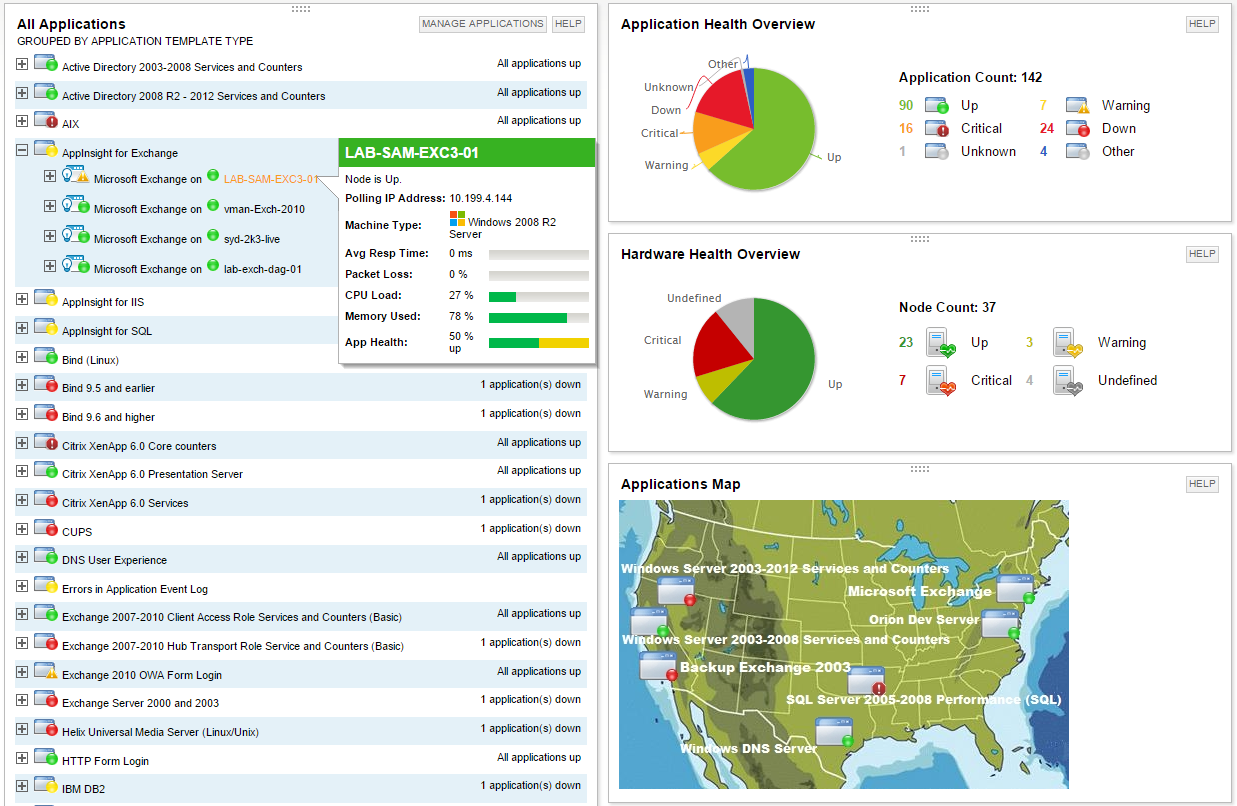
Screenshot of Multi-vendor application performance monitoringScreenshot of Multi-vendor server monitoringScreenshot of Application dependency mapping with AppStack™ dashboardScreenshot of Microsoft Exchange performance monitoring with AppInsight™ templateScreenshot of Microsoft IIS performance monitoring with AppInsight™ templateScreenshot of Server hardware health monitoring
