Google Cloud Speech-to-Text vs. Localize

Overview
ProductRatingMost Used ByProduct SummaryStarting Price
Google Cloud Speech-to-Text
Score 6.6 out of 10
N/A
Speech-to-Text on Google Cloud is a tool used to convert speech into text using an API powered by Google’s AI technologies. The vendor states users can transcribe content in real time or from stored files; deliver a better user experience in products through voice commands; and, gain insights from customer interactions to improve service.
$0.02
per min
Localize
Score 10.0 out of 10
Enterprise companies (1,001+ employees)
Localize is a no-code translation solution for SaaS platforms, allowing users to translate a web app, dashboard, or API docs. Localize enables users to translate a SaaS platform in hours , helping users to expand into new markets around the globe. Localize boasts users among enterprise SaaS brands like Cisco, Intuit, Atlassian, Afterpay, Discord, and Canva, who translate their platforms and provide better user experiences to customers.
$50
per month
Pricing
Google Cloud Speech-to-TextLocalize
Editions & Modules
Speech-to-Text V2 API
$0.016
per min
Speech-to-Text V1 API
$0.024
per min
Individual
$50.00
per month
Basic
$275.00
per month
Core
$625.00
per month
Advanced
Contact sales team
Offerings
Pricing Offerings
Google Cloud Speech-to-TextLocalize
Free Trial
YesYes
Free/Freemium Version
YesNo
Premium Consulting/Integration Services
NoNo
Entry-level Setup FeeNo setup feeNo setup fee
Additional DetailsSpeech-to-Text V1 API V1 offers data residency for multi region only. Models include short, long, phone call, and video. V1 does not include audit logging. New customers get $300 in free credits and 60 minutes for transcribing and analyzing audio free per month, not charged against your credits. Speech-to-Text V2 API V2 offers data residency for multi and single region. Models include short, long, telephony, video, and Chirp. V2 does include audit logging and support for customer managed encryption keys.
More Pricing Information
Community Pulse
Google Cloud Speech-to-TextLocalize
Best Alternatives
Google Cloud Speech-to-TextLocalize
Small Businesses
RingCentral Contact Center
Score 8.6 out of 10

No answers on this topic

Medium-sized Companies
Zoom Contact Center
Zoom Contact Center
Score 8.7 out of 10

No answers on this topic

Enterprises
Verint Speech and Text Analytics
Score 8.4 out of 10

No answers on this topic

All AlternativesView all alternativesView all alternatives
User Ratings
Google Cloud Speech-to-TextLocalize
Likelihood to Recommend
5.9
(44 ratings)
8.0
(10 ratings)
Usability
7.2
(25 ratings)
8.2
(1 ratings)
Support Rating
-
(0 ratings)
9.0
(1 ratings)
User Testimonials
Google Cloud Speech-to-TextLocalize
Likelihood to Recommend
Google
Real-time meeting notes for the smaller group audience. Strong language coverage of over 125+ languages. Handles mobile phone recordings and environmental noise effectively. Fast transcription turnaround also supports phrases, which improves industry-specific terminology. Generating QA/compliance audit logs. Also builds the sentences with accurate punctuation and sentence boundaries. It has vast global support centers whose primary focus in resolving customer issues and help multinational engineering in building great products
Read full review
Localize
Localized fits perfectly for clients who would love to have their website localized. It offers great plugins and integrations with popular content management systems and serves as a translation management system for your website. Setup is rather easy, however, more complex setups would require a more technical approach which is not always possible.
Read full review
Pros
Google
  • So, first of all it gives the answer or translates in real time which is awesome.
  • It has speaker diarization, which detects who spoke each segment. This is a great feature because it can track the number of people as well.
  • It has an automatic punctuation system that detects each punctuation mark, such as a dot and a comma, and places it in the text.
  • Lastly, it offers a variety of language translations, providing a global platform for interaction with people from different countries.
Read full review
Localize
  • Super easy integration - it takes one minute to add and configure the Localize WordPress plugin.
  • Convenient Admin - it is straight forward to add a project, get the API key and start adding translations.
  • Front End display - the switch between language is intuitive and efficient. It loads all languages super fast.
Read full review
Cons
Google
  • Integration outside of the google eco system is challenging here.
  • Google Cloud Speech-to-Text works only with active internet connection if the internet bandwidth is low it effect the transcription process and can lead to data inaccuracy.
  • In terms of the pricing also this is at higher range which all the companies cannot afford like small scale organisation if they would like to use the tool they would look over the price to make the decision. Reducing the price can increase the product usage more
Read full review
Localize
  • Providing other features, beyond language. Such as replacing images or other content to allow a fully tailored website for each country.
Read full review
Usability
Google
The reasoning behind my 10 is that the UI is very intuitive; I didn't require any formal training to use it. Google's speech-to-text is not just a conversion tool; it helps automate mundane tasks, saves time, and has an almost human-like understanding.
Read full review
Localize
Very simple to use website.
Read full review
Support Rating
Google
No answers on this topic
Localize
Great support documentation is available on their platform and can solve 95% of your queries. Other queries are often resolved in a timely fashion and with attention to detail.
Read full review
Alternatives Considered
Google
Google Cloud Speech-to-Text outperformed its competitors significantly in terms of accuracy, surpassing any other product available. Additionally, its support for multiple languages was unrivaled in the market. Moreover, for clients with robust bandwidth, Google Cloud Speech-to-Text offered real-time transcription capabilities, enabling users to transcribe live audio streams with minimal delay.
Read full review
Localize
Frankly, we don't know what other translation management systems are out there, so we can't comment on how they compare to Localize.
Read full review
Return on Investment
Google
  • It reduced our budget for assistants who transcribed files manually
  • It speeds up the process, because we can have a transcriptions straight after the interviews
  • It increased accuracy, because AI makes the transcriptions for every second, and you can find the words which were said at specific time.
Read full review
Localize
  • Localize was setup and running on 4 websites in under 8 weeks.
  • Project was delivered well under budget with minimal problems.
Read full review
ScreenShots

Google Cloud Speech-to-Text Screenshots

Screenshot of audio transcription creation -  Using the Speech-to-Text API from within the Cloud Console by creating an audio transcription is done in just a few steps. It can transcribe short, long, and streaming audio.Screenshot of creating subtitles for videos using AI -  Transcriptions with captions and subtitles can be added to existing content or in real time to streaming content. Google's video transcription model can be used for indexing or subtitling video and/or multispeaker content and uses similar machine learning technology as YouTube does for video captioning.Screenshot of adding Speech-to-Text to apps - The video pictures covers how to add AI to an application without extensive machine learning model experience. The pretrained Speech-to-Text API lets users enable AI for applications.Screenshot of Language, speech, text, and translation with Google Cloud API - The pictures displays a section of Google training course, where learners use the Speech-to-Text API to transcribe an audio file into a text file, translate with the Google Cloud Translation API, and create synthetic speech with Natural Language AI.

Localize Screenshots

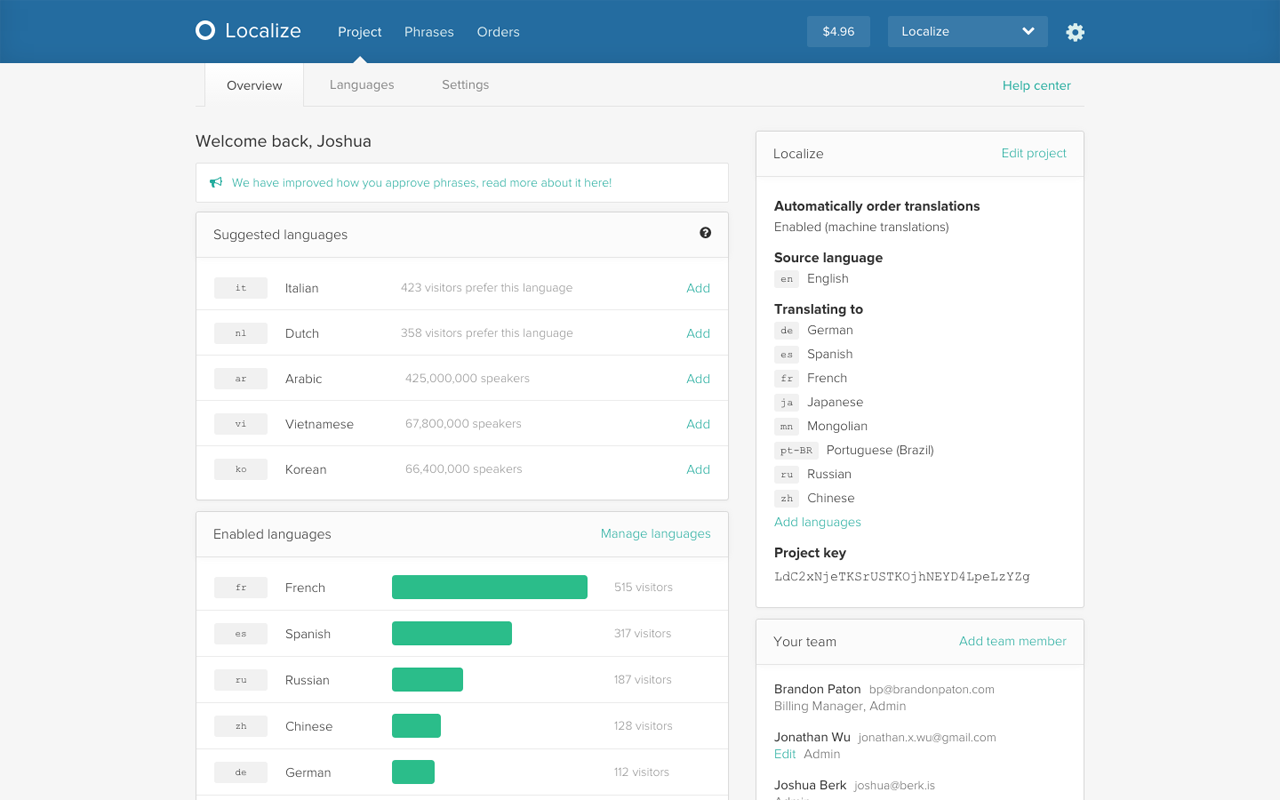
Screenshot of Project OverviewScreenshot of Content WorkflowScreenshot of Order TranslationsScreenshot of In-context EditingScreenshot of Widget on site