HG Insights Platform vs. Predicte.com

Overview
ProductRatingMost Used ByProduct SummaryStarting Price
HG Insights Platform
Score 9.0 out of 10
Enterprise companies (1,001+ employees)
The HG Insights platform provides a view into global industries, markets, and companies allowing users to identify the most valuable opportunities and build strategies to maximize revenue and accelerate growth.N/A
Predicte.com
Score 0.0 out of 10
Small Businesses (1-50 employees)
Predicte offers real-time predicive insights from product, sales, and client data. By unifying disparate data sources within its Data Platform (Analytics), Predicte empowers distributors, wholesalers and manufacturers to forecast sales with greater accuracy, detect churn risks before they escalate, and deliver tailored recommendations. The platform’s analytics framework helps teams optimize product usage, enhance sales performance, and continuously improve client outcomes through its…N/A
Pricing
HG Insights PlatformPredicte.com
Editions & Modules
No answers on this topic
Offerings
Pricing Offerings
HG Insights PlatformPredicte.com
Free Trial
NoNo
Free/Freemium Version
NoNo
Premium Consulting/Integration Services
NoNo
Entry-level Setup FeeOptionalRequired
Additional Details
More Pricing Information
Features
HG Insights PlatformPredicte.com
Sales Intelligence Data Standards
Comparison of Sales Intelligence Data Standards features of Product A and Product B
HG Insights Platform
9.1
36 Ratings
5% below category average
Predicte.com
-
Ratings
Company information8.336 Ratings00 Ratings
Financial Research
Comparison of Financial Research features of Product A and Product B
HG Insights Platform
8.3
34 Ratings
0% below category average
Predicte.com
-
Ratings
Industry-Specific Information8.529 Ratings00 Ratings
Search Tools8.230 Ratings00 Ratings
Market Research
Comparison of Market Research features of Product A and Product B
HG Insights Platform
8.1
36 Ratings
0% below category average
Predicte.com
-
Ratings
Competitor Research7.933 Ratings00 Ratings
Market Insights and Reports8.334 Ratings00 Ratings
Best Alternatives
HG Insights PlatformPredicte.com
Small Businesses
Lead411
Lead411
Score 8.2 out of 10
Mediafly
Mediafly
Score 7.7 out of 10
Medium-sized Companies
Lead411
Lead411
Score 8.2 out of 10
Clari
Clari
Score 8.7 out of 10
Enterprises
D&B Hoovers
D&B Hoovers
Score 8.2 out of 10
Clari
Clari
Score 8.7 out of 10
All AlternativesView all alternativesView all alternatives
User Ratings
HG Insights PlatformPredicte.com
Likelihood to Recommend
9.1
(38 ratings)
-
(0 ratings)
Usability
8.5
(36 ratings)
-
(0 ratings)
User Testimonials
HG Insights PlatformPredicte.com
Likelihood to Recommend
HG Insights
For someone working in B2B IT Marketing, the HG Insights Platform has a wide range of data available that is suited for both a data level employee as well as an ISR. The one draw back is the integration with SFDC isn't as great as we'd like, meaning it is more manual for us to run propensity models using more than one source of data.
Read full review
Predicte.com
No answers on this topic
Pros
HG Insights
  • It works great for seeing if the site or app for a company is hosted on AWS.
  • Intricately uses a different approach (vs the other tools we use) - which helps confirm from another angle.
  • It has a great google chrome plug-in.
  • UI/UX is modern and clean.
Read full review
Predicte.com
No answers on this topic
Cons
HG Insights
  • integration with SFDC could be better
  • Sometime provides back an incorrect/no match when a better is available from an uploaded file, though this is getting slightly better
  • A way to gauge how many hits you will get off an intent topic before selecting them so you don't feel like one is going to waste could be useful.
Read full review
Predicte.com
No answers on this topic
Usability
HG Insights
It’s very easy to use, and the team is very responsive and friendly to work with. The information is unique and usable and can complement some of the data we get from call recordings. The integration with Salesforce is easy to implement and offers good insights into our database.
Read full review
Predicte.com
No answers on this topic
Alternatives Considered
HG Insights
- Sales Intel seems to be more of a direct competition. Their human research seems to be something interesting. Also the claim to focus on firmographics - We went with Bombora for intent technology in the past - We did not move forward with 6sense
Read full review
Predicte.com
No answers on this topic
Return on Investment
HG Insights
  • I don't massively get involved in financial matters, but the propensity models we use internally to help run our campaigns are certainly a big factor when our sales people approach our clients.
  • Every campaign sold now comes with a flat data fee for us to run and use a propensity model for the activity we complete on behalf of our clients.
  • Whilst the client will never see the raw data behind the model (of which HG does play a part along with our other data sources) they are briefed on the methodology and reasoning behind them.
Read full review
Predicte.com
No answers on this topic
ScreenShots

HG Insights Platform Screenshots

Screenshot of the welcome screen.Screenshot of the HG Insights Opportunity Generator.Screenshot of HG Insights' Market Analyzer, used to interactively explore and act on your total addressable market, competitive dynamics, and whitespace with speed and confidence.

Predicte.com Screenshots

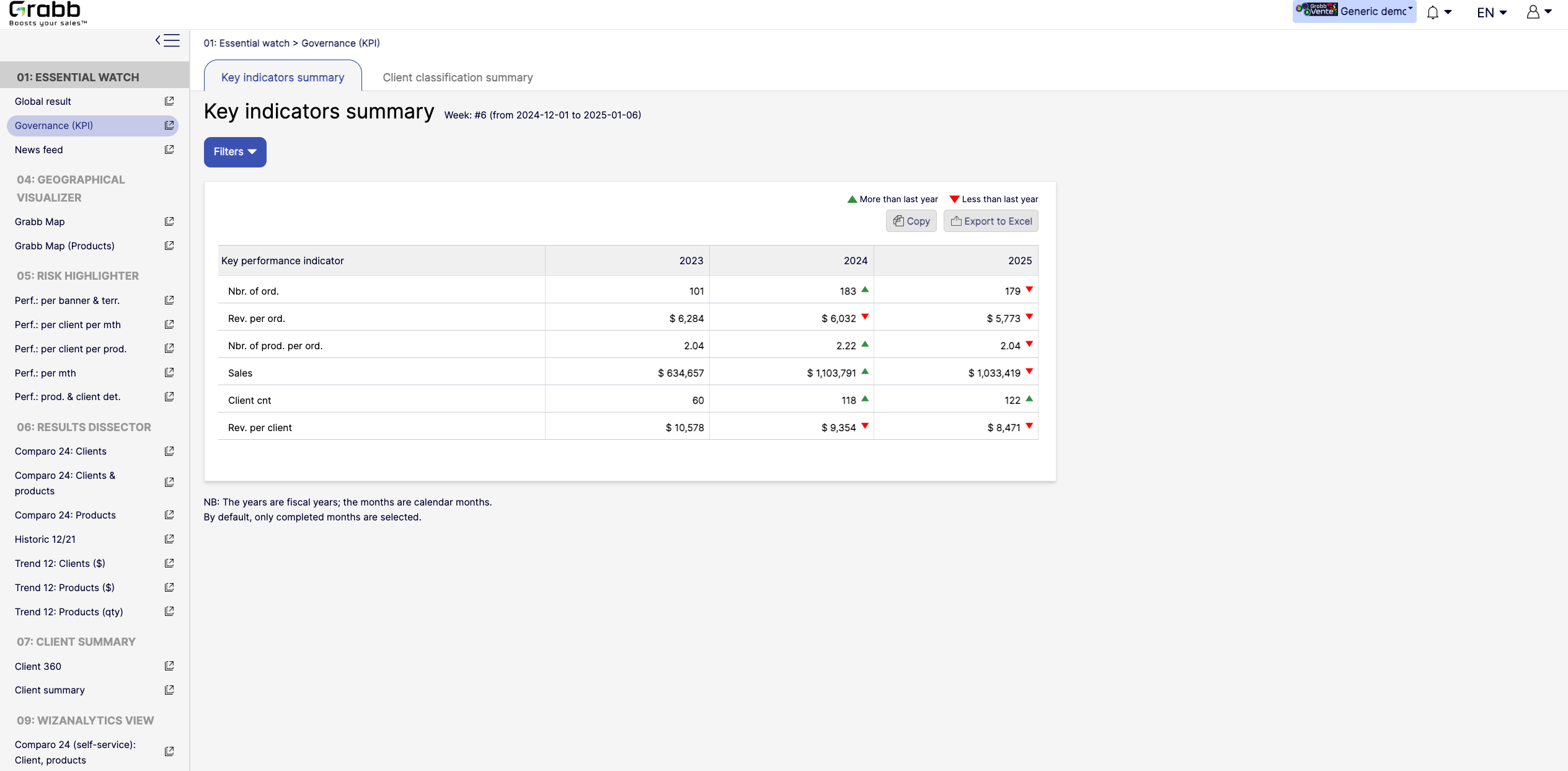
Screenshot of the dashboard for executives and managers, with various performance metrics:

High‐Level KPIs: Summarizes top metrics (e.g., total sales, revenue per client, average products per order) all in one table, making it easier to spot whether the company is trending up or down.
Year‐to‐Year Comparison: Displays data for each fiscal year, with green/red arrows to show improvement or decline since the previous year.
Immediate Visibility of Trends: Simplifies strategic decision‐making by illustrating whether overall performance is improving or if corrective measures are needed.
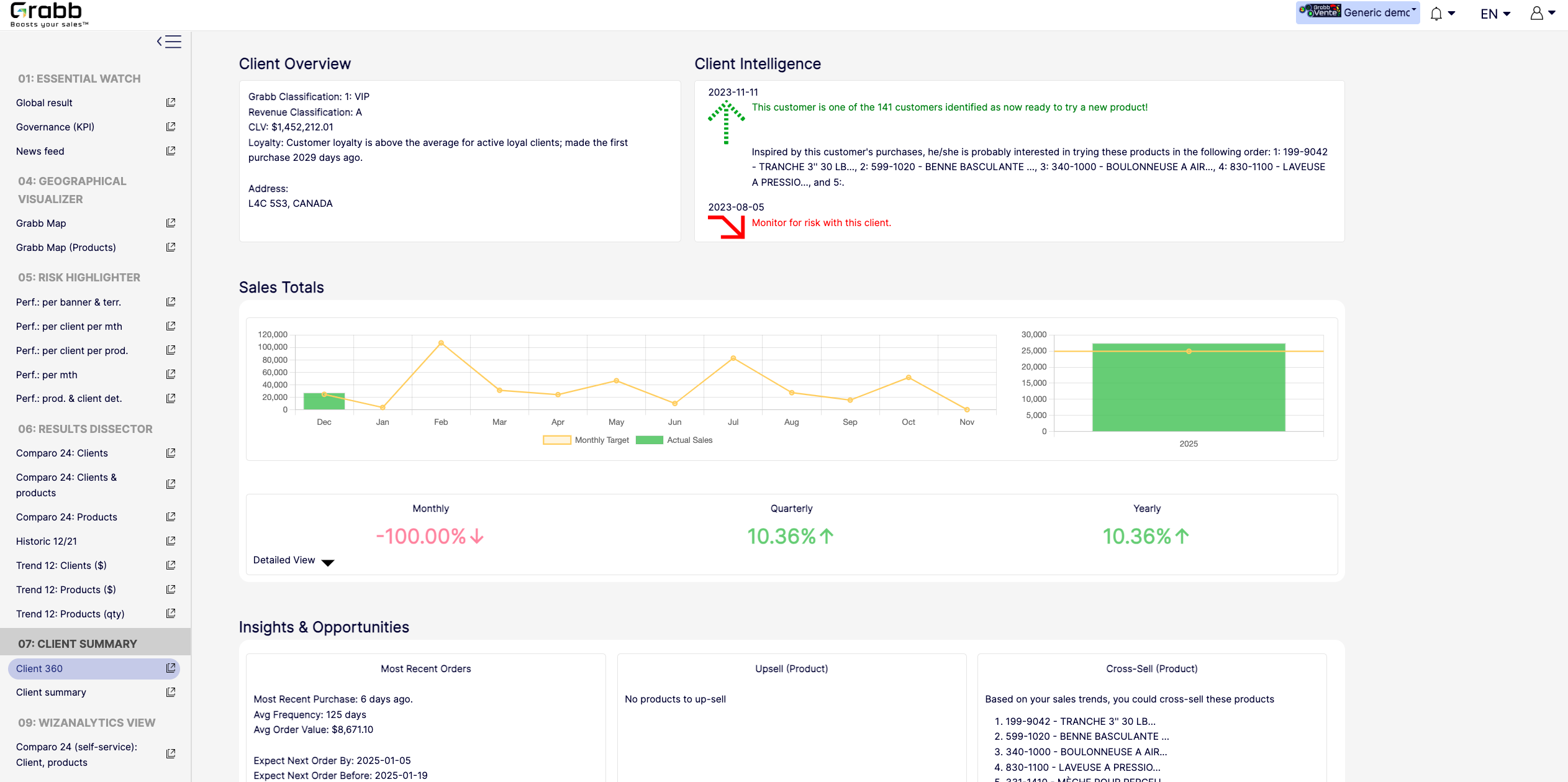
It’s a quick, executive‐friendly scoreboard of the organization’s health, ensuring leaders have the clarity to plan next steps.Screenshot of an at‐a‐glance understanding of a single client’s status, loyalty level, buying behavior, and next best actions that includes data about up‐selling, cross‐selling, and churn risk is often siloed or not immediately visible. This provides:

A Centralized Client Snapshot: Shows the client’s classification (e.g., VIP), revenue category, and CLV, ensuring everyone quickly sees the client’s overall value.
Predictive Intelligence: Highlights whether the client is “ready to try a new product,” or if there’s any “monitor for risk” alert, taking the guesswork out of deciding the next sales move.
Sales Trend & Graphs: Displays monthly, quarterly, and yearly sales to pinpoint performance patterns and quickly identify dips/spikes.
Upsell/Cross‐Sell Suggestions: Automatically suggests which products the client is most likely to buy next, helping reps act on potential revenue opportunities immediately.
Insights & Opportunities: Offers quick reference points such as “Most Recent Purchase,” average order value, frequency, and predicted next order date so you can plan proactive outreach.
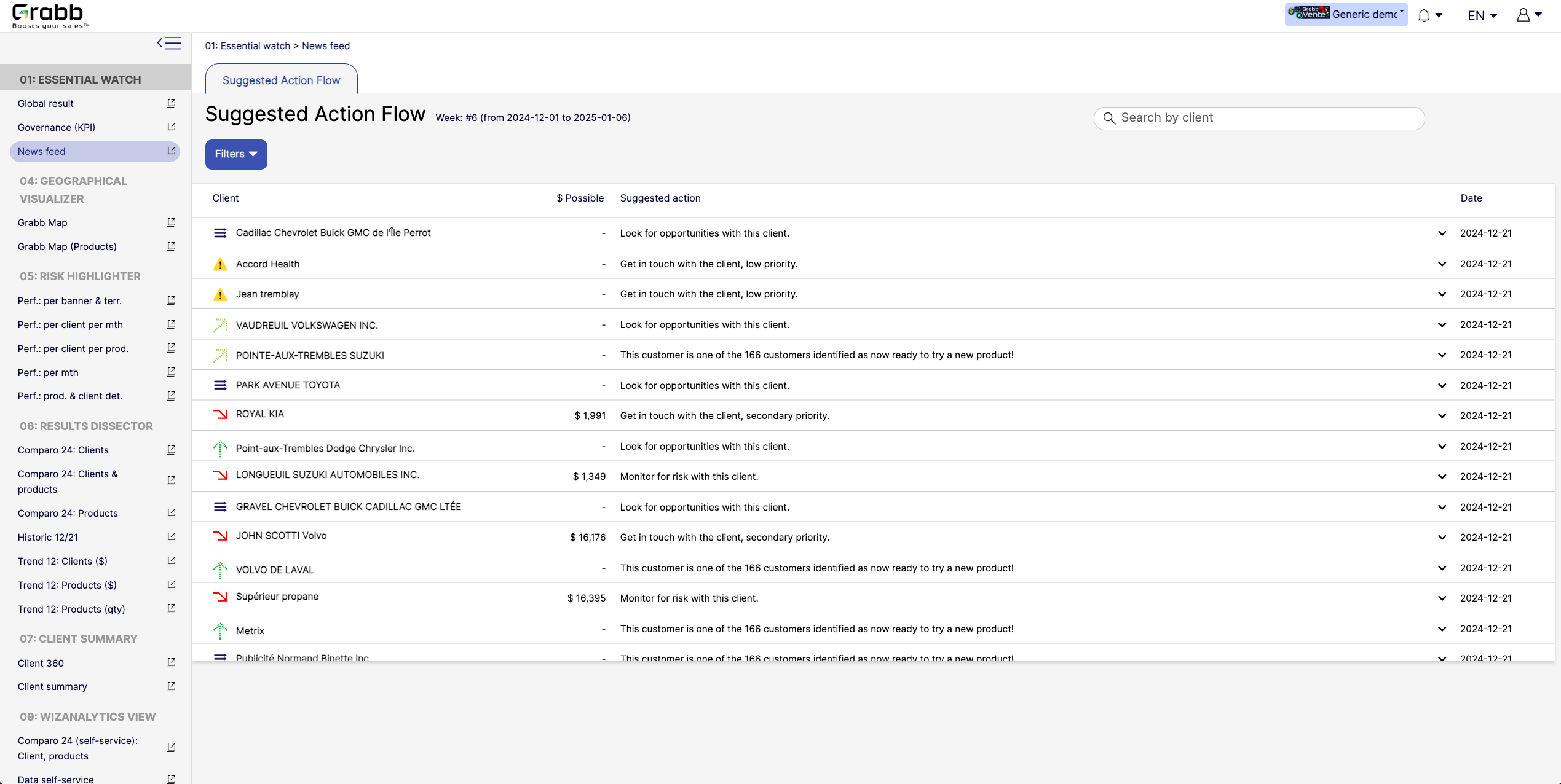
This holistic view enables data‐driven decisions—whether to focus on strengthening loyalty, pitching new products, or preventing churn.Screenshot of A visualization for sales reps and managers, providing:

Prioritized Recommandations: Provides a dynamic feed of next best actions—whether it’s “Look for opportunities with this client” or “Monitor for risk,” ensuring no lead or account slips through the cracks.
Opportunity & Risk Indicators: Quickly flags which clients are “ready to try a new product” versus those at higher risk, so teams can focus their energy where it matters most.
Estimated Upside ($ Possible): In some cases, the screen shows potential revenue if successful, helping reps evaluate the ROI of their outreach efforts.
Search & Filter Capabilities: Salespeople can easily locate a specific client in the list and see suggested actions, which speeds up daily planning and follow‐ups.
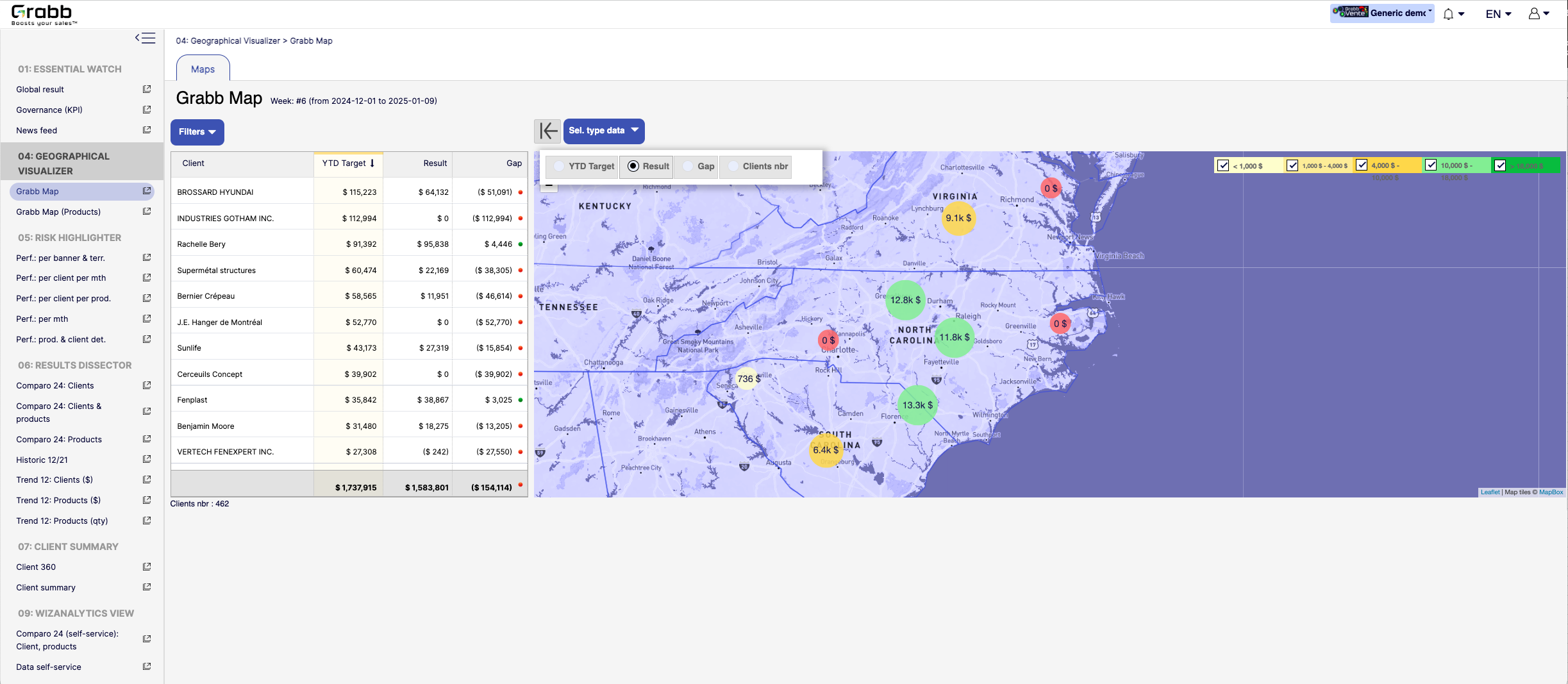
By centralizing these recommended “next steps,” the Suggested Action Flow turns raw data into a practical to‐do list—making each sales call or client interaction more purposeful and timely.Screenshot of a visualization for sales teams that helps them understand how their performance is distributed across different territories or locations. Without geographic context, managers can overlook local trends, regional opportunities, or problem areas.

Solution Provided:

Interactive Territory Overview: Displays each client’s Year‐to‐Date (YTD) target, actual results, and any gap in a color‐coded map, quickly revealing where the biggest mismatches lie.
Client‐Level Details: The list alongside the map allows you to see real‐time data—such as current gap amount or sales performance—sorted by region or client.
Visual Clustering: Bubbles on the map show consolidated sales amounts or gaps for clusters of clients, making it easier to spot hot‐spots or underperforming zones.
Target & Result Comparison: By toggling between metrics (e.g., “YTD Target,” “Result,” “Gap,” “Clients nbr”), managers can instantly pivot the view to see how the team is tracking.
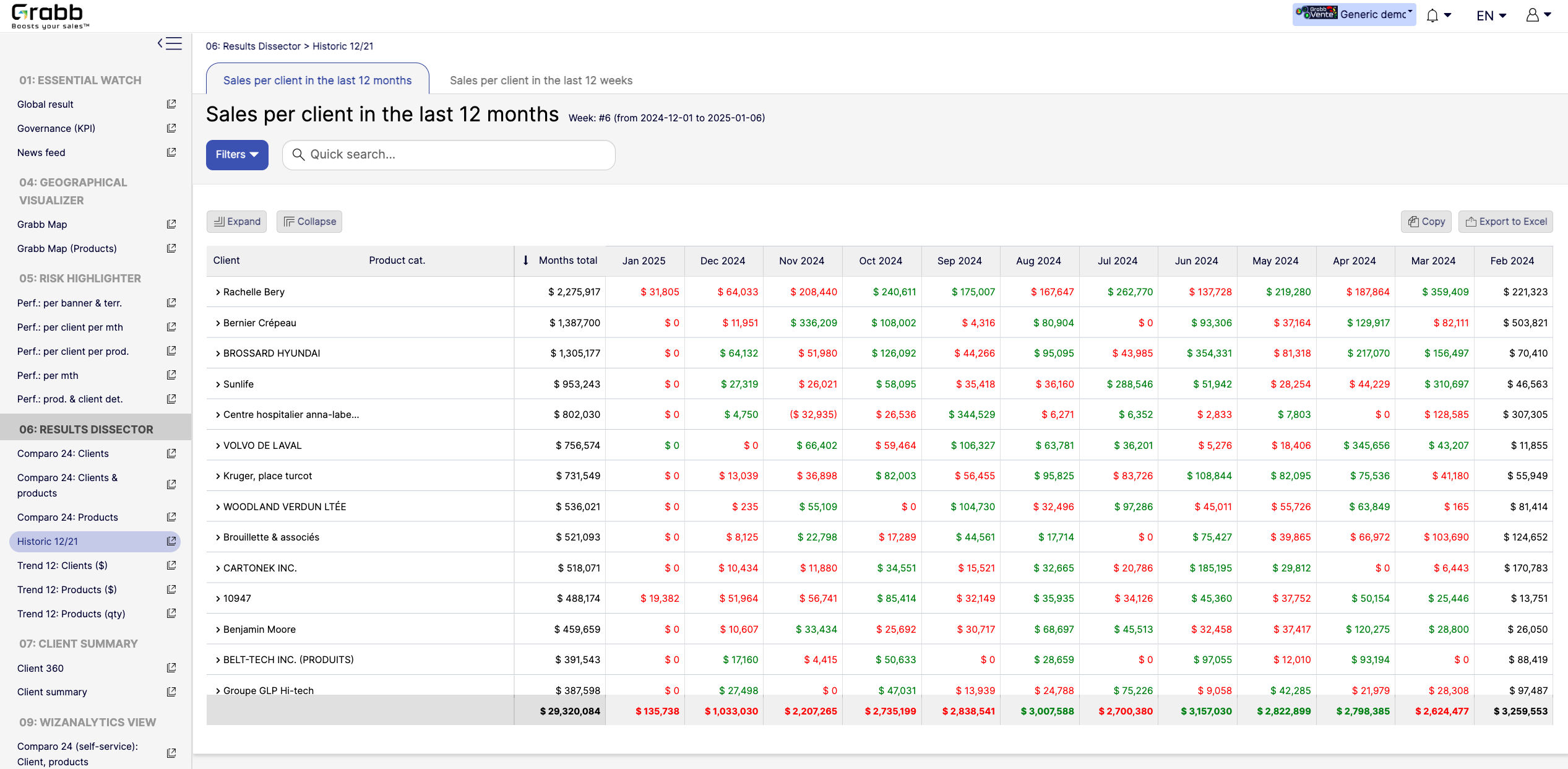
With this map‐based dashboard, leaders can optimize travel routes, allocate resources effectively, and prioritize outreach in areas where the potential impact is greatest.Screenshot of monthly sales trends at the individual‐client level. The visualization provides:

Month‐by‐Month Breakdown: Lists each client with color‐coded monthly sales (green and red), allowing you to see exactly when sales surge or drop off.
Total and Monthly Views: A “Months total” column plus each month’s figure helps you quickly gauge each client’s cumulative performance versus their monthly fluctuations.
Trend Spotting & Seasonality: By laying out 12 consecutive months, it becomes easier to see recurring patterns—helpful for forecasting, inventory planning, and targeted campaigns.
Actionable Insights: Identify which clients need re‐engagement (red cells or big drops) and which clients might be ready for expansion (consistently green or strong increases).
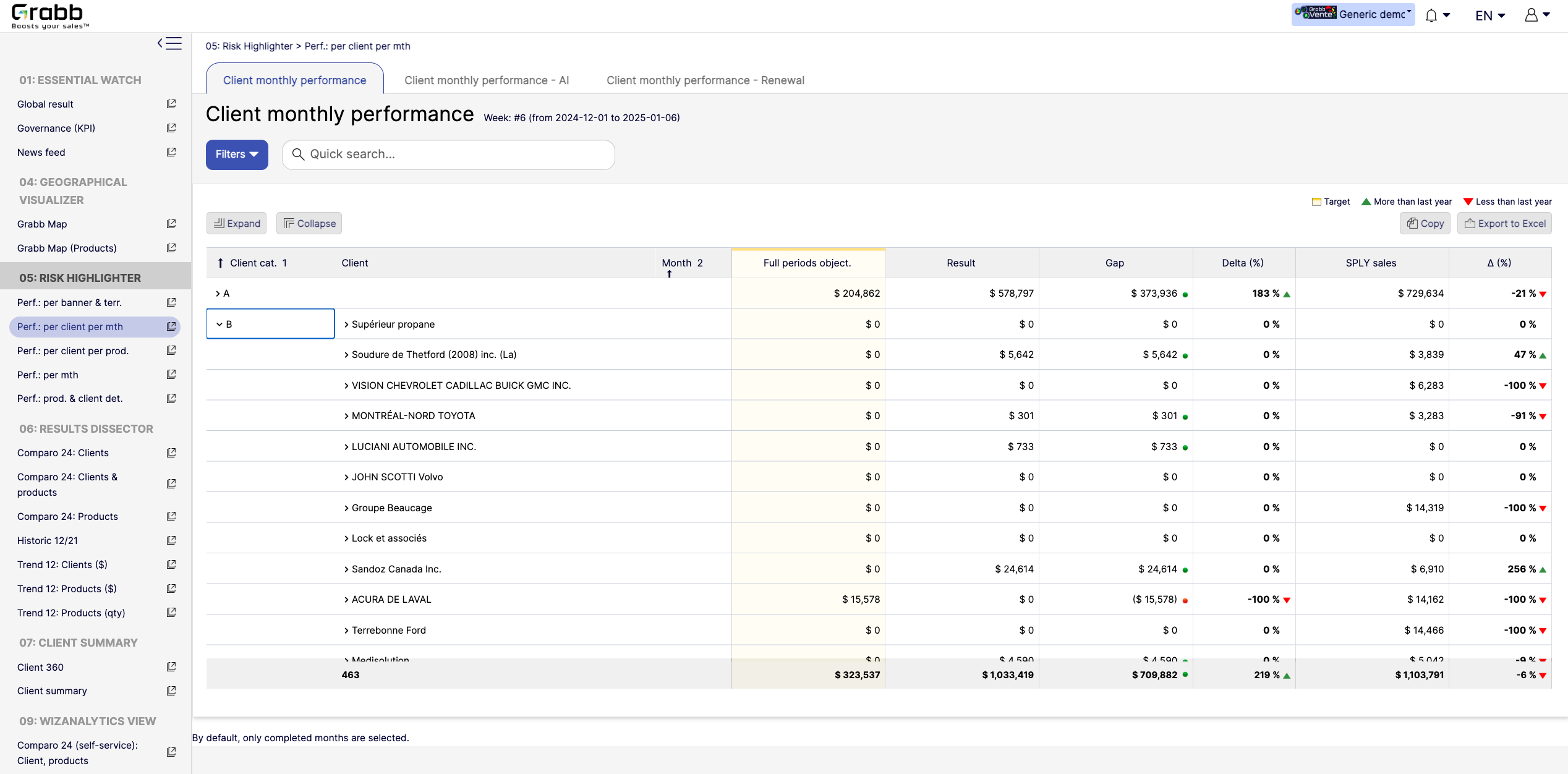
By visualizing an entire year in detail, sales teams can preemptively address potential downturns and capitalize on positive trends.Screenshot of a visualization tracking how each client performs on a month‐to‐month basis, and across accounts. This information provides:

Side‐by‐Side Comparisons: Displays each client’s monthly objectives versus actual results, so sales teams see immediately whether targets are met or missed.
Delta & Gap Analysis: Automatically calculates the variance between the goal and real outcomes—highlighting where shortfalls or over‐performance exist.
Year‐Over‐Year Comparison: “More than last year” or “Less than last year” labels provide quick trend context, guiding strategy for retention or growth.
Easy Filtering & Sorting: Users can filter by client category or name, then expand or collapse details to focus only on accounts that need attention.
With this screen, managers can prioritize which clients need immediate support and which are on track—using precise data rather than guesswork.