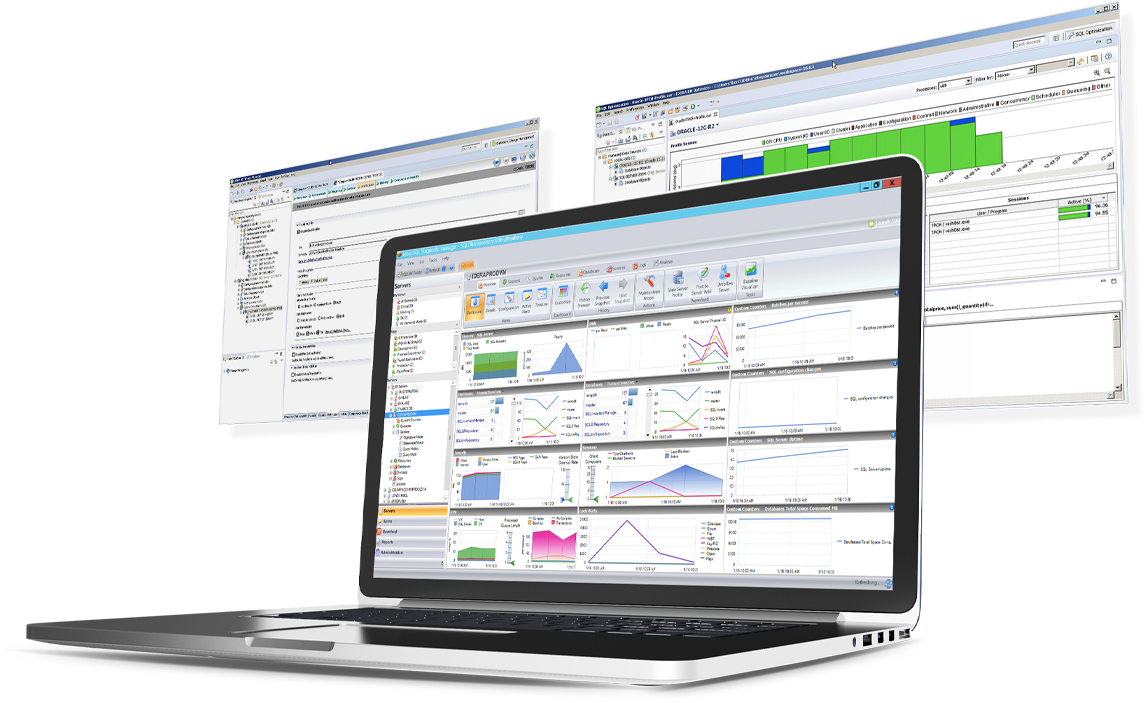
SQL Diagnostic Manager for Microsoft SQL Server helps database administrators to find and fix Microsoft SQL Server performance problems in physical, virtual, and cloud environments. Unlike its competition, it provides effective scalability, advanced SQL query analysis and optimization, prescriptive analysis with corrective SQL scripts, powerful automated alert responses, broad PowerShell integration, complete customization, and extensive support for current and legacy Microsoft SQL Server and…
$1,996
per instance with first year maintenance included
TeamCity
Score7.1 out of 10
N/A
TeamCity is a continuous integration server from Czeck company JetBrains.
SQL Server [Business Intelligence] Manager is useful for tracking performance across SSIS, SSRS and SSA and have the data represented in dashboards. It helps improve performance and helps end users. However, several features are redundant for smaller organization that can use the tools that comes with existing Microsoft products. These features also takes time to learn and use.
A de minimis incentive was given to thank the reviewer for their time. The incentive was not used to bias or drive a particular response, nor was the incentive contingent on a positive endorsement. More Info
TeamCity is very quick and straightforward to get up and running. A new server and a handful of agents could be brought online in easily under an hour. The professional tier is completely free, full-featured, and offers a huge amount of growth potential. TeamCity does exceptionally well in a small-scale business or enterprise setting.
A de minimis incentive was given to thank the reviewer for their time. The incentive was not used to bias or drive a particular response, nor was the incentive contingent on a positive endorsement. More Info
SQLdm does a good job of providing information at a high level, but also allows me to drill down to specific queries and events if needed. I don't always need to sift through tons of details to get the information I need. It also gives a very wide range of information from SQL specific metrics, to OS metrics, to VM metrics, all the way up to host server metrics.
I like how the alert and notification system can be customized. For example, if you know a certain server regularly has long-running queries, you can adjust the alert to not fire unless a query has been running for 30 minutes while the rest of the servers fire after 30 seconds. That is very helpful in not being bombarded at dinner with alerts from a server similar to, "I've been at 90% cpu for 26 milliseconds!!!!!!!...and now it's back down to 30%" Good information to know, but not something you need to literally lose sleep over.
I like how you can configure different servers to be monitored differently. For example, you can have a group of servers called DEVELOPMENT that you can turn on heavier monitoring on so you can test how changes in applications might affect the SQL environment, but in the PRODUCTION group, you may only want to enable the heavier analysis and logging when performance issues are actively being reported.
A de minimis incentive was given to thank the reviewer for their time. The incentive was not used to bias or drive a particular response, nor was the incentive contingent on a positive endorsement. More Info
A de minimis incentive was given to thank the reviewer for their time. The incentive was not used to bias or drive a particular response, nor was the incentive contingent on a positive endorsement. More Info
Windows client has some issues. When you have small time intervals for your data collection, it can cause the client to become unresponsive and require you to restart it.
It takes more time to get the web client running than it does to get the windows client running.
The visualizations have been the same for the last eight years--could use a little bit of a refresh.
A de minimis incentive was given to thank the reviewer for their time. The incentive was not used to bias or drive a particular response, nor was the incentive contingent on a positive endorsement. More Info
The customization is still fairly complex and is best managed by a dev support team. There is great flexibility, but with flexibility comes responsibility. It isn't always obvious to a developer how to make simple customizations.
Sometimes the process for dealing with errors in the process isn't obvious. Some paths to rerunning steps redo dependencies unnecessarily while other paths that don't are less obvious.
A de minimis incentive was given to thank the reviewer for their time. The incentive was not used to bias or drive a particular response, nor was the incentive contingent on a positive endorsement. More Info
TeamCity runs really well, even when sharing a small instance with other applications. The user interface adequately conveys important information without being overly bloated, and it is snappy. There isn't any significant overhead to build agents or unit test runners that we have measured.
A de minimis incentive was given to thank the reviewer for their time. The incentive was not used to bias or drive a particular response, nor was the incentive contingent on a positive endorsement. More Info
IDERA SQL Diagnostic Manager for SQL, Redgate SQL, and MonitorLogicMonitor are similar products to each other. We decided on IDERA SQL Diagnostic Manager for SQL because our experience with locating heavy queries has been very good and it provides real-time monitoring of all servers and databases. It also allows you to have a large volume of historical data which allows you to analyze trends in the databases.
A de minimis incentive was given to thank the reviewer for their time. The incentive was not used to bias or drive a particular response, nor was the incentive contingent on a positive endorsement. More Info
TeamCity is a great on-premise Continuous Integration tool. Visual Studio Team Services (VSTS) is a hosted SAAS application in Microsoft's Cloud. VSTS is a Source Code Repository, Build and Release System, and Agile Project Management Platform - whereas TeamCity is a Build and Release System only. TeamCity's interface is easier to use than VSTS, and neither have a great deployment pipeline solution. But VSTS's natural integration with Microsoft products, Microsoft's Cloud, Integration with Azure Active Directory, and free, private, Source Code repository - offer additional features and capabilities not available with Team City alone.
A de minimis incentive was given to thank the reviewer for their time. The incentive was not used to bias or drive a particular response, nor was the incentive contingent on a positive endorsement. More Info
A de minimis incentive was given to thank the reviewer for their time. The incentive was not used to bias or drive a particular response, nor was the incentive contingent on a positive endorsement. More Info
TeamCity has greatly improved team efficiency by streamlining our production and pre-production pipelines. We moved to TeamCity after seeing other teams have more success with it than we had with other tools.
TeamCity has helped the reliability of our product by easily allowing us to integrate unit testing, as well as full integration testing. This was not possible with other tools given our corporate firewall.
TeamCity's ability to include Docker containers in the pipeline steps has been crucial in improving our efficiency and reliability.
A de minimis incentive was given to thank the reviewer for their time. The incentive was not used to bias or drive a particular response, nor was the incentive contingent on a positive endorsement. More Info