TrustRadius: an HG Insights company

Save this comparison

Save this comparison

Add Product

Recommended Comparisons

    Overview
    ProductRatingMost Used ByProduct SummaryStarting Price

    Jotform PDF Editor

    Score9.4 out of 10
    N/AAside from its flagship survey building product, JotForm also offers the free, online JotForm PDF Editor, which they state is designed to help users produce professional looking forms with ready-made templates, drag and drop form builders, and the ability to integrate data into new .pdf files.N/A

    JungleDocs

    Score7.6 out of 10
    N/AJungleDocs takes properties and parts of an existing document and puts them into a new one. The vendor’s value proposition is that this prevents possible mistakes and saves up to 90% of the user’s time that would be used on inputting and copy-pasting operations. Key features include: Word and PowerPoint document generation and automation Document mail merge from SharePoint lists Template processing engine uses Open XML technology for very fast and…N/A
    Pricing
    Jotform PDF EditorJungleDocs
    Editions & Modules
    No answers on this topic
    No answers on this topic
    Offerings
    Pricing Offerings
    Jotform PDF EditorJungleDocs
    Free Trial
    NoYes
    Free/Freemium Version
    YesNo
    Premium Consulting/Integration Services
    NoYes
    Entry-level Setup FeeNo setup feeNo setup fee
    Additional Details—Licensed per Web Front End (WFE) Server
    More Pricing Information
    Best Alternatives
    Jotform PDF EditorJungleDocs
    Small Businesses
    Tungsten Power PDF
    Score9.8 out of 10
    M‑Files
    Score8.9 out of 10
    Medium-sized Companies
    PDF Xchange Viewer and Editor
    Score9.3 out of 10
    Esker
    Score7.4 out of 10
    Enterprises
    Adobe Acrobat Reader
    Score8.6 out of 10
    Tungsten Capture
    Score9.5 out of 10
    All AlternativesView all alternativesView all alternatives
    User Ratings
    Jotform PDF EditorJungleDocs
    Likelihood to Recommend
    9.4
    (3 ratings)
    7.6
    (3 ratings)
    User Testimonials
    Jotform PDF EditorJungleDocs
    Likelihood to Recommend
    Jotform
    Jotform PDF Editor has been a game-changer for a local festival which is a client of mine. I set them up with a Jotform for parade entries to pre-register, then use the PDF Editor to format each entry in an easy-to-read layout so the announcer can read the information as each entry passes during the parade. I set up another client that uses it to track new members. This scenario is a little trickier as the amount of information gathered can vary quite a bit, so it's a little harder to keep the layout of all the entries consistent
    Incentivized
    Read full review
    EnovaPoint, LLC
    Great for maintaining consistent language in proposals, contracts, RFI responses, and other legal documents. We can make sure our language passes our legal, regulatory and compliance departments without burdening each document with detailed reviews. This saves us time. When responding to RFIs, we have some standard language to several hundred questions and we can answer them by clicking the boxes. We put in an RFI response question # so they can easily be sorted to match the RFI document. Again, I can't count the labor hours saved. We use this to build plan documents and plan adoption agreements using building blocks that are added by selecting the sections and clicking some checkboxes to determine what gets added. JungleDocs is great for these use cases.
    Incentivized
    Read full review
    Pros
    Jotform
    • PDF certificate design and layout
    • Automatic field value population based on form submission
    • Automatic issuing of PDF certificate
    Incentivized
    Read full review
    EnovaPoint, LLC
    • Auto population of documents from files stored on SharePoint. Eliminates extra steps for more efficacy.
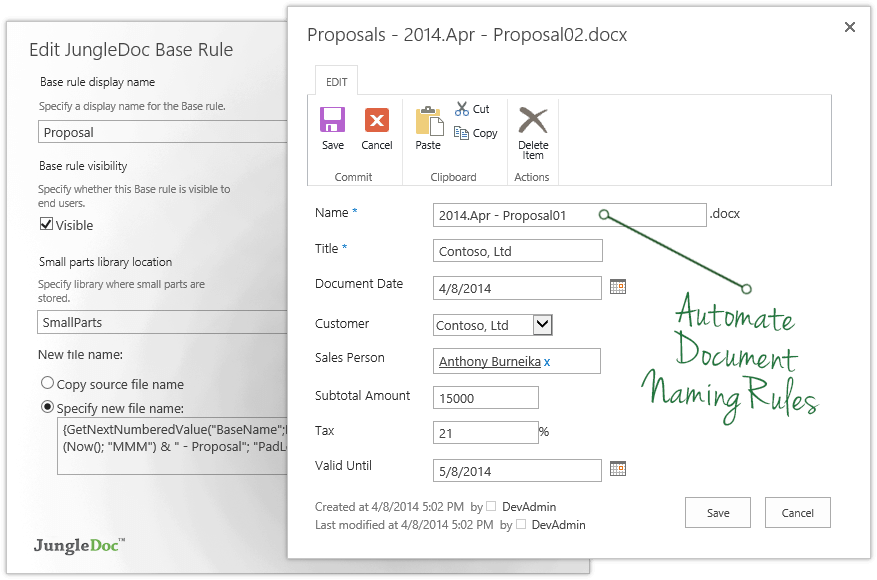
    • Can also set up automation for managing documents. Our department uses specific naming conventions for our documents and JungleDocs allows the naming conventions to be automated to help eliminate human error.
    Incentivized
    Read full review
    Cons
    Jotform
    • Exports all fields, not just the ones that have been conditionally filled out.
    • Could use better page breaks.
    • Would love a clearer editing interface.
    Incentivized
    Read full review
    EnovaPoint, LLC
    • The ability to update fields in headers and footers, if they change after the document has been created
    • When content or metadata change, the document doesn't auto update the fields in the document, you have to manually go and click the update option (excludes fields in headers or footers footers)
    Incentivized
    Read full review
    Alternatives Considered
    Jotform
    Jotform PDF Editor has a feature that natively integrates with Jotform PDF Editor form data. I like the fact that I can easily automate and fill PDF and customise its design based on many multiple purposes of a PDF document.
    Incentivized
    Read full review
    EnovaPoint, LLC
    JungleDocs was intuitively easier to use than eFileCabinet and Sharepoint. JungleDocs works with Sharepoint to extend its feature set and make it easier to use. Our team didn't feel that eFileCabinet was suitable for all of our use cases, especially the RFI response documents. We used a scorecard to rank the products and JungleDocs proved to be the winner.
    Incentivized
    Read full review
    Return on Investment
    Jotform
    • Saves hours of time manually inputting data
    • Keeps entries consistent well organized
    Incentivized
    Read full review
    EnovaPoint, LLC
    • Longer startup for member who are not familiar with metadata.
    • Some support documents are hard to follow.
    Incentivized
    Read full review
    ScreenShots

    Jotform PDF Editor Screenshots

    Product screenshotProduct screenshotProduct screenshot

    JungleDocs Screenshots

    Screenshot of JungleDocs InterfaceProduct screenshotProduct screenshotProduct screenshotProduct screenshotProduct screenshot