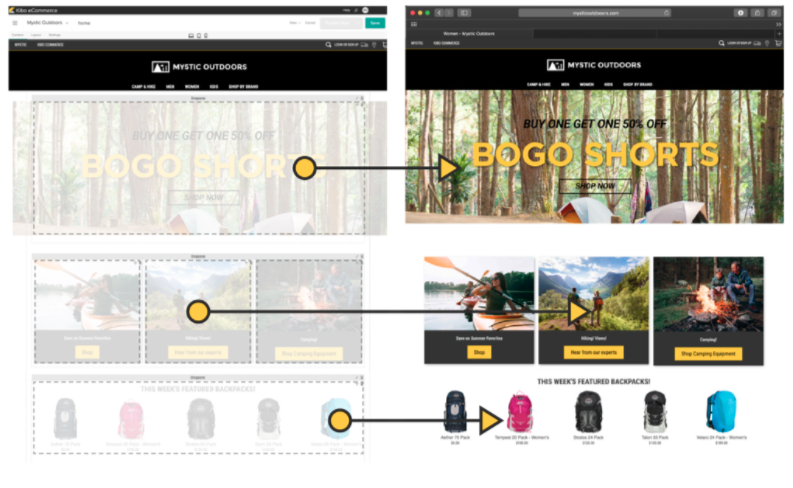
Kibo Software offers Kibo eCommerce (formerly Mozu), designed to support retailers with online offer creation and deployment, content publishing and landing pages, and many tools and widgets out of the box with a retail-oriented ecommerce solution.
Mozu was acquired by Kibo Software from Volusion in October 2016.
N/A
ShopKeep
Score7 out of 10
Small Businesses (1-50 employees)
ShopKeep is an iPad point of sale system; The vendor says it is intuitive, secure, affordable software that helps merchants run smarter businesses. The product optimizes staffing and inventory, while offering sales reports and customer information on a cloud-based platform. The product includes low-cost, integrated payment processing, as well as point of sale hardware. According to the vendor, ShopKeep has 23,000 customers, and a customer…
$69
per month
Pricing
Kibo eCommerce
ShopKeep
Editions & Modules
No answers on this topic
Basic
$69.00
per month
Essential
$99.00
per month
Advanced
$199.00
per month
Offerings
Pricing Offerings
Kibo eCommerce
ShopKeep
Free Trial
No
Yes
Free/Freemium Version
No
No
Premium Consulting/Integration Services
No
No
Entry-level Setup Fee
No setup fee
No setup fee
Additional Details
—
—
More Pricing Information
Features
Kibo eCommerce
ShopKeep
Online Storefront
Comparison of Online Storefront features of Kibo eCommerce and ShopKeep
Feature
Kibo eCommerce
8.3
6 Ratings
6% above category average
ShopKeep
-
Ratings
Product catalog & listings
8.46 Ratings
00 Ratings
Product management
8.26 Ratings
00 Ratings
Bulk product upload
7.65 Ratings
00 Ratings
Branding
8.26 Ratings
00 Ratings
Mobile storefront
8.56 Ratings
00 Ratings
Product variations
8.55 Ratings
00 Ratings
Website integration
8.04 Ratings
00 Ratings
Visual customization
8.16 Ratings
00 Ratings
CMS
8.74 Ratings
00 Ratings
Online Shopping Cart
Comparison of Online Shopping Cart features of Kibo eCommerce and ShopKeep
Feature
Kibo eCommerce
9.0
2 Ratings
16% above category average
ShopKeep
-
Ratings
Checkout user experience
9.02 Ratings
00 Ratings
Online Payment System
Comparison of Online Payment System features of Kibo eCommerce and ShopKeep
Feature
Kibo eCommerce
8.4
6 Ratings
0% above category average
ShopKeep
-
Ratings
eCommerce security
8.46 Ratings
00 Ratings
eCommerce Marketing
Comparison of eCommerce Marketing features of Kibo eCommerce and ShopKeep
Feature
Kibo eCommerce
7.7
6 Ratings
0% above category average
ShopKeep
-
Ratings
Promotions & discounts
8.56 Ratings
00 Ratings
SEO
7.02 Ratings
00 Ratings
eCommerce Business Management
Comparison of eCommerce Business Management features of Kibo eCommerce and ShopKeep
The platform has flexibility at its core and we have made full use of that capability. Even if Kibo [eCommerce] hasn't been ready to provide features and functions we need, we have the opportunity to build them ourselves. The platform started as Mozu and while it was relatively well-developed for DTC, it lacked a lot of basic B2B functionality. As a result, when we were ready to move into that arena, we built a lot for ourselves (including a multi-level account system and a tool to manage it). Keep in mind, too, that Kibo eCommerce is part of a larger suite of tools. The company has purchased a mobile Point-of-Sale system, Baynote, Certona, Monetate, and an OMS. If you need a full-scale solution, they can offer a lot. As I mentioned previously, their support and documentation need shoring up. They're not terrible, but they hinder (rather than help) when it comes to fulfilling the platform's promise of letting the customers be self-service in building out their capabilities.
A de minimis incentive was given to thank the reviewer for their time. The incentive was not used to bias or drive a particular response, nor was the incentive contingent on a positive endorsement. More Info
ShopKeep can maintain up to 10,000 individual stock items. This is perfect for a cafe, coffee shop, wine bar, small retail store, etc. If you're inventory exceeds the 10,000 items then it may not be a fit for you. Also, ShopKeep works with Apple tablets only (iPad 2 or later). If you prefer Android or PC based tablets then this won't work for you.
A de minimis incentive was given to thank the reviewer for their time. The incentive was not used to bias or drive a particular response, nor was the incentive contingent on a positive endorsement. More Info
ShopKeep provides solid pre-sales support. They did a pre-sales screen-share demo that helped us ensure that their system would handle the needs of the business, and they assisted us in making decisions around which hardware would be appropriate.
ShopKeep's hardware seems well thought out and well integrated. One exception is issues with the connection between their recommended iCMP credit card scanner and the register. Other than that, the hardware works well together.
The register has excellent configurability and customization capabilities, and handles a large variety of products easily. High-volume products can have their own buttons on the register. Products can be added to a purchase by using these buttons, by scanning a bar code with an integrated bar code scanner, or by doing a live text search.
The register is also easily configurable to handle product options - either multiple options like pizza toppings, or exclusive options like regular or decaf coffee.
The ShopKeep system can handle hybrid retail/quick serve/restaurant scenarios with grace. This was a factor that eliminated many other systems that are optimized for one or the other, or where the products for handling retail are completely separate from the products for handling quick serve/restaurant operations. Since this customer has a location where there is a quick serve counter, a restaurant, and a retail gift shop all in the same location, ShopKeep's ability to handle all of these kinds of transactions from the same platform is a powerful advantage. ShopKeep also recently added functionality to transfer open tickets between registers, so that if a customer starts out with a cup of coffee at the quick serve counter, their ticket can be picked up and added to at the gift shop if they wander in there to purchase items.
ShopKeep has a Back Office system that can be accessed through any Web browser, or through their mobile app. The Back Office system is used to import and export data, manage inventory, configure the iPad registers, set up product options, manage employees, and report transactions, sales, product costs & margins, and other data.
Discounts, returns and credits are relatively easy to handle from the register, and the system can be configured to require a manager to approve these kinds of transactions, or not.
Bulk imports and exports are handled well by ShopKeep's Back Office. When setting up initial inventory, products can be added through Excel, then imported as comma-separated values (CSV) files by uploading them through the Web browser. Once inventory is established, adding or modifying items can be done directly through the Web interface.
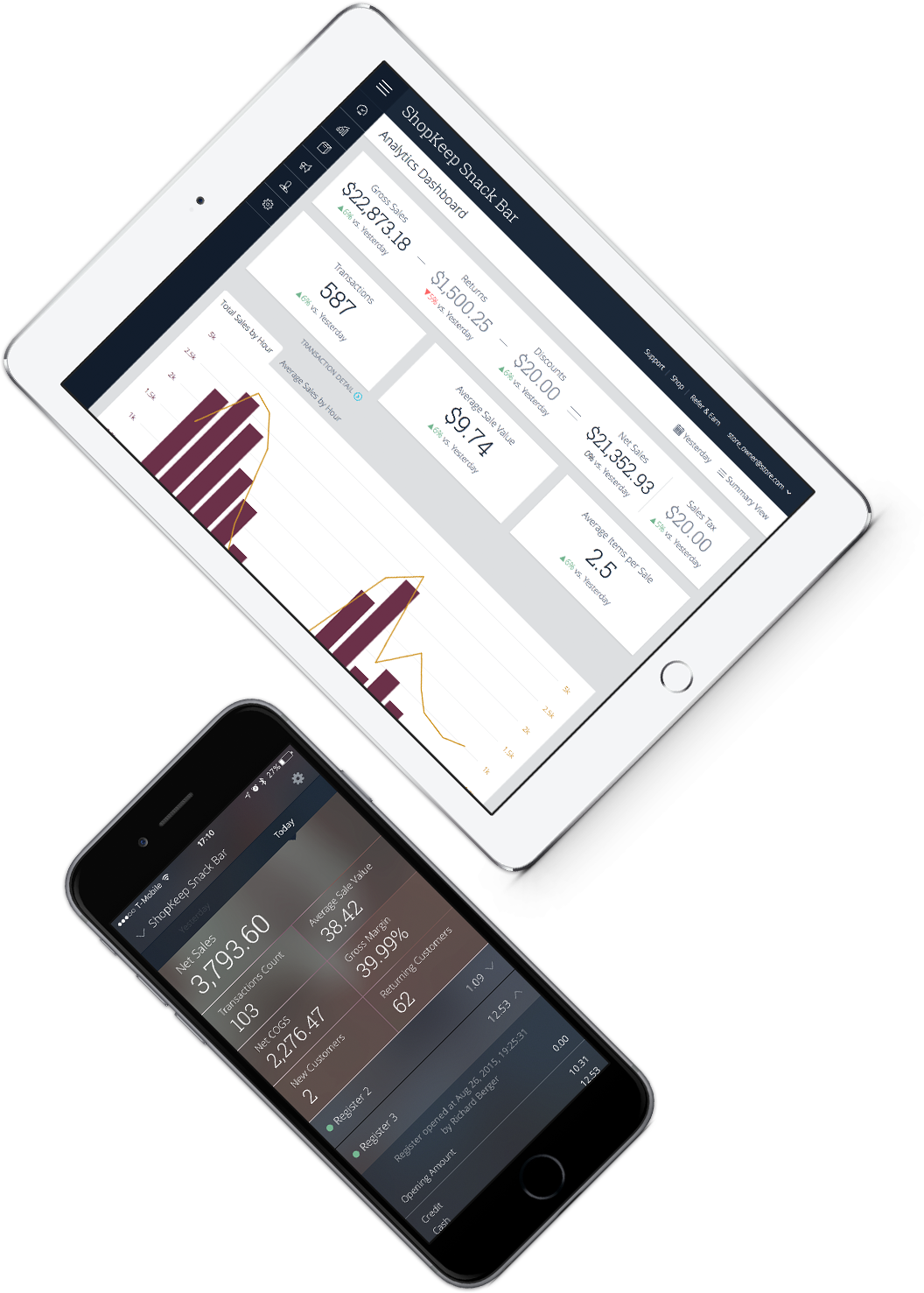
ShopKeep has a mobile app that can be used by owners or managers to remotely access real-time snapshots of sales and other important data whenever they wish.
Prebuilt Integration - There is not currently a large number of preexisting integrations, but custom integrations are fairly quick
Time to Deploy - Don't get me wrong, We have deployed in the timeline we expected, but if you are trying to get something off the ground fast, Kibo might not be right for you. It is a robust platform that take some time to get up and running.
Complicated Shipping - if you have a complicated shipped process, you might want to look for a tool to help, Kibo does not have very robust out of the box shipping capabilities.
A de minimis incentive was given to thank the reviewer for their time. The incentive was not used to bias or drive a particular response, nor was the incentive contingent on a positive endorsement. More Info
Because we expect the current issue with the credit card reader disconnecting from the register to be solved with an upcoming software update, and we like many of the features of Shopkeep.
The register functionality is excellent, both from a learning standpoint and an operations standpoint. Cashiers learn how to use the register quickly, and the registers can be configured with hot buttons for fast-moving products. Setting up product variations and additions is straightforward. The web-accessible Back Office has good features, but lacks enough granularity to provide a store manager with the ability to modify inventory settings without giving them access to all of the financial reports as well.
One positive note is that I have always been able to get someone on the phone in support whenever I have called, even at 1 AM. Getting someone on the phone is only half the battle though. In the first few months of using Mozu it often seemed that support didn’t know anymore about Mozu than we did. This has slowly started to change, but as a daily user you are likely to be on par with support in terms of knowing what to do when you encounter a problem. The support phone number is really most useful for having them put in a support ticket for you rather than typing it all out yourself and emailing it. It is very rare that the support reps are actually empowered to solve the problem at hand. Unless the issue you are having is user error, they will just take your information and pass it on the proper department. Your request or problem will then be ignored for months on end. Some day, it might actually get fixed but you are unlikely to be notified that this has happened. Most of these issues are assigned an internal ID that they use for tracking. Support is more than happy to pass this ID along, but it is useless. There is no way to actually see where the issue lies in the endless queue of similar issues.
Occasional long waits [5 minutes or more] or call-backs needed for telephone support. Email support replies usually take several hours. Support personnel are generally friendly and knowledgable.
At the time of our implementation Mozu did not have any processes or procedures set up around going live. We basically were forced to just wing it and hope for the best
If moving from a "dumb" cash register system, spend all the time needed to get starting inventory and product costing and pricing correct. Shopkeep has good tools for reporting inventory, margins, and other critical business info, but the information is only useful if the starting figures are accurate.
We had a custom, in-house ecommerce website before moving to Kibo. It was brittle, slow, and wasn't going to scale nearly well enough or fast enough to keep up with our requirements
A de minimis incentive was given to thank the reviewer for their time. The incentive was not used to bias or drive a particular response, nor was the incentive contingent on a positive endorsement. More Info
ShopKeep is an inexpensive choice iPad POS system that comes with all of the tools needed to do business without any long-term contracts or expensive fees. It also offers free 24/7 phone and email support along with online live chat during business hours. Coffee Shop Manager offered some of these items, but they also tied you into a long-term contract and you were charged fee after fee for support, etc. Also, the CSM system was big and took up a lot of space compared to ShopKeep's integration with an Apple iPad tablet.
A de minimis incentive was given to thank the reviewer for their time. The incentive was not used to bias or drive a particular response, nor was the incentive contingent on a positive endorsement. More Info
ShopKeep didn't integrate with my accounting software. I had to double enter all financial data.
Without inventory controls, all of my financial information was inaccurate. It is impossible to grow a business without accurate financial information.
A de minimis incentive was given to thank the reviewer for their time. The incentive was not used to bias or drive a particular response, nor was the incentive contingent on a positive endorsement. More Info