Lastline in San Mateo, California offers a network detection and response solution designed to provide network traffic analysis (NTA) to protect enterprise networks against sophisticated threats in real-time.
N/A
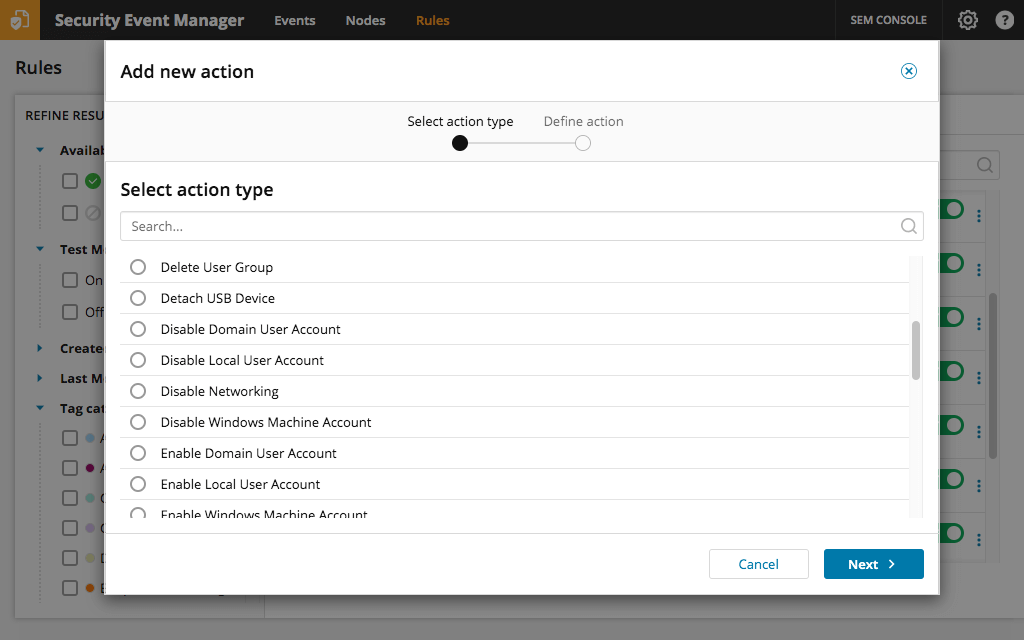
SolarWinds Security Event Manager (SEM)
Score 7.9 out of 10
N/A
SolarWinds LEM is security information and event management (SIEM) software.
N/A
Splunk Enterprise
Score 8.6 out of 10
N/A
Splunk is software for searching, monitoring, and analyzing machine-generated big data, via a web-style interface. It captures, indexes and correlates real-time data in a searchable repository from which it can generate graphs, reports, alerts, dashboards and visualizations.
The compare well against the others - the pricing models for all but Splunk (free version) are based on EPS/TB consumed... the problem they pose is guesstimating the price tag per month. SolarWinds Security Event Manager gets around that.
It came down to price on this one. SolarWinds gave us a great break on
it. For the features that we were looking for, SolarWinds is a great
value for our dollar. As far as features go, we were looking for some
Solarwinds Security Event Manager (SEM) is the best solution for price/performance. The solution has an easily understandable architecture and also the solution can be installed easily. The solution is a very stable and fast solution for our company size.
Fortianalzyer can only do logs from FortiGate so usefulness is limited. Elasticsearch was a lot slower than Solarwinds and the filters were a lot harder to set up and use. The connectors for SEM were far more stable.
Splunk was a pretty good product but the licensing structure needed a lot of work. They changed the structure three times that I am aware and I still had problems understanding LogRhythm had a lot of issues correlating users to IP addresses, the mappings were frequently wrong …
We found that SolarWinds performed poorly when the Architecture included many large data centers spread across the globe. When evaluating the SolarWinds Security Event Manager (SEM) solution we quickly realized that we needed a distributed architecture with log aggregation to …
We chose this product because of its integration to SolarWinds Orion. We were Threat Monitor users previously. This product has been a great substitute. Dollars to dollars this product performs fairly well.
SEM is much better value proposition due to being priced by node and not by size of the event database. It's also much easier to configure that splunk and needs much less infrastructure to run. Out of the box SEM beats splunk on functionality. We looked at many products and …
I find Tripwire Log Center to be adequate and stable but it lacks the graphics and the unified UI that you can have with SolarWinds products. It is also not as simple to set up and operate. One more advantage that SolarWinds products have is the THWACK forum, a big user base …
It is a bit hard to compare, since Cortex XDR is kind of a different starship, with endpoint protection and such, and not really great for auditing Windows Event Logs. ELK stack on the other hand is free in some of it's editions but seems much similar then Cortex. SolarWinds SEM …
We picked SolarWinds because of the better price point, integration with other SolarWinds products, and the ease of training. Because we were already familiar with the SolarWinds way of doing alerts and reports, it made this product a nice fit for our company and it has great …
The first reason is the ease of installation. Unlike competitor, SEM was running and partially deployed within a day. With the defaults already in the SEM, it's super easy to get result quickly, without a consultant. Also, it's not too resource-intensive, and does not …
SolarWinds SEM was selected because it integrates with VMAN on the Orion platform and allows all monitoring information and alerts to be aggregated in one place.
Several clients have moved away from LogRhythm because of cost. SEM offers the best ROI for the function. Its interface is much cleaner then LogRhythm. However, there is a steeper learning curve with SEM. The ease of search and data integrity offered by SEM is definitely a …
I know the Qradar is not the right SIEM tool to compete with Solarwinds SEM but when we looked from a cost, audit & compliance perspective (which are major for many customers), we knew the log management and compliance with regulation would be achieved with SEM. But no machine …
SolarWinds provides support so when you have problems you don't need to turn to information bases as you can just get a hold of SolarWinds support. I would say another reason for getting SEM is that it is generally easier to configure and easier to learn than the other …
I have additionally used Netwrix Auditor, which has some similarity with SolarWinds SEM. I use both hand in hand, but typically use the SEM first since it is easier to manage. With Netwrix custom searches are more complex than customer searches in the SEM. The SEM makes it easy …
We implemented SolarWinds Security Event Manager to replace our Cisco MARS appliance. We found the Cisco MARS appliance cumbersome and difficult to connect to and use, as well as very costly from a support and maintenance perspective. SolarWinds Security Event Manager has more …
Splunk could sort a much better log correlation than it competitors. dynatrace have better dashboards, but its harder to setup and in our case, way too expensive. with Splunk, no one regrets migrating from Qradar. it looks like different generations tools. the correlation is …
Splunk Enterprise has been a well-established solution for many clients for a long time and is a major player in the market. Its track record and performance make it the best choice. Furthermore, its ease of use for developing, using, and managing data makes it the best among …
Splunk Enterprise stands out compared to other solutions due to its broad compatibility and flexibility. It integrates easily with a wide range of infrastructure, network, security, and application products, thanks to its support for multiple data formats and its extensive …
Splunk is the undisputed leader in Security Information and Event Management. Splunk Enterprise Security allows for massive, complex correlation of data across disparate sources. It can be deployed entirely on-premise or in a private cloud, giving total "data sovereignty." …
Splunk Enterprise stacks similarly to IBM's qradar and outperforms both Palo Alto's Panorama and Cisco's Secure Firewall Management Center in regards to storing large amounts of logs and the ability for quick searches. Splunk Enterprise handles queries of data effectively and …
Splunk Enterprise is a very seasoned software , while other comparable software keep on adding new features and keep evolving, Splunk Enterprise has reached a state where new user onboarded doesnt have to request any basic feature or develop modules to simple tasks. Log parsing …
Splunk does a good job at log aggregation and compatibility however, integrations with other products is been a challenge. Especially the pricing can be more competitive to spice up the market and orgs looking to explore AI based logging over traditional practices.
Able to show more than Log data in Splunk views, we tested several plug-ins during a small pilot, and we were able to bring O/S (Win/Unix/Linux) & APM data metrics into the same views as Logged data. I've seen others use it to visualize a wider range of data types, too...better …
While both are market-leading SIEM platforms, they cater to different environments and organization priorities. The choice often comes down to a company's existing infrastructure, integration needs, and long-term security strategy. Deployment and architecture - Splunk offeres …
Splunk features of storing data and ingestion of logs , indexing of data , data analytics make is superior to other tools. Definately there is more improvement requirement in terms of visualisation of data but one stop for all features make splunk better than various other …
Splunk Enterprise was already chosen by our organization to be used across teams. However, the reasoning I know behind is the ability to share events/messages across different message brokers and making onboarding easier to legacy teams by just simple configuration.
Splunk was better in terms of analyzing unstructured data. Also Splunk has had a very good and strong community and is also has a more tried and tested performance. I personally found the dash boarding capability of Splunk better than datadog.
Omnibus was a Linux based tool. Not very easy to sue. End user needs to know Linux commands. Splunk Enterprise is more flexible and ease to use. Splunk Enterprise can generate reports, graphs, data visualization, data validation and much more. Use friendly query language and …
A lot of products have natively inside their own dashboards and or their own logging repositories. And each one is difficult to learn or they're too complex or they're not verbose in the sense that they're not easy to mine the data that you're looking for. So that could be …
Elastic and it's a little bit more cumbersome and a little bit more time consuming. Using Splunk is much easier flow and quicker to utilize to get to the root of a problem.
Cost was major factor which made us choose Splunk Enterprisek. Splunk Enterprise is versatile tool which further helped us to make our decision. Apart from that Managment wish to use something robust hence Splunk Enterprise became there first choice.
Splunk Enterprise is honestly the first tool we used and we cant realistically switch. We have not done any in depth studies or comparisons. We know there are alternatives and we would probably switch if one of them was much more economically viable, but right now we are happy …
Solarwinds SEM is great for generating reports for investigation purposes. Once you set up the connectors you can walk away and the product runs without needing maintenance. It was however pretty difficult to create the reports and alerts when now starting out and it can be very intimidating for new users.
I'm liking the newer products, and I'm looking forward to how they integrate with the overall product when they come together. Just log in and be able to query a large number of systems for similar issues or a unique one. That is a great fit for Splunk Enterprise, looking for a simple case or a simple String or something of that nature across multiple machines. It's a great fit for that to identify issues or particular software, whatever your scenario is, String, to find it across any particular server or group of servers, so that you can update or do a deployment or whatever it is you're looking to do.
SolarWinds easily provides the much needed visibily into changes in an Active Directory (AD) environment. Email alerting can be configured to alert a team if an account is locked out, disabled by another users, or if users and/or computers accounts are created.
SolarWinds allowed a searchable audit feature. Microsoft Windows can be configured to log many different parts of a system, but search those logs can be difficult. SEM allows you to search for specific users or events.
Compared to other SIEMs, there are features that are missing. Machine learning, automatic event correlation, ability to correlate multiple sources together.
The UI is clunky, and the *New* event log analyzer page felt really disjointed from the rest of the product.
In my experience, the dashboards were almost unusable. They persisted across login per device, and even then they sometimes would reset and go back to the ''Getting Started'' look.
It is pretty likely that we will renew SEM when the time comes up. It is easy to use and maintain so there isn't much of a need to replace this product. It is also a pretty fair price for the capabilities provided by the SEM
We are using Splunk extensively in our projects and we have recently upgraded to Splunk version 6.0 which is quite efficient and giving expected results. We keep track of updates and new features Splunk introduces periodically and try to introduce those features in our day to day activities for improvement in our reporting system and other tasks.
It is very good - but you get what you pay for. The intent is not for a Fortune 500 that needs more "heavy lifting" with SolarWinds Security Event Manager & for whom the price tag is not (much of) a consideration.
Splunk usability could be a little more friendly on correlations and log analysis. not for end users, but for the tech team, sometimes is hard to find good professionals to set up integrations and new dashboards when needed. For the high-level management, it can be overwhelming to read Splunk dashboards.
The quality of support can vary depending on whom you end up speaking with. I was fortunate enough to work with a support representative who was very familiar with the product. He had even authored some of the support documentation on the website. On the flip side, I had two other experiences where I was simply directed to online training material.
Splunk maintains a well resourced support system that has been consistent since we purchased the product. They help out in a timely manner and provide expert level information as needed. We typically open cases online and communicate when possible via e-mail and are able to resolve most issues with that method.
The online course was simple clear and described the main capabilities of the solution. There is also an initial module that can be done for free so anyone can familiarize themselves with the functionality of this solution. On the other hand, however, there could be more free online courses. Maybe even with a certificate, this would broaden the group of people who are familiar with the platform while increasing familiarity with the solution itself.
The compare well against the others - the pricing models for all but Splunk (free version) are based on EPS/TB consumed... the problem they pose is guesstimating the price tag per month. SolarWinds Security Event Manager gets around that.
A lot of products have natively inside their own dashboards and or their own logging repositories. And each one is difficult to learn or they're too complex or they're not verbose in the sense that they're not easy to mine the data that you're looking for. So that could be anything from the native logging that you find in other Cisco products. It's easier to use Splunk to draw the data that you're looking for as opposed to going to the individual's products themselves to get the logs that you're looking for.
It saves a lot of time when we had issues trying to figure out where the user account lockout was coming from.
With it being an affordable SIEM, we are able to have the ability to do the actions associated with a SIEM and the advantages of not “breaking the bank account”.
Generation of metrics against compromised accounts based on location and time of the year. It helped in launching phishing education campaign before hitting the most vulnerable month of the year.
It helped in neutralizing vulnerable word-press sites across the campus, leading to the decrease of account compromise.