Lenovo offers LanSchool, a classroom management platform supporting collaboration, monitoring student activity, chat, teacher broadcasting / screen-sharing, and other features.
N/A
Lightspeed Filter
Score9.9 out of 10
N/A
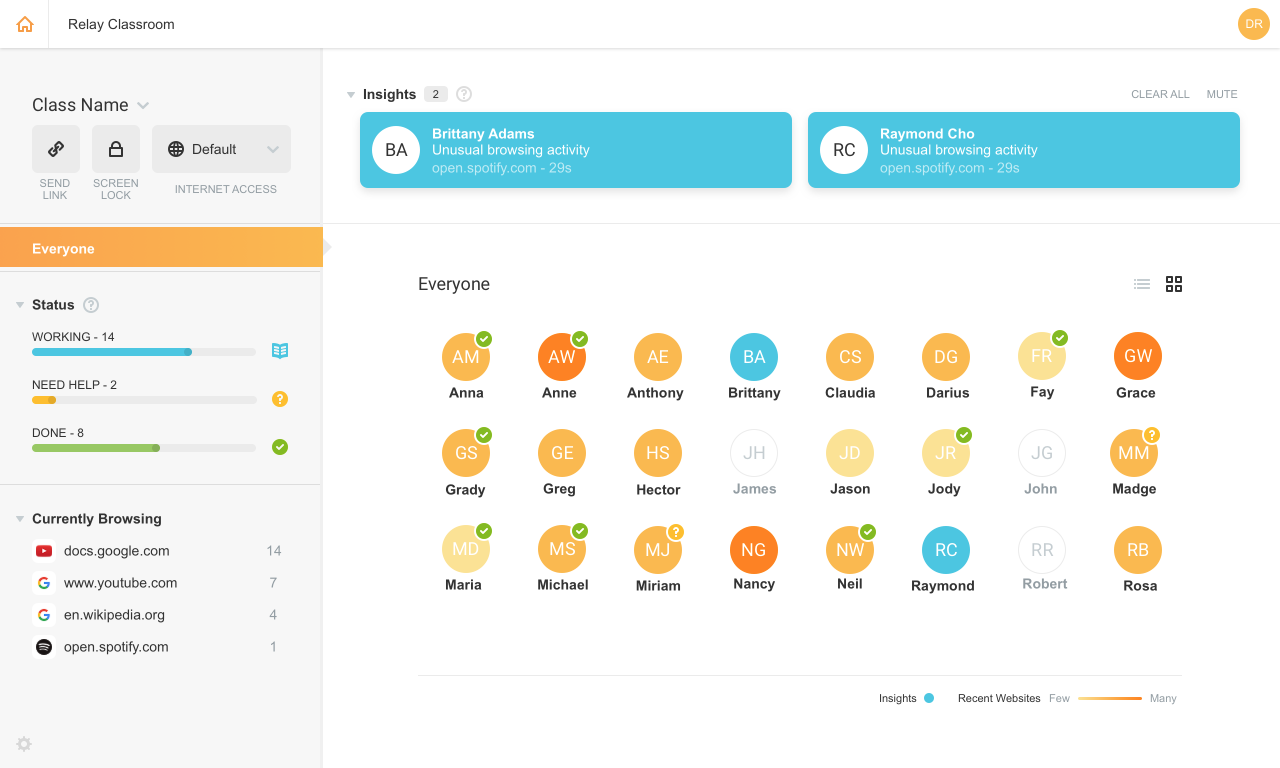
Lightspeed Filter (formerly Relay), from Lightspeed Systems in Austin, offers insights to help understand and maximize the use of 1:1 classroom devices, keep users safe and increase the educational return on technology investments. Lightspeed Systems aims to help users make decisions to enhance technology use, report up administrators, present to your board, reassure concerned parents, empower teachers, and direct students on appropriate use. According to the vendor, Lightspeed Filter powers…
N/A
Pricing
LanSchool
Lightspeed Filter
Editions & Modules
No answers on this topic
No answers on this topic
Offerings
Pricing Offerings
LanSchool
Lightspeed Filter
Free Trial
No
Yes
Free/Freemium Version
No
No
Premium Consulting/Integration Services
No
No
Entry-level Setup Fee
No setup fee
No setup fee
Additional Details
—
Priced per student device. Quote available upon request.
I have recommended it across campus and would not hesitate to do so again. It has been great in our lab environments and would like to continue using it for years to come. In the future as we move away from physical labs I will be investigating to purchase for BYOD devices, however I know that I will face pushback from students on this. However we must weigh privacy & security vs. using BYOD devices and integrity on exams.
A de minimis incentive was given to thank the reviewer for their time. The incentive was not used to bias or drive a particular response, nor was the incentive contingent on a positive endorsement. More Info
Lightspeed web filtering using the Chromebook Relay agent is amazing and does a great job for a cloud filtering solution. The reports that are available are great and can be customized and retains data for 90 days. Reports are easily shared with staff and/or parents for transparency and disciplinary reasons. The agent for Lightspeed (Relay) does not work well with OSX and works okay in Windows, but doesn't allow you to access local IP addresses in the web browser. There needs to be a way to bypass filtering for local network access. This can make it unusable in some cases.
A de minimis incentive was given to thank the reviewer for their time. The incentive was not used to bias or drive a particular response, nor was the incentive contingent on a positive endorsement. More Info
Lenovo LanSchool has a very easy to use and easy to learn interface. With software, the hardest thing to do is to teach new teachers or veteran teachers how to use technology in their classrooms. Being able to easily teach teachers to use this software is one of the best aspects of the [Lenovo LanSchool].
Something that LanSchool does well is to monitor student actions. On the screens, you can see all the linked computers of all students. This feature lets you see every student on one screen. The alternative is walking around the classroom or scrolling through pages of student screens, with LanSchool you can guarantee that you are seeing all screens at once.
Overall classroom management is a key feature on the platform. You can share files, freeze student screens, blank out student screens and share another screen to the entire class. There are far more options in terms of engaging the students than a conventional method of asking students to pay attention. Installing LanSchool is a huge asset for teachers to engage and update their lessons.
A cool element I seldom use is the speaking software, being able to speak through their computer screens is great to give direction or get attention quickly.
A de minimis incentive was given to thank the reviewer for their time. The incentive was not used to bias or drive a particular response, nor was the incentive contingent on a positive endorsement. More Info
A de minimis incentive was given to thank the reviewer for their time. The incentive was not used to bias or drive a particular response, nor was the incentive contingent on a positive endorsement. More Info
A de minimis incentive was given to thank the reviewer for their time. The incentive was not used to bias or drive a particular response, nor was the incentive contingent on a positive endorsement. More Info
A de minimis incentive was given to thank the reviewer for their time. The incentive was not used to bias or drive a particular response, nor was the incentive contingent on a positive endorsement. More Info
A de minimis incentive was given to thank the reviewer for their time. The incentive was not used to bias or drive a particular response, nor was the incentive contingent on a positive endorsement. More Info
We were already a [Lightspeed] customer so the transition was seamless to Relay. Their support and team at [Lightspeed] are top-notch. We have been with Lightspeed for over 20 years and have evaluated on occasions other options and [ended] up back with [Lightspeed] each time. Their price point, ease of use, great team of engineers, and overall customer focus keep them on top in my eyes.
A de minimis incentive was given to thank the reviewer for their time. The incentive was not used to bias or drive a particular response, nor was the incentive contingent on a positive endorsement. More Info
A de minimis incentive was given to thank the reviewer for their time. The incentive was not used to bias or drive a particular response, nor was the incentive contingent on a positive endorsement. More Info
A de minimis incentive was given to thank the reviewer for their time. The incentive was not used to bias or drive a particular response, nor was the incentive contingent on a positive endorsement. More Info