LibreOffice is a free and open-source Office Suite from The Document Foundation, presented as the successor to OpenOffice.org. The suite includes Writer (word processing), Calc (spreadsheets), Impress (presentations), Draw (vector graphics and flowcharts), Base (databases), and Math (formula editing).
$0
free and open source under the Mozilla Public License v2.0
Mediafly
Score7.7 out of 10
N/A
Mediafly Intelligence360, based on InsightSquared's solution acquired by Mediafly in 2021, is a sales analytics and development platform that also supports demand generation analytics and SaaS reporting. It is designed for providing insights into sales processes, closing rates, pipeline and revenue forecasts, calculating KPIs, and market hiring processes.
If you're working with numbers, LibreOffice doesn't get in your way and try to make changes as it sees fit, forcing you to repeatedly go back and undo processes you didn't want, didn't ask for, and that have no place in the document you are trying to produce. All I want to do is assemble the data, process it for the task at hand, and then print it for distribution. LibreOffice allows me to do that.
InsightSquared has been a great tool for quick reference dashboards for the whole organization and teams within the sales org. It presents a standardized individual dashboard for all the reps on the team. It doesn't fare well when trying to deep dive things like campaign and lead source inquiries, as well as activities associated with that opportunity.
A de minimis incentive was given to thank the reviewer for their time. The incentive was not used to bias or drive a particular response, nor was the incentive contingent on a positive endorsement. More Info
A de minimis incentive was given to thank the reviewer for their time. The incentive was not used to bias or drive a particular response, nor was the incentive contingent on a positive endorsement. More Info
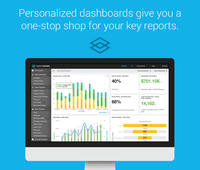
The dashboard is amazing: easily customize your view so you can view all the data that is most relevant to you at a glance
Sales metrics: see how you are comparing to your peers, from every possible angle. InsightSquared gathers all the data you need to know, want to know, and didn't even know you wanted!
Predictive statistics and the likelihood of a deal to fail or succeed is quite useful in a sales environment where time efficiency is key. Need to know what deals to focus on? You can see exactly what deals need more TLC, which ones are likely to close, and which ones to stop wasting time on.
I know this is something they have in process, but I would love to be able to customize reports myself. The support team is always super responsive and makes sure that we're taken care of. But, it would be great to just be able to log in and change the small things myself.
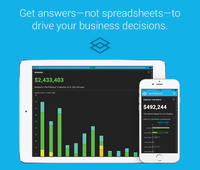
I recently downloaded the InsightSquared app to my phone, and I'd like to see more functionality there. Currently. You are only able to see dashboards that have a already been created.
We use it consistently and have a lot of documents in the OpenDocument format so it will be necessary to use LibreOffice or a compatible product such as Openoffice in the future to be able to open these files. Because the license fee for Libreoffice is zero it is not very costly to keep using it - the costs are mostly for keeping it installed on the office PCs and regularly updated, and solving employee issues with the user support.
A de minimis incentive was given to thank the reviewer for their time. The incentive was not used to bias or drive a particular response, nor was the incentive contingent on a positive endorsement. More Info
InsightSquared has been hugely beneficial to us, and to me in particular as someone outside of our sales team to gain insight into how our sales team and company is performing and how our overall health is. They offer fantastic customer support and have a great community to assist in your implementation of the product.
For all of the reasons in the foregoing evaluation. Its menus are clean, intuitive and straightforward. Any function I need to use can be accessed via keystrokes, without having to stop, move my hand to the mouse, deal with it, and then get back to the keyboard to proceed. It helps me keep my mind on my work and not worry about dealing with the mouse all the time.
InsightSquared is easy to use overall. Running reports and creating dashboards is quick and easy - drag and drop functionality. All reports have multi-filter options allowing you to drill down into your data. Scorecards for employees help show how quickly a rep can start selling after they join your team. Activity ratios provide insight into what it takes from a KPI standpoint to close a deal.
Libreoffice is a desktop app not requiring any server part so it is always available when the PC is working normally. Installing it on another machine if one PC fails is very quick and easy. This is a non-issue.
A de minimis incentive was given to thank the reviewer for their time. The incentive was not used to bias or drive a particular response, nor was the incentive contingent on a positive endorsement. More Info
For big/imported tables or text documents with images loaded from the internet it is sometimes getting very slow, RAM and CPU intensive, and sometimes even hangs due to some memory leaks or other bugs. This is a long-term problem and is still not resolved perfectly.
A de minimis incentive was given to thank the reviewer for their time. The incentive was not used to bias or drive a particular response, nor was the incentive contingent on a positive endorsement. More Info
Support is not officially offered. However, you can find answers to any usage questions or trouble-shooting online easily, typically starting with a Google search. (I believe that all forums / tips for OpenOffice apply equally to LibreOffice, and vice versa.) While Microsoft Office, for example, officially includes support, I find that typically you end up going to a Google search in any case. So, this is not really a downside. However, in all these cases, you end up doing a lot of figuring things out for yourself.
A de minimis incentive was given to thank the reviewer for their time. The incentive was not used to bias or drive a particular response, nor was the incentive contingent on a positive endorsement. More Info
InsightSquared has a very responsive team, and always willing to help with reporting needs which are not able to be completed in house. They do offer a professional services team at an additional cost, so if your reporting is very complex, or you have a team that is continuously changing the type of metrics they require as a business, their support team will be an invaluable asset for you.
A de minimis incentive was given to thank the reviewer for their time. The incentive was not used to bias or drive a particular response, nor was the incentive contingent on a positive endorsement. More Info
Generally easy to perform, issues are how to ensure regular automatic updates on Mac OS X. Fortunatly we have only a few machines with OS X run by management and we can do these updates manually occasionally. Windows updates are quite easy with the support of third party software such as Ninite or Chocolatey, and Linux updates are super-easy thanks to the package manager (apt-get).
A de minimis incentive was given to thank the reviewer for their time. The incentive was not used to bias or drive a particular response, nor was the incentive contingent on a positive endorsement. More Info
If you are looking for a well-rounded, GNU-licensed product that will encompass word processing, spreadsheets, presentations, and database then LibreOffice is probably all you need.
For online collaboration, links with cloud storage, and more robust support, Microsoft Office 365 and Google Docs are probably what you or your organization needs.
LibreOffice is at its best for regular document creation and spreadsheet management. It is more cumbersome when it comes to fonts but also when it comes to linkages with cloud-based services. It is there, but you need some more computer knowledge to make it work.
There are other free alternatives, most notably Apache Open Office, which is also a very good alternative if you do not like LibreOffice.
Having said that, I honestly think off-line computers or laptops used off-site can certainly benefit from having LibreOffice installed.
A de minimis incentive was given to thank the reviewer for their time. The incentive was not used to bias or drive a particular response, nor was the incentive contingent on a positive endorsement. More Info
I was not involved in our purchasing of this platform, so comparing it is difficult. This being said, it's most similar to constantly running reports in Salesforce, probably. SFDC offers more flexibility, obviously, but InsightSquared offers better visualization, less report updating, and more features dedicated to making analytics more enjoyable. It's worth the cost of the platform to save your admin time in reporting.
A de minimis incentive was given to thank the reviewer for their time. The incentive was not used to bias or drive a particular response, nor was the incentive contingent on a positive endorsement. More Info
With more users using it in the company there are more cases when a simultaneous editing of the same document is needed and this feature is lacking in Libreoffice even though the files concerned are shared and synced by some solution (we use ownCloud). Google Docs or MS Office365 via Sharepoint/Onedrive offer a better function for this.
A de minimis incentive was given to thank the reviewer for their time. The incentive was not used to bias or drive a particular response, nor was the incentive contingent on a positive endorsement. More Info
I am able to quickly create and edit word processing documents and spreadsheets which are for all intents and purposes equivalent to documents I could create and edit in other tools such as Microsoft Office and Google Docs/Sheets.
Lack of an online portal for sharing documents necessitates the use of Google Sheets for automation/integration. Ideal would be an all-in-one solution.
Having open-source software that provides common functionality eliminates the need for expensive licenses.
Lack of dedicated support is negligible. Most issues can be resolved using online search.
A de minimis incentive was given to thank the reviewer for their time. The incentive was not used to bias or drive a particular response, nor was the incentive contingent on a positive endorsement. More Info
A de minimis incentive was given to thank the reviewer for their time. The incentive was not used to bias or drive a particular response, nor was the incentive contingent on a positive endorsement. More Info